

How to test digital accessibility on your website


.svg)

Digital experiences should not be limited to design and functionality. Think about inclusion that makes your website accessible to every user. Digital accessibility compliance means creating a website that anyone can use with or without assistive tools.
If your business serves people in the United States, then your website is tied to ADA Title III compliance and Section 508. Recent court decisions have also made WCAG more important.
So how do you actually test your website’s accessibility? Keep reading to find all the answers in this digital accessibility guide.
Are you curious if your website is missing key accessibility requirements? Get a quick, no-cost digital accessibility consultation from ADACP.
What Is Digital Accessibility Testing?
Digital accessibility testing is the process of evaluating how well your website meets the Web Content Accessibility Guidelines. WCAG 2.2 checklists require that users should be able to browse your website via screen readers, keyboard navigation, or assistive technologies.
It includes:
● Manual testing
● Automated scanning
● Assistive tech checks
● Code-level audits
● Real-user testing
Importance of digital accessibility testing
Digital accessibility testing services are absolutely worth it for all sizes of organizations. These services improve your content and make it suitable for older adults, people with situational impairments, mobile users, and even search engines.
Some measurable benefits include:
● Increased conversions and lower bounce rate
● Better SEO (Google loves accessible structure and semantic HTML)
● Higher customer retention
● Reduced legal liability
● Stronger brand trust
Want to learn in detail about the benefits of investing in digital accessibility testing services? Read our blog [What is Digital Accessibility Compliance? Why does Your Website Need This?]
How to Test Digital Accessibility on Your Website
Here is a replicable framework that your team can follow with the help of digital accessibility consulting services.
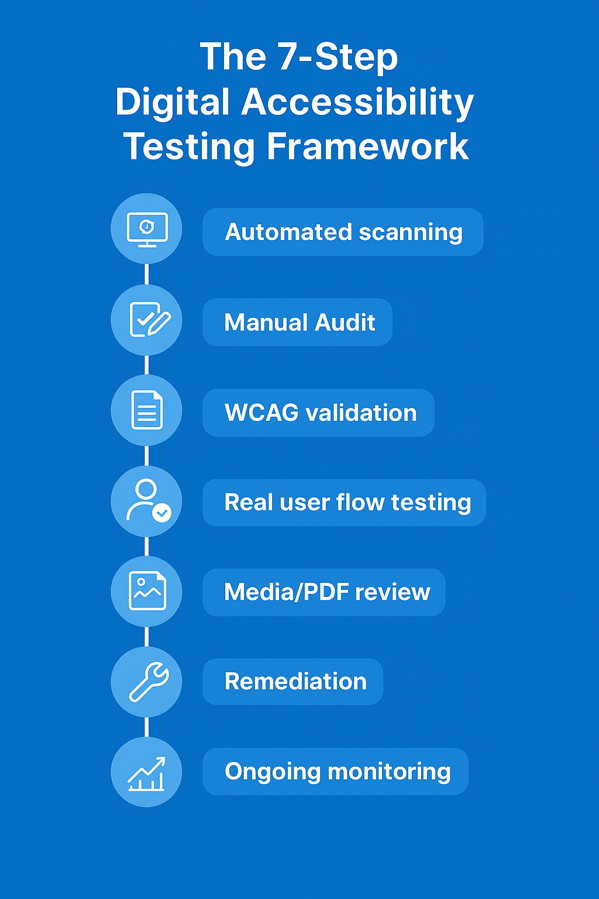
Step 1: Start with Automated Scans (but don’t stop here)
This is the easiest way to identify structural issues fast without the help of third party agencies. Automated tools crawl pages and flag errors like missing alt text, low contrast, or ARIA misuse. Some very effective and popular tools are available online for free. You can use them but don’t just stop there if your aim is total compliance. For this, we need to move to the next step.
Q: Can automated tools alone ensure WCAG compliance?
A: Automated scans detect about 30% of accessibility issues. The remaining 70% require expert human testing. So keep in mind that automated testing is your starting point, not your finish line.
Step 2: Manual Accessibility Testing
Automated tools are not effective for unclear link purposes or confusing navigation. Additionally, if your website has keyboard traps, then you need the help of a digital accessibility provider for manual audits.
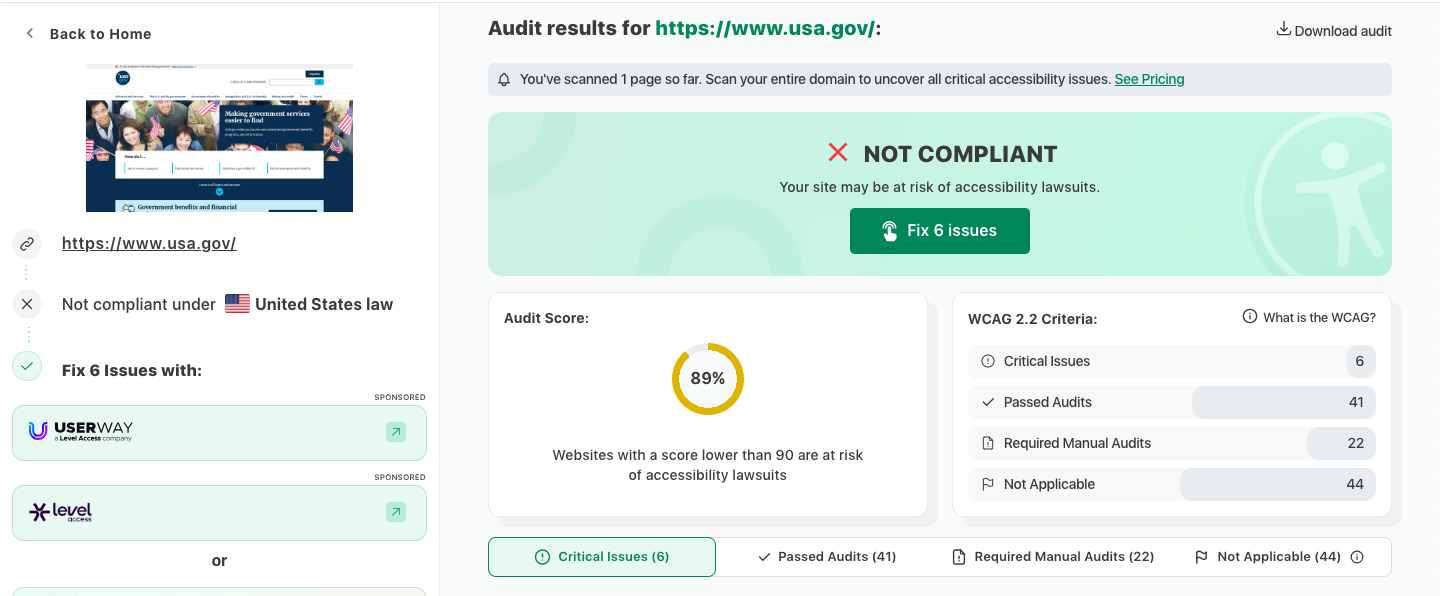
Source: https://www.accessibilitychecker.org/audit/?website=https%3A%2F%2Fwww.usa.gov%2F&flag=us
Audit experts can perform manual testing on your website to catch the aspects a tool might miss:
● Keyboard Testing Checklist
● Tab through the entire page
● Ensure no keyboard traps
● Make sure focus states are visible
● Verify dropdowns, sliders, and modals work without a mouse
● Structure & Content Checks
● Headings follow a logical order
● Links make sense out of context
● Form labels are descriptive
● Dynamic content updates are announced properly
Along with these manual checks, professionals also run detailed Assistive Technology (AT) testing to replicate the actual experience of a disabled user on your website. This means browsing the site with screen readers to hear how the content is announced.
ADACP testers also utilize tools like screen magnifiers, voice-based navigation, and alternative input devices to check how the site works for people who rely on non-traditional ways of browsing.
Q: What does a digital accessibility audit look like?
A: Professional audits start with automated scans followed by manual checks. Then they perform screen reader testing and a full review of your website code and structure.
Want a manual WCAG audit done by experts? Schedule a 30-minute WCAG consultation with ADACP to learn more about our full end-to-end testing.
Step 3: Validate Code Against Standards
The next step after the basic checks is to look at the website’s actual code and make sure it lines up with WCAG accessibility standards.
The developers and auditors review the HTML to see if screen readers can understand what each part of the page is supposed to do. They check things like ARIA roles on menus and pop-ups. They make sure every form field has a clear label so users know exactly what information to enter.
They also ensure that buttons, links and banners are marked correctly so assistive tech knows how they behave. Additionally, if something on the page changes automatically like error messages or notifications then assistive tools should announce it.
Recommended Read: A quick and easy breakdown of WCAG 2.2 for beginners.
Step 4: Test Real User Flows and Edge Cases
Ask yourself this question:
Q: A visually impaired user who cannot even use a mouse, can they still complete this task?
If the answer is no, your site needs remediation.
Step 5: Review PDFs, Videos & Third-Party Integrations
A large number of accessibility cases relate to documents and media as well as webpages.
Ensure your digital assets include:
● PDF tagging
● Captions for videos
● Audio descriptions
● Accessible infographics
● Keyboard-friendly embedded widgets
● Third-party tools like chatbots, calendars, and payment gateways also need testing.
Step 6: Fix What the Tests Reveal
Digital accessibility testing is only half the job. Fixing accessibility gaps makes your site compliant. This step often needs professional expertise. Without expert remediation, many issues remain unresolved. It can still leave your website vulnerable to accessibility barriers and lawsuits.
Common digital accessibility compliance fixes include:
1. Adding alt text so images can be understood by people using screen readers.
2. Improving color contrast to make text easier to read for everyone.
3. Updating the heading structure so the page flows in a clear, logical order.
4. Checking ARIA to confirm that every element is functioning correctly.
5. Removing keyboard traps so anyone can move through the site easily.
6. Making all forms accessible by adding proper labels, instructions, and error messages.
7. Tagging PDFs so screen readers can read the content in the right order and format.
Read this blog [Quick Wins for WCAG 2.2 Level AA Compliance. 7 ways to improve your website] to find a clear explanation of the tasks included in accessibility remediation.
Step 7: Maintain Accessibility Over Time
Compliance with digital accessibility standards is an ongoing commitment that needs regular attention. There will be new accessibility gaps as your website grows with newly added features.
Keep a steady maintenance routine to stay ahead. Conduct quarterly audits and test new pages and fresh content every time. Monitor regularly and get clear accessibility reports for stakeholders.
Many organizations hire professional digital accessibility compliance services to keep everything in line with WCAG standards. Experts ensure that accessibility stays on track, problems are caught early, and the website remains usable and inclusive for everyone.
Q: How often should a website be tested for accessibility?
A: Every quarter is the ideal timeframe to consult with experts for a digital accessibility audit and certification. Besides, you should always do it after major updates or redesigns.
Get continuous monitoring and quarterly audits with ADACP’s Accessibility Maintenance Program. Schedule a free consultation right now to get started.
Conclusion
Testing your website for accessibility is a responsible decision you can make. It protects your brand, gives you SEO benefits and keeps you aligned with ADA and WCAG standards.
But accessibility testing is not simple. Total WCAG or Section 508 compliance comes with expertise and the right tools. That’s where ADACP steps in.
ADACP’s experts handle everything end-to-end: detailed audits, remediation and long-term accessibility maintenance.
Want a website that is accessible and compliant? ADACP, the best digital accessibility provider can guide you. Schedule a free consultation with ADACP and avoid lawsuits.
FAQs
1. What level of WCAG compliance do most businesses need?
Most organizations aim for WCAG 2.2 Level AA, which is the current industry standard.
2. Do overlays or widgets make a site accessible?
Overlays are good for minor adjustments but cannot replace real accessibility testing or remediation.
3. How long does a full accessibility audit take?
Typically 4 weeks but duration may change for large and complex sites.
4. Are PDFs required to be accessible?
Any downloadable content provided to users must meet accessibility standards.
5. What industries are most at risk for accessibility lawsuits?
Retail, education, finance, hospitality, healthcare and government-related services see the highest volume of web accessibility claims.
Digital experiences should not be limited to design and functionality. Think about inclusion that makes your website accessible to every user. Digital accessibility compliance means creating a website that anyone can use with or without assistive tools.
If your business serves people in the United States, then your website is tied to ADA Title III compliance and Section 508. Recent court decisions have also made WCAG more important.
So how do you actually test your website’s accessibility? Keep reading to find all the answers in this digital accessibility guide.
Are you curious if your website is missing key accessibility requirements? Get a quick, no-cost digital accessibility consultation from ADACP.
What Is Digital Accessibility Testing?
Digital accessibility testing is the process of evaluating how well your website meets the Web Content Accessibility Guidelines. WCAG 2.2 checklists require that users should be able to browse your website via screen readers, keyboard navigation, or assistive technologies.
It includes:
● Manual testing
● Automated scanning
● Assistive tech checks
● Code-level audits
● Real-user testing
Importance of digital accessibility testing
Digital accessibility testing services are absolutely worth it for all sizes of organizations. These services improve your content and make it suitable for older adults, people with situational impairments, mobile users, and even search engines.
Some measurable benefits include:
● Increased conversions and lower bounce rate
● Better SEO (Google loves accessible structure and semantic HTML)
● Higher customer retention
● Reduced legal liability
● Stronger brand trust
Want to learn in detail about the benefits of investing in digital accessibility testing services? Read our blog [What is Digital Accessibility Compliance? Why does Your Website Need This?]
How to Test Digital Accessibility on Your Website
Here is a replicable framework that your team can follow with the help of digital accessibility consulting services.
Step 1: Start with Automated Scans (but don’t stop here)
This is the easiest way to identify structural issues fast without the help of third party agencies. Automated tools crawl pages and flag errors like missing alt text, low contrast, or ARIA misuse. Some very effective and popular tools are available online for free. You can use them but don’t just stop there if your aim is total compliance. For this, we need to move to the next step.
Q: Can automated tools alone ensure WCAG compliance?
A: Automated scans detect about 30% of accessibility issues. The remaining 70% require expert human testing. So keep in mind that automated testing is your starting point, not your finish line.
Step 2: Manual Accessibility Testing
Automated tools are not effective for unclear link purposes or confusing navigation. Additionally, if your website has keyboard traps, then you need the help of a digital accessibility provider for manual audits.
Source: https://www.accessibilitychecker.org/audit/?website=https%3A%2F%2Fwww.usa.gov%2F&flag=us
Audit experts can perform manual testing on your website to catch the aspects a tool might miss:
● Keyboard Testing Checklist
● Tab through the entire page
● Ensure no keyboard traps
● Make sure focus states are visible
● Verify dropdowns, sliders, and modals work without a mouse
● Structure & Content Checks
● Headings follow a logical order
● Links make sense out of context
● Form labels are descriptive
● Dynamic content updates are announced properly
Along with these manual checks, professionals also run detailed Assistive Technology (AT) testing to replicate the actual experience of a disabled user on your website. This means browsing the site with screen readers to hear how the content is announced.
ADACP testers also utilize tools like screen magnifiers, voice-based navigation, and alternative input devices to check how the site works for people who rely on non-traditional ways of browsing.
Q: What does a digital accessibility audit look like?
A: Professional audits start with automated scans followed by manual checks. Then they perform screen reader testing and a full review of your website code and structure.
Want a manual WCAG audit done by experts? Schedule a 30-minute WCAG consultation with ADACP to learn more about our full end-to-end testing.
Step 3: Validate Code Against Standards
The next step after the basic checks is to look at the website’s actual code and make sure it lines up with WCAG accessibility standards.
The developers and auditors review the HTML to see if screen readers can understand what each part of the page is supposed to do. They check things like ARIA roles on menus and pop-ups. They make sure every form field has a clear label so users know exactly what information to enter.
They also ensure that buttons, links and banners are marked correctly so assistive tech knows how they behave. Additionally, if something on the page changes automatically like error messages or notifications then assistive tools should announce it.
Recommended Read: A quick and easy breakdown of WCAG 2.2 for beginners.
Step 4: Test Real User Flows and Edge Cases
Ask yourself this question:
Q: A visually impaired user who cannot even use a mouse, can they still complete this task?
If the answer is no, your site needs remediation.
Step 5: Review PDFs, Videos & Third-Party Integrations
A large number of accessibility cases relate to documents and media as well as webpages.
Ensure your digital assets include:
● PDF tagging
● Captions for videos
● Audio descriptions
● Accessible infographics
● Keyboard-friendly embedded widgets
● Third-party tools like chatbots, calendars, and payment gateways also need testing.
Step 6: Fix What the Tests Reveal
Digital accessibility testing is only half the job. Fixing accessibility gaps makes your site compliant. This step often needs professional expertise. Without expert remediation, many issues remain unresolved. It can still leave your website vulnerable to accessibility barriers and lawsuits.
Common digital accessibility compliance fixes include:
1. Adding alt text so images can be understood by people using screen readers.
2. Improving color contrast to make text easier to read for everyone.
3. Updating the heading structure so the page flows in a clear, logical order.
4. Checking ARIA to confirm that every element is functioning correctly.
5. Removing keyboard traps so anyone can move through the site easily.
6. Making all forms accessible by adding proper labels, instructions, and error messages.
7. Tagging PDFs so screen readers can read the content in the right order and format.
Read this blog [Quick Wins for WCAG 2.2 Level AA Compliance. 7 ways to improve your website] to find a clear explanation of the tasks included in accessibility remediation.
Step 7: Maintain Accessibility Over Time
Compliance with digital accessibility standards is an ongoing commitment that needs regular attention. There will be new accessibility gaps as your website grows with newly added features.
Keep a steady maintenance routine to stay ahead. Conduct quarterly audits and test new pages and fresh content every time. Monitor regularly and get clear accessibility reports for stakeholders.
Many organizations hire professional digital accessibility compliance services to keep everything in line with WCAG standards. Experts ensure that accessibility stays on track, problems are caught early, and the website remains usable and inclusive for everyone.
Q: How often should a website be tested for accessibility?
A: Every quarter is the ideal timeframe to consult with experts for a digital accessibility audit and certification. Besides, you should always do it after major updates or redesigns.
Get continuous monitoring and quarterly audits with ADACP’s Accessibility Maintenance Program. Schedule a free consultation right now to get started.
Conclusion
Testing your website for accessibility is a responsible decision you can make. It protects your brand, gives you SEO benefits and keeps you aligned with ADA and WCAG standards.
But accessibility testing is not simple. Total WCAG or Section 508 compliance comes with expertise and the right tools. That’s where ADACP steps in.
ADACP’s experts handle everything end-to-end: detailed audits, remediation and long-term accessibility maintenance.
Want a website that is accessible and compliant? ADACP, the best digital accessibility provider can guide you. Schedule a free consultation with ADACP and avoid lawsuits.
FAQs
1. What level of WCAG compliance do most businesses need?
Most organizations aim for WCAG 2.2 Level AA, which is the current industry standard.
2. Do overlays or widgets make a site accessible?
Overlays are good for minor adjustments but cannot replace real accessibility testing or remediation.
3. How long does a full accessibility audit take?
Typically 4 weeks but duration may change for large and complex sites.
4. Are PDFs required to be accessible?
Any downloadable content provided to users must meet accessibility standards.
5. What industries are most at risk for accessibility lawsuits?
Retail, education, finance, hospitality, healthcare and government-related services see the highest volume of web accessibility claims.

.svg)
.svg)
.svg)
We will contact you shortly.
.webp)


.svg)

.svg)
.svg)