

How to Test for Section 508 Compliance


.svg)

In January 2025, several federal agencies quietly updated their procurement review protocol. One change that stood out was stricter enforcement of Section 508 compliance testing before any digital product can be purchased or renewed.
Vendors that used to get away with light compliance are now seeing contracts paused or rejected altogether.
This shift has created a sense of urgency among organizations. If you sell SaaS products, internal enterprise tools, PDFs, mobile apps, hardware, or IT services then 508 testing is mandatory. It is important for federal work and is increasingly expected in the private sector.
This guide is for those who need a VPAT®, an audit or a 508 remediation project. Schedule a session with our accessibility specialists today for expert guidance on 508 compliance testing.
What Is Section 508 Compliance?
Section 508 places a responsibility on federal organizations and their technology partners. This act guarantees that websites, software, or documents are accessible to people with disabilities.
Since the 2018 “508 Refresh”, most requirements follow WCAG 2.0 AA (with many teams now adopting WCAG 2.2 for future-proofing).
Section 508 applies to:
● Websites
● Web apps & SaaS platforms
● Desktop, enterprise and cloud software
● Mobile apps
● PDFs, manuals, reports and forms
● Procurement documents
● Multimedia & e-learning content
● Hardware & kiosks
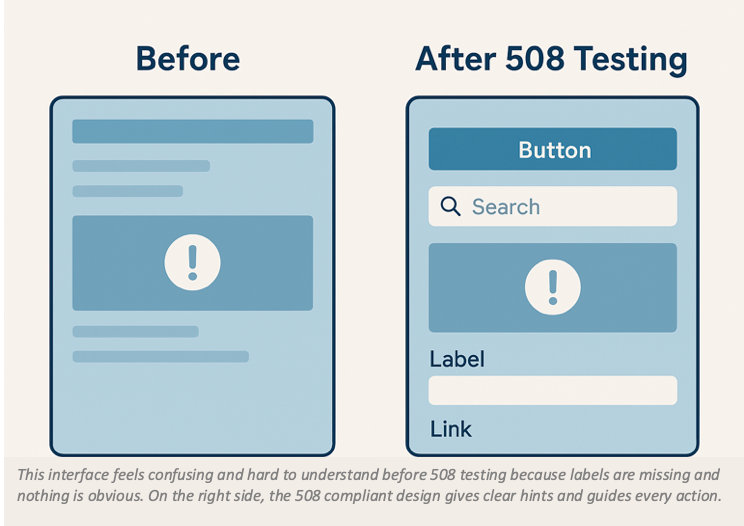
Effective Section 508 testing tools provide the foundation for compliance evidence.
Q: How often should federal contractors test?
A: Federal contractors with ongoing deliverables should test every major version or at least once every quarterly sprint.
Importance of Section 508 website compliance
There are several reasons driving the urgency of investing in 508 testing and remediation, such as:
1. Procurement teams are rejecting shallow VPATs
Federal evaluators now look much deeper into accessibility claims. They routinely ask for details such as the testing methodology, specific URLs that were evaluated, remediation plans, and version numbers.
Copy-paste VPATs or automated-only evaluations are flagged instantly.
2. Accessibility lawsuits continue rising
Even though Section 508 mainly affects government contracts, WCAG lawsuits in the private sector have been rising fast. It has crossed 4,000 cases a year since 2023.
That’s why cutting corners on 508 web compliance can come back to harm you. If the testing is not solid, you are opening the door to legal trouble and contract issues.
3. Renewals and audits are becoming more strict
Renewals with agencies such as DoD and HHS often require updated ACRs and proof of active remediation.
If using a Section 508 checker was not on your radar, this is the moment to prioritize it.
Learn more about why Section 508 compliance is crucial for digital accessibility and government contracts. Read the full guide here.
How to Test for Section 508 Compliance
Below is the exact process accessibility auditors use to conduct Section 508 testing.
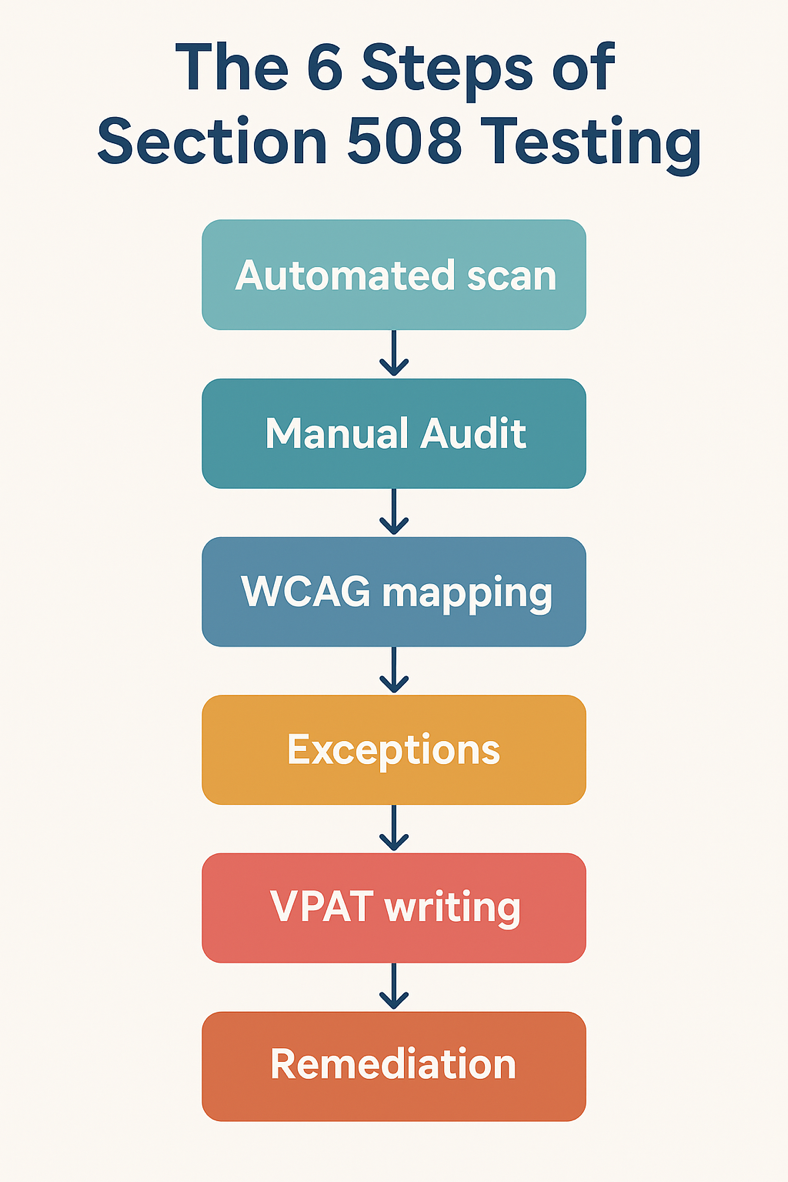
Step 1: Run an Initial Automated Scan
Automated tools catch around 25–35% of WCAG/508 issues. So, use them only for the first pass, not the final evaluation.
In this step, you should look for:
● Missing alt text: Screen readers cannot explain if images have no description.
● Color contrast failures: Similar text and background colors can become hard to read.
● Missing form labels: No labels on form fields can confuse the user about what information to put.
● Incorrect heading structure: Out of order headings can confuse the navigation for screen reader users.
● ARIA misuse: Assistive technology can give you the wrong result if ARIA attributes are applied incorrectly.
● Keyboard traps: Users can get stuck and can’t navigate away due to the trap.
● Missing language attributes: No language specification can cause incorrect pronunciation by screen readers.
Automated 508 compliance testing tools are good for identifying all the above obvious errors. However, Section 508 compliance requires manual validation.
Q: How often should you test for Section 508 compliance?
A: Most organizations should run a full accessibility test every 6–12 months or whenever they release major new features.
Step 2: Manual Audits
Keyboard testing is one of the fastest ways to uncover major accessibility issues, and manual audits typically begin with this step.
Audit experts use only the keyboard to move through the product to check if they can
● navigate all interactive elements,
● access every part of the content,
● operate controls,
● open menus, modals, tabs, and accordions,
● use skip links and landmark regions,
● reach the footer without getting stuck, and see every focus indicator.
During this process, they look for common failures such as missing focus states, focus slipping into hidden elements and controls that don’t work without a mouse. They find components that simply can’t be operated using the keyboard alone.
If keyboard navigation doesn’t work, the product is not Section 508 compliant.
This is where most accessibility teams and vendors fail. Manual auditing teams also test your product using real assistive technologies like screen readers, speech recognition tools, voice controls, screen magnifiers and alternative input tools.
During testing, they verify that proper announcements are made for headings, buttons, menus and dialogs. The alt text, forms, ARIA roles, table headers and focus management are accurate.
These results form the backbone of your ACR/VPAT documentation. See a sample ACR to understand how testing results shape your VPAT documentation. Read here in detail.
Step 3: Validate WCAG Criteria Mapped to Section 508
Although Section 508 references WCAG 2.0 AA, most teams now test against WCAG 2.2 because agencies request it.
WCAG is built around four main areas. The first area is Perceivable, which means users are able to see or hear the content. The second is Operable, which means people can use the keyboard, have enough time and avoid any seizures. The third area is Understandable which ensures content behaves in a predictable way. The last one is Robust which makes the content compatible with screen readers. The table below gives a quick hint at the key WCAG areas that testers will check during a 508 audit.
Key WCAG Areas for Section 508 Compliance Testing
Map each result directly to the Success Criterion number for your VPAT.
There’s also a Section 508/WCAG mapping PDF on the Access Board website. It’s a good reference to see which WCAG criteria satisfy which §1194 requirements.
Step 4: Identify Exceptions and Non-Compliant Areas
Most products will fail some criteria despite strong engineering.
Document the exact component/URL and why it fails 508. Categorize the issue based on severity (Critical, High, Medium, Low).
This transparency will actually strengthen your ACR because it shows a professional, accurate evaluation.
Step 5: Document the Findings in a VPAT®/ACR
The next crucial step is to fill out the VPAT. Organizations typically document accessibility through an ACR created using the VPAT® template. This documentation must reflect findings from legitimate testing. It should include:
● Testing methodology
● AT tools used
● Scope
● Version numbers
● Tester qualifications
● Detailed conformance notes
● Roadmap for fixes
Remember, procurement officers are trained to spot vague or copy-paste responses. So, accuracy always wins and you should aim for a complete and accurate 508 VPAT ACR.
Read more about VPAT and how to create an effective Accessibility Conformance Report in our detailed guide.
Step 6: Build a Remediation Plan
Testing alone doesn’t solve the problem, you also need a strong remediation plan.
Efficient remediation clearly lists the issues and sets the timeline for each task. It also includes retesting after fixes are made and long-term accessibility goals.
If you are preparing for a government contract, add this remediation plan to your accessibility package.
Q: What are the most common mistakes people make in Section 508 testing?
A: Teams creating a 508 VPAT only after automated testing is the biggest mistake. Most commonly, people skip screen reader testing or ignore PDFs. In addition to this, outdated VPAT editions or leaving out remediation details and evidence are common mistakes that lead to rejection by most vendors.
Avoid these mistakes and your 508 testing will instantly be stronger than that of most competitors.
Conclusion
Section 508 compliance is not a bureaucratic checkbox. It is an operational requirement if you want to keep winning government contracts. Proper 508 testing not only shields your organization from lawsuits but also makes your product usable for all users.
Working with expert auditors who specialize in manual testing and assistive technology evaluations can save you months of headaches. Choose ADA Compliance Pros and avoid costly procurement delays.
If you are ready to see where your website stands, then schedule a free consultation today and get a clear roadmap for Section 508 compliance.
FAQs
Do I need a VPAT for Section 508?
Law does not mandate a VPAT but procurement teams ask for it during evaluation. 508 testing is what makes a valid VPAT.
Can automated tools alone make my product accessible?
A Section 508 compliance checker can detect only 30% of issues. Therefore manual testing is mandatory.
Who is responsible for Section 508 fulfilment?
Both vendors and federal agencies share responsibility. Vendors must provide evidence through testing and ACRs.
Can skipping Section 508 testing save money?
Skipping 508 testing leads to higher costs later. Non-compliance means the contract goes to your competitors and you are left with expensive retroactive fixes. Invest in testing upfront to save money.
How long does Section 508 testing take?
● Small product: 1–2 weeks
● Medium SaaS: 2–4 weeks
● Enterprise system: 4–8+ weeks
Want to know how many days it will take to make your website Section 508 compliant? Schedule a free Section 508 consultation and find out now.
In January 2025, several federal agencies quietly updated their procurement review protocol. One change that stood out was stricter enforcement of Section 508 compliance testing before any digital product can be purchased or renewed.
Vendors that used to get away with light compliance are now seeing contracts paused or rejected altogether.
This shift has created a sense of urgency among organizations. If you sell SaaS products, internal enterprise tools, PDFs, mobile apps, hardware, or IT services then 508 testing is mandatory. It is important for federal work and is increasingly expected in the private sector.
This guide is for those who need a VPAT®, an audit or a 508 remediation project. Schedule a session with our accessibility specialists today for expert guidance on 508 compliance testing.
What Is Section 508 Compliance?
Section 508 places a responsibility on federal organizations and their technology partners. This act guarantees that websites, software, or documents are accessible to people with disabilities.
Since the 2018 “508 Refresh”, most requirements follow WCAG 2.0 AA (with many teams now adopting WCAG 2.2 for future-proofing).
Section 508 applies to:
● Websites
● Web apps & SaaS platforms
● Desktop, enterprise and cloud software
● Mobile apps
● PDFs, manuals, reports and forms
● Procurement documents
● Multimedia & e-learning content
● Hardware & kiosks
Effective Section 508 testing tools provide the foundation for compliance evidence.
Q: How often should federal contractors test?
A: Federal contractors with ongoing deliverables should test every major version or at least once every quarterly sprint.
Importance of Section 508 website compliance
There are several reasons driving the urgency of investing in 508 testing and remediation, such as:
1. Procurement teams are rejecting shallow VPATs
Federal evaluators now look much deeper into accessibility claims. They routinely ask for details such as the testing methodology, specific URLs that were evaluated, remediation plans, and version numbers.
Copy-paste VPATs or automated-only evaluations are flagged instantly.
2. Accessibility lawsuits continue rising
Even though Section 508 mainly affects government contracts, WCAG lawsuits in the private sector have been rising fast. It has crossed 4,000 cases a year since 2023.
That’s why cutting corners on 508 web compliance can come back to harm you. If the testing is not solid, you are opening the door to legal trouble and contract issues.
3. Renewals and audits are becoming more strict
Renewals with agencies such as DoD and HHS often require updated ACRs and proof of active remediation.
If using a Section 508 checker was not on your radar, this is the moment to prioritize it.
Learn more about why Section 508 compliance is crucial for digital accessibility and government contracts. Read the full guide here.
How to Test for Section 508 Compliance
Below is the exact process accessibility auditors use to conduct Section 508 testing.
Step 1: Run an Initial Automated Scan
Automated tools catch around 25–35% of WCAG/508 issues. So, use them only for the first pass, not the final evaluation.
In this step, you should look for:
● Missing alt text: Screen readers cannot explain if images have no description.
● Color contrast failures: Similar text and background colors can become hard to read.
● Missing form labels: No labels on form fields can confuse the user about what information to put.
● Incorrect heading structure: Out of order headings can confuse the navigation for screen reader users.
● ARIA misuse: Assistive technology can give you the wrong result if ARIA attributes are applied incorrectly.
● Keyboard traps: Users can get stuck and can’t navigate away due to the trap.
● Missing language attributes: No language specification can cause incorrect pronunciation by screen readers.
Automated 508 compliance testing tools are good for identifying all the above obvious errors. However, Section 508 compliance requires manual validation.
Q: How often should you test for Section 508 compliance?
A: Most organizations should run a full accessibility test every 6–12 months or whenever they release major new features.
Step 2: Manual Audits
Keyboard testing is one of the fastest ways to uncover major accessibility issues, and manual audits typically begin with this step.
Audit experts use only the keyboard to move through the product to check if they can
● navigate all interactive elements,
● access every part of the content,
● operate controls,
● open menus, modals, tabs, and accordions,
● use skip links and landmark regions,
● reach the footer without getting stuck, and see every focus indicator.
During this process, they look for common failures such as missing focus states, focus slipping into hidden elements and controls that don’t work without a mouse. They find components that simply can’t be operated using the keyboard alone.
If keyboard navigation doesn’t work, the product is not Section 508 compliant.
This is where most accessibility teams and vendors fail. Manual auditing teams also test your product using real assistive technologies like screen readers, speech recognition tools, voice controls, screen magnifiers and alternative input tools.
During testing, they verify that proper announcements are made for headings, buttons, menus and dialogs. The alt text, forms, ARIA roles, table headers and focus management are accurate.
These results form the backbone of your ACR/VPAT documentation. See a sample ACR to understand how testing results shape your VPAT documentation. Read here in detail.
Step 3: Validate WCAG Criteria Mapped to Section 508
Although Section 508 references WCAG 2.0 AA, most teams now test against WCAG 2.2 because agencies request it.
WCAG is built around four main areas. The first area is Perceivable, which means users are able to see or hear the content. The second is Operable, which means people can use the keyboard, have enough time and avoid any seizures. The third area is Understandable which ensures content behaves in a predictable way. The last one is Robust which makes the content compatible with screen readers. The table below gives a quick hint at the key WCAG areas that testers will check during a 508 audit.
Key WCAG Areas for Section 508 Compliance Testing
Map each result directly to the Success Criterion number for your VPAT.
There’s also a Section 508/WCAG mapping PDF on the Access Board website. It’s a good reference to see which WCAG criteria satisfy which §1194 requirements.
Step 4: Identify Exceptions and Non-Compliant Areas
Most products will fail some criteria despite strong engineering.
Document the exact component/URL and why it fails 508. Categorize the issue based on severity (Critical, High, Medium, Low).
This transparency will actually strengthen your ACR because it shows a professional, accurate evaluation.
Step 5: Document the Findings in a VPAT®/ACR
The next crucial step is to fill out the VPAT. Organizations typically document accessibility through an ACR created using the VPAT® template. This documentation must reflect findings from legitimate testing. It should include:
● Testing methodology
● AT tools used
● Scope
● Version numbers
● Tester qualifications
● Detailed conformance notes
● Roadmap for fixes
Remember, procurement officers are trained to spot vague or copy-paste responses. So, accuracy always wins and you should aim for a complete and accurate 508 VPAT ACR.
Read more about VPAT and how to create an effective Accessibility Conformance Report in our detailed guide.
Step 6: Build a Remediation Plan
Testing alone doesn’t solve the problem, you also need a strong remediation plan.
Efficient remediation clearly lists the issues and sets the timeline for each task. It also includes retesting after fixes are made and long-term accessibility goals.
If you are preparing for a government contract, add this remediation plan to your accessibility package.
Q: What are the most common mistakes people make in Section 508 testing?
A: Teams creating a 508 VPAT only after automated testing is the biggest mistake. Most commonly, people skip screen reader testing or ignore PDFs. In addition to this, outdated VPAT editions or leaving out remediation details and evidence are common mistakes that lead to rejection by most vendors.
Avoid these mistakes and your 508 testing will instantly be stronger than that of most competitors.
Conclusion
Section 508 compliance is not a bureaucratic checkbox. It is an operational requirement if you want to keep winning government contracts. Proper 508 testing not only shields your organization from lawsuits but also makes your product usable for all users.
Working with expert auditors who specialize in manual testing and assistive technology evaluations can save you months of headaches. Choose ADA Compliance Pros and avoid costly procurement delays.
If you are ready to see where your website stands, then schedule a free consultation today and get a clear roadmap for Section 508 compliance.
FAQs
Do I need a VPAT for Section 508?
Law does not mandate a VPAT but procurement teams ask for it during evaluation. 508 testing is what makes a valid VPAT.
Can automated tools alone make my product accessible?
A Section 508 compliance checker can detect only 30% of issues. Therefore manual testing is mandatory.
Who is responsible for Section 508 fulfilment?
Both vendors and federal agencies share responsibility. Vendors must provide evidence through testing and ACRs.
Can skipping Section 508 testing save money?
Skipping 508 testing leads to higher costs later. Non-compliance means the contract goes to your competitors and you are left with expensive retroactive fixes. Invest in testing upfront to save money.
How long does Section 508 testing take?
● Small product: 1–2 weeks
● Medium SaaS: 2–4 weeks
● Enterprise system: 4–8+ weeks
Want to know how many days it will take to make your website Section 508 compliant? Schedule a free Section 508 consultation and find out now.

.svg)
.svg)
.svg)
We will contact you shortly.
.webp)


.svg)

.svg)
.svg)