
Functional performance criteria: the ACR rows vendors get wrong
You have VPAT 2.5Rev 508 open, the WCAG 2.0 Level A and Level AA tables are done, and the first table under the Revised Section 508 Report heading is a three-column grid headed “Chapter 3: Functional Performance Criteria (FPC)” with nine rows and no instructions attached. Nothing in your test results maps to it. The solicitation listed 302.1 through 302.9 as requirements. The proposal is due.
Three defaults are available at that moment. Leave the table blank. Mark all nine rows Supports. Or paraphrase the WCAG findings into the remarks column and hope the shape looks right. All three are wrong, and for the same reason: they treat Chapter 3 as a catch-all for anything that did not fit elsewhere, when the standard makes it a narrow gap-filler with a specific trigger.
This piece states the trigger, walks the decision, and shows real published rows, correct and incorrect, from accessibility conformance reports you can open yourself.
The gate is a gap in the standard, not an inapplicable criterion
Here is the operative sentence, from the Revised 508 Standards:
E204.1 General. Where the requirements in Chapters 4 and 5 do not address one or more functions of ICT, the functions not addressed shall conform to the Functional Performance Criteria specified in Chapter 3.
That text is published by the U.S. Access Board and appears verbatim in the codified rule at 36 CFR part 1194, Appendix A, so you can cite either in a remark and a reviewer can follow it.
Read what the trigger actually is. It is a gap in the standard. Chapters 4 and 5 have nothing to say about some function of your product, so Chapter 3 covers that function instead. It is not “this provision does not apply to us.” A provision that does not apply to your product is simply Not Applicable, with a remark explaining why, and Chapter 3 has no part in that row. Writing functional performance prose into a Not Applicable row answers a question nobody asked, and it leaves a remark in the record that does not answer the question the row does ask.
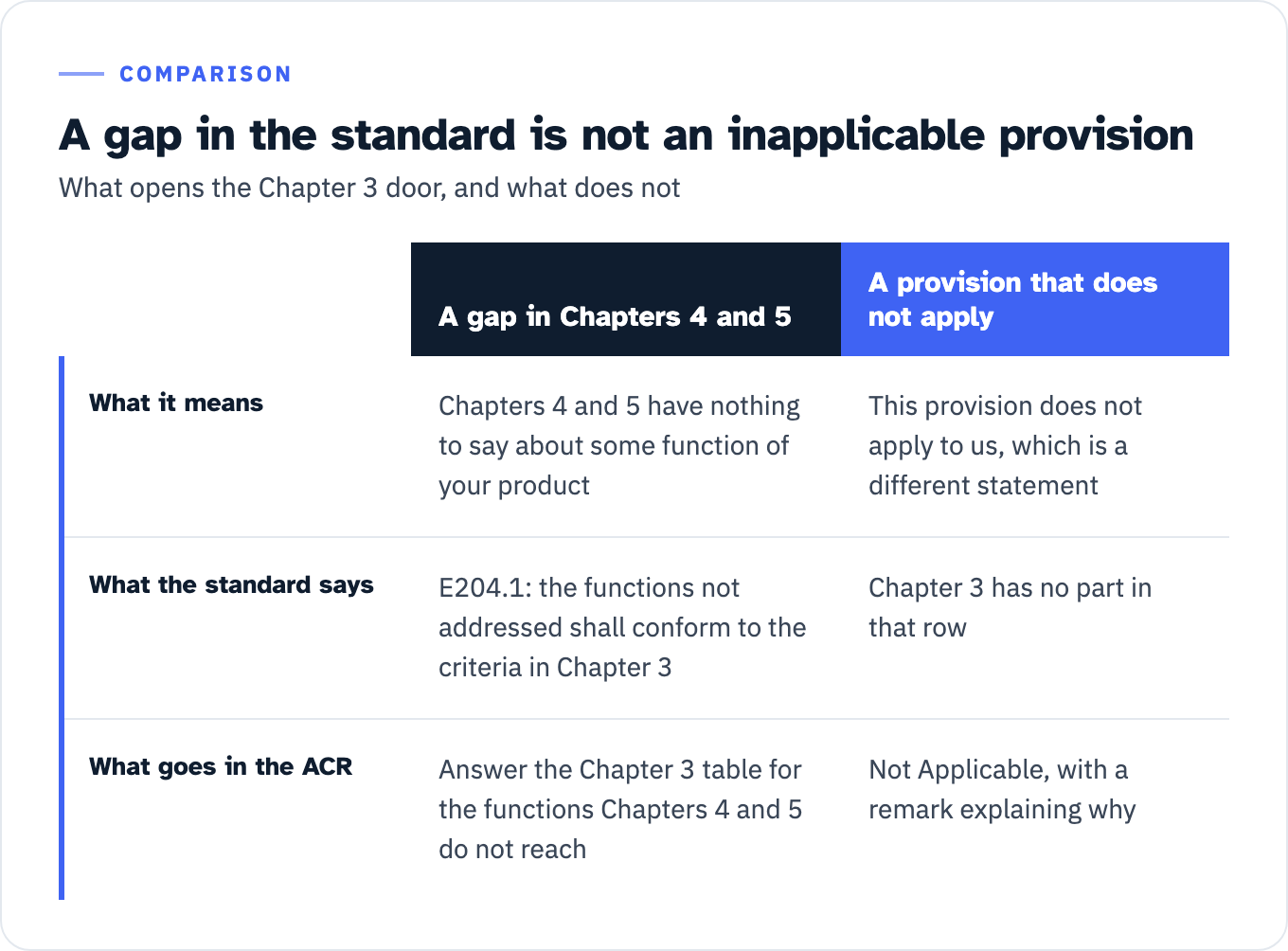
View the data as a table
| A gap in Chapters 4 and 5 | A provision that does not apply | |
|---|---|---|
| What it means | Chapters 4 and 5 have nothing to say about some function of your product | This provision does not apply to us, which is a different statement |
| What the standard says | E204.1: the functions not addressed shall conform to the criteria in Chapter 3 | Chapter 3 has no part in that row |
| What goes in the ACR | Answer the Chapter 3 table for the functions Chapters 4 and 5 do not reach | Not Applicable, with a remark explaining why |
The final rule preamble’s own summary of the chapter says the same thing. Chapter 3 contains “outcome-based provisions that apply when applicable technical requirements (i.e., Chapters 4 and 5) do not address one or more features of ICT.”
Two details in the preamble matter for how you apply the gate.
First, the analysis is holistic. The Board changed the word “features” to “functions” between the proposed rule and the final rule for exactly this reason: “We intended for the functionality of the ICT to be considered holistically, and not on a feature-by-feature basis.” You are not walking a feature list and asking whether each item is addressed. You are asking whether the product does something, as a product, that Chapters 4 and 5 do not reach.
The report format gives you nowhere to be selective about it either. In GSA’s machine-readable OpenACR catalog for this edition, only the WCAG rows are split by component: every Level A, AA and AAA success criterion declares four (web, electronic-docs, software, authoring-tool). Every Revised Section 508 row declares a single component, none, and takes one answer. That is true of Chapter 3 and equally true of the Hardware, Software and Support Documentation chapters, so it is a fact about the report format rather than evidence for the holistic reading. It has the same practical effect. There is no cell in which to answer 302.1 one way for your web interface and another way for your installer.
Second, the Board considered and rejected the broad reading. In the 2011 advance notice it proposed that ICT must conform to the FPC even when the technical criteria are met. Commenters said that would be “unduly burdensome and costly, and would greatly increase the time for accessible ICT procurement,” and the Board dropped it: “Accordingly, in the NPRM, we proposed that the FPC need only be met when the features of the ICT are not addressed by the provisions in Chapters 4 or 5.” If someone tells you Chapter 3 applies to everything, they are describing a rule the Board abandoned before the Revised 508 Standards were published on 18 January 2017 at 82 FR 5790.
What Chapters 4 and 5 actually cover
The gate is measured against a finite surface. Chapter 4 is hardware, fifteen sections. Chapter 5 is software, four sections. That is the whole thing:
| Chapter 4: Hardware | Chapter 5: Software |
|---|---|
| 401 General | 501 General |
| 402 Closed Functionality | 502 Interoperability With Assistive Technology |
| 403 Biometrics | 503 Applications |
| 404 Preservation of Information Provided for Accessibility | 504 Authoring Tools |
| 405 Privacy | |
| 406 Standard Connections | |
| 407 Operable Parts | |
| 408 Display Screens | |
| 409 Status Indicators | |
| 410 Color Coding | |
| 411 Audible Signals | |
| 412 ICT With Two-Way Voice Communication | |
| 413 Closed Caption Processing Technologies | |
| 414 Audio Description Processing Technologies | |
| 415 User Controls for Captions and Audio Descriptions |
Notice what is not on that list: web content and electronic documents. The WCAG obligation for those runs through Chapter 2. Electronic content is scoped by E205.4, which requires conformance to “Level A and Level AA Success Criteria and Conformance Requirements in WCAG 2.0.” Software user interfaces and the content of platforms and applications are scoped by E207.2, in the same terms. Electronic support documentation is scoped by 602.3, again to WCAG 2.0 Level A and AA. E205.4 and E207.2 sit in Chapter 2, not Chapters 4 or 5, and WCAG itself is incorporated by reference at 702.10.1 in Chapter 7.
Chapter 5 does carry WCAG obligations of its own, in two places. The 501.1 exception releases web applications that do not have access to platform accessibility services from 502 and 503 “provided that they conform to Level A and Level AA Success Criteria and Conformance Requirements in WCAG 2.0.” And 504.2 requires authoring tools to “provide a mode of operation to create or edit content that conforms to Level A and Level AA Success Criteria and Conformance Requirements in WCAG 2.0.” Those two provisions are precisely the Chapter 5 material the template’s WCAG tables answer for.
That has a direct consequence. A shortfall in WCAG’s coverage of your web application is not a gap in Chapters 4 and 5, so it does not open the E204.1 door. FPC do not backfill WCAG success criteria. If you are unsure which WCAG version any given legal rule actually incorporates, that question is answered in which WCAG version each rule points to; the Section 508 answer is WCAG 2.0 Level A and AA, and the 508 edition of the VPAT is built on that.
GSA’s authoring guidance offers a rougher working version of the test: “If your product does not contain any applicable standards from the Level A and AA tables, then complete the Chapter 3: Functional Performance Criteria table.” Read the wording before you rely on it. GSA’s trigger is phrased against the WCAG tables, not against Chapters 4 and 5, so it is a practical proxy rather than a restatement of E204.1. And GSA’s own FAQ answer for a product made of software plus support documentation names three things: the WCAG Level A and AA tables, Revised Section 508 Chapter 5 for the software, and Chapter 6 for the electronic support documentation. Chapter 3 is not in that answer.
One honest limit. E204.1’s text is one sentence. In 2017 the Board wrote that “the Board intends to provide further guidance on the applicability of final E204.1 in its technical assistance.” Checked on 27 July 2026, the Board’s Guidance Documents page lists only ADA, ABA, recreation facility, transportation vehicle, public rights-of-way and prescription drug label material, and its Technical Assistance Documents page lists exactly two items, on electric vehicle charging stations and COVID-19 home tests. None of it is about ICT, and the Additional Resources block on the ICT standards page lists no ICT applicability guide. That guidance does not appear to exist yet, which leaves E204.1’s one sentence as the whole of the official applicability material.
The second place Chapter 3 operates: equivalent facilitation
Gap-filling is not the only job. The other one is E101.2:
E101.2 Equivalent Facilitation. The use of an alternative design or technology that results in substantially equivalent or greater accessibility and usability by individuals with disabilities than would be provided by conformance to one or more of the requirements in Chapters 4 and 5 of the Revised 508 Standards is permitted. The functional performance criteria in Chapter 3 shall be used to determine whether substantially equivalent or greater accessibility and usability is provided to individuals with disabilities.
The Board states the two-place structure in a single sentence in the final rule preamble: it retained the FPC “where the requirements in Chapters 4 and 5 do not address one or more functions of ICT,” and “has also retained the requirement that the FPC are used when evaluating an alternative design or technology under equivalent facilitation (final E101.2 and C101.2).”
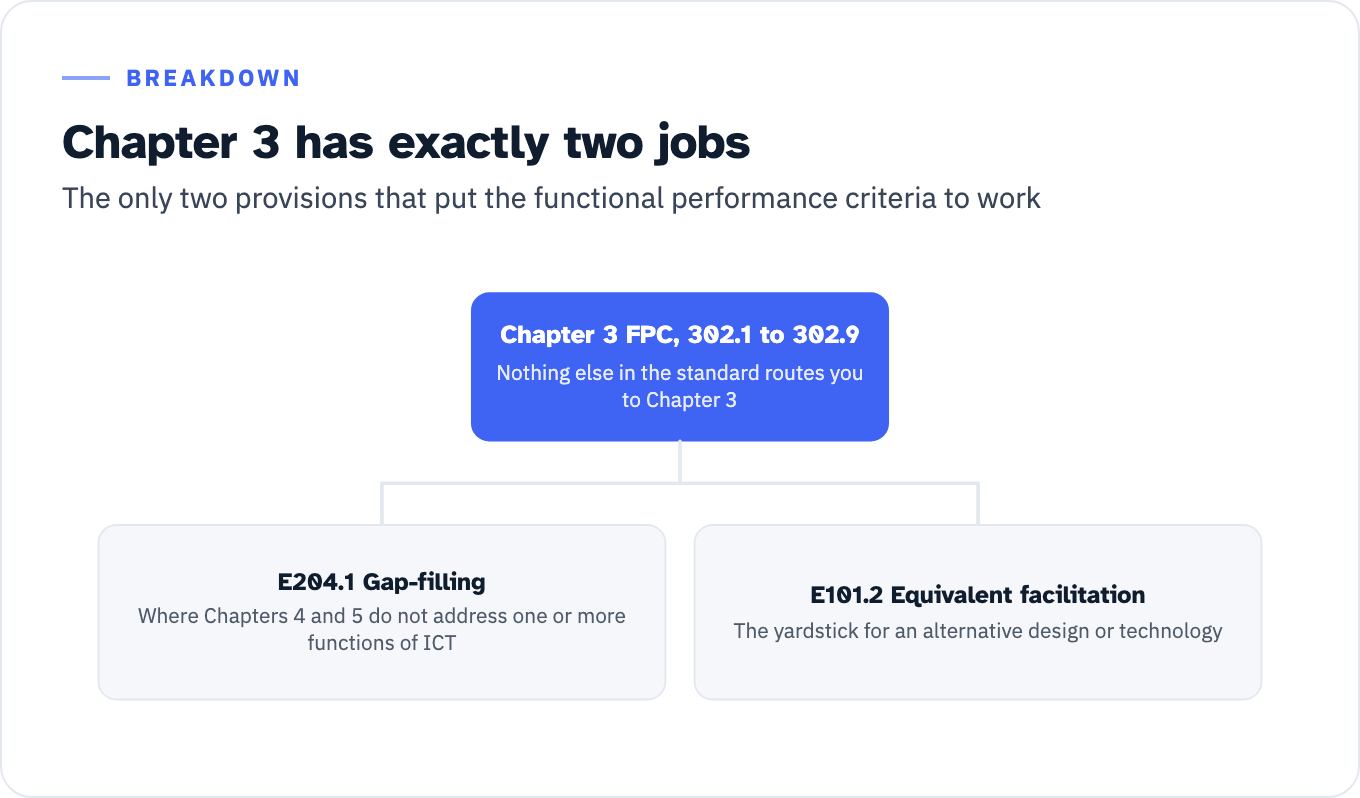
View the data as a list
Chapter 3 FPC, 302.1 to 302.9: Nothing else in the standard routes you to Chapter 3
- E204.1 Gap-filling: Where Chapters 4 and 5 do not address one or more functions of ICT
- E101.2 Equivalent facilitation: The yardstick for an alternative design or technology
This has a quiet consequence for ACR drafting. ITI defines Supports as: “The functionality of the product has at least one method that meets the criterion without known defects or meets with equivalent facilitation.” If you claim Supports on a Chapter 4 or 5 provision because you built something different that works better, you have made a Chapter 3 argument whether you named it or not, and you should be able to show your working. That is a remark describing the alternative design and the evidence that it delivers substantially equivalent or greater accessibility, not a remark saying the product is accessible.
Nothing else in the standard routes you to Chapter 3. A full-text scan of 36 CFR part 1194 turns up exactly two operative provisions on the Section 508 side, E101.2 and E204.1, plus the parallel pair C101.2 and C202.1 on the Section 255 side. Every other occurrence of the phrase is the 301.1 scope sentence, an appendix heading or a table-of-contents entry. No provision in Chapters 4, 5, 6 or 7 cross-references Chapter 3. Chapter 6’s own documentation duty points elsewhere: 602.2 requires documentation to “list and explain how to use the accessibility and compatibility features required by Chapters 4 and 5.” The FAR does not add a third route either. FAR 39.201 implements Section 508 by pointing at the Access Board’s standards at 36 CFR 1194.1, and the phrase “functional performance” does not appear anywhere in FAR Part 39. The Chapter 3 question is settled inside the standards.
Eight of the nine criteria are conditional
This is the single most useful fact for filling the table, and it is visible in the text of every criterion. Eight of the nine open with a “Where …” clause. If that condition is not satisfied for your product, the criterion has nothing to say, and the answer is Not Applicable with a remark stating that the condition is absent. Only 302.9 has no condition precedent.
| Criterion | Condition precedent | What it requires when the condition holds | Evidence that actually supports a claim |
|---|---|---|---|
| 302.1 Without Vision | A visual mode of operation is provided | At least one mode of operation that does not require user vision | Named screen reader and browser or OS pairing, task list run end to end, defects with locations |
| 302.2 With Limited Vision | A visual mode of operation is provided | At least one mode of operation that enables users to make use of limited vision | Magnification level tested, contrast controls exercised, reflow behavior at the tested setting |
| 302.3 Without Perception of Color | A visual mode of operation is provided | At least one visual mode that does not require user perception of color | Enumerated places where color carries meaning and the non-color cue paired with each |
| 302.4 Without Hearing | An audible mode of operation is provided | At least one mode of operation that does not require user hearing | The audible modes listed, and the visual or text equivalent for each |
| 302.5 With Limited Hearing | An audible mode of operation is provided | At least one mode that enables users to make use of limited hearing | Volume and gain controls, interference behavior, any separation of speech from background |
| 302.6 Without Speech | Speech is used for input, control, or operation | At least one mode of operation that does not require user speech | The speech-driven functions listed, and the non-speech path to each one |
| 302.7 With Limited Manipulation | A manual mode of operation is provided | At least one mode that does not require fine motor control or simultaneous manual operations | Every gesture or chord identified, and the single-point or sequential alternative |
| 302.8 With Limited Reach and Strength | A manual mode of operation is provided | At least one mode operable with limited reach and limited strength | Force and travel of controls, reach ranges as installed, switch or alternate input path |
| 302.9 With Limited Language, Cognitive, and Learning Abilities | None. This one always applies | Features making use by individuals with limited cognitive, language, and learning abilities simpler and easier | Named features, and the specific steps where a barrier remains |
The verbatim text is worth having in front of you. 302.4: “Where an audible mode of operation is provided, ICT shall provide at least one mode of operation that does not require user hearing.” 302.6: “Where speech is used for input, control, or operation, ICT shall provide at least one mode of operation that does not require user speech.” 302.7 and 302.8 both begin “Where a manual mode of operation is provided.” And 302.9, the exception, is unconditional: “ICT shall provide features making its use by individuals with limited cognitive, language, and learning abilities simpler and easier.”
302.9 is worth a second look for a reason that is not obvious from the codified text. It was not in the proposed rule. The 2000 standards contained no limited-cognition criterion at all, the TEITAC advisory committee had recommended against one, and the Board added 302.9 only in the final rule, harmonized with the equivalent clause in EN 301 549. So the one row you can never mark Not Applicable is also the newest, the one with the least testing history behind it, and the one most likely to be answered with a sentence of intent.
The decision tree
Run this per product, not per feature, and start at the gate rather than at the criterion.
1. Does the ICT have a function that nothing in Chapters 4 and 5 addresses? Take the product’s principal function as the standard defines ICT: “Information technology and other equipment, systems, technologies, or processes, for which the principal function is the creation, manipulation, storage, display, receipt, or transmission of electronic data and information, as well as any associated content.” Compare that against the nineteen sections listed above.
- No. Chapters 4 and 5 reach every function, and the product’s web and software content runs through E205.4, E207.2 and 602.3 to WCAG 2.0 Level A and AA. E204.1 has not been triggered. Go to step 3.
- Yes. Chapter 3 applies to the functions not addressed. Go to step 2.
2. For each of the nine criteria, is the condition precedent satisfied?
- Yes, and the product delivers the required mode. Supports. The remark names the mode, the function it covers, and how you know it works.
- Yes, and the product delivers it with defects, or only for part of the functionality. Partially Supports or Does Not Support. The remark names the functions or features with issues and how they do not fully support, per the template’s own instruction.
- No. Not Applicable. The remark states the condition that is absent, in the words of the criterion. For example, no audible mode of operation is provided.
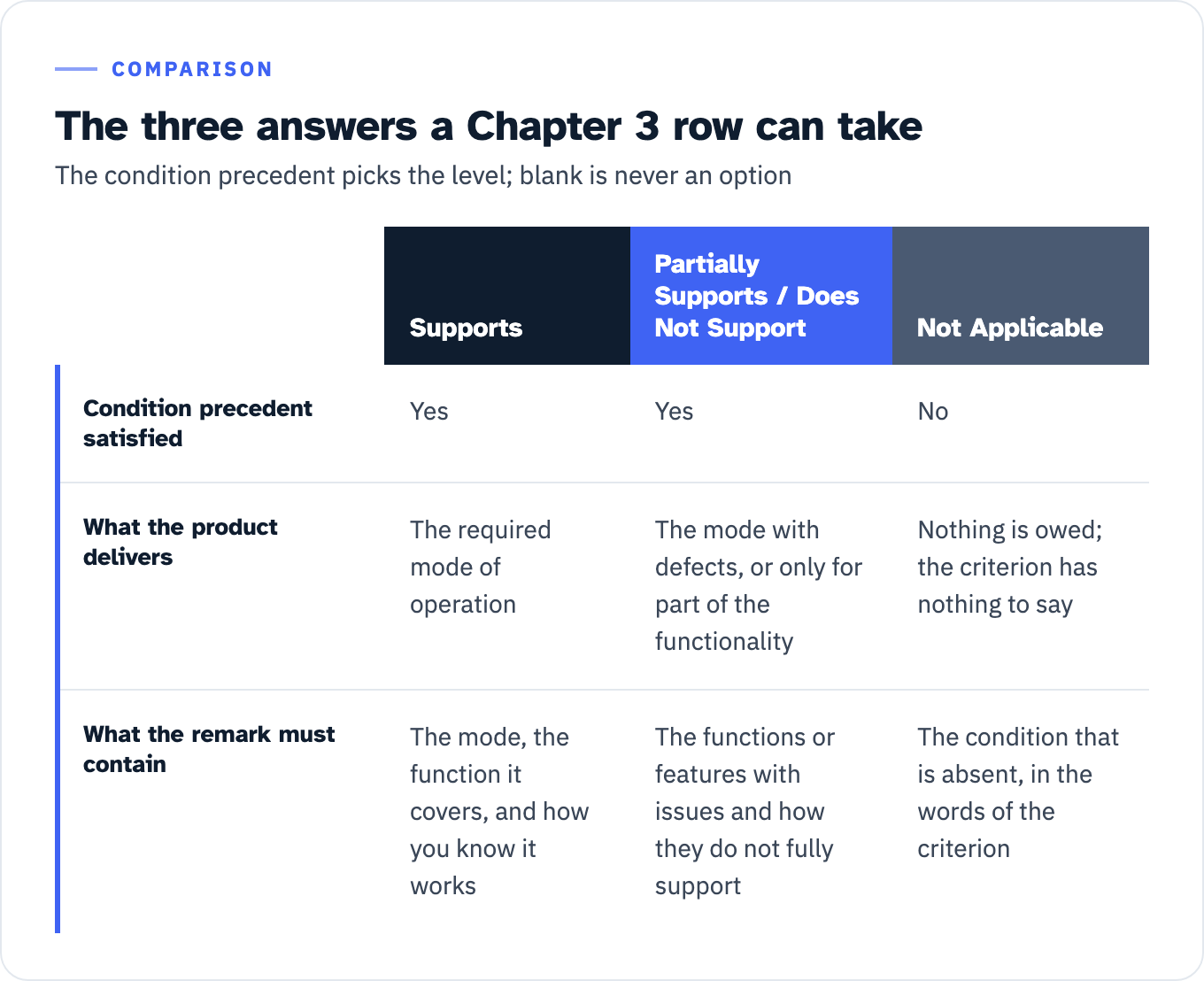
View the data as a table
| Supports | Partially Supports / Does Not Support | Not Applicable | |
|---|---|---|---|
| Condition precedent satisfied | Yes | Yes | No |
| What the product delivers | The required mode of operation | The mode with defects, or only for part of the functionality | Nothing is owed; the criterion has nothing to say |
| What the remark must contain | The mode, the function it covers, and how you know it works | The functions or features with issues and how they do not fully support | The condition that is absent, in the words of the criterion |
3. Are you claiming Supports anywhere on the strength of an alternative design rather than literal conformance?
- Yes. That is equivalent facilitation under E101.2, and Chapter 3 is the yardstick. Describe the alternative and the basis for saying it delivers substantially equivalent or greater accessibility.
- No. Chapter 3 is not engaged. If you are answering the table anyway because the solicitation asked for it, answer each row on its own condition precedent, and use the section notes field to state the position.
The one terminal that is never available: blank rows. The template’s publication checklist says to “Check that there is a response for each criterion for ‘Conformance Level’ and ‘Remarks and Explanations.’” Its size-reduction rule allows removing a whole section with a note saying why, but states that “Individual criteria cannot be removed, only sections at a time.” The same rule appears again for the Section 508 tables specifically: “when subsections of criteria do not apply to the product, the section may be summarized or removed as long as an explanation is provided explaining why a criterion does not apply.” Section, not row. GSA’s test-report guidance agrees: “A completed test report should have a conformance outcome listed for each standard even if the standard does not apply.” And GSA’s solicitation guidance is blunt about the stakes: “To be considered for award, the ACR must be complete, and submitted according to the instructions,” alongside a separate Supplemental Accessibility Report giving a “Description of evaluation methods used to produce the ACR, to demonstrate due diligence in supporting conformance claims.”
Note also that Not Evaluated is not on the menu here. ITI restricts it to WCAG Level AAA criteria, so it can never legitimately appear in a Chapter 3 row.
Two shortcuts that do not work
The WCAG “no content” shortcut. ITI does allow Supports in place of Not Applicable in some cases, but the note is scoped by its own first six words: “When filling in the WCAG tables, a response may use ‘Supports’ where one might otherwise be inclined to use ‘Not Applicable’. This is in keeping with WCAG 2.0 Understanding Conformance: This means that if there is no content to which a success criterion applies, the success criterion is satisfied.” The underlying W3C sentence says exactly that. The Chapter 3 table is not a WCAG table, so the note does not reach it. What does reach it is the template’s general instruction for the remarks column, which governs every table in the report: “If the criterion does not apply, explain why. If an accessible alternative is used, describe it.”
Deriving Chapter 3 answers from your WCAG results. The Access Board and GSA both publish a WCAG-to-FPC mapping table, and both label it informal guidance on its face. The Access Board’s wording: “Information provided in this mapping is intended solely as informal guidance; it is neither a determination of your legal rights or responsibilities, nor a statement of the official views of the U.S. Access Board or any other federal agency.” GSA’s version says the same thing and adds its own IT Accessibility Program to the list of agencies not speaking.
The map also does not cover the ground. Across its 38 data rows, two of the nine criteria have no WCAG 2.0 Level A or AA success criterion mapped to them at all: 302.6 Without Speech and 302.8 With Limited Reach and Strength. In the other direction, 2.3.1 Three Flashes or Below Threshold is dashed across all nine columns. A Chapter 3 table derived from WCAG results would be silent exactly where the map is silent. The 508-edition VPAT is explicit about what its WCAG tables answer for, and Chapter 3 is not among them: “Tables 1 and 2 also document conformance with Revised Section 508” at Chapter 5, 501.1 Scope and 504.2 Content Creation or Editing, and Chapter 6, 602.3 Electronic Support Documentation.
There is also a wrong list of criteria you may run into. If a page gives you six functional performance criteria including a mode “that does not require visual acuity greater than 20/70,” it is reciting 1194.31 from the original 2000 standards. That list is still printed in the CFR as Appendix D, and it is reachable only through the legacy safe harbor at E202.2, which covers components of existing ICT that comply with the earlier standard and “that has not been altered on or after January 18, 2018.”
The intermediate version circulates too, and it is also wrong. The Board first proposed replacing the acuity thresholds with explicit requirements for magnification, reduction of field of vision, and user control of contrast (NPRM, 80 FR 10880, 10898). Industry commenters called that too prescriptive and pointed at EN 301 549 clause 4.2.2 as a technology-neutral model. The Board agreed and “adopts this suggestion for the language of 302.2 in the final rule.” Final 302.2 contains no magnification, field-of-vision or contrast requirement. It requires one thing: “at least one mode of operation that enables users to make use of limited vision.” 302.5 went the same way, harmonized with EN 301 549 clause 4.2.5. Nine criteria, 302.1 through 302.9, is the current list, and a rule that reads like a specification of magnification and contrast features is a proposal that never became law.
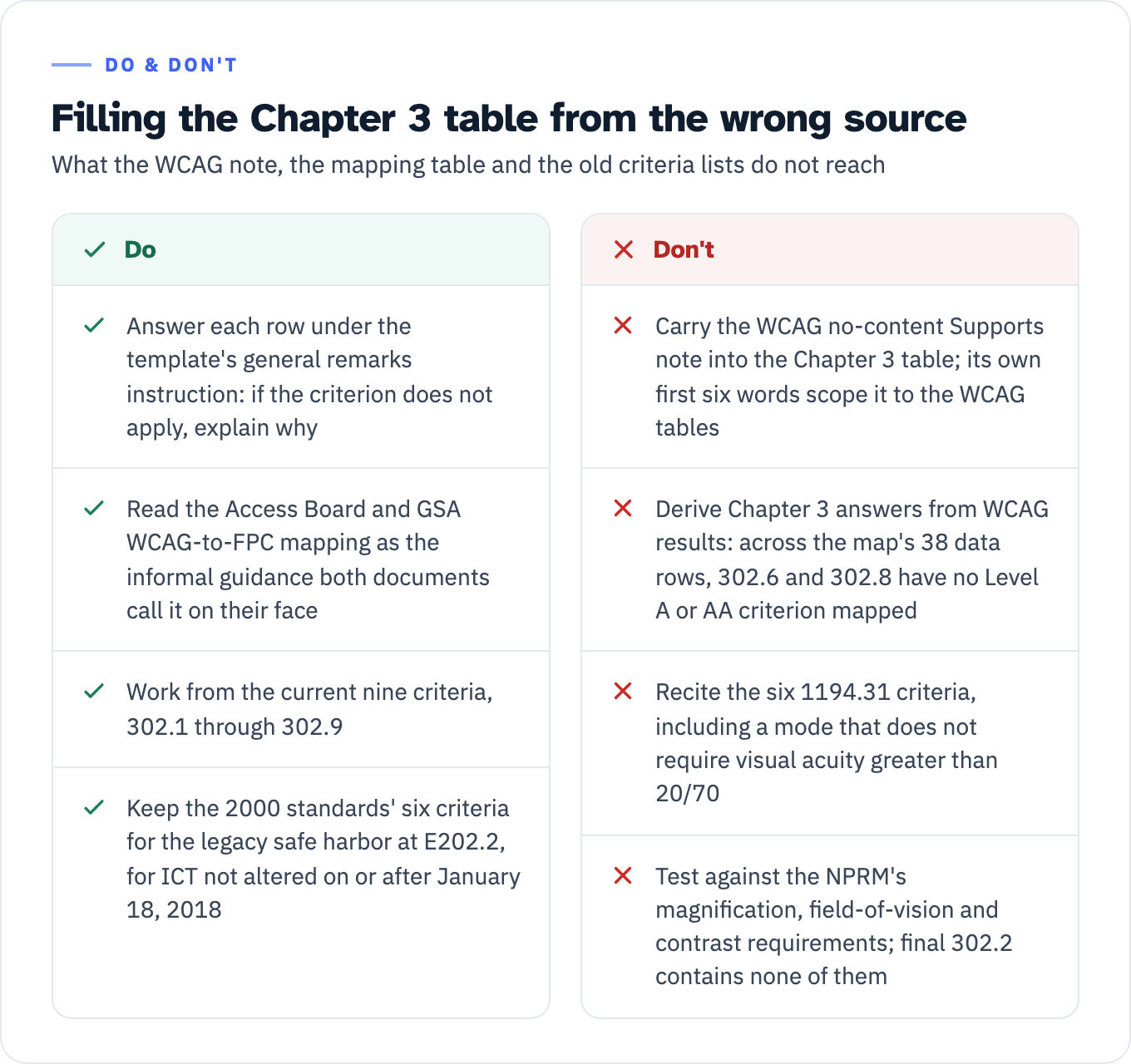
View the data as a table
| Do | Don’t |
|---|---|
| Answer each row under the template’s general remarks instruction: if the criterion does not apply, explain why | Carry the WCAG no-content Supports note into the Chapter 3 table; its own first six words scope it to the WCAG tables |
| Read the Access Board and GSA WCAG-to-FPC mapping as the informal guidance both documents call it on their face | Derive Chapter 3 answers from WCAG results: across the map’s 38 data rows, 302.6 and 302.8 have no Level A or AA criterion mapped |
| Work from the current nine criteria, 302.1 through 302.9 | Recite the six 1194.31 criteria, including a mode that does not require visual acuity greater than 20/70 |
| Keep the 2000 standards’ six criteria for the legacy safe harbor at E202.2, for ICT not altered on or after January 18, 2018 | Test against the NPRM’s magnification, field-of-vision and contrast requirements; final 302.2 contains none of them |
Annotated rows from real federal ACRs
GSA publishes six accessibility conformance reports for its own tools and courses in the Section508.gov ACR Library, each as HTML and as OpenACR YAML. In all six, the Chapter 3 table is enabled and answered while Hardware, Software, and Support Documentation and Services are disabled. That makes them the best available worked material: federal, public, machine-readable, and not drawn from anyone’s confidential test file.
The ACR Editor v1.0 report, dated 18 April 2025, contains both the right pattern and the wrong one in the same table. Its 302.9 row is the only Does Not Support anywhere in the Chapter 3 tables of all six reports:
ACR Editor uses plain language when possible but users with cognitive disabilities or limited language may find the more technical requirements of this tool to be difficult to understand and evaluate.
Exception: Users with cognitive disabilities or difficulties may encounter a barrier at these steps, which could prevent or impair them from continuing with identity authentication
- Create a password while meeting its length and strength requirements
- Select a multi-factor authentication (MFA) while making an informed decision on the level of security and usability
Named steps, a stated barrier, and a limit on the claim. A reviewer can go to those two steps and check. The Does Not Support is not a liability, it is the reason the rest of that table is credible.
Three rows further up, the same report does the opposite:
| Row and level | Remark in the published report | What the remark actually establishes |
|---|---|---|
| 302.4 Without Hearing, Supports | ”No sound is utilized at any point in the use of the ACR Editor tool/website” | 302.4 bites only where an audible mode of operation is provided. The remark says none is. |
| 302.5 With Limited Hearing, Supports | ”No sound is utilized at any point in the use of the ACR Editor tool/website” | Same condition precedent, same absent trigger, same answer needed. |
| 302.6 Without Speech, Supports | ”The website does not require any speech to be used for input, control, or operation.” | 302.6 bites only where speech is used for input, control, or operation. The remark says it is not. |
Each remark establishes that the condition precedent is absent, and then the level column claims the criterion is met. The facts as stated point to Not Applicable. Correcting any of the three is a change to one cell and no change at all to the remark: Not Applicable, “no audible mode of operation is provided,” which is precisely the explanation the template asks for. Same evidence, defensible answer.
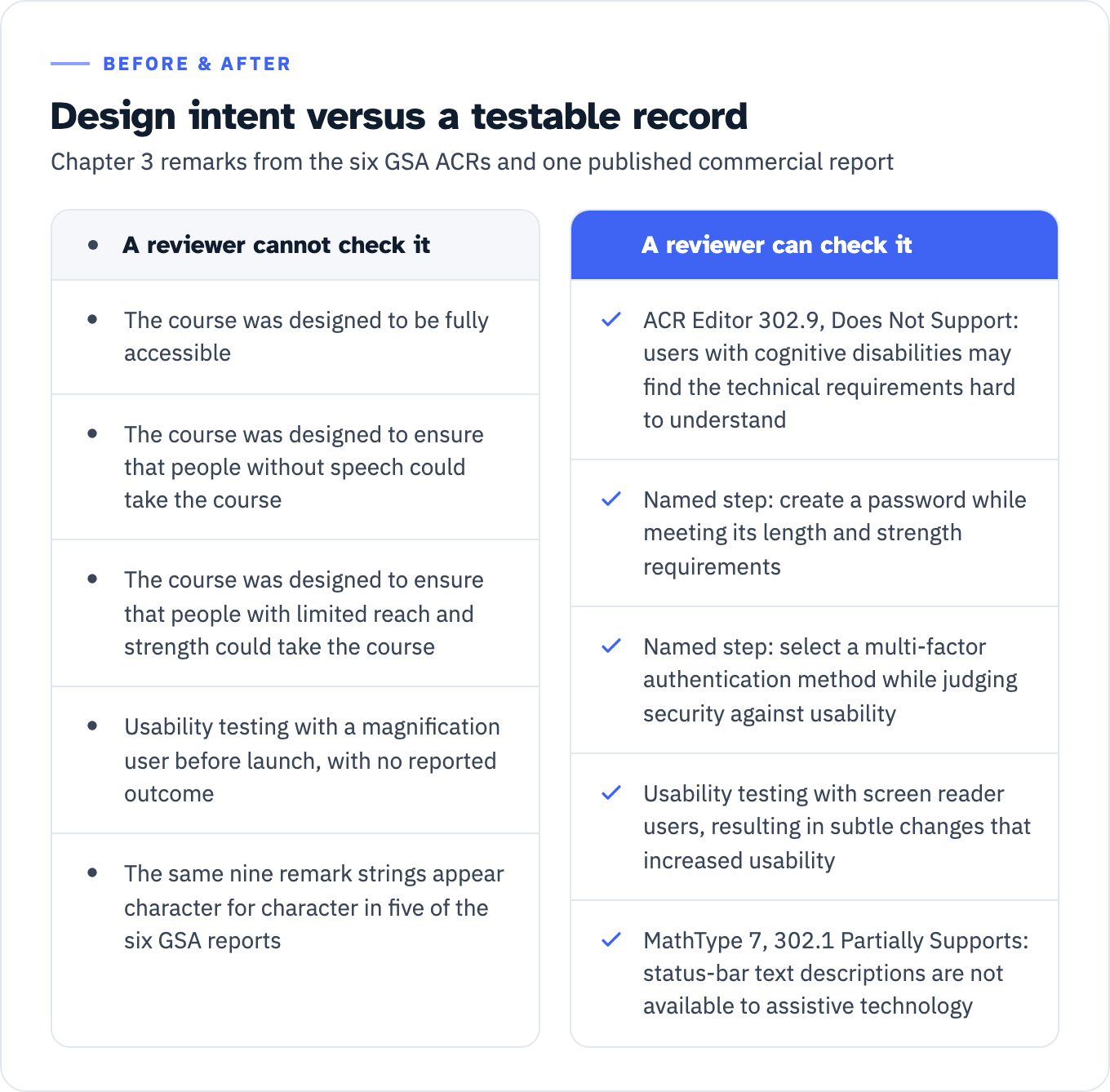
A second pattern runs through the other five reports. In the Section 508 - What Is It and Why Is It Important v4.1 ACR, dated 24 April 2025, all nine rows read Supports, and all nine remarks open with a statement of design intent: “The course was designed to be fully accessible,” “The course was designed to ensure that people without speech could take the course,” “The course was designed to ensure that people with limited reach and strength could take the course.” A reviewer can neither verify nor dispute any of that.
Two rows then add something a reviewer can ask about. The 302.1 remark continues: “The designer conducted usability testing with screen reader users before the course was launched, resulting in subtle changes that increased usability.” The 302.2 remark continues: “The designer conducted usability testing with a magnification user before the course was launched.” Same activity, shorter sentence, no reported outcome. That is the whole difference inside one table, and it is the difference between a design claim and a testing record.
Those nine remarks are not specific to that course. Comparing the OpenACR YAML for all six reports, five of them carry the same nine remark strings character for character: the Accessibility of ICT for Government Executives v2.0.1 report dated 18 April 2025, and four reports dated 24 April 2025 covering micro-purchases, procuring conformant ICT products and services, the What Is It course, and soliciting and evaluating ACRs. The ACR Editor report is the only one of the six with Chapter 3 text of its own. Boilerplate travelling between reports is not an inference here, it is visible in the published files.
A published commercial report shows the same condition-precedent error. Wiris publishes a Revised Section 508 report for MathType 7 in which 302.4 and 302.5 are both Supports on the identical remark “MathType 7 does not require user hearing,” and 302.6 is Supports on “MathType 7 does not require user speech.” The same report gets 302.1 right, as a genuine Partially Supports with a locatable defect: “Menus and dialogs are available to assistive technologies. For toolbars and editing area MathType 7 displays text help information in its status bar upon mouse-over or keyboard focus. However, these text descriptions aren’t available to assistive technology.” That row tells a reviewer where to look and what to reproduce. 302.8 and 302.9, in the same table, are bare assertions of full operability with nothing behind them.
View the data as a table
| A reviewer cannot check it | A reviewer can check it |
|---|---|
| The course was designed to be fully accessible | ACR Editor 302.9, Does Not Support: users with cognitive disabilities may find the technical requirements hard to understand |
| The course was designed to ensure that people without speech could take the course | Named step: create a password while meeting its length and strength requirements |
| The course was designed to ensure that people with limited reach and strength could take the course | Named step: select a multi-factor authentication method while judging security against usability |
| Usability testing with a magnification user before launch, with no reported outcome | Usability testing with screen reader users, resulting in subtle changes that increased usability |
| The same nine remark strings appear character for character in five of the six GSA reports | MathType 7, 302.1 Partially Supports: status-bar text descriptions are not available to assistive technology |
If you decide the E204.1 gate is not met and you want to retire the section rather than answer it, the ACR Editor report models the notes you need. Its disabled chapters carry reasons, not silence: “ACR Editor does not include any hardware”; “ACR Editor does not contain platform software that has access to platform accessibility services. For this reason, the chapter has been omitted.” A Chapter 3 notes field can be written the same way, stating which functions of the product are addressed by Chapters 4 and 5 and by the WCAG tables, and therefore why E204.1 was not triggered. Whether a given reviewer accepts that is a separate question, and a short cover note offering to complete the table on request costs nothing.
Why you were asked for all nine anyway
Because the requirement language probably came out of a tool. GSA’s Accessibility Requirements Tool generates the Section 508 requirements agencies paste into solicitations, and its published requirement mapping attaches all nine functional performance criteria to broad selections including ICT Products, ICT Services, the electronic content branch, the web forms and applications checkbox, and computers and laptops. That mapping was read from the tool’s public code on 27 July 2026 rather than from a run of the tool, so treat it as an explanation rather than a certainty and re-run the tool for your own procurement if it matters. The point stands either way: an agency can land on a requirement list containing 302.1 through 302.9 before anyone has asked whether Chapters 4 and 5 leave a function unaddressed.
There is a second reason the rows are hard to fill honestly. No standard test procedure produces an FPC result. The ICT Testing Baseline Portfolio sets what the Access Board calls “the minimum requirements for evaluating the conformance of ICT with the Revised Section 508,” and its Baseline for Web, version 3.1, published 1 April 2024, is the test set federal testing guidance points to. It contains 62 baseline tests, none of which targets a Chapter 3 criterion. The string “302.” does not appear in the full baseline test set, and neither does the phrase “functional performance.” Every Accessibility Requirements block in it cites WCAG success criteria or WCAG conformance requirements.
So an FPC claim is never corroborated by the automated and manual evidence the rest of the ACR rests on. It has to rest on something you did on purpose and can name: usability testing with named assistive technology users, a documented alternative design, or an explicit statement that the condition precedent is absent. If you are negotiating what proof an agency will take, that argument is worked through in what happens when an agency questions your test evidence.
If you are on the reviewing side
Your decision is narrower than it looks. A blank Chapter 3 table is a completeness defect you can raise on the face of the guidance, because a complete ACR is a condition of award and every criterion needs both a level and an explanation. Nine rows of Supports on design-intent remarks is a different thing. It is not automatically a conformance concern, and rejecting on that basis alone is hard to defend against the guidance as written. It is worth a clarification question, and the useful ones are specific: which functions of the product are not addressed by Chapters 4 or 5, what evidence supports 302.9 given that it applies unconditionally, and for any row marked Supports where the remark says a mode is absent, whether Not Applicable was intended.
Two things to hold on to. GSA tells buyers that Not Applicable “should not be confused with non-conformance; it simply signifies that a specific aspect of the accessibility standard is not relevant to the product in question,” and that the buyer’s job is to read the remark and understand why. And no published federal source describes how evaluators actually treat these tables, so score against what the guidance requires rather than against a norm nobody has documented. The broader method for reading a submitted report is in how to score a vendor ACR, and the exceptions the agency itself has to determine, rather than the vendor, are covered in Section 508 exceptions and agency determinations.
The context is about to change. GSA has a Paperwork Reduction Act notice out for a centralized ACR Repository, published 24 June 2026 at 91 FR 37982, with comments closing 24 August 2026 and a burden estimate of 5,000 uploaded ACRs. GSA describes the repository as a response to OMB’s requirement in M-24-08 to “explore options for establishing a standardized accessibility conformance reporting process for government procurement of ICT, which should include a central repository of vendor accessibility conformance reports.” Chapter 3 tables that today sit in isolated PDFs will sit next to each other in one searchable place. The five identical remark sets above took a file comparison to find. In a repository they would take a search box.
Do this today
Open your current ACR to the Chapter 3 table and go row by row with the criterion text beside you. For 302.1 through 302.8, ask only whether the condition precedent holds for this product. Any row where the remark itself says the mode is absent should read Not Applicable, not Supports. Then look hard at 302.9, the one row that always applies, and replace anything that begins “the product was designed to” with a named feature, a named step, or a named test you can produce.
If the table is going into a bid and you want it reviewed against the gate before it ships, that is what ADACP’s VPAT and ACR authoring and testing work covers, and if the pressure is coming from solicitation language rather than the product, Section 508 procurement support is the right starting point.