

A lot of teams first look up VPAT pricing when a deal is already at risk.
A buyer sends over an RFP. Procurement asks for a VPAT. Legal wants to know whether your accessibility claims are defensible. Product assumes this is a form someone can fill out in an afternoon. Then the uncomfortable part lands: the document is the easy part. The primary cost sits underneath it, in the audit work required to support every claim in the final report.
That’s why budgeting for a VPAT the wrong way causes trouble. If you treat it like a document purchase, you’ll likely get a weak ACR, vague remarks, and a review process that stalls when the customer’s accessibility team starts asking follow-up questions. If you treat it like a scoped compliance project, you’ll make better decisions about testing depth, remediation, and timing.
The companies that handle this well usually do one thing early. They stop asking, “What does a VPAT cost?” and start asking, “What will it take to produce a procurement-ready ACR that can survive scrutiny?”
Your RFP Requires a VPAT Now What
The usual trigger is simple. A promising enterprise prospect asks for accessibility documentation before vendor selection, and your team doesn’t have it ready.
That scenario became more common as VPAT adoption among SaaS startups surged in 2025 due to procurement pressures and legal risks, with early-stage firms increasingly submitting VPATs for federal and EU-related buying processes, as noted by Ada Compliance Pros on SaaS VPAT adoption in 2025. For many B2B software teams, a VPAT is now part of standard revenue operations, not a niche compliance exercise.
The first mistake is assuming you need “a certificate.” You don’t. You need a credible accessibility conformance report that reflects how your product behaves when tested. The second mistake is assuming speed matters more than accuracy. In regulated buying environments, a fast but weak report can create more delay than no report at all.
What buyers are really asking for
When procurement requests a VPAT, they’re usually trying to answer three practical questions:
- Can this product enter review at all
Some buyers won’t move a vendor forward without accessibility documentation. - Are the claims specific enough to trust
Reviewers look for detailed remarks, not broad assurances. - Will legal and compliance accept the risk
A vague self-attested report can raise more questions than it resolves.
A VPAT request is often less about paperwork and more about buyer risk management.
That matters because your response strategy should change. If the deal is strategic, you’re not buying a form. You’re buying evidence, documentation quality, and a smoother path through vendor review.
For teams selling into government, healthcare, education, or finance, it also helps to get support early from people who understand procurement mechanics. If that’s your situation, Section 508 procurement support is often more useful than a document-only approach because it aligns the accessibility work with the buyer’s review process.
What works and what doesn’t
What works is a scoped audit, realistic timeline, and a clear answer to which product areas are in scope.
What doesn’t work is sending a generic VPAT with unsupported “Supports” claims and hoping nobody reads the remarks column carefully. Someone usually does.
Understanding the VPAT and the ACR
A lot of procurement confusion starts with terminology.
VPAT stands for Voluntary Product Accessibility Template. It’s the template. ACR stands for Accessibility Conformance Report. It’s the completed document based on actual evaluation results. If you need a simple analogy, think of the VPAT as a blank tax form and the ACR as the filed return with supporting information behind it.
The template is not the deliverable
When teams say they “need a VPAT,” they usually mean they need a completed report they can send to a customer. That completed report is the ACR.
The distinction matters because buyers review the finished conformance report, not the blank standard template. A serious review team wants to know what was tested, how it was tested, which standards were applied, and how exceptions or gaps were documented. If your team needs a foundational explainer before procurement starts, this guide to VPATs and ACRs is a useful reference.
What the conformance ratings mean in practice
A completed ACR uses conformance labels such as:
- Supports
- Partially Supports
- Does Not Support
- Not Applicable
Those labels are only meaningful when they’re tied to evidence. A row marked “Supports” without thoughtful testing is weak. A row marked “Partially Supports” with precise remarks is often far more credible because it tells the reviewer exactly where the product stands.
Practical rule: The remarks column carries most of the real weight in an ACR.
That’s where experienced evaluators distinguish between a procurement-ready report and a risky one. They explain the limitation, describe the affected component or flow, and make it clear whether the issue blocks use, creates friction, or has a workaround.
Why unsupported reports create problems
An ACR is not a promise of perfect accessibility. It’s a documented statement of conformance at a point in time. That means the report has to match the product that was tested.
What fails vendor review is usually not the existence of issues. Most reviewers know software has defects. What fails review is overclaiming, vague language, inconsistent methodology, or a report that reads like it was completed without serious testing.
That’s why a defensible ACR starts with the audit, not the template.
The 7 Key Factors That Determine VPAT Pricing
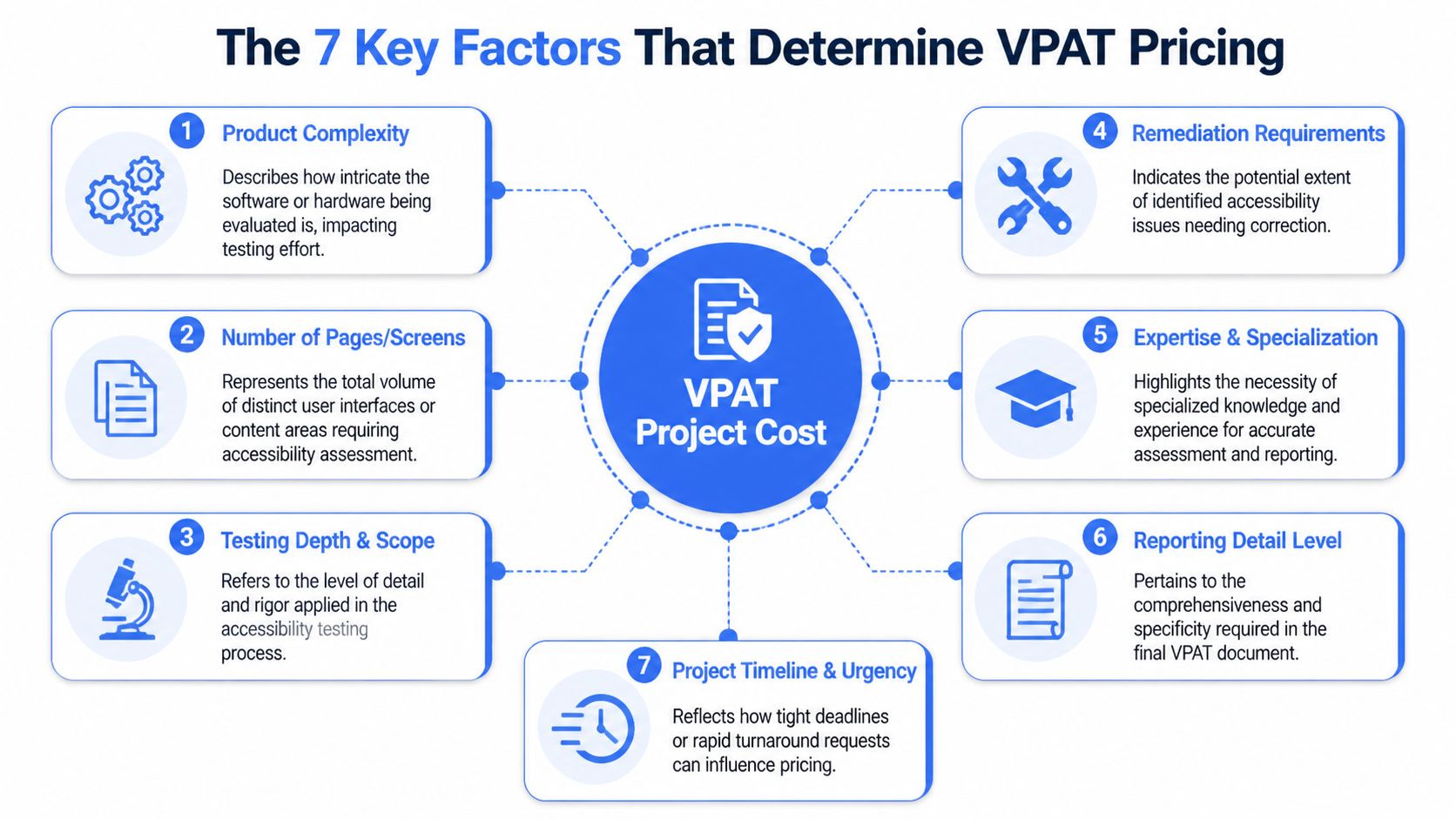
A buyer looking at VPAT pricing usually wants one number. In practice, the price depends on how much product has to be evaluated, how rigorously it needs to be tested, and whether the engagement stops at reporting or includes support after defects are found.
Scope drives almost everything
The biggest cost driver is scope.
A static marketing site with a handful of templates is one kind of project. A SaaS product with multiple user roles, dynamic states, dashboards, tables, modals, settings panels, and admin workflows is another. The document may still be “one VPAT,” but the effort behind it is completely different.
The scope questions that change pricing fastest include:
- How many distinct pages or screens are in scope
- Which user flows matter most, such as sign-up, search, checkout, reporting, or account management
- Whether authenticated experiences are included
- Whether mobile apps, desktop software, or hardware interfaces are also part of the review
A common budgeting mistake is counting pages when actual complexity sits in states and interactions. One screen with rich filters, drag-and-drop behavior, inline validation, and modal workflows can take more evaluation time than several static pages.
Standards and testing depth change the effort
The required standard also changes cost.
A WCAG-only engagement is narrower than one that also needs Section 508 or EN 301 549 coverage. As standards expand, the evaluator has more criteria to review and more reporting precision to maintain. That affects both testing time and writing time.
Then there’s the issue of manual testing rigor. Automated scanning can help find obvious problems, but it doesn’t produce a defensible ACR on its own. Buyers with experienced accessibility reviewers know that. They’ll expect human evaluation of keyboard behavior, focus order, form handling, screen reader output, error recovery, and component behavior in real workflows.
Other depth-related factors include:
- Assistive technology coverage
A stronger review usually includes hands-on testing with the tools people use, not just browser automation. - Environment complexity
Staging issues, role-based access, and integrations often slow testing more than teams expect. - Version control discipline
If the product changes during the audit, the report can become stale before it’s delivered.
If your product changes weekly, freeze the release branch for the audited scope or accept that the final ACR may need revision.
Support work after testing affects the real total
Many budgets break at this point.
A vendor might quote for the audit and ACR, but your team may also need developer-facing remediation guidance, meetings with engineering, and re-testing after fixes land. None of that is “extra” in a practical sense if your goal is to pass buyer review.
The final three cost factors are often the least visible at quote stage:
- Remediation support
Findings are more useful when they include actionable guidance that developers can implement. - Re-testing and verification If the team fixes key blockers, someone needs to confirm the issues are resolved before the ACR is updated.
- Hardware and mobile testing
Native apps, kiosks, devices, and hybrid experiences widen the test matrix quickly.
Cheap engagements usually save money by reducing one of these layers. Sometimes that’s appropriate. Often it isn’t.
VPAT Pricing Models and Sample Cost Ranges
When buyers search for VPAT pricing, they often see the report fee first. That number is real, but it’s incomplete.
The document is the small line. The audit behind it is the large one, and on most engagements it is the great majority of the total. That ratio is the thing to check when you compare quotes. A low headline price usually means one of two things: the audit is scoped to fewer templates than your product actually has, or it is largely automated, in which case the resulting ACR asserts conformance that nobody verified. Ask what share of the fee is manual testing time and how many unique screens it covers. A vendor quoting per page or per screen should be able to tell you both without recalculating.
What vendors usually price
In practice, there are two common pricing models.
One is a fixed project for a defined scope. That’s usually best for a first VPAT because procurement, legal, and product teams all need clarity on what’s included.
The other is a broader ongoing engagement where accessibility work continues through remediation, re-testing, and updated reporting. That model can make sense if your product is changing actively or if you expect repeated customer requests for refreshed documentation.
Here’s the budgeting point many teams miss: the report price is rarely the decision-making issue. The cost sits in the evaluation effort needed to produce a report that won’t collapse under reviewer questions. If your team is comparing options, a manual accessibility audit is the service category worth examining closely, because that’s where rigor, scope, and defensibility are determined.
Sample VPAT project costs by product complexity
The table below uses the verified pricing ranges above. It doesn’t invent product-specific quotes. It shows how teams should think about budgeting based on complexity and the known audit-plus-ACR ranges.
| Product Complexity | Typical Scope | Estimated Total Cost Range |
|---|---|---|
| Simple website or small app | Limited set of pages or screens, narrower workflows | $1,850 to $4,450 |
| Standard SaaS product | Broader authenticated experience, multiple key flows, higher interaction complexity | Starts above the minimum range and increases with screen count, testing depth, and remediation needs |
| Complex enterprise platform | Large number of screens, multiple roles, integrations, or mobile/hardware scope | Can increase substantially, especially where vendors price at $200 to $350 per page or screen |
Two cautions are worth stating plainly.
First, if a quote looks unusually cheap, check what was excluded. It may omit authenticated flows, assistive technology testing, remediation guidance, or re-testing.
Second, if a quote looks high, ask whether the scope includes multiple standards, extensive product areas, or post-audit support. High pricing isn’t automatically inflated. It may reflect a more realistic scope.
How to Budget and Scope Your VPAT Project Correctly
The cleanest way to control VPAT pricing is to define scope before you ask for proposals.
Most cost overruns don’t happen because the evaluator changed the rules. They happen because the client started with an incomplete description of the product, then added screens, user roles, environments, and support expectations after work began.
What to gather before you request quotes
Before you send an RFP or ask a consultant for a proposal, assemble the materials that let them scope the job accurately.
Use a checklist like this:
- Product inventory
List the pages, screens, modules, and user roles that matter. - Critical user journeys
Identify the flows a buyer is most likely to care about, such as onboarding, form submission, reporting, checkout, or account administration. - Environment access
Provide test credentials, MFA instructions, required permissions, and any setup dependencies. - Platform details
Clarify whether the scope includes web, native mobile, downloadable software, embedded UI, or documents. - Release status
State whether the evaluated build is production, staging, or a pre-release branch. - Business purpose of the ACR
Say whether this is for a live procurement, internal readiness, renewal, or general enterprise sales enablement.
A well-scoped accessibility project starts with the product team being honest about what exists, what matters, and what’s stable enough to test.
RFP language that gets better proposals
If you want comparable bids, ask every vendor for the same things.
A useful VPAT RFP usually asks for:
- A manual accessibility audit, not just automated scanning.
- Testing across representative user flows and authenticated areas where relevant.
- Assistive technology testing appropriate to the product type.
- A completed ACR tied to the required standard or standards.
- Issue documentation with remediation guidance for engineering teams.
- Re-testing options after fixes are implemented.
- Clear assumptions and exclusions so scope boundaries are visible.
You don’t need elaborate legal language. You need operational clarity. Ask how the vendor documents findings, how they determine conformance ratings, and what they need from your team to avoid delays.
One more practical point: insist that the proposal define the test sample. If the vendor says “core screens” or “representative pages,” ask them to name those screens and pages. Ambiguity at proposal stage becomes disagreement later.
Smart Strategies to Reduce Overall VPAT Costs
You can lower total VPAT pricing without weakening the result, but the savings come from efficiency, not shortcuts.
Cut waste without cutting rigor
The best savings usually come before the audit starts.
If your team can catch obvious issues internally, organize the test environment, and define the highest-value flows, the external evaluator spends less time untangling avoidable problems. That doesn’t replace manual testing. It just makes the paid audit time more productive.
Useful cost-control strategies include:
- Do an internal pre-review
Use basic accessibility checks to catch clear failures before the formal audit. This won’t produce a valid ACR, but it can reduce noise. - Prioritize the critical path first
If budget is tight, start with the product areas buyers will scrutinize most closely. - Provide stable access on day one
Broken credentials, missing permissions, and shifting test builds waste billable time. - Bundle related work where it makes sense
If your team is also standardizing internal documentation, it can help to compare document automation solutions so audit outputs, issue logs, and compliance materials are easier to manage consistently.
A second, often overlooked saver is speed of internal response. When auditors ask clarifying questions about workflows, component libraries, or known limitations, answer quickly. Slow client feedback stretches the project and increases the chance that the product changes before the report is finished.
What not to do
The biggest budget trap is buying the cheapest report and paying for the consequences later.
An under-scoped engagement often leads to unclear findings, engineering confusion, and buyer pushback. Then the team orders a second audit or scrambles to rewrite the ACR under deadline pressure. That sequence costs more than doing the first engagement properly.
For teams under time pressure, this guidance on speeding up a VPAT report without missing compliance is worth reviewing because it focuses on process discipline rather than cutting the testing that makes the report credible.
A short explainer can also help align internal stakeholders on where effort belongs:
Frequently Asked Questions for Legal and Compliance Teams
Legal and compliance teams usually aren’t asking whether a VPAT exists. They’re asking whether they can rely on it.
Is a self-attested VPAT sufficient for procurement
Sometimes for low-risk reviews. Rarely for serious enterprise or government scrutiny.
Buyers with accessibility maturity usually want a report that reflects rigorous testing and specific remarks. They know not all vendors evaluate conformance with the same discipline, so unsupported self-reporting often creates follow-up review rather than faster approval.
What are the legal risks of an inaccurate ACR
They’re not theoretical. An inaccurate ACR can expose a vendor to Section 508 procurement challenges, ADA litigation, and false advertising claims, and agencies such as CMS actively validate ACRs against WCAG 2.1 AA during vendor evaluation, according to the Section508.gov ACR and VPAT FAQ.
That means legal review should focus on evidence, scope definition, and whether the report language overstates conformance. If your team is comparing report language against contract obligations, tools that analyze legal contracts with AI can help surface inconsistencies for human review, especially across procurement terms, representations, and accessibility exhibits.
The legal risk usually isn’t that your product has defects. It’s that your documentation makes claims your testing can’t support.
How long is a VPAT valid
A VPAT is a snapshot in time.
If the product changes materially, the report can stop reflecting reality. New components, revised workflows, design-system changes, and major releases can all trigger the need for updates. Legal teams should treat the ACR as versioned documentation tied to a tested state of the product, not as a permanent certification.
If your team needs a procurement-ready accessibility review, ADA Compliance Pros helps organizations scope audits, produce defensible VPAT and ACR documentation, support remediation, and prepare for buyer review without relying on shortcuts.