

How to Get a VPAT Certification That Passes Enterprise & Government Procurement


.svg)

Introduction
A VPAT certification is now a standard procurement requirement for organizations selling SaaS platforms, mobile apps, dashboards, portals, or enterprise software. Government buyers (federal, state, local) and large enterprises won’t finalize contracts unless your VPAT/ACR demonstrates real accessibility compliance.
Yet 70% of VPATs fail procurement review because they are self-written, incomplete or vague. (eCampusOntario, 2025). As a result, reviewers question the product’s VPAT accessibility claims right away.
This guide simplifies the entire process. You’ll learn exactly why many VPATs are rejected and how to build a VPAT that is accurate and strong enough to pass compliance checks the first time.
What Procurement Teams Want
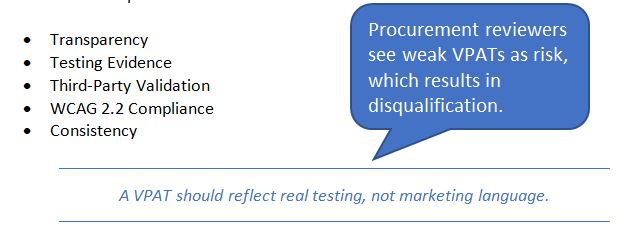
Buyers expect accuracy over perfection in your VPAT report. They also look for real testing proof, like screenshots or examples that show the product was checked. Buyers feel safer when the VPAT is written or reviewed by experts, not just guessed by someone on the team. They also check if the VPAT follows the newest rules, like WCAG 2.2, because old reports are often not accepted. Everything in the VPAT should match and make sense, with no mixed or opposite answers. In short, below is the checklist a procurement team may have during the VPAT assessment process:
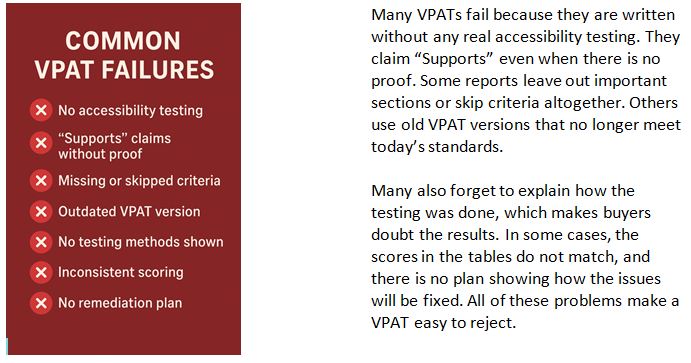
Why Most VPATs Fail Procurement
What is a VPAT Certification
A VPAT certification is a verified accessibility report that shows how well your product meets WCAG standards. It is a detailed and validated document that buyers depend on during procurement. A true VPAT certification includes:
1. Accessibility Testing
Manual testing, assistive technology checks, and code review
(JAWS, NVDA, Voice Over, color contrast tools and keyboard testing)
2. Findings Documentation
Each WCAG 2.2 criterion is matched with real, tested results.
3. VPAT Writing
Accurate and measurable statements for every requirement.
4. Third-Party Validation
Buyers trust VPATs written or reviewed by certified accessibility experts.
5. A Final ACR (Accessibility Conformance Report)
This is the version procurement teams use to check your accessibility compliance.
A VPAT with no expert validation is not trusted and often rejected.
Related Reading: Learn how WCAG guidelines affect VPAT reporting by exploring our comprehensive WCAG blog.
How to Get a VPAT That Passes Procurement
Passing procurement starts with a VPAT that tells the full truth. Follow the steps mentioned below to clearly report on your compliance testing and remediation approach.
Step 1: Conduct a Complete Accessibility Audit
The first step is to run a proper audit against WCAG criteria. It should be a combined effort of automated and manual testing. A complete manual audit gives you the accurate, evidence-based results needed for a strong, trustworthy VPAT:
• WCAG 2.2 AA testing
• Screen reader testing
• Keyboard-only navigation
• Color contrast & UI issues
• Mobile & responsive checks
• PDF/document accessibility
Avoid automated-only scans because they catch only 30% of issues.
Related reading: Read in detail about why automated scans are not enough for compliance audits in this blog. [WCAG Checkers cannot save you from lawsuits-The smarter way to audit].
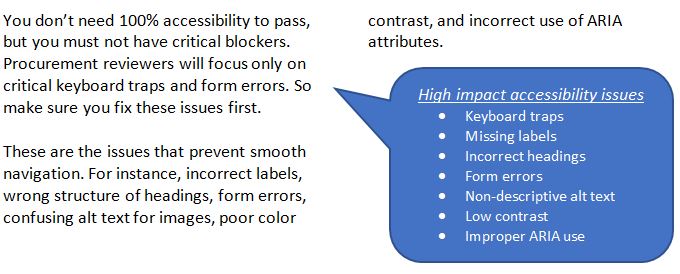
Step 2: Fix High-Impact Issues First
Step 3: Write the VPAT with Evidence
A VPAT entry should clearly list the testing methods you used. Note any limitations you faced during testing. Include the assistive technologies that your product supports. Provide a short, simple description for each issue you found. Make sure the conformance score is accurate and easy to understand. Each point should be clear and concise so readers can quickly grasp your accessibility status.
Click here to see a sample VPAT certification.
Example (good): Supports with Exceptions: Form labels are accessible except on the custom dropdown component, which lacks ARIA attributes. Keyboard navigation works as expected.
Example (bad): Supports: All forms work.
Step 4: Get Third-Party VPAT Certification
Procurement teams pay close attention to this step. A VPAT certified by a trusted third party signals credibility and reduces risk.
What does a certified VPAT include?
A certified VPAT typically includes:
• An independent audit of your product
• Third-party attestation of findings
• Reviewer-friendly formatting for easy assessment
• Accurate conformance scoring
• ACR plus a clear remediation roadmap
Having a VPAT prepared by ADACP or a similar expert builds trust and can speed up contract approvals. It shows your commitment to accessibility and compliance.
Strengthen your VPAT and win contracts faster with ADACP. Book a VPAT consultation with our experts today.
Step 5: Provide a Remediation Timeline
Procurement teams expect a clear remediation plan if there are exceptions. Provide them with an estimated timeline in the report, which will show your accountability.
Example:
“ARIA updates for dropdown menus scheduled within 30 days.”
What does a Procurement-Ready VPAT look Like?
A procurement ready VPAT certification includes complete tables for WCAG, Section 508 and EN 301 549. It should have consistent scoring and notes under each criterion about assistive technology testing and methodology details. The formatting should be professional and it may contain third-party verification.
Such a VPAT passes 95% of procurement reviews without additional questions.
Benefits of a Proper VPAT Certification
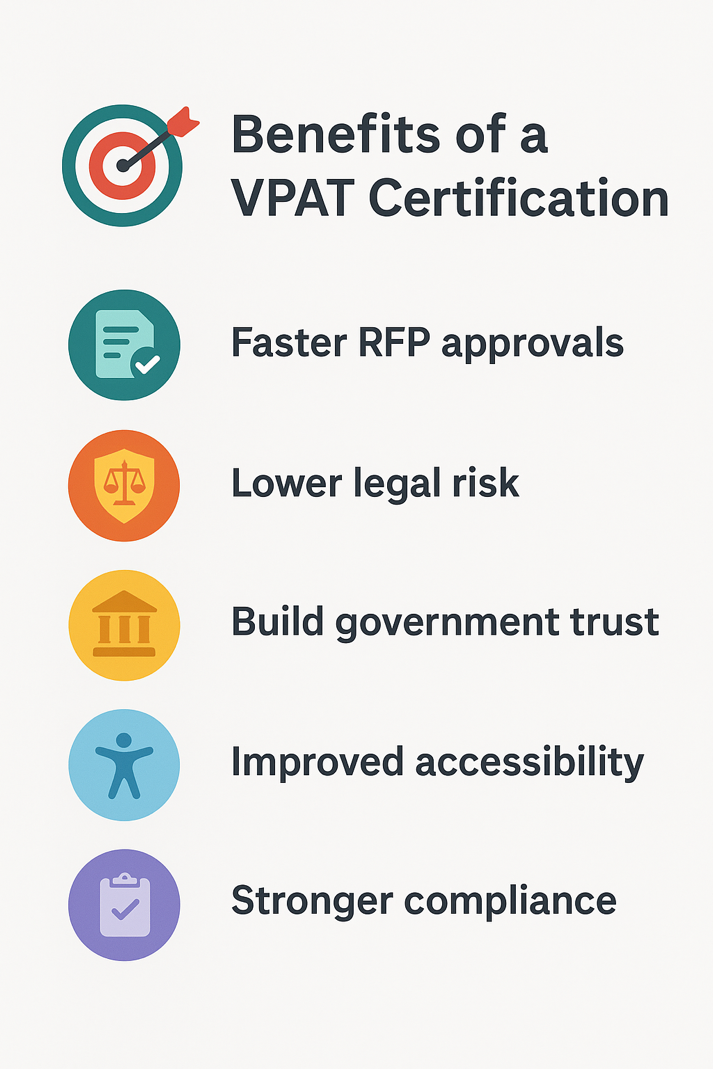
Invest in a properly certified VPAT ACR to attain the following tangible business benefits:
• Faster RFP approvals: It will reduce back and forth questions by the procurement teams.
• Reduced legal exposure: Less chance of complaints related to inaccessible products.
• Greater trust with government buyers: Verified accessibility documents signal professionalism.
• Better product accessibility long-term: Uncovered accessibility gaps will benefit all users over time.
How ADACP helps you achieve VPAT accessibility certification
ADACP specializes in digital accessibility compliance services to help organizations secure VPAT certification and meet WCAG 2.2 AA standards. Our services include:
1. Full WCAG 2.2 AA testing: Thorough manual audit of websites, applications and digital content.
2. VPAT Writing & Remediation: Expert written VPAT documents.
3. Third-Party Certified VPAT Reports: We provide independent validation.
4. PDF, Web, SaaS, Mobile App Testing: Available for all platforms and content types.
5. Document Accessibility: Corporate standard documents.
6. Accessibility Roadmap for Procurement: Fast and effective remediation.
Outcome:
You receive a reviewer-friendly VPAT trusted by government and enterprise buyers. Schedule your VPAT consultation today to stay ahead of the competition.
Red Flags Procurement Reviewers Watch For
Bonus tips for Writing Procurement-Safe VPAT Entries
A. Use “Supports” only when sure
Make sure you’ve done full manual testing and tested with assistive technology. Check there are no functional problems. Make sure there are no usability barriers.
B. Use “Supports with Exceptions” most of the time
This is often the most honest scoring. Procurement trusts this more than “Supports”.
C. Use short but specific notes
Example:
• Issue: Focus order skips the “Continue” button on the payment page.
• Impact: Users relying on screen readers may get stuck.
• Planned Fix: Update tab index. ETA 30 days.
D. Avoid marketing language
Statements like “Best-in-class” or “fully compliant” create procurement distrust. Avoid these and stick to facts only.
E. Cross-check scores
Example: If Keyboard = Supports, then Pointer Gestures should not be “Does Not Support.”
VPAT Tools & Templates
Digital accessibility starts with the right tools and templates. Here is a curated list to help you create, test, and validate VPATs efficiently.
Templates Available:
• VPAT 2.5 WCAG 2.2 – Latest VPAT version for web accessibility compliance.
• Section 508 Refresh – For US federal accessibility standards.
• EN 301 549 – European accessibility standard for ICT products.
Accessibility Testing Tools:
• WAVE – Online accessibility checker for web pages.
• Axe DevTools – Browser extension for automated accessibility testing.
• ARC Toolkit – Chrome extension for detailed accessibility reports.
• Color Contrast Analyzer – Checks text and background color contrast.
• Accessibility Insights – Comprehensive tool for WCAG and Section 508 testing.
Tools cannot write your VPAT, only experts can. Book a free consultation today to ensure your VPAT meets all compliance standards.
Conclusion
A VPAT certification that meets procurement standards gives you a clear competitive edge. Combine thorough accessibility testing, honest documentation and expert writing, your VPAT ACR will be a trusted document that accelerates deals.
If you want your VPAT to serve as a powerful sales tool to the large public-sector and enterprise clients then contact ADACP today. Our accessibility documentation consistently outperforms the industry standards, so look no further and book a consultation now.
Introduction
A VPAT certification is now a standard procurement requirement for organizations selling SaaS platforms, mobile apps, dashboards, portals, or enterprise software. Government buyers (federal, state, local) and large enterprises won’t finalize contracts unless your VPAT/ACR demonstrates real accessibility compliance.
Yet 70% of VPATs fail procurement review because they are self-written, incomplete or vague. (eCampusOntario, 2025). As a result, reviewers question the product’s VPAT accessibility claims right away.
This guide simplifies the entire process. You’ll learn exactly why many VPATs are rejected and how to build a VPAT that is accurate and strong enough to pass compliance checks the first time.
What Procurement Teams Want
Buyers expect accuracy over perfection in your VPAT report. They also look for real testing proof, like screenshots or examples that show the product was checked. Buyers feel safer when the VPAT is written or reviewed by experts, not just guessed by someone on the team. They also check if the VPAT follows the newest rules, like WCAG 2.2, because old reports are often not accepted. Everything in the VPAT should match and make sense, with no mixed or opposite answers. In short, below is the checklist a procurement team may have during the VPAT assessment process:
Why Most VPATs Fail Procurement
What is a VPAT Certification
A VPAT certification is a verified accessibility report that shows how well your product meets WCAG standards. It is a detailed and validated document that buyers depend on during procurement. A true VPAT certification includes:
1. Accessibility Testing
Manual testing, assistive technology checks, and code review
(JAWS, NVDA, Voice Over, color contrast tools and keyboard testing)
2. Findings Documentation
Each WCAG 2.2 criterion is matched with real, tested results.
3. VPAT Writing
Accurate and measurable statements for every requirement.
4. Third-Party Validation
Buyers trust VPATs written or reviewed by certified accessibility experts.
5. A Final ACR (Accessibility Conformance Report)
This is the version procurement teams use to check your accessibility compliance.
A VPAT with no expert validation is not trusted and often rejected.
Related Reading: Learn how WCAG guidelines affect VPAT reporting by exploring our comprehensive WCAG blog.
How to Get a VPAT That Passes Procurement
Passing procurement starts with a VPAT that tells the full truth. Follow the steps mentioned below to clearly report on your compliance testing and remediation approach.
Step 1: Conduct a Complete Accessibility Audit
The first step is to run a proper audit against WCAG criteria. It should be a combined effort of automated and manual testing. A complete manual audit gives you the accurate, evidence-based results needed for a strong, trustworthy VPAT:
• WCAG 2.2 AA testing
• Screen reader testing
• Keyboard-only navigation
• Color contrast & UI issues
• Mobile & responsive checks
• PDF/document accessibility
Avoid automated-only scans because they catch only 30% of issues.
Related reading: Read in detail about why automated scans are not enough for compliance audits in this blog. [WCAG Checkers cannot save you from lawsuits-The smarter way to audit].
Step 2: Fix High-Impact Issues First
Step 3: Write the VPAT with Evidence
A VPAT entry should clearly list the testing methods you used. Note any limitations you faced during testing. Include the assistive technologies that your product supports. Provide a short, simple description for each issue you found. Make sure the conformance score is accurate and easy to understand. Each point should be clear and concise so readers can quickly grasp your accessibility status.
Click here to see a sample VPAT certification.
Example (good): Supports with Exceptions: Form labels are accessible except on the custom dropdown component, which lacks ARIA attributes. Keyboard navigation works as expected.
Example (bad): Supports: All forms work.
Step 4: Get Third-Party VPAT Certification
Procurement teams pay close attention to this step. A VPAT certified by a trusted third party signals credibility and reduces risk.
What does a certified VPAT include?
A certified VPAT typically includes:
• An independent audit of your product
• Third-party attestation of findings
• Reviewer-friendly formatting for easy assessment
• Accurate conformance scoring
• ACR plus a clear remediation roadmap
Having a VPAT prepared by ADACP or a similar expert builds trust and can speed up contract approvals. It shows your commitment to accessibility and compliance.
Strengthen your VPAT and win contracts faster with ADACP. Book a VPAT consultation with our experts today.
Step 5: Provide a Remediation Timeline
Procurement teams expect a clear remediation plan if there are exceptions. Provide them with an estimated timeline in the report, which will show your accountability.
Example:
“ARIA updates for dropdown menus scheduled within 30 days.”
What does a Procurement-Ready VPAT look Like?
A procurement ready VPAT certification includes complete tables for WCAG, Section 508 and EN 301 549. It should have consistent scoring and notes under each criterion about assistive technology testing and methodology details. The formatting should be professional and it may contain third-party verification.
Such a VPAT passes 95% of procurement reviews without additional questions.
Benefits of a Proper VPAT Certification
Invest in a properly certified VPAT ACR to attain the following tangible business benefits:
• Faster RFP approvals: It will reduce back and forth questions by the procurement teams.
• Reduced legal exposure: Less chance of complaints related to inaccessible products.
• Greater trust with government buyers: Verified accessibility documents signal professionalism.
• Better product accessibility long-term: Uncovered accessibility gaps will benefit all users over time.
How ADACP helps you achieve VPAT accessibility certification
ADACP specializes in digital accessibility compliance services to help organizations secure VPAT certification and meet WCAG 2.2 AA standards. Our services include:
1. Full WCAG 2.2 AA testing: Thorough manual audit of websites, applications and digital content.
2. VPAT Writing & Remediation: Expert written VPAT documents.
3. Third-Party Certified VPAT Reports: We provide independent validation.
4. PDF, Web, SaaS, Mobile App Testing: Available for all platforms and content types.
5. Document Accessibility: Corporate standard documents.
6. Accessibility Roadmap for Procurement: Fast and effective remediation.
Outcome:
You receive a reviewer-friendly VPAT trusted by government and enterprise buyers. Schedule your VPAT consultation today to stay ahead of the competition.
Red Flags Procurement Reviewers Watch For
Bonus tips for Writing Procurement-Safe VPAT Entries
A. Use “Supports” only when sure
Make sure you’ve done full manual testing and tested with assistive technology. Check there are no functional problems. Make sure there are no usability barriers.
B. Use “Supports with Exceptions” most of the time
This is often the most honest scoring. Procurement trusts this more than “Supports”.
C. Use short but specific notes
Example:
• Issue: Focus order skips the “Continue” button on the payment page.
• Impact: Users relying on screen readers may get stuck.
• Planned Fix: Update tab index. ETA 30 days.
D. Avoid marketing language
Statements like “Best-in-class” or “fully compliant” create procurement distrust. Avoid these and stick to facts only.
E. Cross-check scores
Example: If Keyboard = Supports, then Pointer Gestures should not be “Does Not Support.”
VPAT Tools & Templates
Digital accessibility starts with the right tools and templates. Here is a curated list to help you create, test, and validate VPATs efficiently.
Templates Available:
• VPAT 2.5 WCAG 2.2 – Latest VPAT version for web accessibility compliance.
• Section 508 Refresh – For US federal accessibility standards.
• EN 301 549 – European accessibility standard for ICT products.
Accessibility Testing Tools:
• WAVE – Online accessibility checker for web pages.
• Axe DevTools – Browser extension for automated accessibility testing.
• ARC Toolkit – Chrome extension for detailed accessibility reports.
• Color Contrast Analyzer – Checks text and background color contrast.
• Accessibility Insights – Comprehensive tool for WCAG and Section 508 testing.
Tools cannot write your VPAT, only experts can. Book a free consultation today to ensure your VPAT meets all compliance standards.
Conclusion
A VPAT certification that meets procurement standards gives you a clear competitive edge. Combine thorough accessibility testing, honest documentation and expert writing, your VPAT ACR will be a trusted document that accelerates deals.
If you want your VPAT to serve as a powerful sales tool to the large public-sector and enterprise clients then contact ADACP today. Our accessibility documentation consistently outperforms the industry standards, so look no further and book a consultation now.

.svg)
.svg)
.svg)
We will contact you shortly.
.webp)


.svg)

.svg)
.svg)