

How to Know If Your Product Truly Passed Section 508 Testing


.svg)

After the 508 web compliance audit is done, your team usually receives the test report.
There are findings, screenshots and maybe a VPAT draft, for which everyone has the same question:
Did we actually pass Section 508 compliance testing or not?
Most organizations get stuck after the testing. How do you confirm if your product is actually compliant and ready for federal customers, procurement teams, and accessibility reviewers?
Keep reading and you will know exactly what passing 508 testing looks like and what to do if you didn’t pass.
Why Passing 508 Testing Isn’t Always Clear
Unlike school exams, 508 testing doesn’t give you a neat pass/fail score.
This creates confusion, especially for teams reporting to leadership or preparing for a VPAT/ACR.
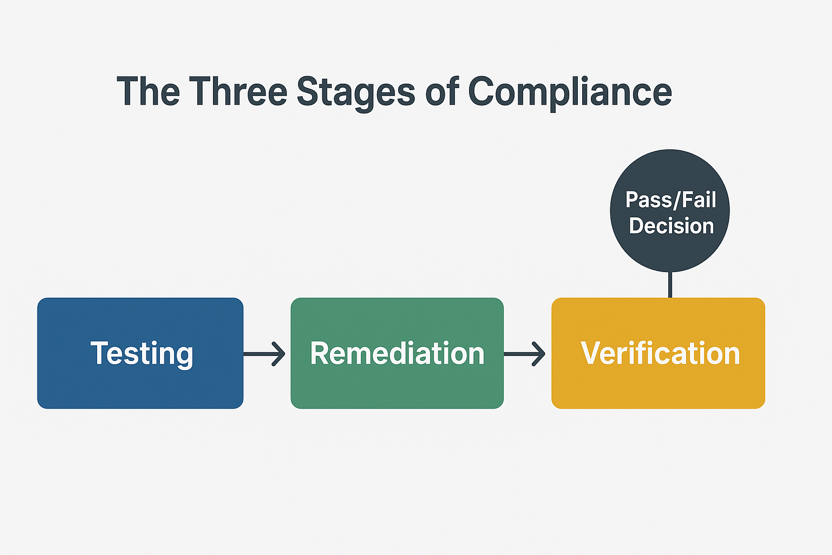
You only pass Section 508 when all issues that block conformance are fixed and validated.
Many teams assume they passed simply because testing was completed. But testing is not passing because it is just the diagnosis.
You need successful remediation and Section 508 compliance certification to truly pass.
Not sure if you actually passed? Let’s check together. Claim your free Section 508 consultation.
What Section 508 website compliance means
Section 508 is built on WCAG requirements. Compliance means your product is:
• Usable with a keyboard
• Readable by screen readers
• Perceivable by users with low vision
• Operable without a mouse
• Predictable and error-tolerant
Your product is not compliant if any of the above break in any website component.
Want a full breakdown on Section 508 requirements? Read this detailed compliance guide. [What Are the 508 Compliance Standards for Websites?]
The 5-Part Checklist to Know If You Passed 508 Testing
This is the clearest way to confirm your compliance status. Your website passed if all five statements below are true.
1. Your Test Report Includes Manual + Assistive Technology Testing
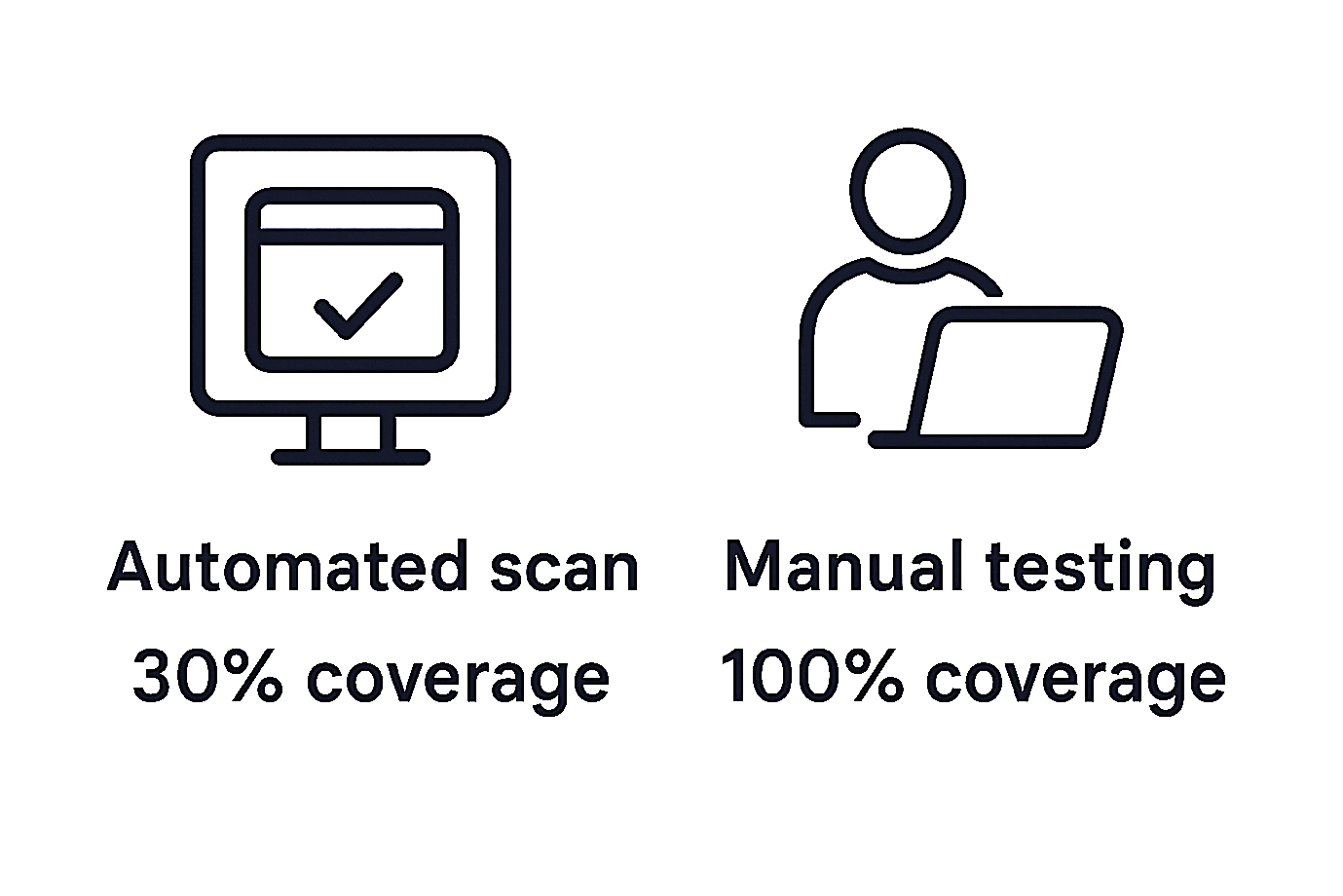
You did not pass the test if your results came only from automated 508 compliance testing tools.
Because automated tools catch only 30–40% of issues. They can’t test usability, reading order or logical navigation.
Scan-only audits are insufficient for federal buyers. Passing is only possible when real humans test your product with screen readers and keyboards.
2. Every Blocker and Critical Issue Has Been Remediated
Your report may include severities like:
• Critical
• High
• Medium
• Low
• Recommendations
Fix all critical and high issues to pass Section 508. Also, aim for resolving medium issues before federal procurement reviews.
If your team still has unresolved blockers like no alt text, no visible focus, incorrect headings or color contrast failures then the product has not passed yet.
How long does it take to fix common 508 issues?
Basic issues like missing alt text, focus indicators, heading errors and contrast failures can take a few days. You can only pass 508 once these fixes are verified.
3. The Accessibility Team Has Re-Tested All Fixes
A product passes only after remediation is validated.
Many teams skip this step due to timelines or budgets. The assumption that a development fix should work is risky.
You need verification screenshots and pass/fail notes again. If your fixes were not re-tested, your status is not compliant yet.
4. The Final VPAT/ACR Accurately Reflects Verified Results
A VPAT is the document federal buyers trust. Your VPAT should match your testing findings.
If your VPAT is incomplete, over-claimed, or not aligned with valid testing, you will:
• Fail procurement reviews
• Lose contract opportunities
• Look non-transparent
• Trigger accessibility concerns
Remember, a valid, accurate VPAT is a core signal that you passed 508 testing.
Q: Who is supposed to write a VPAT?
A: A VPAT should be written by trained accessibility professionals who have actually tested your product. It can be your internal accessibility team or an external audit partner. A VPAT must be based on real manual testing. Procurement teams expect the VPAT writer to be qualified and able to defend the findings.
Learn everything about VPAT ACR in this detailed blog. [Do I Need a VPAT Accessibility Conformance Report for Section 508 Compliance?]
5. Compliance ultimately comes down to real world usability
Forget policies and checklists, the real test is if a screen reader user or keyboard only user can access your website.
They should be able to sign in, submit a form or access key features with their preferred assistive technology. If a user cannot do this, your product fails 508 regardless of what your internal team believes.
This is why real user simulation is irreplaceable by automated scanning.
How to Quickly Confirm If You Passed
No need to go into technical details. A simple conversation gives you your real compliance status in minutes.
Ask your accessibility partner or testing provider these three questions:
1. Did we fix and verify all critical and high-severity issues?
You did not pass if there is no clear yes.
2. Is our VPAT accurate and based on verified testing outcomes?
A quick VPAT that too without 508 remediation is not compliant.
3. Would a user relying on assistive tech be able to complete all essential functions?
You already know the truth if they hesitate.
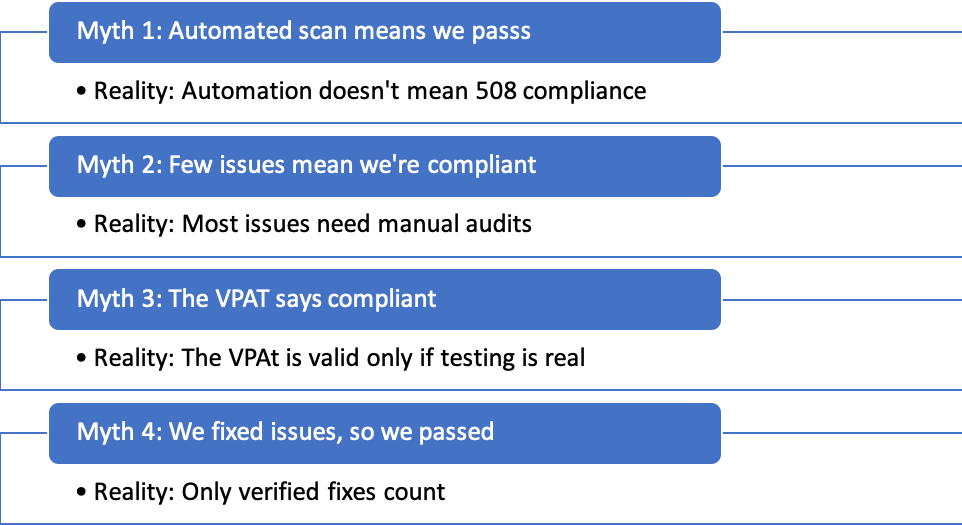
Common Myths About Passing 508 Testing
Signs You Did NOT Pass Section 508 Testing
You are not compliant yet if any of the following sound familiar.
• Your team is still fixing bugs
• You only ran automated scans
• No assistive technology testing was performed
• Your VPAT feels too clean or overly positive
• There is no validation cycle after remediation
• The testing provider delivered results suspiciously fast
• You are unsure how conformance was calculated
You are not ready for government buyers if you have even one item wrong on this list.
What to Do If You Didn’t Pass
You need to follow these three steps:
Step 1: Remediation of critical issues
Step 2: Re-test every fix
Step 3: Update your VPAT/ACR
Remediation is your priority when you fail 508 testing. Fix all the critical barriers that affect real users the most.
Verification is the backbone of true compliance, so retest when the fixes are implemented. Only after validation should you update your VPAT/ACR so the documentation reflects accurate results.
This entire process can move quickly and efficiently with a specialist team. Organizations that skip validation or produce shallow VPATs often end up losing federal bids.
Conclusion
Your product passes Section 508 testing when you complete manual testing. Make sure all critical issues are remediated and the VPAT accurately reflects results.
If you are still not at the finish line, you need help confirming if you passed.
We can help with your compliance status and a clean, procurement-ready VPAT.
ADA Compliance Pros has decades of digital accessibility experience and we have become the #1 agency for 508 compliance consultation. We offer:
• Full manual + AT testing
• Issue remediation guidance
• Verification cycles
• VPAT 2.5 documentation
• Fast turnarounds for procurement deadlines
Get a quick consultation and know exactly where you stand.
After the 508 web compliance audit is done, your team usually receives the test report.
There are findings, screenshots and maybe a VPAT draft, for which everyone has the same question:
Did we actually pass Section 508 compliance testing or not?
Most organizations get stuck after the testing. How do you confirm if your product is actually compliant and ready for federal customers, procurement teams, and accessibility reviewers?
Keep reading and you will know exactly what passing 508 testing looks like and what to do if you didn’t pass.
Why Passing 508 Testing Isn’t Always Clear
Unlike school exams, 508 testing doesn’t give you a neat pass/fail score.
This creates confusion, especially for teams reporting to leadership or preparing for a VPAT/ACR.
You only pass Section 508 when all issues that block conformance are fixed and validated.
Many teams assume they passed simply because testing was completed. But testing is not passing because it is just the diagnosis.
You need successful remediation and Section 508 compliance certification to truly pass.
Not sure if you actually passed? Let’s check together. Claim your free Section 508 consultation.
What Section 508 website compliance means
Section 508 is built on WCAG requirements. Compliance means your product is:
• Usable with a keyboard
• Readable by screen readers
• Perceivable by users with low vision
• Operable without a mouse
• Predictable and error-tolerant
Your product is not compliant if any of the above break in any website component.
Want a full breakdown on Section 508 requirements? Read this detailed compliance guide. [What Are the 508 Compliance Standards for Websites?]
The 5-Part Checklist to Know If You Passed 508 Testing
This is the clearest way to confirm your compliance status. Your website passed if all five statements below are true.
1. Your Test Report Includes Manual + Assistive Technology Testing
You did not pass the test if your results came only from automated 508 compliance testing tools.
Because automated tools catch only 30–40% of issues. They can’t test usability, reading order or logical navigation.
Scan-only audits are insufficient for federal buyers. Passing is only possible when real humans test your product with screen readers and keyboards.
2. Every Blocker and Critical Issue Has Been Remediated
Your report may include severities like:
• Critical
• High
• Medium
• Low
• Recommendations
Fix all critical and high issues to pass Section 508. Also, aim for resolving medium issues before federal procurement reviews.
If your team still has unresolved blockers like no alt text, no visible focus, incorrect headings or color contrast failures then the product has not passed yet.
How long does it take to fix common 508 issues?
Basic issues like missing alt text, focus indicators, heading errors and contrast failures can take a few days. You can only pass 508 once these fixes are verified.
3. The Accessibility Team Has Re-Tested All Fixes
A product passes only after remediation is validated.
Many teams skip this step due to timelines or budgets. The assumption that a development fix should work is risky.
You need verification screenshots and pass/fail notes again. If your fixes were not re-tested, your status is not compliant yet.
4. The Final VPAT/ACR Accurately Reflects Verified Results
A VPAT is the document federal buyers trust. Your VPAT should match your testing findings.
If your VPAT is incomplete, over-claimed, or not aligned with valid testing, you will:
• Fail procurement reviews
• Lose contract opportunities
• Look non-transparent
• Trigger accessibility concerns
Remember, a valid, accurate VPAT is a core signal that you passed 508 testing.
Q: Who is supposed to write a VPAT?
A: A VPAT should be written by trained accessibility professionals who have actually tested your product. It can be your internal accessibility team or an external audit partner. A VPAT must be based on real manual testing. Procurement teams expect the VPAT writer to be qualified and able to defend the findings.
Learn everything about VPAT ACR in this detailed blog. [Do I Need a VPAT Accessibility Conformance Report for Section 508 Compliance?]
5. Compliance ultimately comes down to real world usability
Forget policies and checklists, the real test is if a screen reader user or keyboard only user can access your website.
They should be able to sign in, submit a form or access key features with their preferred assistive technology. If a user cannot do this, your product fails 508 regardless of what your internal team believes.
This is why real user simulation is irreplaceable by automated scanning.
How to Quickly Confirm If You Passed
No need to go into technical details. A simple conversation gives you your real compliance status in minutes.
Ask your accessibility partner or testing provider these three questions:
1. Did we fix and verify all critical and high-severity issues?
You did not pass if there is no clear yes.
2. Is our VPAT accurate and based on verified testing outcomes?
A quick VPAT that too without 508 remediation is not compliant.
3. Would a user relying on assistive tech be able to complete all essential functions?
You already know the truth if they hesitate.
Common Myths About Passing 508 Testing
Signs You Did NOT Pass Section 508 Testing
You are not compliant yet if any of the following sound familiar.
• Your team is still fixing bugs
• You only ran automated scans
• No assistive technology testing was performed
• Your VPAT feels too clean or overly positive
• There is no validation cycle after remediation
• The testing provider delivered results suspiciously fast
• You are unsure how conformance was calculated
You are not ready for government buyers if you have even one item wrong on this list.
What to Do If You Didn’t Pass
You need to follow these three steps:
Step 1: Remediation of critical issues
Step 2: Re-test every fix
Step 3: Update your VPAT/ACR
Remediation is your priority when you fail 508 testing. Fix all the critical barriers that affect real users the most.
Verification is the backbone of true compliance, so retest when the fixes are implemented. Only after validation should you update your VPAT/ACR so the documentation reflects accurate results.
This entire process can move quickly and efficiently with a specialist team. Organizations that skip validation or produce shallow VPATs often end up losing federal bids.
Conclusion
Your product passes Section 508 testing when you complete manual testing. Make sure all critical issues are remediated and the VPAT accurately reflects results.
If you are still not at the finish line, you need help confirming if you passed.
We can help with your compliance status and a clean, procurement-ready VPAT.
ADA Compliance Pros has decades of digital accessibility experience and we have become the #1 agency for 508 compliance consultation. We offer:
• Full manual + AT testing
• Issue remediation guidance
• Verification cycles
• VPAT 2.5 documentation
• Fast turnarounds for procurement deadlines
Get a quick consultation and know exactly where you stand.

.svg)
.svg)
.svg)
We will contact you shortly.
.webp)


.svg)

.svg)
.svg)