
Native app conformance: WCAG2ICT substitutions and ACR rows
 By David LoPresti August 13, 2026
 Your product ships as an iOS app and an Android app. A buyer has asked for an Accessibility Conformance Report, and the report your team already has was written against a website. Someone opens it, changes the product name, and starts copying rows.
That is where the trouble starts, because the standard underneath those rows is written about web pages. Mobile app accessibility testing has to work around that before it can start. WCAG says “web page,” “set of web pages,” “viewport” and “user agent.” A native app has no URL, no user agent it does not carry inside itself, and no viewport in the CSS sense. Every criterion that uses one of those words has to be read through a substitution before it can be tested at all, and a handful of criteria have to be rewritten rather than word-swapped.
The arithmetic was done once, for WCAG 2.0, and no agency did it. In the preamble to the 2017 ICT Standards and Guidelines final rule, at 82 FR 5798, the Access Board recited the work of an “industry ad hoc working group” that “analyzed each WCAG 2.0 Success Criterion to determine its suitability for application to non-Web documents and software,” citing that group’s 2013 W3C Working Group Note. The working group “determined that of the 38 Level A and Level AA Success Criteria in WCAG 2.0, 26 do not include Web-related terminology that would cause the reader to question whether they are applicable to non-Web documents and non-Web software.” Of the remaining 12, 8 “could be applied as written if certain Web-specific terms or phrases, e.g., ‘Web page’ are replaced,” and “The remaining four Success Criteria posed problems in being applied to non-Web content because they refer to ‘sets of Web pages.’” The Board relied on that count. It did not produce it.
No equivalent published mapping for WCAG 2.1 turned up in the sources checked for this article, and WCAG 2.1 is the version the ADA Title II web and mobile app rule requires. That gap is the subject of this article.
What follows is not a row for each of the 50 Level A and Level AA criteria in WCAG 2.1. It is the criteria whose reading changes on a native app, grouped by what the substitution does to the work, then the platform property that carries each requirement on iOS and Android, and then the part that decides whether your report survives review: which rows in the document change state when the product is an app rather than a site.
The only document that does the mapping says it is not a standard
The mapping exists. It is WCAG2ICT, “Guidance on Applying WCAG 2 to Non-Web Information and Communications Technologies,” published 11 December 2025. The first sentence of its Status of This Document section describes what it is: “This is a W3C Group Note on Applying WCAG 2 to Non-Web Information and Communications Technologies (WCAG2ICT).” Its abstract says what a Group Note is: “It provides informative guidance (guidance that is not normative and does not set requirements).” Its conformance section removes the ambiguity entirely: “WCAG2ICT is not a standard, so it is not possible to conform to WCAG2ICT.”
The same abstract sets its version scope, and it is wider than the edition number suggests. The Note “describes how the Web Content Accessibility Guidelines (WCAG) versions 2.0 [WCAG20], 2.1 [WCAG21], and 2.2 [WCAG22] principles, guidelines, and success criteria can be applied to non-web Information and Communications Technologies (ICT).” It carries separate sections for “4.1.1 Parsing” and “4.1.1 Parsing (Obsolete and removed) (WCAG 2.2)” precisely because it addresses both. A reader working to a WCAG 2.1 obligation is therefore not reading a note written for some other version. They are reading one that covers three at once, and that includes criteria their rule does not ask for.
It also declines to answer the question a compliance reader arrives with. It “does not seek to determine which WCAG 2 provisions (principles, guidelines, or success criteria) should or should not apply to non-web documents and software,” only how they would apply if applied.
Read one more sentence carefully. WCAG2ICT’s introduction states that the DOJ Title II regulation “directs implementers to utilize the guidance in this document.” The regulation says something weaker. The appendix to the 2024 Title II rule, codified as Appendix D to 28 CFR part 35, reads: “In determining how to make conventional electronic documents and mobile apps conform to WCAG 2.1 Level AA, public entities may wish to consult W3C’s guidance on non-web information and communications technology, which explains how the WCAG success criteria can be applied to conventional electronic documents and mobile apps.” The operative rule text at 28 CFR 35.200 says nothing about WCAG2ICT at all. A suggestion to consult is not a direction to use, and a contract clause that cites WCAG2ICT as a requirement is citing a document that says of itself that conformance to it is not possible.
Section 508 handles the same problem the opposite way. There, the substitution is not guidance. It is codified regulatory text. E207.2.1 reads:
For non-Web software, wherever the term “Web page” or “page” appears in WCAG 2.0 Level A and AA Success Criteria and Conformance Requirements, the term “software” shall be substituted for the terms “Web page” and “page”. In addition, in Success Criterion in 1.4.2, the phrase “in software” shall be substituted for the phrase “on a Web page.”
So the same engineering problem carries two different legal statuses depending on who is buying. Under Section 508 the word swap is a rule you can cite by number. Under Title II it is an informative note you may consult, applied to a criterion set the rule requires on its own terms.
What the two rules actually say about an app
Start with the definition, because a responsive website is not covered by any of this. 28 CFR 35.104 defines the term narrowly: “Mobile applications (‘apps’) means software applications that are downloaded and designed to run on mobile devices, such as smartphones and tablets.” A site rendered in a phone browser is web content and is tested as web content. Only a downloaded, device-resident application raises the substitution question.
28 CFR 35.200(a) names apps directly. A public entity must ensure that both “(1) Web content that a public entity provides or makes available” and “(2) Mobile apps that a public entity provides or makes available, directly or through contractual, licensing, or other arrangements” are readily accessible to and usable by individuals with disabilities. Paragraph (b)(1) sets the obligation and the date: beginning April 26, 2027, a public entity with a total population of 50,000 or more must ensure its web content and mobile apps “comply with Level A and Level AA success criteria and conformance requirements specified in WCAG 2.1.” Paragraph (b)(2) sets April 26, 2028 for smaller entities and special district governments.
Those dates are not the ones in the 2024 rule. They were moved by an interim final rule, Extension of Compliance Dates, 91 FR 20902, published 20 April 2026 and effective the same day, which pushed the large-entity date from April 24, 2026 to April 26, 2027 and the small-entity date from April 26, 2027 to April 26, 2028. If a requirements document in your pipeline still says 2026, it predates that rule.
Three structural points about subpart H are worth reading before you write a single row.
First, an asymmetry that is visible on the face of the text. 28 CFR 35.202 permits a public entity to “use conforming alternate versions of web content, as defined by WCAG 2.1, to comply with § 35.200 only where it is not possible to make web content directly accessible due to technical or legal limitations.” That provision says “web content” twice and never says “mobile apps.” The drafting tracks the WCAG definition the rule borrows: the 2024 preamble explains that “As WCAG 2.1 defines it, a conforming alternate version is a separate version of web content that is accessible, up to date, contains the same information and functionality as the inaccessible web content, and can be reached in particular ways.” Whether the omission of apps was deliberate is not stated. Either way, the conforming alternate version route is not written to reach an app.
Second, two provisions do reach apps by name. 28 CFR 35.205 deems an entity to have met § 35.200 where noncompliance “has such a minimal impact on access” that it would not affect use of “the public entity’s web content or mobile app.” And 28 CFR 35.201 excepts preexisting conventional electronic documents available “as part of a public entity’s web content or mobile apps” before the compliance date, unless they are currently used to apply for, gain access to, or participate in the entity’s services. The PDF inside your app is governed by a different sentence than the app around it.
Third, and this is the divergence that breaks a copied report: the four criteria Section 508 releases for non-web software are not released under Title II. E207.2 requires WCAG 2.0 Level A and AA conformance for software, then states three exceptions, of which the second is:
Non-Web software shall not be required to conform to the following four Success Criteria in WCAG 2.0: 2.4.1 Bypass Blocks; 2.4.5 Multiple Ways; 3.2.3 Consistent Navigation; and 3.2.4 Consistent Identification.
DOJ went the other way. Its appendix acknowledges the Section 508 exception, then states: “the Department declines to set forth exceptions to these success criteria in subpart H of this part,” because it “believes it is important to apply one consistent standard to web content and mobile apps,” with conformance owed “to the extent those criteria can be applied.”
| Revised Section 508 | ADA Title II subpart H | |
|---|---|---|
| WCAG version | 2.0 Level A and AA, by E207.2 | 2.1 Level A and AA, by 28 CFR 35.200(b) |
| Word substitution for non-web software | Regulatory text, E207.2.1 | None in the rule. WCAG2ICT is suggested for consultation in the appendix |
| 2.4.1, 2.4.5, 3.2.3, 3.2.4 | Excepted for non-web software, E207.2 Exception 2 | No exception. DOJ declined to write one |
| Complete processes | Excepted, then restored for software by E207.3 | WCAG 2.1 Conformance Requirement 5.2.3 applies as written |
| Platform interoperability requirements beyond WCAG | Chapter 5, sections 502 and 503 | None in the rule. Additional standards run through equivalent facilitation at 28 CFR 35.203 |
| Compliance date | In force | 26 April 2027 or 26 April 2028, as amended by 91 FR 20902 |
One more version trap sits on top of that table. Because WCAG2ICT covers 2.0, 2.1 and 2.2 in one document, its table of contents contains criteria that exist only in WCAG 2.2, including 2.5.8 Target Size (Minimum), 2.4.11 Focus Not Obscured (Minimum) and 3.2.6 Consistent Help. None of those is required by 28 CFR 35.200(b). The strings “2.5.8” and “2.4.11” occur zero times in the WCAG 2.1 Recommendation that the rule incorporates by reference. Working from the Note is fine as long as you know which of its sections your rule does not ask you to fill. Our breakdown of which WCAG version each US rule requires sets out the rest of that split.
Where the substitution changes the test
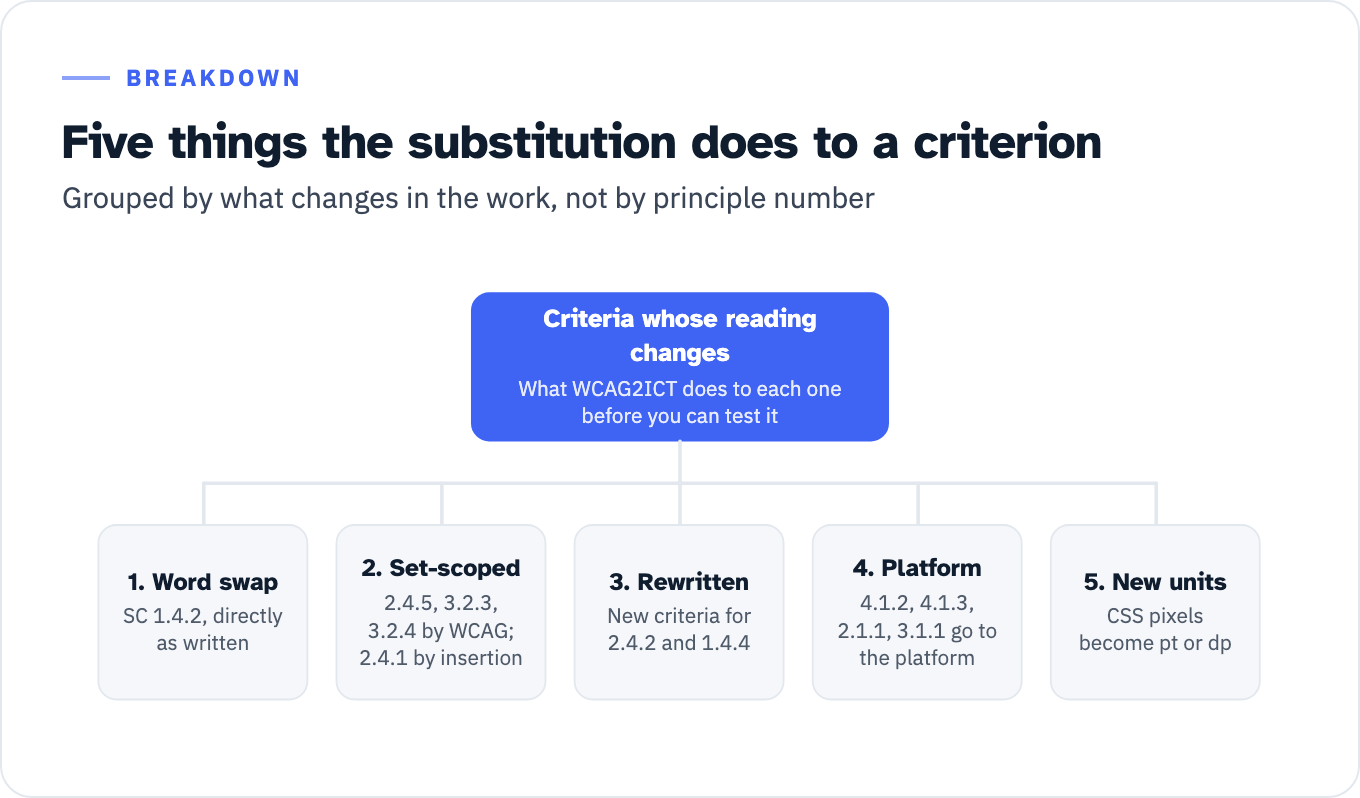
Group the criteria by what the substitution does to the work, not by principle number. There are five behaviors.
One: a word swap that leaves the test intact. SC 1.4.2 Audio Control is the worked example both WCAG2ICT and DOJ reach for. WCAG2ICT applies it “directly as written,” replacing “on a web page” with “in the non-web document or software,” “whole page” with “whole non-web document or software,” removing the reference to Conformance Requirement 5, and adjusting a note to avoid the normative term “must.” DOJ’s footnote uses the same swap to illustrate the whole idea. You still launch each screen that auto-plays audio for more than three seconds and look for a pause, stop or independent volume control.
Two: criteria scoped to a “set” that a single app is not part of. SC 2.4.5 Multiple Ways, 3.2.3 Consistent Navigation and 3.2.4 Consistent Identification turn on the phrase “set of web pages” in WCAG’s own text. SC 2.4.1 Bypass Blocks does not. Its WCAG 2.1 text reads: “A mechanism is available to bypass blocks of content that are repeated on multiple Web pages.” WCAG2ICT adds the set restriction when it substitutes, and says so: it replaces “on multiple web pages” with a bracketed insertion “to explicitly state that the multiple documents (or software programs) are part of a set rather than any two documents or pieces of software.” With that insertion, 2.4.1 reads: “A mechanism is available to bypass blocks of content that are repeated [in multiple non-web documents in a set of non-web documents, or in multiple software programs in a set of software programs].” The brackets are WCAG2ICT’s own convention for text it inserted, so for 2.4.1 the set argument is an addition rather than a reading of the criterion. Keep that distinction in view. This group changes the answer rather than the procedure, and it gets its own section below.
Three: criteria WCAG2ICT gives up on and rewrites. In exactly three places the Note abandons word substitution and offers a replacement criterion, introduced by the phrase “The following criterion is recommended as a substitute for the WCAG language.” Two of the three matter for an app. For SC 2.4.2 Page Titled, the reason is stated plainly: the criterion “is problematic to apply directly to non-web software through simple word substitution because application titles rarely describe the topic or purpose of the software.” The replacement is a new criterion, “2.4.2 Non-web Software Titled: In non-web software implemented on a platform that supports a Title property for windows or screens, the non-web software provides titles that describe the name, topic or purpose of each window or screen.” For SC 1.4.4 Resize Text applied to software, the replacement adds a platform ceiling: text can be resized “either up to 200 percent or, if the platform provides text resizing capabilities but it does not reach 200 percent for all text, up to the text sizing capabilities of the platform.”
Four: criteria that get redirected from markup to platform accessibility services. SC 4.1.2 Name, Role, Value is the load-bearing one. With the substitution applied, notification of changes must be available to “[assistive technologies and accessibility features of underlying software],” and the Note adds that “it is usually best practice for software user interfaces to use the accessibility services of platform software.” SC 4.1.3 Status Messages loses its ARIA assumption: for software, exposure is “enabled through the use of accessibility services of the user agent or other platform software.” SC 2.1.1 Keyboard applies “where ICT is or includes non-web software that can be run on a software platform that provides a device-independent keyboard interface service,” and the Note closes an obvious escape: “Inclusion of an on-screen keyboard can be done as well but does not satisfy this requirement since it does not allow for the use of keyboard alternatives.” SC 3.1.1 Language of Page resolves to the platform locale: applications that use the platform “locale / language” setting and render their interface in it “would satisfy this success criterion.” For all four, the artifact you inspect is the platform accessibility tree, not a DOM.
Five: criteria whose units change. WCAG measures in CSS pixels and your app does not have any. WCAG2ICT states the conversion rule directly: “Non-web software and its accompanying platform software do not use CSS pixel measurements. Therefore, use platform-defined density-independent pixel measurements which approximate the CSS reference pixel. Examples of platform-defined density-independent pixel measurements include: points (pt) for iOS and macOS, density-independent pixels (dp) for Android, and effective pixels (epx) for Windows.” That rule governs every numeric criterion. For SC 1.4.10 Reflow, the software note asks for reflow when users “scale content, adjust the size of a window, dialog, or other resizable content area, or change the screen resolution,” or for the software to work “with platform features that satisfy this success criterion,” at a width equivalent to 320 CSS pixels for vertical scrolling content and a height equivalent to 256 CSS pixels for horizontal scrolling content. On device that is rotation, split screen and the largest display size setting.
Two more entries belong in the map for completeness. SC 4.1.1 Parsing was made obsolete and removed in WCAG 2.2, and WCAG2ICT states that its non-web interpretation “has been removed” with it. For a WCAG 2.0 or 2.1 report the row survives, and WCAG2ICT’s own example list names the app case among the situations where the criterion is satisfied: “Android or iOS apps which use a markup language to specify UI layout (accessibility information is exposed via platform accessibility APIs, not the markup).” And the two criteria drafted with mobile in mind, SC 1.3.4 Orientation and SC 2.5.4 Motion Actuation, survive almost intact. 2.5.4 applies directly as written. 1.3.4 applies directly as written “except for non-web software that will never be displayed on hardware that is reoriented in typical use,” an exception written for a wall-mounted directory or a copier panel and inert for anything running on a phone.
A hybrid app does not escape any of this by wrapping a website. WCAG2ICT defines software as products “that have a user interface and do not depend upon a separate user agent to present any of its content,” and attaches the note that settles the WebView question: “For software, the user interface and any other embedded content is covered by these guidelines. The software provides a function equivalent to a user agent for the embedded content.” The shell is software and reads through the substitutions. The content inside the WebView is covered too, and because the shell is standing in for the browser, the Note warns that “the application of some WCAG 2 success criteria would be different for content embedded in software versus content in a document, where it is viewed through a separate user agent.” A report that tests only the web bundle has tested neither the shell nor the seam.
View the data as a list
Criteria whose reading changes: What WCAG2ICT does to each one before you can test it
-
- Word swap: SC 1.4.2, directly as written
-
- Set-scoped: 2.4.5, 3.2.3, 3.2.4 by WCAG; 2.4.1 by insertion
-
- Rewritten: New criteria for 2.4.2 and 1.4.4
-
- Platform: 4.1.2, 4.1.3, 2.1.1, 3.1.1 go to the platform
-
- New units: CSS pixels become pt or dp
The set question decides four rows, and no authority has answered it
Once WCAG2ICT’s substitutions are applied, all four of those criteria hang on a single defined term. WCAG2ICT defines a “set of software programs” as a “collection of [software programs] that share a common purpose; are created by the same author, group or organization; [and are distributed together and can be launched and used independently from each other, but are interlinked each with every other one such that users can navigate from one program to another via a consistent method that appears in each member of the set].”
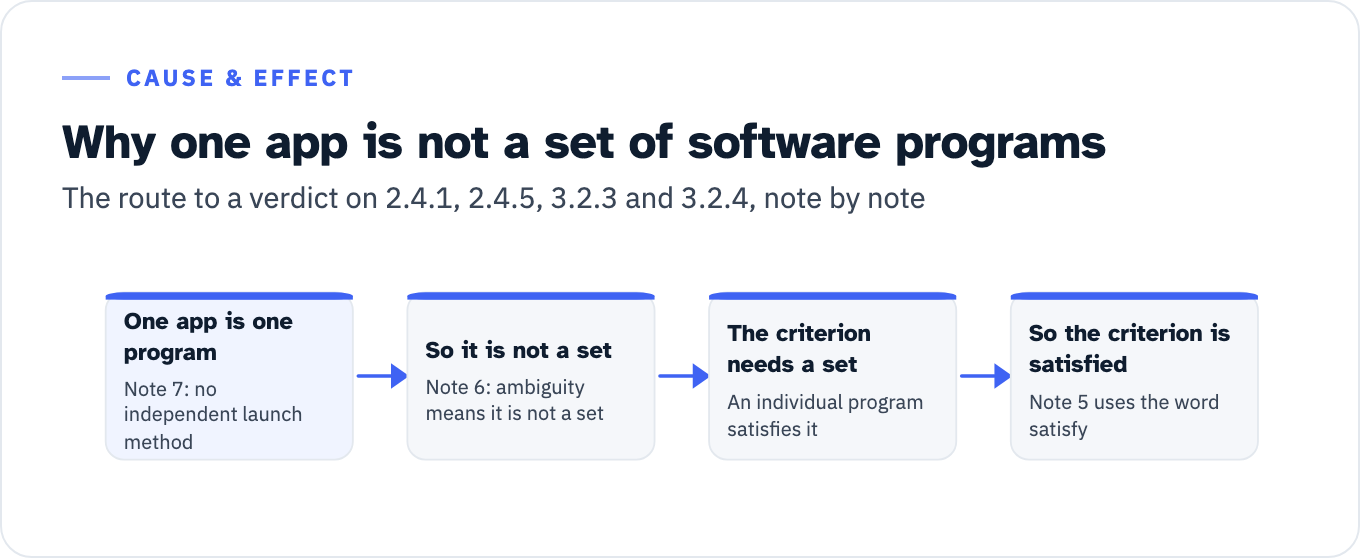
Four of the eight notes attached to that definition do the work. Note 1: “Although ‘sets of web pages’ occur frequently, ‘sets of software programs’ appear to be extremely rare.” Note 5 states the consequence: “Any software program that is not part of a set, per this definition, would automatically satisfy any success criterion that is specified to apply to ‘sets of’ software.” Note 6 is a tie-breaker: “If there is any ambiguity whether the group is a set, then the group is not a set.” Note 7 is the one that decides a single app outright: “If there is no independent method to launch the software programs (as is common in ICT with closed functionality), those programs would not meet the definition of a ‘set of software programs’.”
Apply that to a phone app. A tab bar repeated across screens inside one app is not a set of software programs, because there is one program and its screens cannot be launched independently, which is exactly what Note 7 excludes. WCAG2ICT says so directly under 2.4.1: “Individual documents or software programs (not in a set) would automatically satisfy this success criterion because this success criterion applies only to things that appear in a set.”
Test the definition against the case that could go the other way. A bank that ships a retail app, a business app and an authenticator is closer to it than a single app is, because each is separately launchable. It still has to clear the interlinking condition: members must be “interlinked each with every other one such that users can navigate from one program to another via a consistent method that appears in each member of the set.” WCAG2ICT’s counterexamples include “A bundle of software programs that is sold together but the only way to navigate between the programs in the bundle is to use a platform software level menu.” A home screen icon is a platform software level menu. If your app family is a set, the four criteria are live and have to be tested across the family.
The word to notice in Note 5 is “satisfy,” not “not applicable.” Two documents support that reading, and they are not the same weight. W3C’s Understanding Conformance page carries the note that “if there is no content to which a success criterion applies, the success criterion is satisfied,” and the VPAT template quotes that sentence in its own definitions. WCAG2ICT states the point more bluntly in its Comments on Conformance chapter: “If the success criterion is in relation to something that does not exist for the item being evaluated … where some might consider the criterion ‘not applicable,’ the success criterion is automatically met.” The blunter sentence is the Group Note’s own gloss, not WCAG text, so cite the Understanding Conformance note when a reviewer pushes.
Here is the limit of what can honestly be said. Under Section 508, none of this reasoning is needed, because E207.2 Exception 2 releases the four criteria by rule. Under Title II there is no exception, so the four criteria are owed. For 2.4.5, 3.2.3 and 3.2.4 the set language is in WCAG itself, so a reader can reach the answer without WCAG2ICT: an app is not a set of web pages, there is no content to which the criterion applies, and the criterion is satisfied. For 2.4.1 there is no set language to lean on, and the Title II route runs through the criterion’s own words instead: “repeated on multiple Web pages” has no referent inside a single app, which reaches the same result without borrowing an interpretation from a document that says it cannot be conformed to.
Whichever route you take, write it into the remarks column as reasoning rather than as a verdict, because no agency has said whether a public entity may rely on it and no published decision applying it to an app turned up in the research for this article. WCAG2ICT is candid that its unit of evaluation is an editorial choice rather than a derived truth: “it wasn’t possible to unambiguously carve up software into discrete pieces, and so the unit of evaluation for non-web software is the whole software program.” A reviewer who disagrees should be able to see exactly which step they are disagreeing with.
View the data as a list
- One app is one program: Note 7: no independent launch method
- So it is not a set: Note 6: ambiguity means it is not a set
- The criterion needs a set: An individual program satisfies it
- So the criterion is satisfied: Note 5 uses the word satisfy
Which platform property carries each requirement
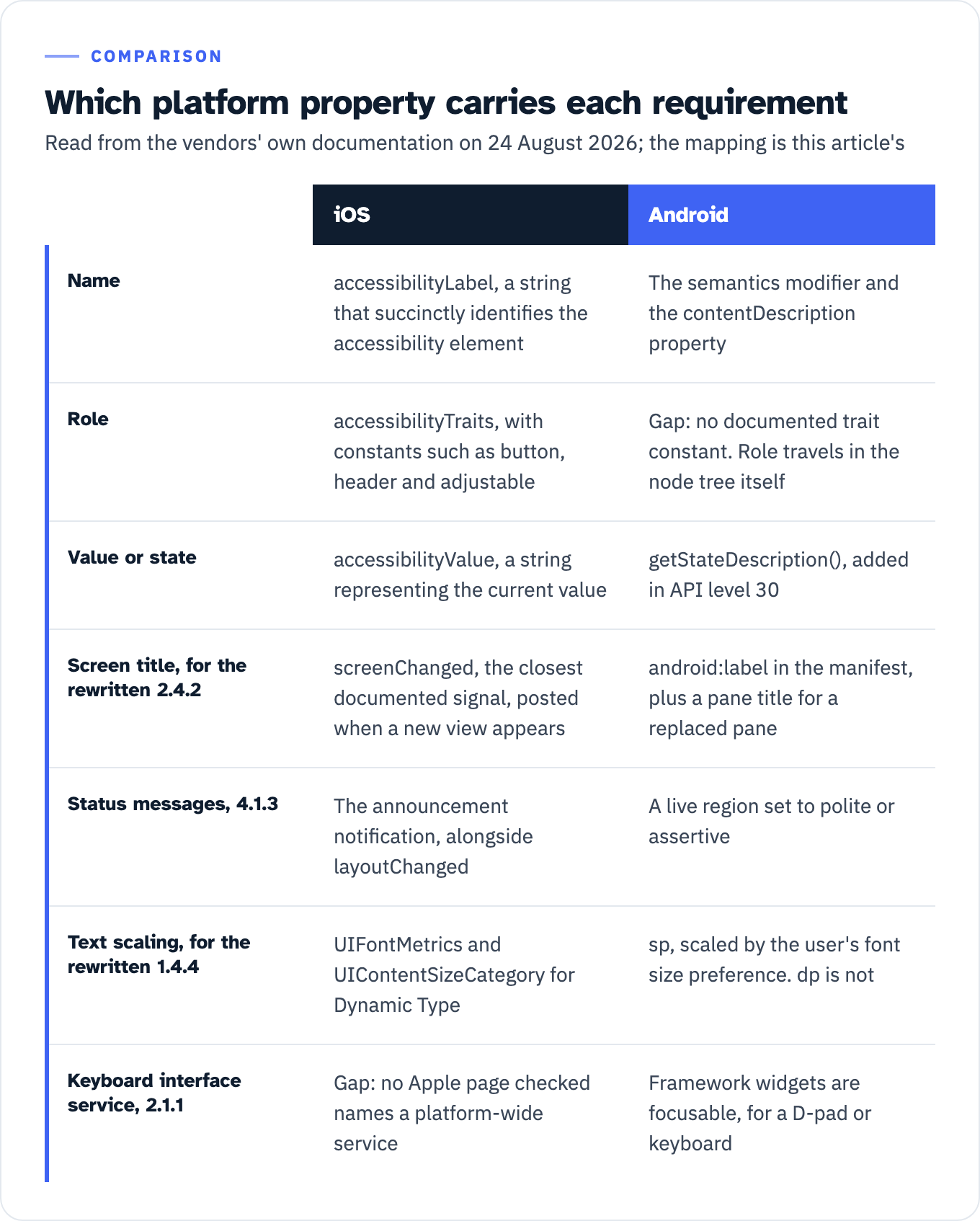
Every statement in this section was read from the vendors’ own documentation on 24 August 2026. Apple and Android publish these pages without version numbers and change them without notice, so a claim from either carries a read date rather than an OS release. Neither vendor maps its APIs to WCAG success criteria anywhere checked here; the mapping below is this article’s, drawn from what each property is documented to do.
Name, role and value split cleanly on iOS and less cleanly on Android. Apple documents accessibilityLabel as “A string that succinctly identifies the accessibility element,” with the instruction that “the label for a Save button is ‘Save,’ not ‘Save button.’” Role travels through accessibilityTraits, “The combination of traits that best characterize the accessibility element,” whose constants include .button (“The accessibility element behaves like a button”), .header (“a header that divides content into sections, such as the title of a navigation bar”) and .adjustable (“allows continuous adjustment through a range of values”). Value travels through accessibilityValue, “A string that represents the current value of the accessibility element.” That is a three-way match to what SC 4.1.2 asks for, and WCAG2ICT points at it: “‘AccessibleName’ (or the corresponding term used in different APIs) of the Accessibility API of the platform is an example of such a name.”
Android has no single documented equivalent of a trait constant, and a mapping table that invents one is wrong. Android’s current first-party guidance is Compose-first and routes labeling through semantics: “if you need to manually specify a UI element’s semantic properties, use the semantics modifier and the contentDescription property.” Role is carried by the node itself. AccessibilityNodeInfo documents the tree an assistive technology reads: “a window’s content is presented as a tree of accessibility node infos, which may or may not map one-to-one to the view hierarchy.” State has its own accessor, getStateDescription(), “Get the state description of this node,” marked in the reference as added in API level 30. Heading semantics come from ViewCompat.setAccessibilityHeading.
Screen titles, which the rewritten SC 2.4.2 asks for, exist on both platforms and are not the same object. On Android, use android:label in the manifest for an activity’s window title, and android:accessibilityPaneTitle or ViewCompat.setAccessibilityPaneTitle for a replaced pane, because “Views with pane titles produce TYPE_WINDOW_STATE_CHANGEDs when they appear, disappear, or change title.” On iOS the closest documented signal is UIAccessibility.Notification.screenChanged, “A notification that an app posts when a new view appears that occupies a major portion of the screen.”
Status messages map to a notification on one platform and a region mode on the other. Apple documents UIAccessibility.Notification.announcement as the notification “an app posts when it needs to convey an announcement to the assistive app,” alongside layoutChanged. Android sets a live region with ACCESSIBILITY_LIVE_REGION_POLITE or ACCESSIBILITY_LIVE_REGION_ASSERTIVE. Call View.setAccessibilityLiveRegion for it: the AndroidX wrapper ViewCompat.setAccessibilityLiveRegion reads “Added in 1.1.0, Deprecated in 1.13.0” on the reference page today, with the replacement given as “Call setAccessibilityLiveRegion directly.” The neighboring ViewCompat.setAccessibilityHeading and ViewCompat.setAccessibilityPaneTitle carry no deprecation line on that same page.
Text scaling is where the platform ceiling in the rewritten SC 1.4.4 earns its place. Apple documents UIFontMetrics as “A utility object for obtaining custom fonts that scale to support Dynamic Type” and UIContentSizeCategory as “Constants that indicate the preferred size of your content.” Android’s sp unit is documented as “like the dp unit, but it is also scaled by the user’s font size preference,” while dp is “an abstract unit that is based on the physical density of the screen … relative to a 160 dpi (dots per inch) screen.” Text laid out in dp does not respond to the user’s font preference. Text laid out in sp does.
One cell in the map is a research gap rather than a platform gap, and it should be labeled as such. Android’s guidance states that framework widgets “are focusable,” so “users can navigate with control devices such as a D-pad or keyboard.” Apple documents the pieces without naming a service that matches SC 2.1.1’s wording: UIFocusSystem “Queries and reevaluates the currently focused item,” and UIKeyCommand is “An object that specifies a key press perform on a hardware keyboard and the resulting action.” Both are app-level constructs. No Apple page checked for this article describes a platform-wide device-independent keyboard interface service in the sense the criterion uses, and WCAG2ICT is explicit that this is what the criterion means: “Keyboard interface does not refer to a physical device but to the service of platform software.” Until someone can cite that page, pair a hardware keyboard and test the traversal rather than naming a feature from memory.
View the data as a table
| iOS | Android | |
|---|---|---|
| Name | accessibilityLabel, a string that succinctly identifies the accessibility element | The semantics modifier and the contentDescription property |
| Role | accessibilityTraits, with constants such as button, header and adjustable | Gap: no documented trait constant. Role travels in the node tree itself |
| Value or state | accessibilityValue, a string representing the current value | getStateDescription(), added in API level 30 |
| Screen title, for the rewritten 2.4.2 | screenChanged, the closest documented signal, posted when a new view appears | android:label in the manifest, plus a pane title for a replaced pane |
| Status messages, 4.1.3 | The announcement notification, alongside layoutChanged | A live region set to polite or assertive |
| Text scaling, for the rewritten 1.4.4 | UIFontMetrics and UIContentSizeCategory for Dynamic Type | sp, scaled by the user’s font size preference. dp is not |
| Keyboard interface service, 2.1.1 | Gap: no Apple page checked names a platform-wide service | Framework widgets are focusable, for a D-pad or keyboard |
The target size number that is not in the rule
Three different numbers answer to the phrase “target size,” and they come from three different documents.
24 by 24 CSS pixels is SC 2.5.8 Target Size (Minimum), Level AA, and it first appears in WCAG 2.2. 44 by 44 CSS pixels is SC 2.5.5 Target Size, and the WCAG 2.1 Recommendation labels it “(Level AAA).” 48 dp by 48 dp is Android’s own recommendation, stated on the Make apps more accessible guide as of 24 August 2026: “For touch interfaces, we recommend that each interactive UI element have a focusable area, or touch target size, of at least 48dpx48dp.”
Follow that through the rule and a checkable consequence falls out. 28 CFR 35.200(b) requires Level A and Level AA of WCAG 2.1. WCAG 2.1 contains no Level AA target-size criterion. Its only target-size criterion is 2.5.5, at Level AAA. 28 CFR 35.200(b) imposes no target-size requirement. A public entity may want one, and Android recommends one, but neither is the rule.
This is worth stating because the rule’s own preamble points the other way. DOJ wrote that WCAG 2.1 Level AA “includes specific success criteria related to mobile app accessibility” addressing “challenges such as touch target size, orientation, and motion actuation,” and its footnote cites success criteria 2.5.5, 1.3.4 and 2.5.4. Two of those three are Level AA in WCAG 2.1. The target-size one is not. Whether DOJ intended to require target size and cited the wrong criterion, or intended only to illustrate, is not stated in the rule, and speculating about intent is not useful. Knowing which number your report is measured against is: 24 pt or dp for a WCAG 2.2 report, nothing at Level AA under 28 CFR 35.200, and 48 dp as a platform recommendation you may choose to meet and record.
Expect the preamble sentence to be quoted at you anyway, because it is quotable. The answer is not an argument about intent. Measure your targets in platform units, record the number and the method, and note that 2.5.5 is Level AAA in WCAG 2.1 while the rule reaches Level AA. A buyer is free to ask for more than the rule requires. That is a contract term, and it belongs in the contract rather than in a dispute about what 28 CFR 35.200(b) says.
The rows that move in the ACR
Now the document. The current template is VPAT 2.5Rev, April 2025, published by the Information Technology Industry Council, and ITI’s own page defines the artifact: “A version of the VPAT which has been completed for a specific product is an ACR.” The same page settles a question buyers ask: “there is no VPAT certification.”
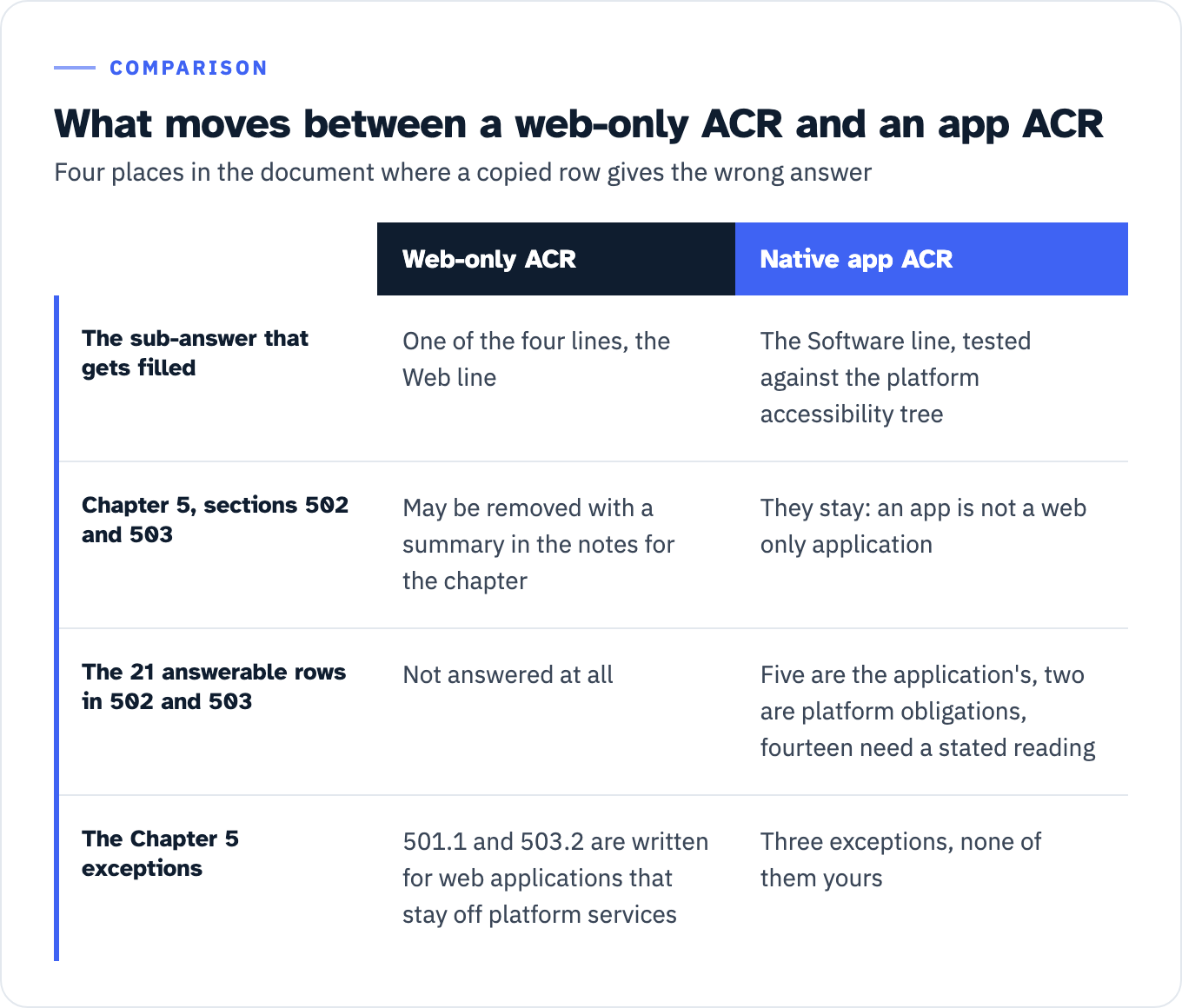
Four things change between a web-only report and a native app report, and each one is a place where a copied row is wrong.
The sub-answer that gets filled. Each WCAG row in the 508 edition carries four sub-answers: “Web:”, “Electronic Docs:”, “Software:” and “Authoring Tool:”. A web-only report fills one of the four. A native app report fills the Software line, tested against the platform accessibility tree. A row saying “Supports” on the Web line and nothing on the Software line is not an answer about your app.
Chapter 5 comes back into scope, and not every row in it is yours. ITI’s instructions permit the deletion, and they say exactly who may delete: “in Chapter 5 the criteria in 502 and 503 will not apply to a web only application, thus those sections can be removed with a summary in the notes for the chapter, or a row in the table.” Your app is not a web only application, so the sections stay. Counted from the template, 502 and 503 hold 21 answerable rows: 502.2.1 and 502.2.2; the fourteen rows of 502.3.1 through 502.3.14; 502.4; and 503.2, 503.3, 503.4.1 and 503.4.2. The heading cells at 502, 502.3, 503 and 503.4 take no response, and the template has no 502.2 row at all.
Restoring the sections is not the same as answering all 21 rows as the vendor. The Access Board text splits them three ways, and the split is visible in the scoping sentence of each provision.
Five rows are squarely the application’s. 502.2.2 requires that software “not disrupt platform features that are defined in the platform documentation as accessibility features.” 503.2 requires that “Applications shall permit user preferences from platform settings for color, contrast, font type, font size, and focus cursor.” 503.3 governs an alternative user interface that functions as assistive technology. 503.4.1 requires caption selection controls at the same menu level as volume controls wherever volume controls exist, and 503.4.2 does the same for audio description alongside program selection controls.
Two rows are platform obligations that an iOS or Android app does not carry. 502.2.1 begins “Platform software shall provide user control over platform features that are defined in the platform documentation as accessibility features.” 502.4 Platform Accessibility Features begins “Platforms and platform software shall conform to the requirements in ANSI/HFES 200.2,” and the seven sections it then lists are operating system behaviors: chorded keystrokes, key acceptance delay, double-strike acceptance, visual alternatives for audio output, synchronized audio equivalents for visual events, speech output services and caption display. Your app does not ship sticky keys. Answer those two rows as not applicable with a remark that names the scoping sentence and points at the OS.
The fourteen rows of the 502.3 series need a stated reading before they can be answered at all. The chapeau at 502.3 reads: “Platform software and software tools that are provided by the platform developer shall provide a documented set of accessibility services that support applications running on the platform to interoperate with assistive technology and shall conform to 502.3. Applications that are also platforms shall expose the underlying platform accessibility services or implement other documented accessibility services.” Read literally, the first sentence addresses platforms. On the broader reading, an application answers 502.3.x by showing that the information each subsection names is exposed through the platform services it consumes, which is why 502.3.1 (“The object role, state(s), properties, boundary, name, and description shall be programmatically determinable”) lines up with what you tested for SC 4.1.2. State which reading your report uses in the Chapter 5 notes. A row answered without stating the reading is a row a reviewer can reject either way. Two of the subsections have no WCAG analogue at all, which is why a WCAG-only test package cannot produce them: 502.3.10 requires that “A list of all actions that can be executed on an object shall be programmatically determinable,” and 502.3.11 that “Applications shall allow assistive technology to programmatically execute available actions on objects.”
Three exceptions become permanently unavailable. The 501.1 exception releases 502 and 503 for a product that reaches the platform through nothing but the browser, and it is conditional: “Where Web applications do not have access to platform accessibility services and do not include components that have access to platform accessibility services, they shall not be required to conform to 502 or 503 provided that they conform to Level A and Level AA Success Criteria and Conformance Requirements in WCAG 2.0.” A native app is built on those services and cannot claim it, with or without the proviso. The 503.2 exception is written the same way, for “Applications that are designed to be isolated from their underlying platform software, including Web applications.” A third, at 502.1, releases interoperability for ICT conforming to 402, which is closed functionality: “a property or characteristic that prevents users from attaching, installing, or using assistive technology,” in WCAG2ICT’s terms. An app on a general-purpose phone operating system with a screen reader available is not closed. Three exceptions, none of them yours.
The verdict on the four set criteria. The template defines its vocabulary: “Supports” means at least one method meets the criterion without known defects, “Not Applicable” means the criterion “is not relevant to the product.” It then states the tie-breaker: “a response may use ‘Supports’ where one might otherwise be inclined to use ‘Not Applicable.’ This is in keeping with WCAG 2.0 Understanding Conformance: This means that if there is no content to which a success criterion applies, the success criterion is satisfied.” For 2.4.1, 2.4.5, 3.2.3 and 3.2.4 in an app report, that means “Supports,” with a remark that states which route got you there, not “Not Applicable” with an empty remark. The template’s own instruction on remarks asks for exactly that: where the criterion does not apply, “explain why.”
View the data as a table
| Web-only ACR | Native app ACR | |
|---|---|---|
| The sub-answer that gets filled | One of the four lines, the Web line | The Software line, tested against the platform accessibility tree |
| Chapter 5, sections 502 and 503 | May be removed with a summary in the notes for the chapter | They stay: an app is not a web only application |
| The 21 answerable rows in 502 and 503 | Not answered at all | Five are the application’s, two are platform obligations, fourteen need a stated reading |
| The Chapter 5 exceptions | 501.1 and 503.2 are written for web applications that stay off platform services | Three exceptions, none of them yours |
If you are scoping this work rather than doing it, our VPAT and ACR service settles the edition, the version and the Chapter 5 scope before testing starts, and our WCAG audit and testing work covers the criterion-level evidence the rows depend on. For a SaaS product sold into both federal and state buyers, the software industry page sets out how the two obligations run together.
What no source says
An honest mapping has to mark its own edges, and there are more of them here than in the web equivalent.
No agency mapping of WCAG 2.1 to native apps, criterion by criterion, turned up in the sources checked for this article. The 2.0 count exists because a W3C working group produced it and the Access Board recited it. DOJ adopted WCAG 2.1 for apps and expressly declined to write exceptions. The Department’s Small Entity Compliance Guide contains zero occurrences of “WCAG2ICT” and zero of “non-web.”
There is no federal test baseline for software, so there is none for an app. GSA’s ICT Testing Baseline Portfolio states its own coverage: “The Portfolio includes a Baseline for Web and a Baseline for Documents. Additional Baselines will be developed for all ICT covered by Section 508 including software and hardware.” The section508.gov sitemap held more than 600 URLs when it was pulled on 24 August 2026, and not one of them contains the string “mobile.”
The one federal mobile test process is frozen. DHS states on its Section 508 Testing page that it “developed test processes for evaluating Section 508 compliance for iOS and Android applications, based largely upon Section 508’s Functional Performance Criteria (FPC),” covering native and hybrid apps, and then adds the warning: “Please be mindful that the mobile testing process has not been updated since 2017.” The attachment list confirms it: iOS version 1.0, April 2017, Android version 1.0, September 2017. That predates WCAG 2.1, WCAG 2.2, the Title II rule and both editions of the updated WCAG2ICT.
No published decision applying WCAG2ICT’s substitutions to a native app turned up in the research for this article. What did turn up is one settlement agreement. In January 2024, DOJ resolved an investigation of the Oklahoma Mobile ID App with an agreement in which “Service Oklahoma will ensure that any mobile application that it creates, administers, or maintains conforms to Web Content Accessibility Guidelines (‘WCAG’) 2.1, Level AA.” The agreement rests on 42 U.S.C. 12132 and 28 C.F.R. 35.130 and 35.160, not on 35.200, which was not yet in force. It contains zero occurrences of “WCAG2ICT,” “non-web” and “success criteri”: it names the target and says nothing about how criteria written for web pages are read against an app. One settlement is a document, not a rate, and it is not precedent.
Where this stops, and what to do first
Two boundaries. The first is about who owes what. Title II binds public entities, and a software vendor is not one: writing an ACR for a state or local buyer gives that entity evidence for its own obligation, on whatever terms the contract sets. Section 508 works the same way in reverse, binding federal agencies, so your Chapter 5 answers are a procurement artifact rather than a duty the statute places on your company. That distinction decides who has to argue the hard readings in this article.
The second boundary is legal. Whether a given organization is a public entity under Title II, whether an app is provided or made available “through contractual, licensing, or other arrangements,” and whether a fundamental alteration or undue burden demonstration is available are legal determinations. 28 CFR 35.204 puts the burden where it lands: “a public entity has the burden of proving that compliance with § 35.200 would result in such alteration or burdens.” Those questions belong to your counsel. What belongs here is the test and the document: which criterion reading applies, what you can observe on device, and what the row should say.
Four things to do before the next report goes out.
- Decide the regime and the version first, in writing. Section 508 means WCAG 2.0, the E207.2.1 substitution as regulatory text, and four criteria excepted. Title II means WCAG 2.1, no exceptions and no substitution in the rule. A report that does not say which one it answers cannot be scored against either.
- Run the set analysis once, record it, reuse it. If the app is one program, 2.4.5, 3.2.3 and 3.2.4 read as satisfied because an app is not a set of web pages, and 2.4.1 reads as satisfied because “repeated on multiple Web pages” has no referent inside it. Write the route into the remark. The remark, not the verdict, is what a reviewer reads.
- Re-measure every numeric criterion in platform units: points on iOS, density-independent pixels on Android, and text in
sprather thandpwhere the user’s font preference has to reach it. - Restore Chapter 5 if a federal buyer is in the pipeline, then sort its 21 rows before you answer them. Five are the application’s, two are platform obligations, the fourteen in 502.3 need your reading stated in the notes, and three exceptions your app cannot claim.
If you already have a web ACR and an app you are about to describe with it, the fastest check is the Software sub-answer. Open any WCAG row, look at the “Software:” line, and see whether anything is written there. If it is blank or identical to the Web line, the report has not been tested against your app yet, and the criteria in this article are the ones that will show it first.