
What a Section 508 document test has to cover
 By David LoPresti August 19, 2026
 A supplier returns a remediated 90-page PDF with a one-line note saying the file is now Section 508 conformant. Nothing in that note says what was checked. Ask, and you get a tool name and a report with a green header and almost no vocabulary in common with the standard you are being measured against.
The regulation answers “checked against what?” and stops there. Appendix A to 36 CFR part 1194 points a non-web document at WCAG 2.0 Level A and AA and subtracts four success criteria. It does not say what a test of that document has to cover. One published federal document does, test by test: the ICT Testing Baseline for Electronic Documents, Version 1.0, released 30 September 2024. Its change log holds a single row, version 1.0, September 2024, initial release, checked again on 24 August 2026.
Two things about it before any detail. It is not a rule, and it is not a test process. The Access Board’s Baseline Portfolio page says federal agencies “are encouraged to adopt this baseline when evaluating non-web electronic documents for accessibility.” Encouraged. And the Baseline says of itself that it “is best utilized by developers of test methodologies.”
So this is not a description of what a federal reviewer must do. It is the only published federal statement of what a document test has to cover before the coverage is complete, which is the more useful artifact anyway, because you can put it into a statement of work and check a supplier’s report against it line by line. This article is the test method and only the test method. Scope, sequencing and cost are the subject of document remediation triage, and ADACP’s document remediation service is where the file itself gets fixed.
Not a rule, not a procedure, and not silent about file format
The Portfolio page defines the category in two lists. A Baseline is “A comprehensive set of test components that a Section 508 conformance test process should include to ensure full coverage of all requirements. Independent of any testing tools.” A Baseline is not “A step-by-step testing procedure or methodology” and not “A specific testing tool or software for Section 508 conformance testing.”
The tool-agnostic claim covers the procedures, and the Baseline states it: “Agencies can employ any tools that align with this baseline to ensure consistent and reliable testing outcomes.”
It is not format-neutral, though, and a reader who assumes it is will mis-scope the buy. The combined test text references 19 distinct PDF-specific W3C technique identifiers, PDF1 through PDF22, and one of those technique titles names a commercial product outright: “PDF20: Using Adobe Acrobat Pro’s Table Editor to repair mistagged tables.” Test group 1 states its own platform assumption, “This test was written to be performed on a standard physical keyboard for a Windows PC.” Test group 6 names the image formats it has in view, “.jpg, .png, .svg, .gif, .tiff, and .bmp.”
The sentence that should shape your contract language sits in the Intended Audience section:
“The Baseline for Documents is best utilized by developers of test methodologies. It is unlikely that a single test methodology can effectively test multiple file formats. For example, a test methodology for PDF may not be useful for Word or another file format. To ensure that the test methodology tests all Section 508 requirements, include each Baseline test in the test methodology.”
Read that twice if you are buying remediation for a mixed pile of Word, PowerPoint and PDF. The federal source’s own position is that one methodology will not serve them all, and that whichever methodology is used has to carry every Baseline test. Those are two separate things to ask for: the complete list, and a method written for the format actually in the file.
One format claim to refuse as a substitute for either. PDF/UA appears once in the operative text of the Revised 508 Standards, at 504.2.2 in appendix C: “Authoring tools capable of exporting PDF files that conform to ISO 32000-1:2008 (PDF 1.7) shall also be capable of exporting PDF files that conform to ANSI/AIIM/ISO 14289-1:2016 (PDF/UA-1).” That provision binds authoring tools, not files, and the incorporation by reference at 702.3.1 is recorded as “IBR approved for Appendix C, Section 504.2.2.” A PDF/UA conformance claim on a delivered file is not a Section 508 document test result, and nothing in the Baseline asks for one.
No federal test process for documents sits on top of the Baseline either. GSA describes the DHS Trusted Tester process as “a manual test approach that aligns with the ICT Testing Baseline,” and the process it lists is labeled for Web. GSA lists only a web process. That absence is why the method has to be written into your contract rather than referenced by name.
Twenty-four groups and fifty-seven tests
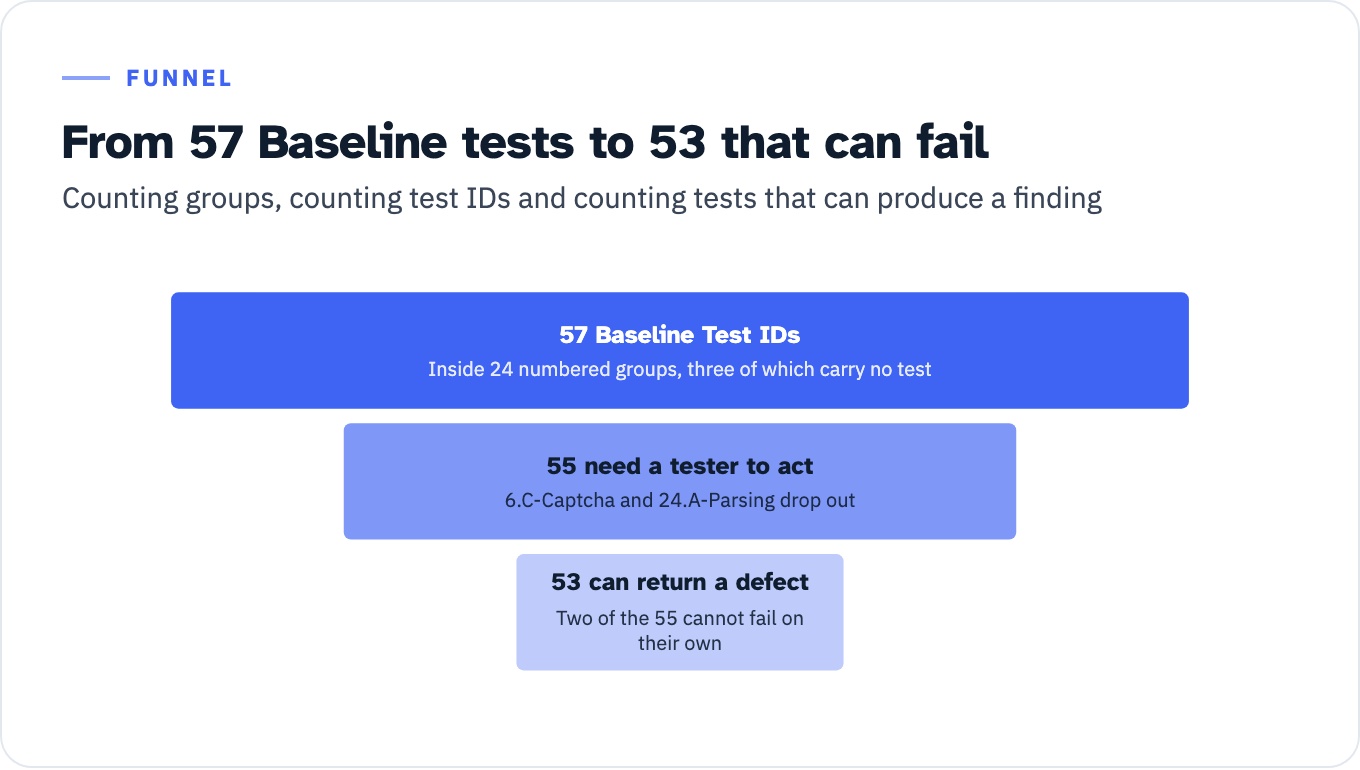
The Baseline is organized as 24 numbered groups, from Keyboard Accessible at 1 to Parsing at 24. Counting groups is not the same as counting tests, and the difference matters when a supplier says it ran “all 24.”
Inside those 24 groups sit 57 Baseline Test IDs, each with its own identifier such as 11.A-DocumentTitled. Three groups carry no test at all: Repetitive Content (4), Frames and iFrames (19) and Multiple Ways (23). A fourth item, 6.C-Captcha, sits inside an applicable group and is itself marked not applicable to documents. A fifth, 24.A-Parsing, carries the instruction “No testing necessary” and the result “Baseline Test 24.A-Parsing passes.”
That leaves 55 tests requiring a tester to do something. Two of those 55 cannot independently produce a failure, for reasons below, so 53 tests are capable of independently returning a defect against your file. Those are the numbers to hold a report against.
View the data as a table
| Stage | Detail |
|---|---|
| 1. 57 Baseline Test IDs | Inside 24 numbered groups, three of which carry no test |
| 2. 55 need a tester to act | 6.C-Captcha and 24.A-Parsing drop out |
| 3. 53 can return a defect | Two of the 55 cannot fail on their own |
The four criteria Section 508 removes, and why they are still printed
The reason three groups are empty is regulatory, not editorial. Section 508’s content provision, at E205.4 in appendix A to 36 CFR part 1194, requires that “Electronic content shall conform to Level A and Level AA Success Criteria and Conformance Requirements in WCAG 2.0 (incorporated by reference, see 702.10.1).” Its exception subtracts four:
“Non-Web documents shall not be required to conform to the following four WCAG 2.0 Success Criteria: 2.4.1 Bypass Blocks, 2.4.5 Multiple Ways, 3.2.3 Consistent Navigation, and 3.2.4 Consistent Identification.”
Groups 4 and 23 exist to carry those four and say they do not apply. The Baseline’s stated reason for keeping them is harmonization with the web version: group 4 “is from the ICT Testing Baseline for Web and was not removed to maintain harmonization.” Group 19 gives a different reason, “Frames and iframes are not implemented in non-web documents, so this test is not applicable,” and 6.C-Captcha says the same about captchas.
One correction worth carrying into your own citations. The Baseline page reproduces the E205.4 exception and E205.4.1 with the words “WCAG 2.2” where the codified text reads “WCAG 2.0.” Its rendering of E205.4 itself is correct. GSA’s electronic documents overview makes the same substitution in E205.4.1 while rendering the exception correctly. The regulation is the authority, and it says WCAG 2.0, incorporated by reference at 702.10.1 as the “W3C Recommendation, December 11, 2008.” The Portfolio page explains the convention behind the swap, that Baseline tests “reference the latest version (2.2) of WCAG Understanding SC articles” while “the Baselines are mapped only to Section 508 (and WCAG 2.0) requirements.” No federal source acknowledges that the quoted regulatory text itself was altered. Quote the CFR, not the Baseline page, when the version number is load-bearing.
The same appendix supplies the rule behind two of the renamed tests: for non-web documents, “wherever the term ‘Web page’ or ‘page’ appears in WCAG 2.0 Level A and AA Success Criteria and Conformance Requirements, the term ‘document’ shall be substituted for the terms ‘Web page’ and ‘page’.” That is why the web baseline’s 11.A-PageTitled is 11.A-DocumentTitled here, and its 15.A-LanguagePage is 15.A-LanguageDocument.
Two definitions decide whether a file is in scope. A document is a “Logically distinct assembly of content (such as a file, set of files, or streamed media)” that “Functions as a single entity rather than a collection; is not part of software; and does not include its own software to retrieve and present content for users,” with examples including “letters, email messages, spreadsheets, presentations, podcasts, images, and movies.” A non-web document is “A document that is not: A Web page, embedded in a Web page, or used in the rendering or functioning of Web pages.”
Two provisions upstream of those definitions decide whether the file has to be tested at all. E205.2 covers electronic content that is public facing. E205.3 covers content that is not public facing, but only when it is agency official business communicated in one of nine listed ways, from an emergency notification to a survey questionnaire to a template or form.
Note also what that examples list drags in. Eleven of the 57 tests, all four in group 16 and all seven in group 17, exist to test audio and video. A quote for “PDF accessibility” buys a subset of this Baseline, and no source states what the remainder costs or who performs it.
Three tests that do not behave like tests
3.A-NonInterference produces no independent observation. It identifies as its content the “Results of Baseline Tests 21.D-AudioControl, 1.B-NoKeyboardTrap, 9.A-Flashes, 21.B-MovingInfo, and 21.C-AutoUpdate,” instructs the tester to “Check that all of the test results are pass,” and states that “This test result is a logical AND of the identified SCs.” A report showing 3.A as a standalone pass, without those five inputs, has not shown its work.
20.A-ConformingAltVersion cannot fail: “It is not a WCAG requirement to provide a conforming alternate version. This test only checks that a conforming alternate version is present. If there is not a conforming alternate version, the result for this baseline test is ‘Does Not Apply’ (it would not be a failure).” It also carries the only sequencing advice in the Baseline, because a conforming alternate version narrows what else has to be tested: “it is advised that this be one of the first tests performed.”
24.A-Parsing auto-passes. Section 508 incorporates WCAG 2.0, in which SC 4.1.1 Parsing is not deprecated, so the criterion remains a Section 508 requirement even though WCAG 2.2 marks it “Obsolete and removed.” The Baseline resolves the conflict by adopting the WCAG 2.0 errata, which state that the criterion “should be considered as always satisfied for any content using HTML or XML,” and then instructs “No testing necessary.” Worth knowing where that rests: the errata page files the 4.1.1 item under Editorial Errata and records “No substantive errata recorded at present.” No source found for this article resolves whether an editorial erratum can retire a criterion that a regulation incorporated by a fixed date.
Where an automated checker stops
GSA’s testing overview states the limit in seven words: “Automated scanning tools cannot apply human subjectivity.” The same page explains the consequence, which is that a scanner either returns a pile of false positives or, tuned to avoid them, checks only a small part of the requirement set. GSA publishes no percentage, and neither will this article.
Two tooling instructions are specific enough to write into an acceptance clause. On format: “Select tools that test using the document’s native format. Tools that scan documents often convert files into HTML before testing. This conversion process reduces the fidelity and accuracy of conformance testing.” On contrast, from GSA’s non-web contrast page: “These automated checkers cannot test images of text; manual testing should always be performed.” The Baseline concedes the same for media: evaluating an alternative “generally involves a manual, cognitive comparison of the original content and its alternative(s).”
Now the specifics. Six tests turn on a judgment no checker makes, and each is a question you can put to a supplier.
11.A Document Titled is two checks long, and a scanner half-answers it. The instructions are “Check that the document’s Title property is defined for the document. [SC 2.4.2] Check that the document title describes the contents or purpose of the document. [SC 2.4.2]” A tool confirms the property exists. Whether Microsoft Word - FY26 draft v7 FINAL.docx describes the contents is a human call. The limitations add that this test “always applies,” and applies to each document in a collection, “e.g., PDF portfolios.”
6.A and 6.B Images split on meaning, not markup. For a non-empty text alternative, 6.A asks the tester to check that it “provides an equivalent description of the image’s purpose,” and to confirm the image is not merely “page design/formatting” that “could be ignored by assistive technology without any loss of meaning.” For an empty alternative, 6.B accepts three markings, that the image “is marked as decorative,” “marked as an artifact,” or “only part of the background, header, footer, or on a hidden layer,” then requires that none of three disqualifiers is true, including that “The image is the only way to convey meaningful information.”
13.C Programmatic Headings Visual runs the check in the opposite direction from the usual one. A tool looks for visual headings that lack markup. 13.C looks for the reverse: “Check that each programmatically determinable heading is also serving as a visual heading on the page. Content that is not a visual heading cannot have a role of heading.” A file tagged in a hurry, with heading roles applied to bold runs that head nothing, fails 13.C while passing a missing-markup check.
Group 13’s limitations contradict four rules that automated checkers apply. “A document with only one heading does not have a heading level structure and would not be tested for heading structure.” “Document can have more than one heading level 1 or no heading level 1.” “The heading level 1 on a page is not required to match the document title.” And on skipped levels, the order “may not always be in sequence but may be valid as it relates to the visual structure/importance communicated by visible headings on the page.” A report showing a defect for a missing h1 or a skipped level, with no reasoning about the visible structure, is applying its tool’s rule rather than the Baseline’s.
12.C Layout Tables catches over-tagging, which a missing-markup rule never flags: “Check that the table used purely for layout purposes does NOT include data table heading elements and/or associated attributes (e.g., row or column headers, summary, caption, scope).” Its companion 12.A applies only where content is “not in a meaningful sequence when linearized,” linearization being “the presentation of a table’s two-dimensional content in one-dimensional order of the content in the source, beginning with the first cell in the first row and ending with the last cell in the last row, from left to right, top to bottom.” Deciding whether that linearized run still reads correctly is a reading task.
18.A and 18.B Meaningful Content and Sequence turn on reading the file rather than inspecting it. 18.A: “Check that all meaningful content is available in the body of the document or programmatically identified.” 18.B: “Check that the reading order of all meaningful content (in context) is logical.” The scope is wider than the visible page: meaningful content “includes content in headers, footers, watermarks, master page items, artifacts, and in floating elements.”
One numeric detail from 8.A Contrast belongs in an acceptance clause because the Baseline anticipates tools that round. Alongside the 4.5:1 threshold, and the 3:1 allowance at “At least 18 point (24 pixels)” or “At least 14 point (18.5 pixels) AND bold (at least 700 font weight),” it instructs: “Use contrast tools that do not round values. A ratio of 4.499:1 would not meet the 4.5:1 threshold.”
The map from test to requirement
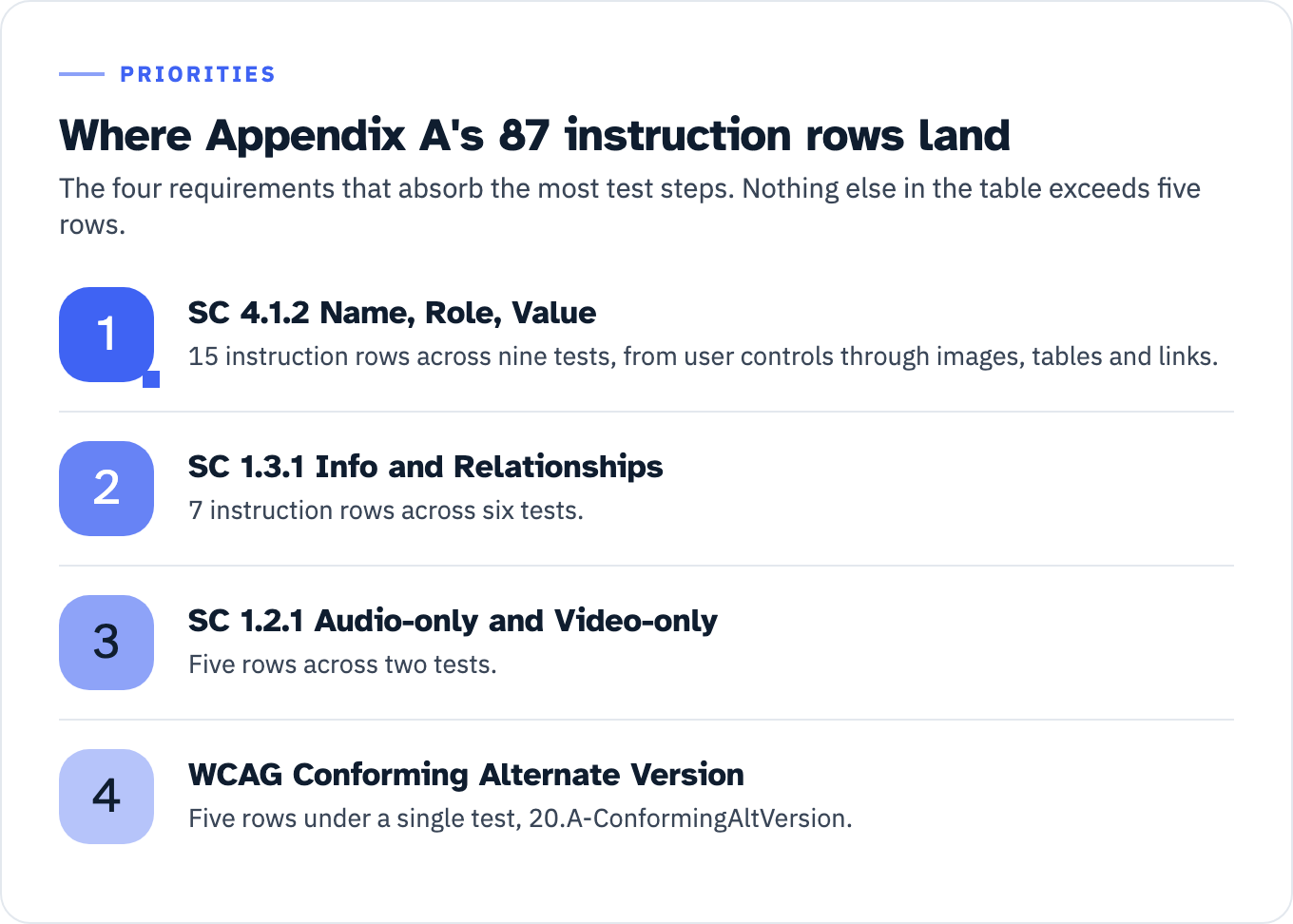
Appendix A carries a cross-reference table of 87 instruction rows, mapping test steps to Section 508 provisions and WCAG success criteria. The concentration in that table shows where document testing spends its effort. SC 4.1.2 Name, Role, Value collects 15 instruction rows across nine tests, from user controls through images, tables and links. SC 1.3.1 Info and Relationships collects 7 rows across six tests. Nothing else exceeds five: SC 1.2.1 Audio-only and Video-only (Prerecorded) sits at five rows across two tests, and the Conforming Alternate Version rows sit at five under a single test.
Two gaps in the appendix are real and checkable. Of the 57 test IDs, 55 appear in it. 6.C-Captcha is absent, which is defensible because the test does not apply. 7.C-AudibleCues is absent, which is not, because 7.C is a live test whose instructions cite SC 1.1.1. Whether that omission is one of the open issues on the Baseline’s working repository was not determined for this article.
A third gap is deliberate and documented. WCAG 2.0 has 38 Level A and AA success criteria. Subtract the four E205.4 exceptions and 34 apply to a non-web document. Appendix A maps 33. The one with no test of its own is SC 1.2.3 Audio Description or Media Alternative (Prerecorded), and the Baseline says why: SC 1.2.5 covers the same ground at Level AA, and “The related Level A requirement, SC 1.2.3, should be marked as ‘Not Applicable’ in the test report.”
View the data as a list
- SC 4.1.2 Name, Role, Value: 15 instruction rows across nine tests, from user controls through images, tables and links.
- SC 1.3.1 Info and Relationships: 7 instruction rows across six tests.
- SC 1.2.1 Audio-only and Video-only: Five rows across two tests.
- WCAG Conforming Alternate Version: Five rows under a single test, 20.A-ConformingAltVersion.
What the documents baseline changed from the web baseline
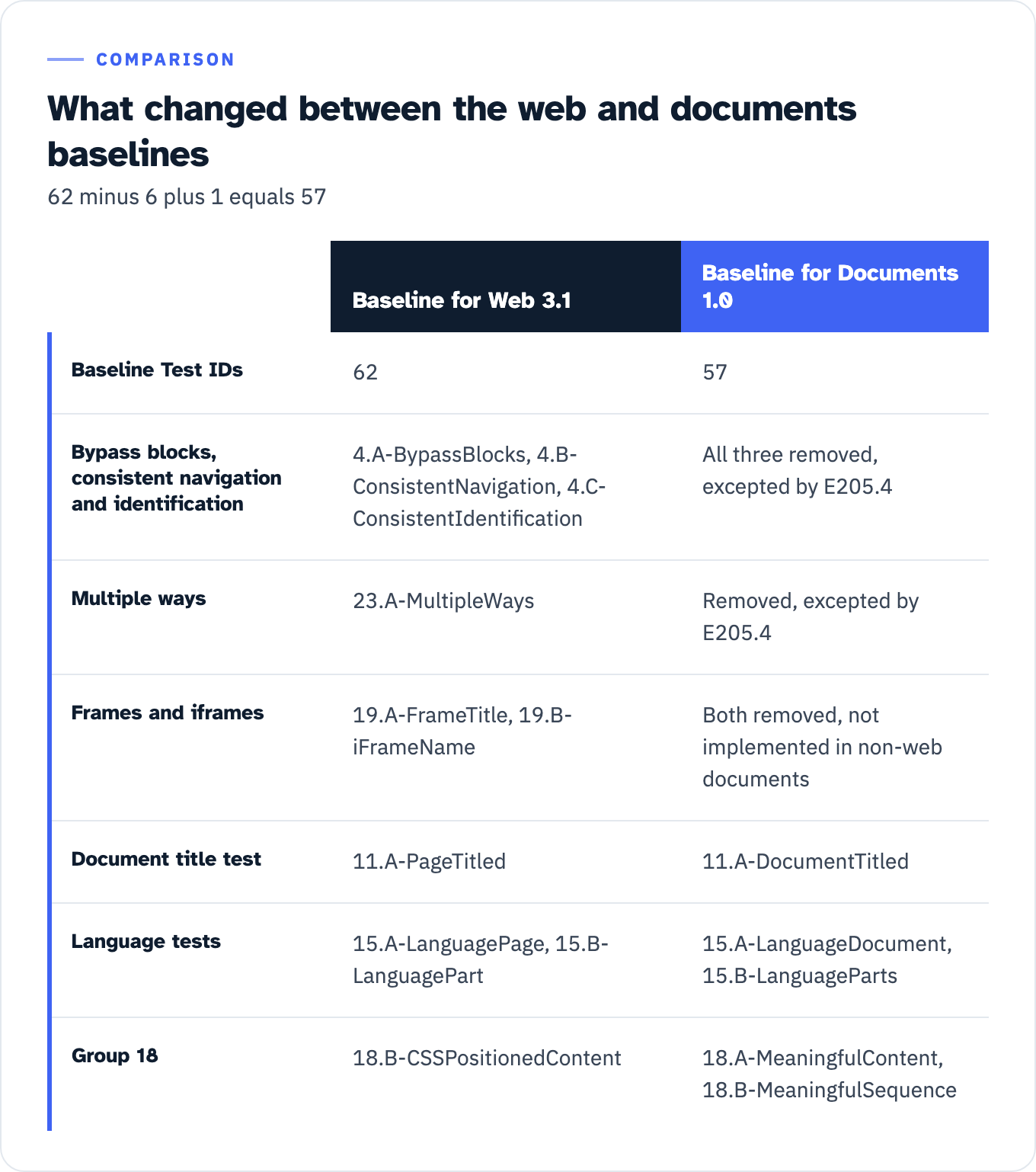
The Baseline for Web, version 3.1, published 1 April 2024, carries 62 test IDs. The documents version carries 57, and the difference is arithmetic you can reproduce: 62 minus 6 plus 1.
Six web test IDs are gone. Four of them, 4.A-BypassBlocks, 4.B-ConsistentNavigation, 4.C-ConsistentIdentification and 23.A-MultipleWays, correspond to the four criteria E205.4 excepts. Two, 19.A-FrameTitle and 19.B-iFrameName, go because “Frames and iframes are not implemented in non-web documents.” One test is new, 18.A-MeaningfulContent, added when its group was renamed from CSS Positioning to Meaningful Content and Sequence. Four tests were renamed. Two of those follow the E205.4.1 word substitution, 11.A-PageTitled to 11.A-DocumentTitled and 15.A-LanguagePage to 15.A-LanguageDocument. The other two are 15.B-LanguagePart to 15.B-LanguageParts and 18.B-CSSPositionedContent to 18.B-MeaningfulSequence.
The rest of the web furniture stayed. The documents glossary still defines the accessibility tree, ARIA and aria-live, and still carries WCAG’s change-of-context definition in terms of “the Web page.” What a tester should do with an ARIA definition inside a Word document test method is not addressed in the source.
View the data as a table
| Baseline for Web 3.1 | Baseline for Documents 1.0 | |
|---|---|---|
| Baseline Test IDs | 62 | 57 |
| Bypass blocks, consistent navigation and identification | 4.A-BypassBlocks, 4.B-ConsistentNavigation, 4.C-ConsistentIdentification | All three removed, excepted by E205.4 |
| Multiple ways | 23.A-MultipleWays | Removed, excepted by E205.4 |
| Frames and iframes | 19.A-FrameTitle, 19.B-iFrameName | Both removed, not implemented in non-web documents |
| Document title test | 11.A-PageTitled | 11.A-DocumentTitled |
| Language tests | 15.A-LanguagePage, 15.B-LanguagePart | 15.A-LanguageDocument, 15.B-LanguageParts |
| Group 18 | 18.B-CSSPositionedContent | 18.A-MeaningfulContent, 18.B-MeaningfulSequence |
What to require in a document test deliverable
The Baseline states what a test covers. It says almost nothing about what a supplier hands over: across all 57 tests the phrase “test report” appears three times, and that is the whole set. GSA’s Essential Elements of an Accessibility Test Report supplies the rest.
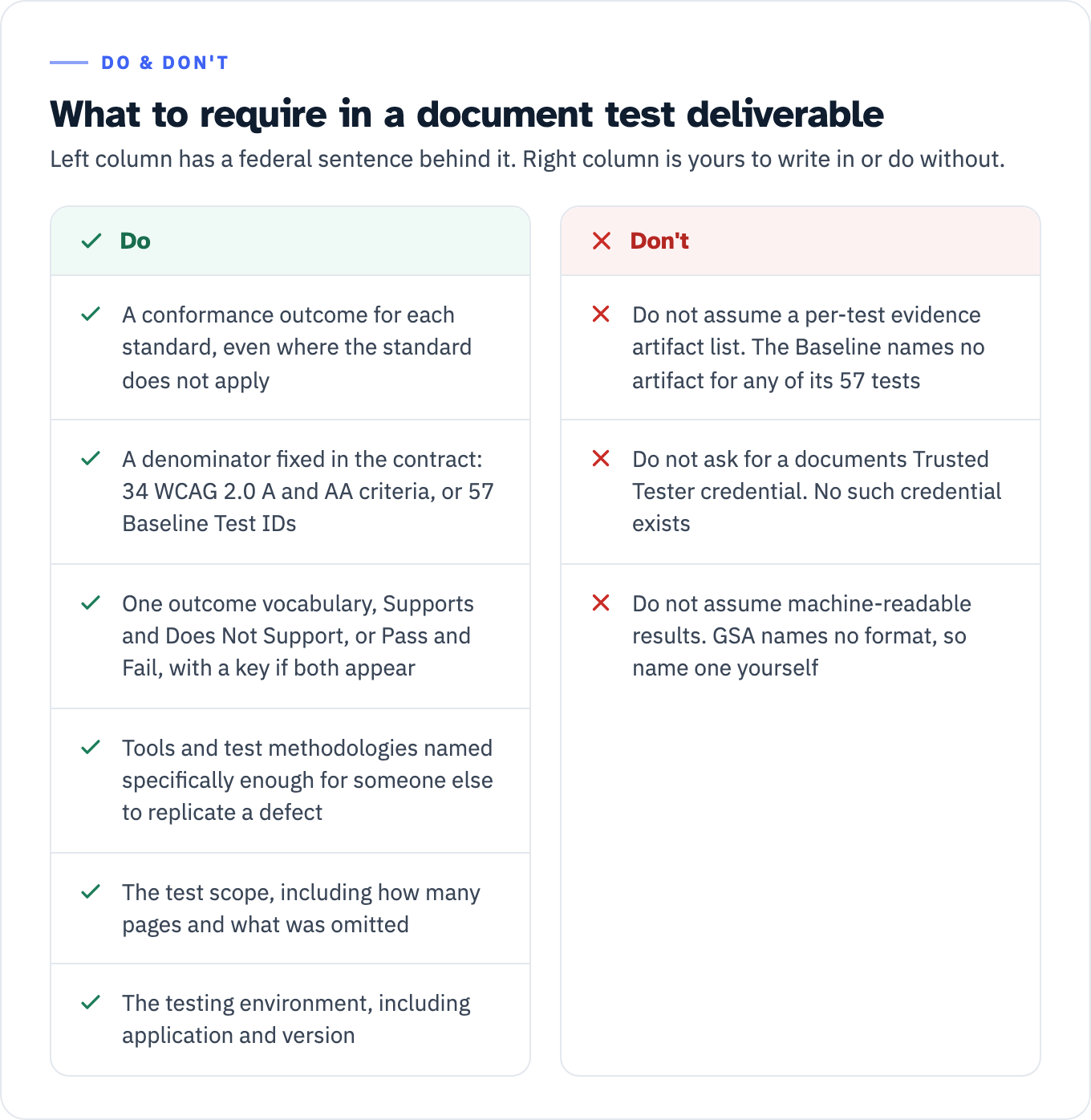
Start with completeness, the cheapest thing to check. GSA asks a report to “Provide a conformance outcome for all Section 508 Standards, WCAG Success Criteria, and other applicable accessibility standards,” and adds that “A completed test report should have a conformance outcome listed for each standard even if the standard does not apply.”
Read the unit of account in that sentence, because it is where buyers and suppliers talk past each other. GSA counts standards and success criteria. It does not count Baseline Test IDs. A supplier who returns 34 outcomes, one for each WCAG 2.0 Level A and AA criterion that survives the E205.4 exception, has satisfied GSA. If you want the Baseline’s resolution instead, and it is finer because several tests can sit under one criterion, you have to buy it: write into the contract that the deliverable carries an outcome for each of the 57 Baseline Test IDs, plus three more lines if you want the three empty groups covered as well. Nothing in the federal sources requires that of a supplier who has not agreed to it. Either denominator beats the thing that arrives instead, which is 20 findings and no denominator at all.
Then vocabulary. GSA notes that outcomes “are typically denoted by Supports, Does Not Support, or Not Applicable,” and that “Test methodologies may use other phrases such as Pass, Fail, or Not Applicable.” Either set works. Mixing them without a key does not.
Then reproducibility, which separates a report you can act on from a report you have to trust: “Specify what tools and test methodologies were used to complete testing. Testing methods include manual, automated, or hybrid testing. Be as specific as possible so others can use the methodologies and tools to replicate any defects noted.” GSA also asks the report to “Specify the test scope, including what was tested, how many pages, what may have been omitted in test scope,” which is the line that keeps a media-free PDF from being billed as 57 tests performed. The Baseline adds an environment requirement for focus testing, that “test reports should include details about testing environment, including application and version,” and warns that a tool’s own focus outline “should not be used as an indicator of visible focus for meeting this requirement.”
Two Baseline advisories change how findings are presented. A failure of SC 1.4.2 or 2.2.2 “would also fail Conformance Requirement 5: Non-Interference and should be highlighted in test reports to indicate the severe impact on accessibility.” And SC 1.2.3 is recorded as Not Applicable rather than omitted.
Know also what no federal source requires, so you can ask for it as a contract term rather than as a standard. There is no per-test evidence artifact list anywhere: the Baseline names no artifact for any of its 57 tests, and GSA’s guidance asks for a screenshot per defect but nothing test by test. There is no documents Trusted Tester credential to require. And GSA says only that “Machine-readable formats facilitate comparison capabilities and tool integration” without naming a format, so name one yourself if you want structured results.
View the data as a table
| Do | Don’t |
|---|---|
| A conformance outcome for each standard, even where the standard does not apply | Do not assume a per-test evidence artifact list. The Baseline names no artifact for any of its 57 tests |
| A denominator fixed in the contract: 34 WCAG 2.0 A and AA criteria, or 57 Baseline Test IDs | Do not ask for a documents Trusted Tester credential. No such credential exists |
| One outcome vocabulary, Supports and Does Not Support, or Pass and Fail, with a key if both appear | Do not assume machine-readable results. GSA names no format, so name one yourself |
| Tools and test methodologies named specifically enough for someone else to replicate a defect | |
| The test scope, including how many pages and what was omitted | |
| The testing environment, including application and version |
Keep the two documents distinct while you are at it. GSA: “An Accessibility Conformance Report (ACR) provides an overview of a product’s conformance to Section 508. In contrast, a Section 508 test report offers a more detailed, developer-oriented document to assist product teams in enhancing Section 508 conformance.” Asking for one and accepting the other is how a buyer ends up with a summary where the defect list should be.
What this source does not tell you
No published figure exists for how many documents fail any given Baseline test. There is no pass rate, no failure ranking and no defect-frequency list in the federal sources read for this article. Any such number in a sales deck came from somewhere else.
No cost or effort figure exists. The Baseline gives no time estimate per test, and GSA’s document testing pages give none. The single effort estimate in GSA’s testing material describes a hypothetical 100-page website, not documents.
No count of adopting agencies exists. GSA encourages adoption and does not measure it, so a supplier claiming this Baseline is what agencies run is claiming something no source supports.
No published decision, settlement or enforcement action applying this Baseline turned up in the research for this article. Version 1.0 is under two years old. Treat every mechanic above as text on a federal web page rather than as construed law.
No successor version has been announced. The change log has one entry and the working group publishes no roadmap, so the count of 57 is correct as of 24 August 2026 and should be re-checked before it goes into a contract that runs for years.
And Section 508 is not the only target in play. The ADA Title II web and mobile app rule sets WCAG 2.1 Level A and AA from 26 April 2027 or 26 April 2028 depending on population and special-district status, and the HHS Section 504 rule sets the same version from 11 May 2027 or 10 May 2028 depending on headcount. Both sets of dates were pushed back a year in 2026, by 91 FR 20902 on 20 April and 91 FR 25496 on 11 May. A Baseline-aligned document test is by construction a WCAG 2.0 test. If you are a public entity or an HHS recipient, read which WCAG version each rule requires before adopting this list as your only yardstick.
One boundary. Whether a particular contract clause is enforceable, and what to do when a supplier’s report does not meet it, is a question for your counsel rather than your accessibility vendor. What sits on this side of the line is the list, the tests, and whether the report in front of you covers them.
The next thing to do
Take the last document test report a supplier sent you and look for a denominator. A defect list with no count of what was checked is a findings memo, not a test report. Then work out which denominator you were owed: 34 outcomes if the contract said WCAG 2.0 Level A and AA, 57 if it said this Baseline, and if it said neither, that is the first thing to fix in the next contract. Then ask two more questions: which file format the methodology was written for, and what application and version the testing environment ran. Those answers say more about the quality of the work than the defect list does.
If you would rather have that read done against your own file, ADACP’s Section 508 testing work maps every finding to its WCAG 2.0 criterion, and document remediation covers the tags, reading order, alternative text, table headers, form fields and language settings the tests above are looking at.