

A professional web accessibility audit in 2026 typically costs between $3,000 for a small business website and can exceed $25,000 for a complex enterprise application, with the final price depending on scope, complexity, and testing depth. For standard website work, the verified market data is tighter: audits typically fall between $500 and $10,000, with expert manual audits at $2,500 to $10,000 for up to 12 pages and small business audits commonly starting at $3,000 to $5,000.
If you’re a CTO or Product Manager trying to get a budget approved, this is usually the moment where the conversation gets stuck. Someone asks for “the number,” finance wants a clean range, legal wants risk reduced, and engineering wants to know whether they’re paying for a scan, a real audit, or months of remediation support hidden behind a small proposal.
That’s where most accessibility audit cost guides fall short. They talk about brochure sites. They rarely help you budget for a SaaS platform with dynamic states, a healthcare portal, procurement-driven VPAT work, or an ICT product that has to stand up to Section 508 review. The practical question isn’t just “what does an audit cost?” It’s “what are we buying, and what should we expect this to cost for our kind of product?”
The Real Cost of Ignoring Accessibility
A CTO approves a release for a customer portal. Two weeks later, sales flags that a government buyer wants accessibility documentation. Support has already logged keyboard traps in a billing flow. Legal asks whether the company has tested the product against WCAG. At that point, the question is no longer whether an audit feels expensive. The question is how much delay, rework, and exposure the team is about to absorb.
Accessibility audit spend belongs in the same budget conversation as product risk, procurement readiness, and release quality. That matters even more for complex web applications, SaaS platforms, employee systems, and ICT products sold into enterprise or public-sector environments. A brochure site can often survive with a lighter review. A multi-step workflow with custom components, role-based permissions, embedded documents, and authenticated user journeys cannot.
I see the budgeting mistake often. Teams compare an audit proposal to a QA tool subscription or a one-time scan. That comparison breaks down fast once the product includes dashboards, modal-heavy workflows, data tables, design-system components, native app wrappers, or VPAT obligations. The cost driver is not just testing time. It is the cost of getting a defensible answer about whether important user tasks work for keyboard and assistive technology users.
Cheap audit work usually fails in a specific way. It produces a long spreadsheet, gives leadership a false sense of coverage, and misses the barriers that block revenue, procurement, or service delivery. In simple marketing sites, that may still catch enough to be useful. In enterprise software, it often misses the failures that matter most: broken focus order in custom widgets, inaccessible file upload flows, screen reader confusion in dynamic tables, or task failure inside authenticated journeys.
That is why a low quote can become the expensive option.
The downstream costs are familiar. Engineering gets pulled into rushed fixes instead of planned remediation. Product has to re-scope releases. Legal and security questionnaires take longer to answer. Sales loses time in procurement. Government contractors and vendors selling into regulated environments may also need accessibility evidence that stands up during review, not a thin report generated by a crawler. For a broader business case, see this breakdown of how non-compliance hits your bottom line.
The same budgeting logic shows up in other regulated work. If your team already pays for high stakes financial document translation, the rationale is familiar. Precision costs more than basic processing because the output has to hold up under scrutiny.
A well-scoped accessibility audit is a controlled cost. Delay, retrofit work, failed procurement reviews, and weak documentation are not.
Audit Types and What You Are Paying For
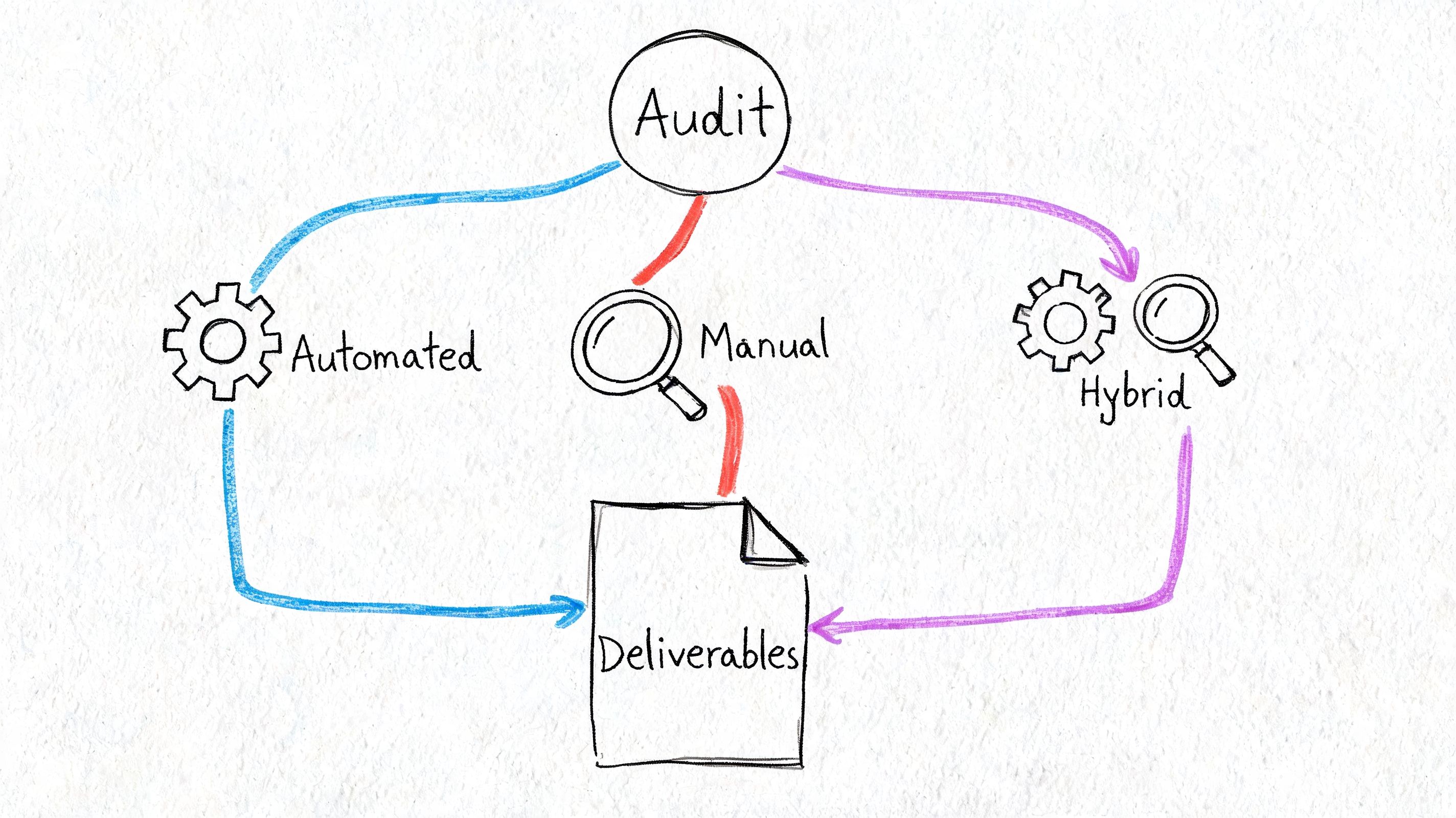
An “accessibility audit” can mean anything from a quick scan of public pages to a line-by-line review of a complex product with authenticated workflows, custom components, role-based permissions, and export or document features. That gap is why quotes vary so much.
Automated audits are useful for coverage, not compliance decisions
Automated testing is the cheapest option because software does the first pass. A scanner can review large numbers of URLs or screens quickly, flag detectable code issues, and give teams an initial defect list. That makes it useful for regression checks, broad triage, and monitoring large estates.
Its limits show up fast in real products.
Scanners do not complete multi-step tasks the way users do. They usually miss failures inside custom date pickers, drag-and-drop patterns, dynamic tables, chart interactions, permission-based UI states, modal stacks, and complex form validation. In a SaaS platform or internal enterprise app, those are often the screens that carry the highest user and procurement risk.
Manual audits pay for expert testing time
Manual work costs more because a specialist has to test behavior, not just code patterns. The auditor checks keyboard access, focus order, naming and role exposure, screen reader output, error handling, status messages, and whether a user can finish the task from start to finish.
Audit cost begins to align with product complexity. A brochure site may need representative page sampling. A web application may require scenario-based testing across user roles, states, data conditions, and responsive breakpoints. If the product includes dashboards, data grids, document viewers, media players, embedded third-party tools, or mobile web views, the audit hours increase because each pattern has failure modes that automation will not judge accurately.
A solid manual engagement should include:
- Assistive technology testing: Keyboard-only review and screen reader checks on the browsers and environments that match your user base
- Task-based coverage: Login, account setup, search, filtering, file upload, purchasing, approvals, reporting, and other business-critical flows
- Component inspection: Review of reusable patterns such as modals, menus, tabs, accordions, tables, and form controls
- Developer-ready reporting: Findings mapped to WCAG with issue context, impact, reproduction steps, and practical remediation notes
- Prioritization: Clear separation between blockers, high-risk defects, and lower-priority fixes
For enterprise software and ICT products, that reporting layer is part of what you are buying. Teams need evidence that can support engineering estimates, procurement responses, VPAT work, and internal risk review.
Hybrid audits are usually the right buying decision
In practice, many worthwhile audits are hybrid. The team uses automation to speed up broad detection, then applies manual testing where users are most likely to fail or where contracts require stronger evidence.
That structure is usually the best fit for complex applications because it controls cost without reducing the audit to scan output. Shared components can be tested once and traced across products. High-risk workflows can get deeper review. Lower-risk static content can be handled more efficiently. The result is a budget that reflects actual risk instead of a flat number that hides thin coverage.
If you are reviewing proposals, ask vendors to break out three things: what is scanned, what is manually tested, and how they choose sample journeys or components. This guide to manual vs automated accessibility testing is a useful reference before procurement approves scope.
A cheap audit usually means one of two things. The vendor is testing a very small sample, or the work is heavily automated. For a simple website, that may be acceptable. For enterprise SaaS, government contractor deliverables, or ICT products sold into regulated environments, it usually is not.
How Accessibility Audits Are Priced
Consultancies usually price accessibility work in one of three ways. The model matters because it changes how predictable the budget is and how easy it is to control scope.
Per-page pricing works when templates are stable
Per-page pricing is straightforward when your site is mostly page-based and the templates are known. What drives the number is not page count but how many distinct templates and interactive states sit behind those pages. A primary page — one with forms, a transaction, custom components, or a state machine to walk through — carries several times the manual effort of a light content page that is a heading, some prose and a link list. Ask any quote to separate the two, and to say how many unique templates it assumes; a per-page rate quoted without that breakdown is a number waiting to be revised once testing starts.
A useful example:
| Page type | Typical verified range | Best fit |
|---|---|---|
| Static primary page | $100 | Marketing pages, content-heavy screens |
| Interactive primary page | $175 | Forms, search, account flows |
| Complex primary page | $250 | eCommerce pages, SPAs, custom widgets |
| Light page | $25 to $100 | Policies, simple legal or support pages |
This model is good when:
- Templates repeat: A representative sample can cover similar pages.
- Content patterns are known: The vendor can group pages by complexity.
- Procurement needs clarity: Finance gets a defensible scope tied to countable assets.
The weakness is obvious. Per-page logic starts to wobble when you move from websites to apps. A “page” in a SaaS platform may contain many states, permissions, filters, dialogs, and asynchronous interactions. That’s why page count alone is a poor budgeting method for complex products.
Hourly pricing fits targeted support
Hourly pricing is useful when you already know what you need. Maybe the team wants expert review of a checkout flow, guidance on a design system, or help validating fixes after remediation.
This structure works best for narrow, technical assignments. It gives flexibility, but it can create budget anxiety if the scope is still fuzzy. Buyers usually do better with hourly work after an initial scoping call has already defined what’s in and out.
A good use case is remediation support after the first audit findings land. Another is pre-release review of a new module before it expands the backlog.
Fixed-project pricing is best for procurement
Fixed-project pricing is the most common model for formal engagements. It bundles scoping, testing, reporting, and sometimes a retest into one number. Buyers like it because it supports approvals, purchase orders, and vendor comparison.
It’s the right model when:
- You need internal approval: Budget owners want one line item.
- The timeline matters: Delivery dates and reporting expectations are explicit.
- The output matters as much as the test: You need a report suitable for engineering, compliance, or procurement review.
Fixed-price proposals are only as good as the scope underneath them. If the scope is vague, the “certainty” is fake.
For CTOs and Product Managers, the best buying move is simple. Ask vendors how they handle components, dynamic states, authenticated areas, mobile views, and retesting. If the pricing model doesn’t account for those, you’ll pay later through change orders or missed risk.
Typical Accessibility Audit Costs in 2026
A product team approves a budget based on a “website audit” range. Two weeks later, the vendor asks how many authenticated roles exist, whether the app uses custom components, and whether procurement needs VPAT support. The original number stops being useful.
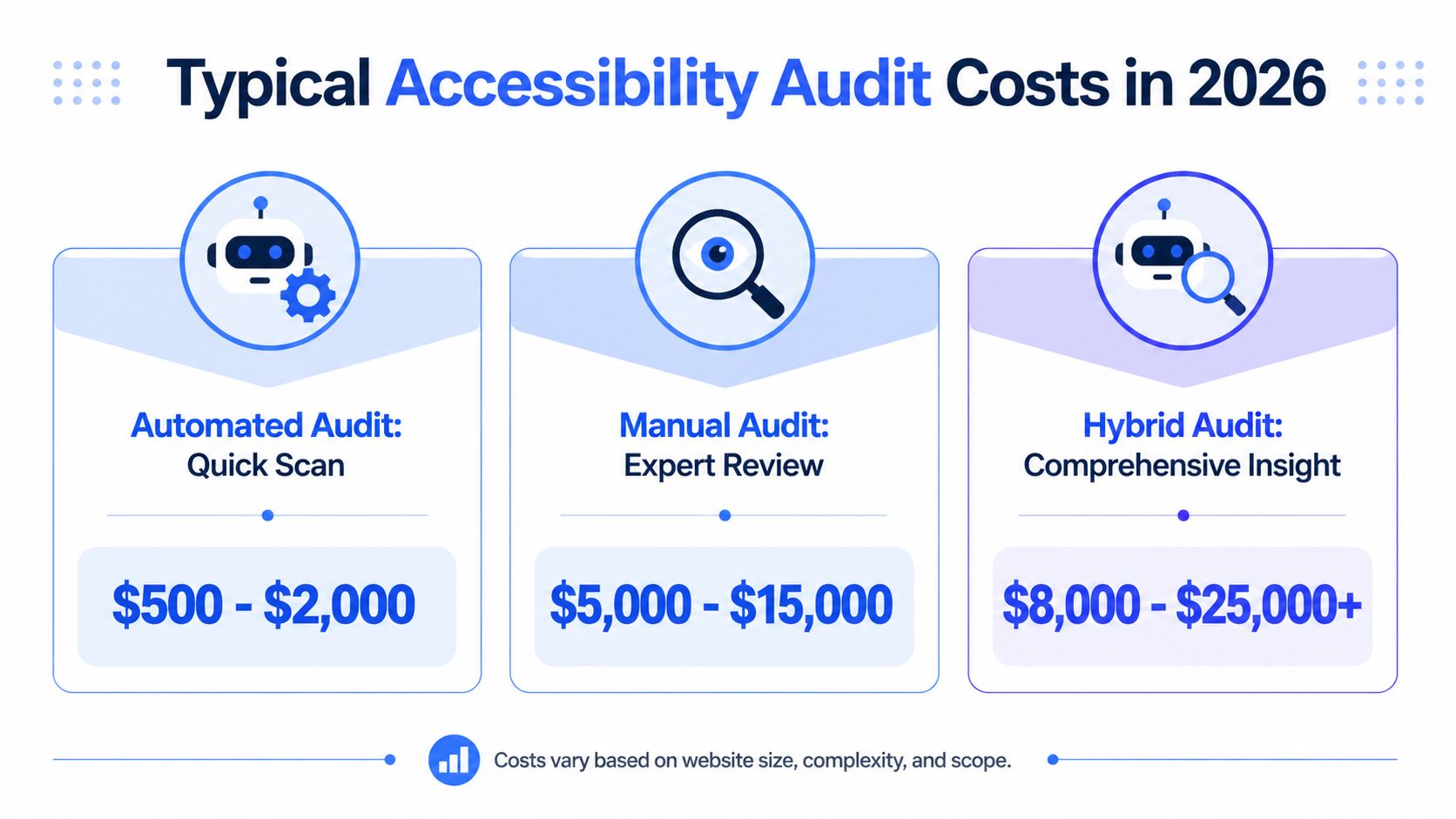
For a simple public-facing website, buyers can often work from published market ranges. For a SaaS platform, enterprise web app, or Section 508 ICT product, those ranges are only a floor. Cost rises with interaction depth, state coverage, assistive technology testing, and documentation requirements.
Small business websites
A straightforward marketing site usually sits at the lowest end of the professional audit market. That budget generally covers manual testing of a limited set of templates, basic form review, and a findings report that gives engineering or a web agency a usable remediation list.
This range fits sites with a narrow footprint:
- A small set of unique templates
- Basic contact or lead forms
- Limited custom UI
- Little or no authenticated functionality
Automated scans can reduce the initial price, but they do not replace keyboard testing, screen reader review, or judgment calls on focus order, labels, error handling, and content structure. If legal exposure or procurement review is part of the decision, low-cost scan-only work rarely holds up.
Mid-size sites and interactive platforms
Costs move up once the product includes meaningful user flows instead of mostly static content. eCommerce, higher education, healthcare, publishing, and multi-brand corporate sites often fall here.
What buyers are paying for is not a longer URL list. They are paying for time spent testing the parts that break in real use:
- Search and filtered results
- Cart and checkout flows
- Validation and recovery paths
- Modals, menus, and overlays
- Media players and document access
- Responsive behavior on smaller screens
I usually tell product owners to budget around user journeys, not page count. A checkout flow with promotions, shipping logic, payment errors, and account creation can take more effort than dozens of static pages.
Complex web apps and ICT products
At this point, generic cost guides stop helping.
A complex web application often needs coverage across signed-in states, permissions, component variants, and task flows that do not exist on a marketing site. The audit may include screen reader testing in data-heavy interfaces, keyboard review of custom controls, zoom and reflow checks, error-state testing, and validation across desktop and mobile breakpoints. That is a different engagement, not a slightly larger website audit.
For enterprise software and SaaS, expect custom scoping if the product includes any of the following:
- Role-based dashboards
- Design systems or shared component libraries
- Advanced data tables, charts, or drag-and-drop interactions
- Multi-step workflows
- Native-like web interfaces with heavy client-side rendering
- Admin and end-user experiences that differ materially
- Release gates that require retesting or sign-off documentation
Government contractors and vendors selling into regulated procurement environments should budget even more carefully. ICT reviews can extend beyond browser screens to software clients, kiosks, hardware interfaces, support documentation, and formal reporting artifacts such as VPAT or ACR support. In those cases, the buyer is not paying only for defect discovery. They are paying for evidence that can survive procurement review, legal review, and technical follow-up.
The practical budgeting rule is simple. Use public website pricing as a reference point for small properties only. If the product is an application, a platform, or an ICT offering, ask for a scoped estimate based on workflows, roles, components, assistive technology coverage, and reporting needs. That is how teams avoid underbudgeting the audit before remediation work even starts.
Key Factors That Drive Your Audit Cost
Two organizations can both say they need an accessibility audit and still receive very different proposals. That’s normal. Pricing follows effort, and effort follows product reality.
Scope is more than page count
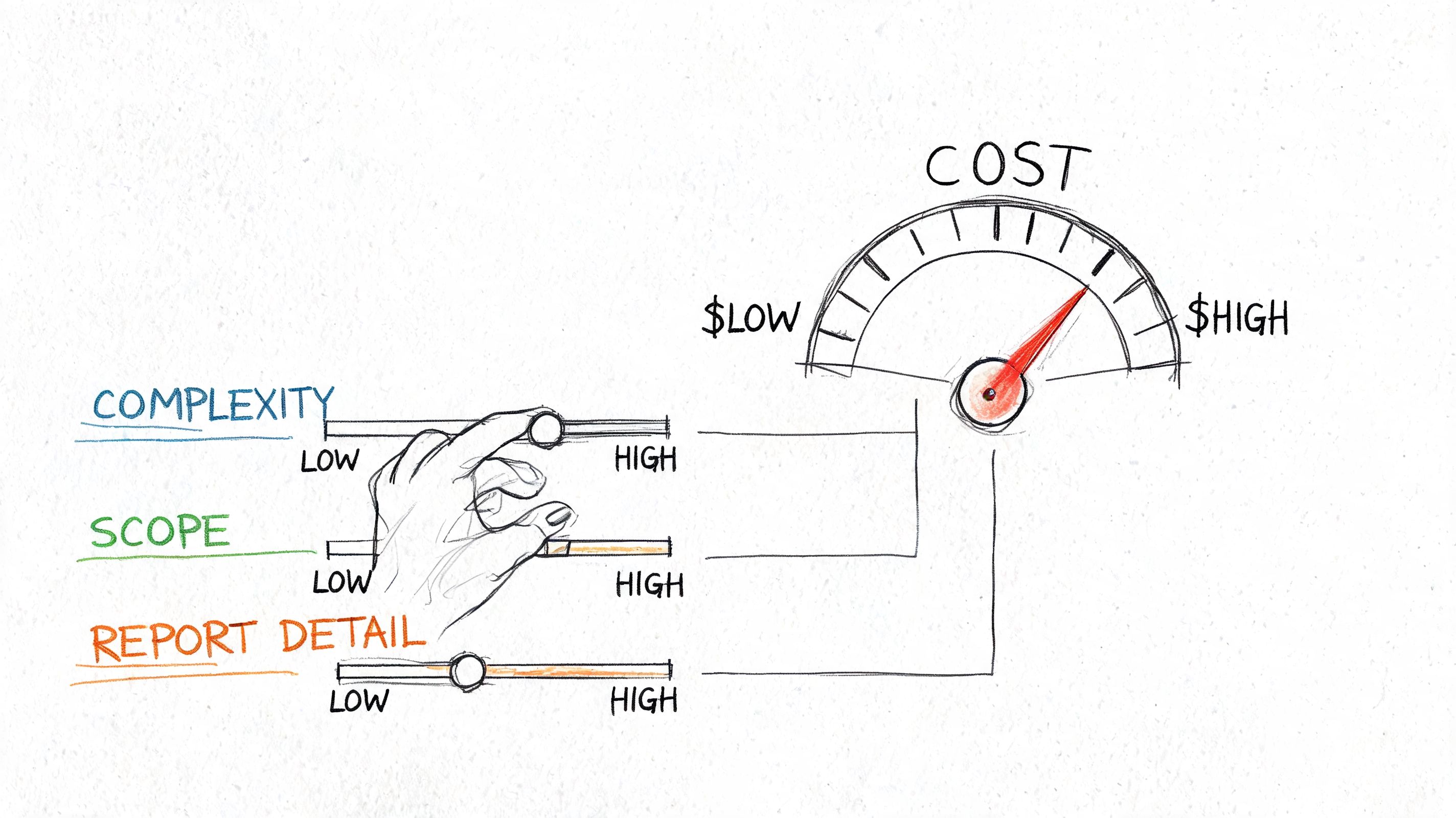
The first driver is scope, but page count alone doesn’t tell the story. Auditors price the number of unique templates, screens, and interaction patterns they need to test.
A static legal page is quick. A dashboard with sortable tables, live updates, modal actions, keyboard traps, and role-specific controls is not.
The biggest cost levers are usually:
- Unique screens and templates: Repeated layouts lower effort. Edge-case screens raise it.
- Interaction complexity: Forms, date pickers, drag-and-drop, charts, and custom controls take longer.
- State coverage: Logged-in states, error states, empty states, success states, and permissions all matter.
- Device expectations: Desktop-only work is simpler than desktop plus mobile behavior review.
- Report depth: Procurement-ready findings and developer-ready remediation notes require more analyst time.
If a vendor scopes only URLs and ignores states, the estimate is probably incomplete.
A practical way to manage budget is to group work by critical journeys instead of trying to audit everything at once. Prioritize revenue, account access, checkout, intake, support, and procurement-sensitive workflows. That gives you coverage where risk is highest.
Compliance context changes the work
A second driver is why you need the audit. Internal quality improvement is one thing. Procurement, litigation response, Section 508 review, or European market readiness changes the standard of evidence.
That affects the work in several ways:
- WCAG target level: AA is a common target. Higher expectations mean more review detail.
- Section 508 or EN 301 549 context: Buyers often need traceable documentation and clearer issue mapping.
- VPAT readiness: Findings must be organized in a way that supports conformance reporting.
- Timeline pressure: Rush projects cost more because they compress specialist availability.
This short explainer is useful if your team needs a quick visual on how scope and depth affect cost.
When teams want to reduce cost, the wrong move is usually cutting manual testing. The better move is tightening scope, sampling intelligently, and auditing shared components first.
Budgeting Beyond the Audit Remediation and Retesting
A common budgeting failure looks like this. The CTO gets approval for the audit, the report lands, and the team realizes none of the actual fix work has funding, owner time, or release capacity attached to it. That is how a reasonable audit spend turns into a stalled compliance project.
For enterprise software, SaaS platforms, and ICT products, the audit is usually the smaller line item. The larger cost often sits in remediation across shared components, design patterns, documents, media, and product workflows that cut across multiple teams. A login issue in a brochure site might take one developer a few hours. The same issue in a role-based web app can touch authentication, error handling, session timeouts, mobile views, and assistive technology behavior.
Budget for four workstreams, not one:
- Remediation delivery: Engineering, design, QA, and content updates tied to the findings.
- Auditor support: Time for issue clarification, triage, and implementation review on defects that are easy to misread from a report alone.
- Retesting: Verification of fixed issues, with attention to the specific pages, states, and user flows that were in scope.
- Documentation: Updated evidence for procurement, internal risk review, or conformance reporting if your buyers require it.
Remediation cost depends less on the number of findings than on where those findings live. If ten defects trace back to one shared component, the fix can be efficient. If those same ten defects appear across custom templates, legacy forms, exported PDFs, and embedded third-party tools, cost rises quickly because ownership and testing are fragmented.
Retesting deserves its own budget line.
Teams often treat retesting as optional and rely on developer confirmation that the issue was fixed. That is weak evidence for a complex product. Accessibility fixes can fail in specific states, break keyboard order in a modal, or pass in Chrome while still failing with screen readers in another environment. Retesting catches those gaps before a customer, procurement reviewer, or plaintiff’s expert does.
The standard budget question is not “What will the audit cost?” It is “What will it take to get this product to an acceptable level of conformance, verify the result, and keep evidence we can use later?”
If your organization needs a planning baseline, this digital accessibility audit guide for ADA, WCAG, and Section 508 helps frame audit scope, remediation ownership, and verification in one procurement cycle.
For budgeting, set aside funding in phases. Fund the audit and a triage workshop first. Then reserve remediation capacity for the highest-risk journeys and shared components. Finally, fund retesting after fixes ship. That structure works better than trying to approve one vague lump sum, especially for government contractors and product teams selling into Section 508 procurement where proof matters as much as intent.
FAQ Answering Your Top Audit Cost Questions
Is an accessibility audit a one-time cost
Treat an audit as a recurring budget item tied to product change, not a one-off purchase.
A brochure site that changes twice a year may only need periodic formal review. A SaaS platform with weekly releases, role-based permissions, custom components, mobile views, and embedded third-party flows needs a different model. In that environment, the initial audit is only the first spend. You also need budget for retesting, new feature review, and periodic reassessment of high-risk workflows.
For enterprise software and ICT products, audit frequency usually follows release velocity, procurement obligations, and product complexity. If your team sells into government, higher education, or large enterprise buying programs, plan for ongoing verification because conformance evidence gets stale as the product changes.
How does VPAT work affect audit pricing
VPAT work increases cost because the deliverable standard is higher.
An internal bug list helps engineering fix issues. A VPAT-ready assessment has to support buyer review, legal review, and procurement follow-up. That means clearer mapping to WCAG and Section 508 criteria, better evidence, and tighter wording around what was tested, in which environments, and with what limitations.
This matters more for complex applications than for simple websites. A static site may have a limited set of templates and user paths. A web app or ICT product often includes authenticated states, data tables, dynamic filters, exports, admin settings, multi-step workflows, and browser or assistive technology differences that have to be checked carefully. That added effort is why public pricing guides for basic websites usually understate what enterprise software teams should budget.
If you need a VPAT for a product that changes often, ask vendors two direct questions before you buy. First, whether the audit scope includes the user roles, states, and environments your buyers will ask about. Second, whether the team writing the VPAT is working from tested evidence or from partial engineering input. The price gap between those two approaches can be significant, and so can the risk.
Can we use a free or cheap automated tool instead
Use automated tools as part of coverage, not as the basis for a compliance decision.
Automation is useful for regression checks, common code issues, and CI enforcement. It does not evaluate many barriers that drive complaints, failed demos, or procurement rejection. Screen reader behavior, focus management in complex components, error handling, timed interactions, drag-and-drop alternatives, and state changes inside single-page applications still need manual testing.
For budgeting, the practical split is simple:
- Use automation to catch repeatable defects early.
- Use manual auditing to evaluate user flows, custom UI, and assistive technology behavior.
- Use retesting to confirm fixes before release or before you publish buyer-facing conformance claims.
Cheap scans can support engineering hygiene. They do not replace an audit for a regulated SaaS product, a government contractor deliverable, or an ICT product that needs defensible documentation.
If you need a scope that fits a website, SaaS platform, or regulated ICT product, ADA Compliance Pros helps teams plan audits, remediation, retesting, and procurement-ready VPAT documentation without relying on shortcuts or overlays.