
Document remediation triage under Title II and Section 504
The decision that sets the invoice
You have a date. You have a document library nobody has counted. You have a budget cycle that closes before the date does, and a finance officer who wants one number.
The number depends on a decision that has not been made yet, and it is not which vendor to hire. It is how much of the library you are legally obliged to fix. Both of the rules driving these deadlines let a legacy document be retired, replaced or left in place under an exception, and they say so in text you can cite. Get that decision right and the remediation invoice is what is left over. Get it wrong and you pay per page to make an inaccessible 2014 newsletter conform to WCAG 2.1 Level AA.
What follows is the decision layer that sits before the purchase: which documents are in scope, what to do with each one, what a defensible cost model looks like when the published market rate spans $0.30 to $12.00 a page, and whether the volume you are left with can be processed before the date at any plausible throughput. For how to make a single file conform, see our guides on auditing and remediating a PDF and building an accessible PDF from the source file. This page is about what to do when you have tens of thousands of them and a date.
Which date is yours, and which rule set it
Two federal rules put dated WCAG 2.1 Level AA obligations on documents you publish. Both were amended in 2026, and both amendments moved the dates out by a year. Commentary published before spring 2026 prints the superseded dates, so check the publication date on anything that hands you an April 2026 or May 2026 deadline.
| Rule | Who it binds | Tier | Compliance date | Where the date lives |
|---|---|---|---|---|
| ADA Title II web and mobile app rule | State and local government public entities | Total population 50,000 or more, other than a special district government | 26 April 2027 | 28 CFR 35.200(b)(1) |
| ADA Title II web and mobile app rule | State and local government public entities | Total population under 50,000, or any special district government | 26 April 2028 | 28 CFR 35.200(b)(2) |
| HHS Section 504 web and mobile app rule | Recipients of HHS federal financial assistance | Fifteen or more employees | 11 May 2027 | 45 CFR 84.84(b)(1) |
| HHS Section 504 web and mobile app rule | Recipients of HHS federal financial assistance | Fewer than fifteen employees | 10 May 2028 | 45 CFR 84.84(b)(2) |
The Title II dates come from a Department of Justice interim final rule published 20 April 2026, 91 FR 20902, effective the same day, which states plainly that “the compliance date for State and local government entities with a total population of 50,000 or more is extended from April 24, 2026, to April 26, 2027” and that the small-entity date moves from April 26, 2027 to April 26, 2028. The Section 504 dates come from an HHS interim final rule published 11 May 2026, 91 FR 25496, effective 7 May 2026, which moves 11 May 2026 to 11 May 2027 and 10 May 2027 to 10 May 2028. The amended text is what appears in 28 CFR part 35 subpart H today. As of 27 July 2026 a Federal Register search on RIN 1190-AA82 and on RIN 0945-AA30 each returns exactly one document, so neither interim final rule has been superseded by a final rule. Check both RINs again before you put a date in a board paper.
The two rules tier on different variables, which matters for an organization sitting under both. Title II tiers on total population, a Census-derived figure defined at 28 CFR 35.104, with separate treatment for independent school districts and a separate category for special district governments. Section 504 tiers on employee headcount. A county hospital can be a public entity under Title II and a recipient under Section 504 at the same time and land on two different dates. Never write “the 2027 deadline” in a project plan without naming the rule and the tier beside it.
The regulated unit is not the PDF
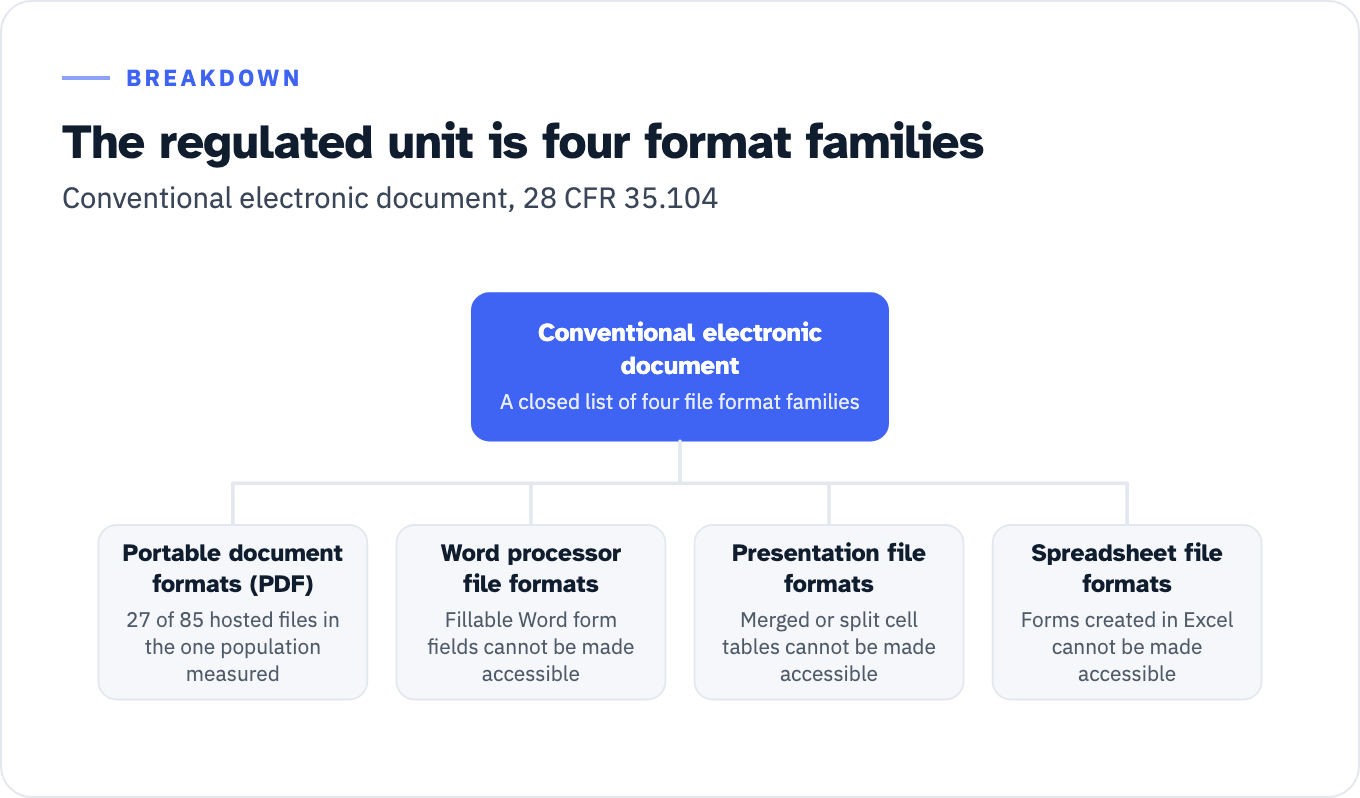
Both rules regulate a defined object called a conventional electronic document, and the definition at 28 CFR 35.104 is a closed list of four file format families: “portable document formats (‘PDF’), word processor file formats, presentation file formats, and spreadsheet file formats.” DOJ’s preamble confirms that this list of conventional electronic documents “is an exhaustive list of file formats, rather than an open-ended list” at 89 FR 31363-64. The Section 504 rule carries the same definition at 45 CFR 84.10.
Scoping a program as PDF remediation therefore misses three of the four families by name. In the one document population measured for this article, described in the next section, PDFs were 27 of 85 hosted files and Office formats were the other 58, a roughly two-to-one split against the format the search term names.
Word, Excel and PowerPoint are not a rounding error, and they are not simply cheaper PDFs. GSA’s own authoring and testing guides say that some of what sits in them cannot be remediated at all:
- “Automated, interactive, fillable Word form fields cannot be made accessible,” and test 15 of the Microsoft Word 365 basic authoring and testing guide asks whether the document is free of Word form fields, failing it if not.
- The Excel 365 guide says the same at test 10 of 11: “Forms created in Excel cannot be made accessible for assistive technology users.”
- GSA’s PowerPoint template training states that “complex tables, tables with merged or split cells, cannot be made accessible in PowerPoint,” and the PowerPoint 365 guide fails a slide outright where a table turns out to be a picture of a table.
View the data as a list
Conventional electronic document: A closed list of four file format families
- Portable document formats (PDF): 27 of 85 hosted files in the one population measured
- Word processor file formats: Fillable Word form fields cannot be made accessible
- Presentation file formats: Merged or split cell tables cannot be made accessible
- Spreadsheet file formats: Forms created in Excel cannot be made accessible
Those are rebuild items, not remediation items, and a per-page remediation quote does not cover them. They also have to be found at inventory time. A per-page quote prices pages, and a Word form that cannot be made accessible at any price is not a page problem. Ask, before the quote arrives, what happens to files that fail the pre-flight checks set out further down this page: who decides they are rebuilds, who pays for the rebuild, and whether they are still counted in the per-page total.
One more scoping edge is worth knowing before you buy: the Section 508 standards define a document as content that “is not part of software” and “does not include its own software to retrieve and present content for users,” a definition section508.gov quotes in full. A PDF carrying scripts stops being a document for testing purposes. GSA’s PDF checklist routes it to the Department of Homeland Security Trusted Tester process for software instead, which is a different test, a different tester competence and a different price.
Count the library before you price it
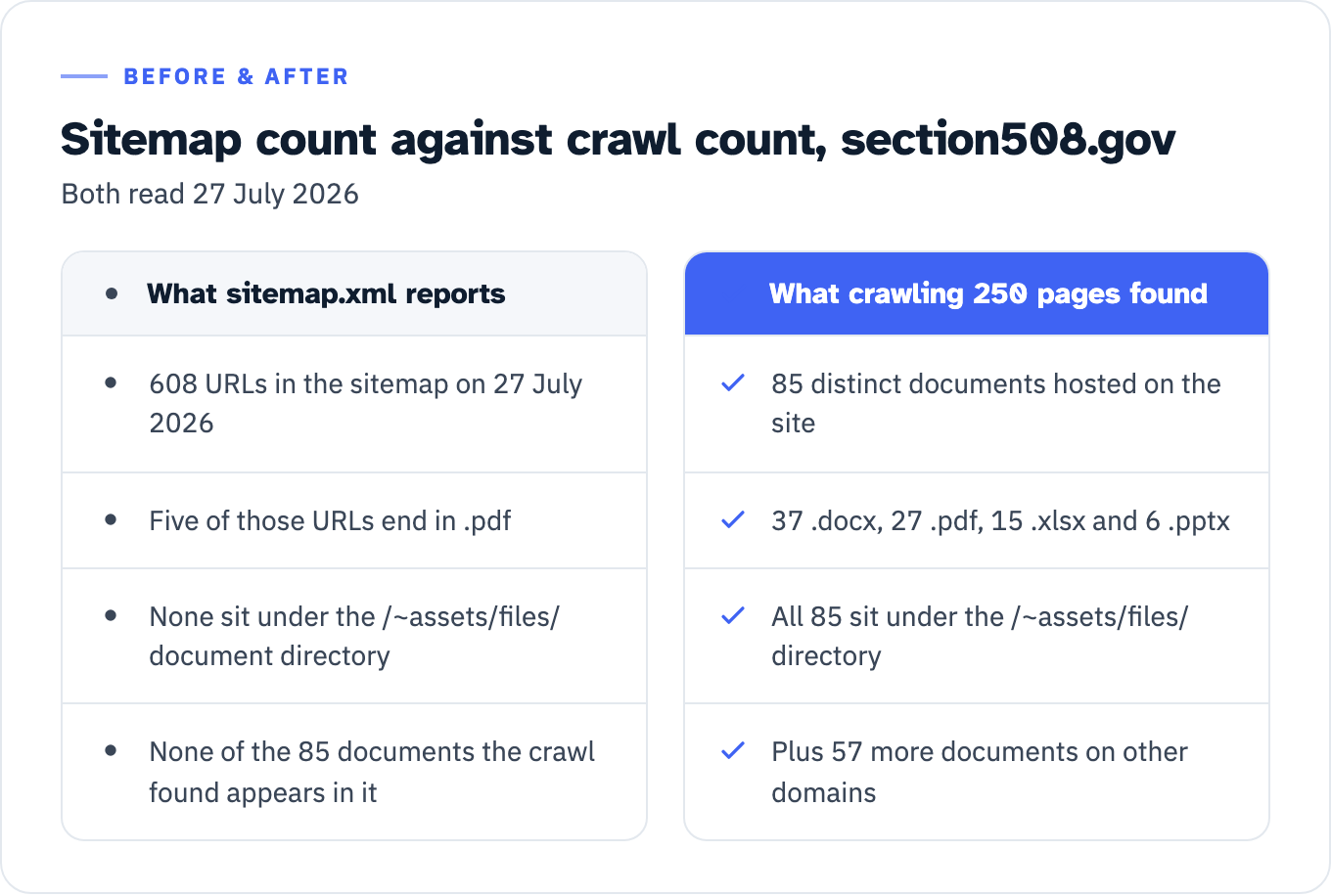
Nobody can triage a library they cannot enumerate, and the sitemap shortcut fails. Sitemaps do not list documents. Run the check on the federal government’s own accessibility website and the gap is measurable. Section508.gov’s sitemap.xml carried 608 URLs on 27 July 2026, of which five ended in .pdf and none sat under its /~assets/files/ document directory. Fetching the 250 sitemap pages under /create/, /test/, /manage/, /develop/, /buy/ and /sell/ and extracting every href ending .pdf, .docx, .xlsx or .pptx returned 85 distinct documents hosted on the site, 37 .docx, 27 .pdf, 15 .xlsx and 6 .pptx, plus 57 more on other domains. All 85 sit under /~assets/files/, and none of the 85 appears in the sitemap. That count is a floor, not a total: it looks at four extensions on 250 pages of one site.
View the data as a table
| What sitemap.xml reports | What crawling 250 pages found |
|---|---|
| 608 URLs in the sitemap on 27 July 2026 | 85 distinct documents hosted on the site |
| Five of those URLs end in .pdf | 37 .docx, 27 .pdf, 15 .xlsx and 6 .pptx |
| None sit under the /~assets/files/ document directory | All 85 sit under the /~assets/files/ directory |
| None of the 85 documents the crawl found appears in it | Plus 57 more documents on other domains |
This is not a quirk of one website. GSA’s Site Scanning data dictionary defines its PDF field as the “Count of URLs ending in .pdf in the detected sitemap.xml,” which is the same shallow measure (field sitemap_xml_pdf_count). Fetch the top-level sitemap.xml for irs.gov, cms.gov, ed.gov or epa.gov and on 27 July 2026 each one was a sitemap index pointing at child sitemaps, carrying zero URLs ending in .pdf. Any inventory number produced from a sitemap should be treated as the beginning of the count.
For scale, Allyant’s PDF Accessibility Index press release of 10 March 2026 reports that 94.75% of 644,854 public-facing PDFs across more than 770 websites failed at least one check, with government at 97.12% and education at 98.01%. Read the method with the number: it is a vendor study run with the vendor’s own automated scanner, scored against WCAG 2.2 rather than the WCAG 2.1 the two rules incorporate, and “inaccessible” there means failing one or more checkpoint, not failing a WCAG 2.1 Level AA conformance evaluation. It tells you the pile is large. It does not tell you your failure rate against your rule.
Build the inventory as a register, not a list. The columns that decide everything downstream are:
| Column | Why it is there |
|---|---|
| URL and file format | Sets which of the four format families applies, and whether the item is a rebuild |
| Page count | The billing unit in every published price list |
| Date first posted | Decides whether the preexisting exception is even available |
| Last modified date | An edit after your compliance date destroys preexisting status |
| Function | Whether the document is used to apply for, gain access to or participate in a service |
| Related documents | Instructions, manuals and question-and-answer files attached to a transactional document inherit its status |
| Behind authentication, and individualized | Sets up the individualized secured-document exception |
| Source file available | Decides whether the fix is remediation of the PDF or re-export from a corrected source |
| Owning department | Decides who approves retirement and who pays |
| Analytics for the last twelve months | A prioritization input, and explicitly not the legal test |
That last row matters enough to state twice. Traffic is not the statutory gate. A zero-download PDF that is the only copy of a benefits application is in scope; a heavily downloaded 1998 water quality report in a properly constituted archive may not be.
The four branches, and the test that opens each one
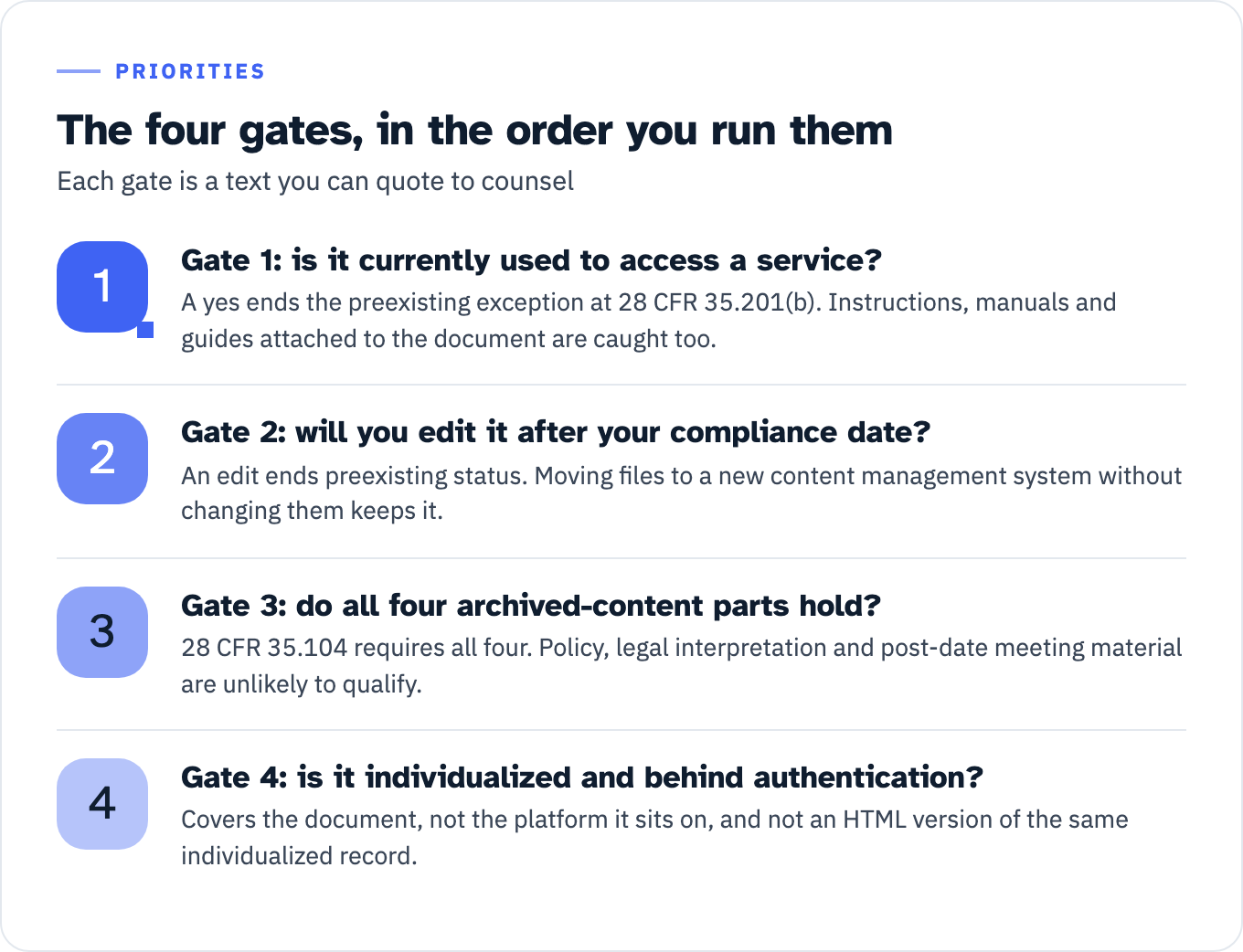
Four dispositions exist for any document in the register: retire it, replace it with HTML, remediate it now, or leave it under an exception and commit to producing an accessible version on request. The operational register splits two of those four, because retiring divides into deleting and archiving, which produce different artifacts, and remediating divides into remediation and rebuild, which carry different prices. The tests that sort documents between them are sequential, and each one is a text you can quote to your general counsel.
View the data as a list
- Gate 1: is it currently used to access a service?: A yes ends the preexisting exception at 28 CFR 35.201(b). Instructions, manuals and guides attached to the document are caught too.
- Gate 2: will you edit it after your compliance date?: An edit ends preexisting status. Moving files to a new content management system without changing them keeps it.
- Gate 3: do all four archived-content parts hold?: 28 CFR 35.104 requires all four. Policy, legal interpretation and post-date meeting material are unlikely to qualify.
- Gate 4: is it individualized and behind authentication?: Covers the document, not the platform it sits on, and not an HTML version of the same individualized record.
Gate 1: is it currently used to apply for, gain access to, or participate in your services, programs or activities? The preexisting exception at 28 CFR 35.201(b) covers documents “available as part of a public entity’s web content or mobile apps before the date the public entity is required to comply with this subpart, unless such documents are currently used to apply for, gain access to, or participate in the public entity’s services, programs, or activities.” Section 504 carries the same exception across at 45 CFR 84.85(b) with the subject changed: “recipient’s web content”, the compliance trigger at § 84.84, and “the recipient’s programs or activities” rather than services, programs or activities. If the answer to the gate is yes, the exception is gone and the branch is remediate or replace.
Two DOJ readings narrow this exception further, both at 89 FR 31365. The first is prospective: “the Department intends to cover documents that are used at any given point in the future, not just at the moment in time when the final rule is published.” The second reaches the material around the transactional file. Preexisting documents are “also not covered by the exception if they provide instructions or guidance related to other documents that are directly used” for those purposes, and DOJ names the categories: “business license application instructions, manuals, sample knowledge tests, and guides, such as ‘Questions and Answers’ documents.” A triage rule that captures only the form itself is too narrow by DOJ’s own example.
Fillable form fields are evidence, not a separate test. DOJ says a fillable PDF can still sit inside the exception on the editing question, then adds at 89 FR 31364 that “a PDF form that must be filled out and submitted when renewing a driver’s license is currently used to apply for, gain access to, or participate in a public entity’s services, programs, or activities, and therefore would not be subject to the exception under Sec. 35.201(b) for preexisting conventional electronic documents.”
Gate 2: will you edit it after your compliance date? DOJ is direct, at 89 FR 31364: “If a public entity changes or revises a preexisting document following the date it is required to comply with subpart H, the document would no longer be ‘preexisting’ for the purposes of the exception.” Moving files to a new content management system without changing them keeps the exception. Updating the mailing address in the header of a benefits application form during that migration does not. Two operational consequences follow. Put an edit gate in front of every excepted document, and understand that DOJ also blocked the reverse dodge at 89 FR 31365: an entity “may not rely on the exception to circumvent its accessibility obligations under subpart H by, for example, converting all of its web content to conventional electronic document formats and posting those documents before the date the entity must comply with subpart H.”
Gate 3: does it meet all four parts of the archived-content definition? 28 CFR 35.104 defines archived web content as content that was created before the compliance date or reproduces pre-date paper or physical media, “is retained exclusively for reference, research, or recordkeeping,” “is not altered or updated after the date of archiving,” and “is organized and stored in a dedicated area or areas clearly identified as being archived.” DOJ’s preamble at 89 FR 31361 says entities “may not circumvent their accessibility obligations by merely labeling their web content as ‘archived’ or by refusing to make accessible any content that is old,” and ada.gov states the test as: the exception does not apply unless all four points are present.
Two categories fail this test on the agencies’ own reading. In the Section 504 rule preamble at 89 FR 40137-38, HHS says content identifying “the current policies or procedures of the recipient” or “containing or interpreting applicable laws or regulations” is unlikely to qualify, because that content notifies the public about ongoing rights and responsibilities and so is not being used exclusively for reference, research or recordkeeping. HHS then supplies the second category itself: new content such as agendas, meeting minutes and other documents related to meetings that take place after the compliance date “would likely not meet all parts of the definition of archived web content.”
Gate 4: is it individualized and behind authentication? The individualized secured-document exception covers files about a specific person, property or account. Its limits are precise, at 89 FR 31378-79: the exception “would not apply to the platform on which the public entity makes those documents available,” an HTML version of the same individualized record is not covered, and a general notice does not become individualized by being attached to an individualized letter such as a bill. The list of links to those documents is web content in its own right.
Excepted is not finished. DOJ says it twice, once for each exception. Even where content “does not have to conform to the technical standard,” entities “still need to ensure that their services, programs, and activities offered using web content and mobile apps are accessible to individuals with disabilities on a case-by-case basis,” including reasonable modifications, effective communication and equal opportunity. The cites are 28 CFR 35.130(b)(1)(ii), (b)(7) and 35.160 for Title II, and 45 CFR 84.68(b)(1)(ii), (b)(7) and 84.77 for Section 504. For individualized secured documents DOJ adds a timing word: existing Title II obligations require accessible versions “in a timely manner” when the documents pertain to individuals with disabilities.
That is the legal basis for the remediate-on-request branch, and also its limit. A branch with no intake channel, no named owner and no response time is not a plan.
| Branch | The test that puts a document here | What you produce | Who approves it |
|---|---|---|---|
| Retire | Not currently used for a service, and the owning department confirms no retention obligation to keep it published | Removal record with date, owner and reason; redirect for the dead URL | Owning department head |
| Archive | All four parts of 28 CFR 35.104 hold, and it is not policy, procedure, legal interpretation or post-date meeting material | Dedicated archive area, clearly labeled, with a no-edit rule attached | Records officer plus web owner |
| Replace with HTML | The content is currently used, and nothing about it requires a fixed-layout file | Accessible HTML page, old document unpublished | Content owner |
| Remediate now | Currently used, and a document format is required for a regulatory, accreditation, legal or genuine user-need reason | Remediated file plus test evidence against WCAG 2.1 Level AA | Accessibility lead |
| Rebuild | Contains Word or Excel form fields, or merged-cell or picture-of-a-table content in PowerPoint | New artifact, for example an HTML form; the old file unpublished | Content owner plus accessibility lead |
| Remediate on request | Preexisting, archived or individualized under an exception that holds | Named intake channel, owner, response time, request log | Accessibility program owner |
Retire and replace before you buy remediation
Two things get confused in the replace branch, and the difference is a regulatory one.
Retiring an inaccessible PDF and publishing its content as an HTML page removes the document from the inventory. Keeping the inaccessible PDF and adding an accessible version alongside it is a conforming alternate version, and 28 CFR 35.202 permits that “only where it is not possible to make web content directly accessible due to technical or legal limitations.” 45 CFR 84.86(a) says the same for recipients, in the same words with “recipient” substituted. DOJ narrowed WCAG deliberately here and said so, calling it “a slight departure from WCAG 2.1.” Plan on the replace branch. Do not plan on the alternate-version branch, because it is gated on impossibility and you carry the argument.
On the merits of replacing, the strongest citable statement is federal. OMB memorandum M-23-22 of 22 September 2023 tells agencies they “should default to creating and publishing content in an HTML format in lieu of publishing content in other electronic document formats that are designed for printing or preserving and protecting the content and layout of the document (e.g., PDF and DOCX formats),” and that an agency “should develop online content in a non-HTML format only if necessitated by a specific user need.” Read the scope honestly: that memorandum is addressed to the heads of federal executive departments and agencies, the operative verb is should, and it does not reach a city, a school district or a Section 504 recipient. GSA’s own PDF authoring page paraphrases it more strongly, as “federal policy requires agencies to prioritize HTML and use PDFs only when necessary.” Quote the memorandum for the requirement and GSA for GSA’s characterization of it.
A public university has already published the operational version of this rule. UMass Dartmouth’s document remediation page routes documents three ways: documents used in course sites are checked in the learning management system and fixed by the site owner following the accessibility report, other documents are verified directly in the authoring tool, and only what cannot be handled either way reaches an external per-page vendor, through a workflow that requires the requester to select a department, a quote to be issued, a department administrator to approve, and the requester to process payment.
The reusable part is the eligibility gate on that paid queue, and it is narrow in both directions. Two categories qualify: “web forms that support university business processes” and “documents required to be distributed in document format due to regulatory, accreditation, or legal requirements.” Three are excluded outright: documents that violate copyright, documents that meet the exception criteria, and scanned books and articles. That converts a triage argument into a form somebody has to complete before money moves, and it puts the exception analysis inside the purchase request rather than after it.
The pre-flight checklist by format
Four published federal check sets cover the four format families, and their check counts are countable from the files themselves: 22 checks in the PDF detailed Section 508 accessibility checklist, 16 in the Word 365 guide, 14 in the PowerPoint 365 guide and 11 in the Excel 365 guide. These are agency test steps, not WCAG success criteria, and passing them is not the same thing as a WCAG 2.1 conformance claim. They are still the best public pre-flight, because each failure is stated in the government’s own words rather than in a consultant’s.
Four pre-flight tests decide the branch before anyone opens the tag tree: LiveCycle origin, embedded scripts, image-only pages and security settings. A file that fails any of those is not a per-page remediation job, and finding that out at inventory time is worth more than finding it out on an invoice.
| Format | Pre-flight check | How to verify it | Source of the requirement |
|---|---|---|---|
| Was the file generated by Adobe LiveCycle Designer? | File > Properties > Description, read Application and PDF Producer | GSA PDF detailed checklist: LiveCycle PDFs “cannot be tested for accessibility with Acrobat Pro” | |
| Does the file contain scripts? | Accessibility Full Check, look for a Scripts item flagged as needing a manual check under Page Content | GSA PDF detailed checklist: scripts turn the file into a software application, test with the DHS Trusted Tester process | |
| Is it an image-only or scanned PDF? | Accessibility Full Check, look for an Image-only PDF item flagged as failed under Document | GSA PDF detailed checklist: if it is flagged, the PDF fails this test | |
| Is assistive technology access enabled? | File > Properties > Security tab, check that Content Copying for Accessibility is allowed | GSA PDF detailed checklist: if it is not allowed, the PDF fails this test | |
| Is the file tagged, and is the document language set? | File > Properties > Description for Tagged PDF, and the Advanced tab for language | GSA PDF detailed checklist | |
| Is it a portfolio, or does it have attachments? | Open the file and check the Attachments pane in the navigation pane | GSA PDF detailed checklist: portfolios and attachments are each opened and tested separately | |
| PDF, Word, PowerPoint, Excel | Color contrast | Skip the check where text is black on white or close to it, otherwise test 4.5:1 for text and 3:1 for large text | GSA guides carry the same skip note in all four formats |
| Word | Is the document free of Word form fields? | Search the file for interactive fillable fields | Word 365 guide, test 15 of 16: fillable Word form fields “cannot be made accessible” |
| Excel | Is the workbook free of form fields? | Inspect the workbook for interactive controls | Excel 365 guide, test 10 of 11: forms created in Excel “cannot be made accessible for assistive technology users” |
| PowerPoint | Is the deck free of pictures of tables? | Select the table and check whether the ribbon shows Table Design or Picture Format | PowerPoint 365 guide, test 9A: a picture of a table fails |
| PowerPoint | Are there merged or split cells in any table? | Inspect each table’s structure | GSA PowerPoint template training: merged-cell tables “cannot be made accessible in PowerPoint” |
Run this before a document reaches a vendor queue, and the LiveCycle files, the scripted files, the image-only scans and the Word and Excel forms all fall out into different queues at different prices. Run it after, and you pay per page for files that were never going to pass.
The PDF checklist also contemplates an alternative accessible version, with three conditions on it. GSA’s wording: “you are still required to create an alternative version that is accessible, up-to-date and has equivalent content.” Up to date is the condition that fails eighteen months later, and it is the reason the conforming alternate version is a maintenance liability as well as a legal one.
A Section 508 conformant document is not automatically a Title II conformant one
A vendor attestation that says “508 compliant” or “PDF/UA” does not answer a Title II or Section 504 question, for three separate reasons.
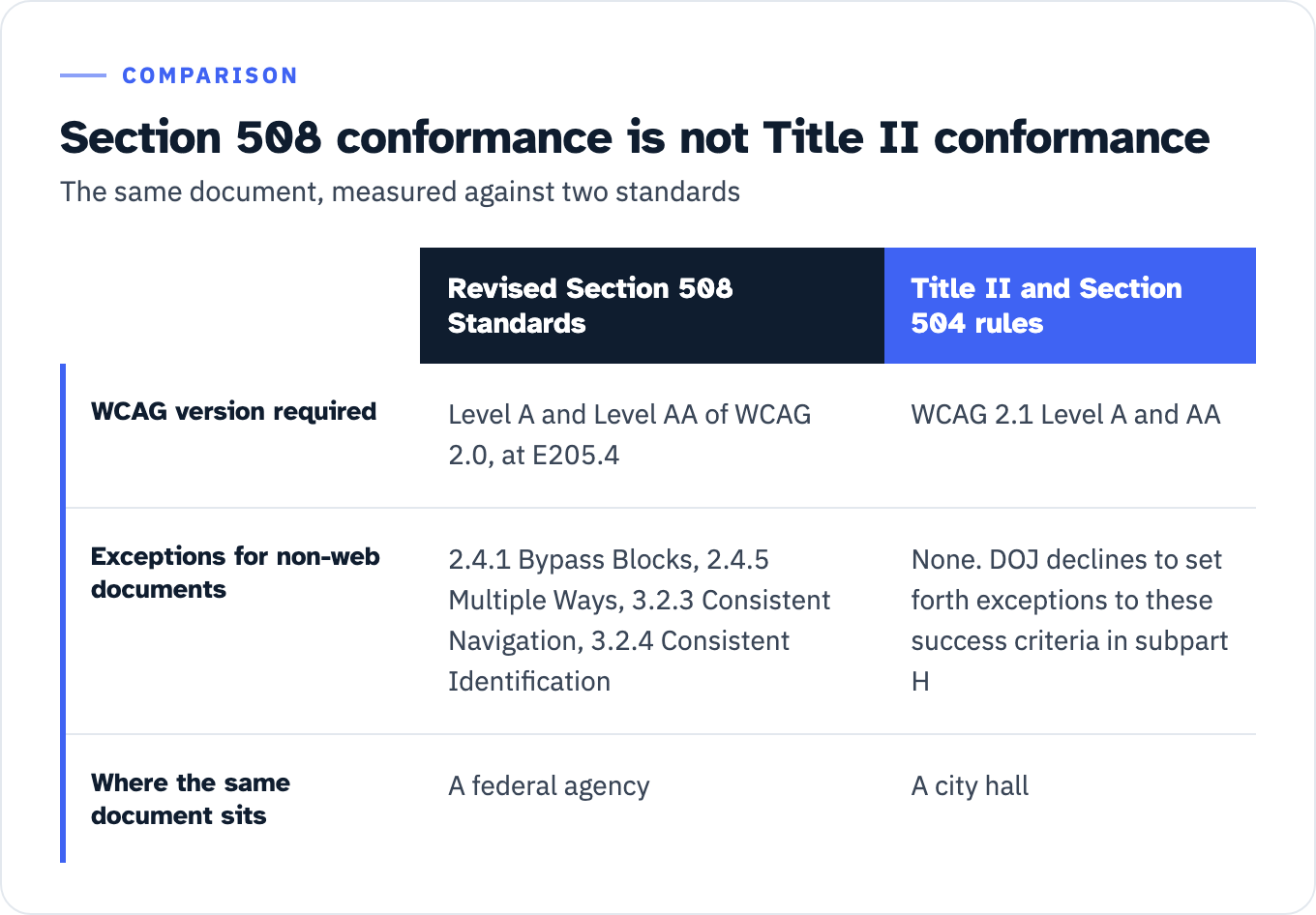
The version is different. The Access Board’s Revised Section 508 Standards require electronic content to conform to “Level A and Level AA Success Criteria and Conformance Requirements in WCAG 2.0” at E205.4. Both 2024 rules incorporate WCAG 2.1 Level A and AA. Our breakdown of which WCAG version each US rule requires sets out the whole matrix, including the citation form to write into a clause.
The exceptions are different. E205.4 carries an explicit carve-out: “Non-Web documents shall not be required to conform to the following four WCAG 2.0 Success Criteria: 2.4.1 Bypass Blocks, 2.4.5 Multiple Ways, 3.2.3 Consistent Navigation, and 3.2.4 Consistent Identification.” DOJ declined to write those exceptions into the Title II rule, at 89 FR 31350: the Department “declines to set forth exceptions to these success criteria in subpart H,” because it “believes it is important to apply one consistent standard.” A document at a city hall therefore has to satisfy criteria the same document at a federal agency does not.
PDF/UA is not the standard. DOJ considered a comment asking it to reference PDF/UA-1 and “declines to adopt additional technical standards for these specific types of content,” noting that PDF/UA could be used through the equivalent facilitation provision at 28 CFR 35.203. Equivalent facilitation is a route, and the entity carries the demonstration. Conformance to PDF/UA is not itself compliance with the rule, and at least one vendor selling document remediation lists PDF/UA among the standards it works to.
View the data as a table
| Revised Section 508 Standards | Title II and Section 504 rules | |
|---|---|---|
| WCAG version required | Level A and Level AA of WCAG 2.0, at E205.4 | WCAG 2.1 Level A and AA |
| Exceptions for non-web documents | 2.4.1 Bypass Blocks, 2.4.5 Multiple Ways, 3.2.3 Consistent Navigation, 3.2.4 Consistent Identification | None. DOJ declines to set forth exceptions to these success criteria in subpart H |
| Where the same document sits | A federal agency | A city hall |
Write the standard into your specification the way the rule writes it, and require test evidence against that standard rather than an attestation against a different one.
The cost model, with the inputs printed
There is no honest average price for document remediation. Publish a model instead, show every input, and cite the observed prices with the date you observed them.
What the market publishes
Three vendors publish per-page prices openly. All three were read on 27 July 2026.
| Source | Published rate | Structure and drivers |
|---|---|---|
| accessible.org, PDF remediation page | $7.50 to $11.50 per page, complex tier at $11.50 a page and up | Three named tiers on PDF work, with 90% of page-based quotes said to fall in that band. Simple: basic text, simple layouts, minimal tables, previously tagged files. Advanced: OCR, complex forms, complex tables, images needing detailed alt text. Complex: nested forms, calculations, dynamic content |
| DigitalA11y, pricing page | $4.00, $6.00, $8.00 per page | Four rows covering PDF, Word, Excel and PowerPoint plus alt text: simple, moderate, complex, with image PDFs and forms at the top rate |
| CASO Comply, pricing page | $0.30, $1.80, and from $12.00 per page | Three service levels, with a published page-counting rule: “By actual PDF page count. We exclude obvious duplicates and blank inserts. Inventory list shared before work begins” |
The spread between the cheapest and the dearest published rate is a factor of forty. That is not a discount, it is a different service. The most useful line in that table is CASO Comply’s counting rule, because page counting sets the invoice before any tagging happens: actual page count, duplicates and blank inserts excluded, inventory list agreed before work starts. Ask for that in writing, and ask what the deliverable, the manual test and the retest are at each price point.
What the federal record shows
Three federal document remediation contracts, retrieved from USAspending on 27 July 2026, show why a per-page number is the wrong unit for a budget conversation.
| Award | Agency | Vendor | Obligated | Period |
|---|---|---|---|---|
| 73351018F0230 | Small Business Administration | StratComm Inc. | $24,919.06 | 15 Aug 2018 to 14 Aug 2019 |
| 140D0423F1158 | Department of the Interior, Departmental Offices | FedWriters Inc. | $266,865.25 | 15 Sep 2023 to 14 Feb 2025 |
| 2031ZB20F00009 | Treasury, Bureau of Engraving and Printing | ScribeDoc.com Inc. | $2,447,798.40 | 26 Feb 2020 to 24 Aug 2024 |
These are obligated amounts rather than ceilings, and the base-and-all-options value is null in the API for all three. Two orders of magnitude separate the smallest from the largest, and both ends are labeled document remediation.
The model
Write the budget as a model with the assumptions visible, so that finance is approving an assumption set rather than a number pulled from a market page.
| Line | Unit | Where the number comes from |
|---|---|---|
| Documents in inventory | Count | Your crawl, not your sitemap. Treat the first number as a floor |
| Triage split across the six dispositions | Percentages | Your register, after the four gates. It multiplies every line below it |
| Pages per remediated document | Average, measured | Your inventory, not an assumption. Page count is the billing unit |
| Rate by complexity tier | Dollars per page | A pilot quote on a representative sample. Published market rates run $0.30 to $12.00 and up |
| Rebuild items | Per artifact | Count of Word and Excel form files and merged-cell decks. Priced as authoring, not per page |
| Manual QA and verification | Percentage of pages sampled, your choice | No published rate exists. It cannot be zero: GSA says automated checkers “are limited in what they can accurately evaluate and may present false positives or fail to report issues” and that “manual testing must be performed as well” |
| Retest after rework | Percentage of pages returned | Your pilot’s first-pass rate. Ask a vendor for its rework rate in writing |
| On-request channel | Annual cost of the intake, owner and response time | Your service model. See the response times below |
| Program overhead | Inventory maintenance, edit gate, reporting | Your own staff time |
Nothing here needs an invented average. A pilot on a representative sample fills the two unknown cells, which is how accessible.org describes its own scoping method: “Estimates are provided based on a representative sample of documents.”
Throughput against the date
The throughput figures below are vendor estimates. No agency or primary source for pages-per-hour throughput by complexity tier turned up in the sources checked for this article, and the two vendor figures that exist do not even share a unit.
Equidox, a software vendor with a commercial interest in the manual figure being high, estimates 15 to 30 minutes to remediate a simple text-based PDF manually, and says a complex report with tables, forms, images and charts “could take several hours or even days if done entirely with manual software.” That estimate is per document. CASO Comply’s pricing page states 15 to 30 minutes per page for traditional manual PDF remediation. Same-looking number, different unit, and on a six-page average document the two readings differ by a factor of six. Replace both with your own pilot number as soon as you have one.
Then do the arithmetic against the date, because it is the arithmetic that decides whether this is a line item or a capital request. From 27 July 2026 there are 195 weekdays to 26 April 2027 and 206 weekdays to 11 May 2027, before holidays and leave.
Here is a fully labeled illustrative fill. Every number in it is an assumption, not a measurement, and the point is the shape of the answer rather than the answer.
| Step | Illustrative value | Note |
|---|---|---|
| Documents in inventory | 40,000 | Illustrative. No public source exists for a named entity’s document count |
| Retired or archived | 25% | Your triage split |
| Replaced with HTML | 15% | Your triage split |
| Remediated now | 45%, so 18,000 documents | Your triage split |
| Remediate on request | 15% | Your triage split |
| Average pages per document | 6, so 108,000 pages | Measure this, do not assume it |
| Cost at the published band | $432,000 at $4.00 per page to $1,242,000 at $11.50 | Published rates, read 27 July 2026 |
| Throughput per remediator | 12 to 24 pages a day at six productive hours | CASO Comply’s per-page estimate of 15 to 30 minutes, simple documents only |
| Output per remediator to 26 April 2027 | 2,340 to 4,680 pages | 195 weekdays |
| Remediators needed | 24 to 47 | 108,000 divided by the line above, rounded up |
The last row is the one that changes the conversation. If the honest answer is 24 to 47 full-time remediators for nine months, then the decision in front of the budget holder is not which vendor to hire. It is how much harder to triage, how much to replace with HTML, and what the written plan says about the remainder. The same 108,000 pages priced at the cheapest of the three rates above comes to $32,400, which should prompt a question about what is in that service rather than a purchase order.
If a widget subscription has been proposed as the alternative, price the two against the same inventory. Our comparison of what overlay subscriptions actually cost covers what those contracts do and do not include. Check whether documents are inside the scope of the subscription at all before treating it as an alternative.
What you write down
The federal government publishes two artifacts for exactly this position, and they are the best public model available. Be precise about their status: they are Section 508 program guidance from GSA, recommended as a best practice for federal agencies. Neither the Title II rule nor the Section 504 rule requires either one. They are worth copying because they answer the operational half of the question, not because they are mandatory for a city or a hospital.
The Section 508 Defect Remediation Plan carries a defect register with a fixed column set: defect ID, description, Section 508 criteria, priority, impacted users, remediation action, responsible team, start date, target completion, status. GSA’s own template fills in a document row: “R-003 | Complex PDF documents not tagged for accessibility | WCAG 1.3.1 | High | Screen reader users | Retag PDFs in Acrobat Pro; create accessible HTML versions | Communications Team | 08/01/2025 | 09/30/2025 | Not Started.” GSA’s guidance page adds the scale that row is prioritized on: an accessibility risk level of High, Medium or Low, judged on the number of users affected and the criticality of the functionality.
The Section 508 Alternative Means Plan is the artifact for everything you are not remediating. GSA’s description is explicit that it covers permanent cases: the plan “documents the actions, timelines, responsible parties, and methods for alternative access” and “applies both while remediation is underway and in situations where remediation will not occur,” naming legacy systems, exceptions and systems scheduled for retirement as the cases it has in mind. Its template supplies numbers you would otherwise have to invent:
- Response time: “Acknowledge requests within 24 hours and fulfill them within 48-72 hours, depending on content type.”
- Escalation: unfulfilled or delayed requests escalate “to the Section 508 Program Manager or relevant leadership within 1 business day.”
- Risk level: High, Medium or Low, and here the template judges it on the severity of the accessibility barriers, the criticality of the impacted functionality and the number of users exposed to the risk. The two scales are close but not identical, so state which one your register uses.
- Signatures: a Program or Project Manager block and a Section 508 Program Manager block, with an optional CIO, senior executive or legal counsel block.
- Worked row: “ICT-001 | PDF documents not tagged for screen readers | Screen reader users | Content Creator | 3 months | Provide accessible HTML versions within 24 hours upon request via [email] or [phone number].”
On that optional signature block, the guidance page is firmer than the template: leadership review “is also critical when ICT will not be remediated,” and CIOs, legal counsel or senior sponsors “should explicitly approve the continued reliance on alternative means, documenting both the business rationale and the accessibility safeguards in place.” If your remediate-on-request branch is permanent rather than temporary, that is the signature that belongs on it.
Those response times are GSA’s, not ours, and they are a reasonable default for the remediate-on-request branch precisely because a reader can check them against a federal template.
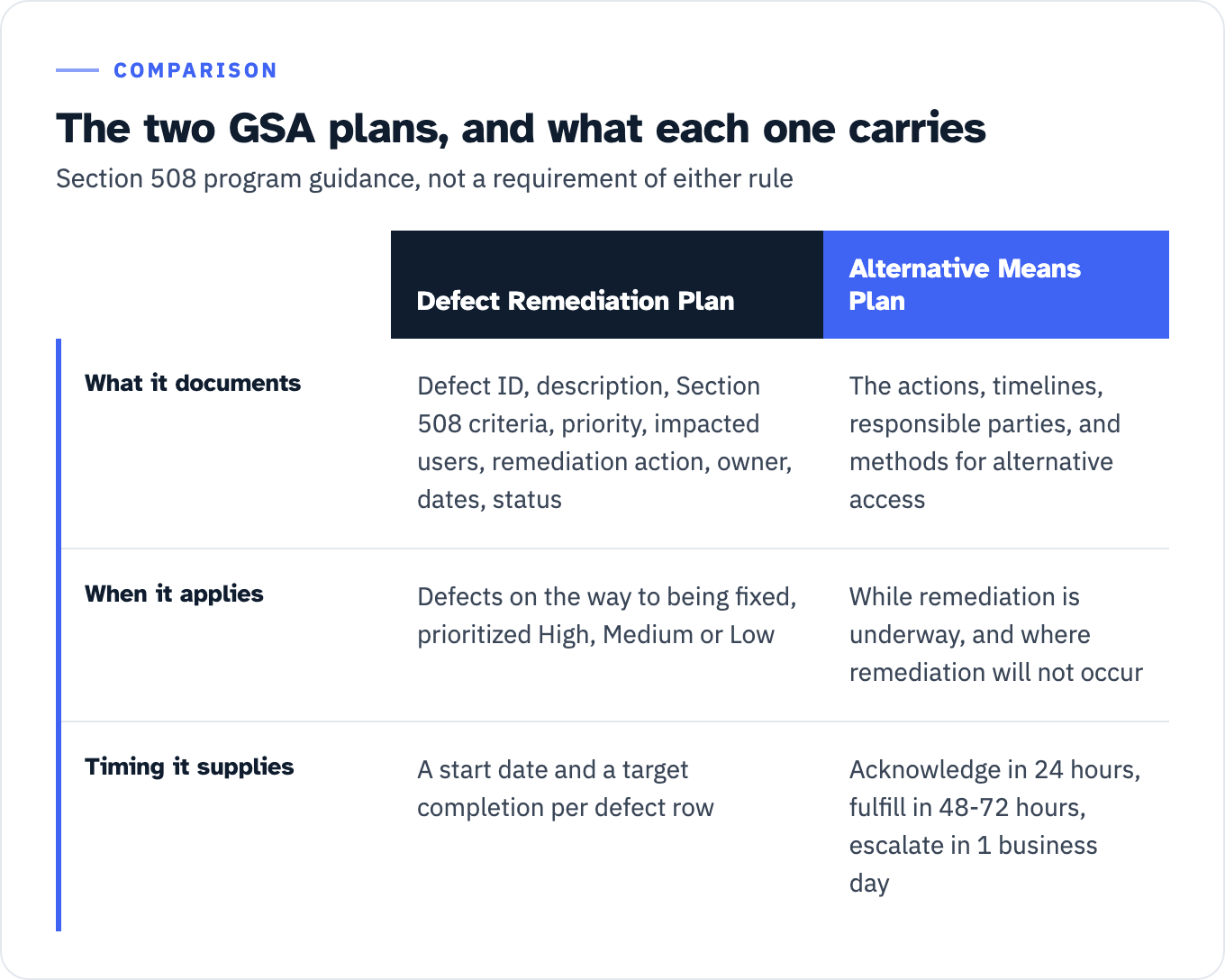
View the data as a table
| Defect Remediation Plan | Alternative Means Plan | |
|---|---|---|
| What it documents | Defect ID, description, Section 508 criteria, priority, impacted users, remediation action, owner, dates, status | The actions, timelines, responsible parties, and methods for alternative access |
| When it applies | Defects on the way to being fixed, prioritized High, Medium or Low | While remediation is underway, and where remediation will not occur |
| Timing it supplies | A start date and a target completion per defect row | Acknowledge in 24 hours, fulfill in 48-72 hours, escalate in 1 business day |
The case for putting a date on every branch comes from the government’s own self-assessment. The FY 2025 Governmentwide Section 508 Assessment, covering 60 agencies and 106 components, found testing and remediation to be “the weakest accessibility implementation area, with agencies reporting an average outcome of 2.00 (Low).” Approximately 70 percent of agencies reported no required remediation timelines across ICT types. Where timelines do exist, 80 percent to 90 percent of agencies reported remediating within them. GSA’s own conclusion from that pair of findings is that “governance, not technical feasibility, is the primary constraint.” The same assessment found 72% of agencies with standardized testing for electronic documents but only 55% using a risk-based approach for public web pages and electronic documents. The distance between having a test process and having a triage rule is the gap this page is written for.
Two off-ramps that are not triage tools
Two provisions get proposed as a way out of a large inventory, and both are worth naming so nobody builds a plan on them.
Fundamental alteration or undue financial and administrative burdens, at 28 CFR 35.204 and 45 CFR 84.88, is not a volume discount. The decision “must be made by the head of a public entity or their designee after considering all resources available for use in the funding and operation of the service, program, or activity, and must be accompanied by a written statement of the reasons for reaching that conclusion.” The burden of proof sits with the entity, the signature sits at the top of the organization, and the entity still has to take every other action that would not result in the burden. Our note on how Section 508 exceptions are the agency’s to claim makes the parallel point on the federal side: an exception is a determination somebody signs, not a status a document has.
The minimal-impact provision at 28 CFR 35.205 and 45 CFR 84.89 is measured against timeliness, privacy, independence and ease of use, not against a defect count or an inventory size. Neither provision is a triage instrument. Whether either applies to your situation is a question for your counsel, not for a vendor and not for this article.
One myth deserves killing here because it appears on a vendor pricing page selling PDF remediation: there is no $75,000 first-violation penalty attached to the Title II web rule. No monetary penalty attaches to that rule at all. The figure comes from the civil penalty the Attorney General can seek against a public accommodation under Title III, 42 U.S.C. 12188(b)(2)(C), codified at 28 CFR 36.504(a)(3), and even there it is stale: the inflation-adjusted table at 28 CFR 85.5 sets $118,225 for a first violation and $236,451 for a subsequent violation for penalties assessed after 3 July 2025. Do not put the $75,000 figure in a budget paper. It is a checkable error in a document written to be checked.
Next step
Spend two hours on the count before you spend anything on remediation. Fetch your own sitemap.xml, count the URLs ending in .pdf, .docx, .xlsx and .pptx, then crawl your top-level service sections and extract every link to those four extensions. The difference between the two numbers is the part of your inventory nobody has budgeted for, and on section508.gov that difference was five files against at least 85.
Then take the twenty documents at the top of the list that a member of the public uses to apply for something, and run gate 1 against each: is it currently used to apply for, gain access to or participate in a service, and does it carry instructions, manuals or question-and-answer files that travel with it. Those twenty and their attachments are the in-scope core, and they are what a pilot quote should be priced against.
If you want a second reader on the register before it goes to procurement, send us the inventory export with your compliance tier, and we will mark which rows fall inside an exception, which are rebuilds rather than remediations, and which belong in the first wave. The triage is where the money is.