
WCAG 2.2 success criteria: thresholds, exceptions and US rules
Two decisions, four facts each
Two decisions turn on these numbers. The first is a conformance column in a proposal: do 2.4.11 and 2.5.8 get a row at all, and does marking 1.4.12 Not Applicable for a PDF deliverable read as evasion. The second is an audit report that has landed with a finding list containing every icon button under 24 pixels, a line height objection, and a sticky header flagged for clipping a focus ring. Someone has to decide which of those findings is real before a sprint gets spent on them.
Both decisions have the same answer shape: the number, the named exceptions, the version the criterion arrived in, and the US rule that binds that version. Get all four and the decision is a lookup. Get only the number and you either pay for remediation nobody required or promise conformance nobody asked for, which is a finding waiting to happen.
Five criteria carry the numbers those two arguments turn on. Three of them are WCAG 2.1 criteria that two federal rules already bind on dates now in the CFR. Two of them are WCAG 2.2 criteria that no federal rule requires. Treating all five as “the new WCAG 2.2 requirements” is the single error that produces both wrong answers.
One boundary on scope. The rules checked for this page are the federal ones plus Colorado. Nothing here settles what the other forty-nine states require, and none of it is legal advice.
The threshold table
Every value below comes from the normative text of WCAG 2.2 or from the W3C Understanding document cited in that criterion’s section.
| Criterion | Level | Added in | Numeric threshold | Named exceptions | Which checked rule requires it |
|---|---|---|---|---|---|
| 1.4.10 Reflow | AA | WCAG 2.1, June 2018 | 320 CSS pixels of width for vertically scrolling content, 256 CSS pixels of height for horizontally scrolling content, with no loss of content or functionality | One: parts of the content which require two-dimensional layout for usage or meaning | ADA Title II from 26 April 2027, HHS Section 504 from 11 May 2027, Colorado public entities since 1 July 2024. Not Section 508 |
| 1.4.11 Non-text Contrast | AA | WCAG 2.1, June 2018 | 3:1 against adjacent colors | Inactive components, appearance determined by the user agent and not modified by the author, and graphics where a particular presentation is essential | ADA Title II from 26 April 2027, HHS Section 504 from 11 May 2027, Colorado public entities since 1 July 2024. Not Section 508 |
| 1.4.12 Text Spacing | AA | WCAG 2.1, June 2018 | Survives an override to line height 1.5 times font size, paragraph spacing 2 times, letter spacing 0.12 times, word spacing 0.16 times | One: human languages and scripts that do not use one or more of the four properties | ADA Title II from 26 April 2027, HHS Section 504 from 11 May 2027, Colorado public entities since 1 July 2024. Not Section 508 |
| 2.4.11 Focus Not Obscured (Minimum) | AA | WCAG 2.2, October 2023 | The focused component is not entirely hidden by author-created content. Partial obscuring passes | None in the criterion text. A note limits testing of user-repositionable content to its initial position | No federal rule, and not Colorado |
| 2.5.8 Target Size (Minimum) | AA | WCAG 2.2, October 2023 | 24 by 24 CSS pixels | Five: Spacing, Equivalent, Inline, User Agent Control, Essential | No federal rule, and not Colorado |
Two facts sit behind that last column, and both are worth stating before the criteria themselves.
W3C’s What’s new in WCAG 2.1 lists 1.4.10, 1.4.11 and 1.4.12 among the additions in that version. What’s new in WCAG 2.2 states that “WCAG 2.2 provides 9 additional success criteria since WCAG 2.1,” and 2.4.11 and 2.5.8 are two of them. And W3C is explicit on its WCAG standards page that the versions coexist: “WCAG 2.0, WCAG 2.1, and WCAG 2.2 are all existing standards. WCAG 2.2 does not deprecate or supersede WCAG 2.1, and WCAG 2.1 does not deprecate or supersede WCAG 2.0.” That sentence is why a 2008 standard can still be the operative one in a 2026 federal solicitation. Our page on which WCAG version each US rule requires works through every rule that names a version; this page stays on the five criteria.
1.4.10 Reflow: 320 by 256, and it is a zoom test
The normative text requires content to be presented “without requiring scrolling in two dimensions for: Vertical scrolling content at a width equivalent to 320 CSS pixels; Horizontal scrolling content at a height equivalent to 256 CSS pixels,” with no loss of information or functionality.
The word “equivalent” is doing real work. W3C states that “320 CSS pixels is equivalent to a starting viewport width of 1280 CSS pixels wide at 400% zoom,” and 256 CSS pixels is a 1024 CSS pixel starting height at 400 percent zoom. This is a desktop zoom test as much as a small-screen test, and a responsive mobile breakpoint does not settle it on its own. The documented failure technique F102 puts the procedure in one line: check the page at a desktop viewport width such as 1280px, then set the viewport width to 320px by narrowing the window or by zooming to 400 percent.
What counts as a loss is narrower than the word suggests. F102 asks, for each element not present at 320px, whether “there is a way to reach the same or equivalent content via disclosure widgets, pop-ups, or links to other views”. Content that restacks, collapses into an accordion or moves behind a menu button has not been lost. Content that disappears with no equivalent route has.
The exception is scoped to a part of the content, not to a page or a component type. The Understanding document says a table or map has the exception, “However, sections of content within the two-dimensional layout, such as each cell within a table, would still need to meet this success criterion.” A finding that says “the pricing table is excepted” is only half right: the cells inside it are still in scope.
Two more resolutions worth having in writing. A horizontally scrolling carousel is addressed by G225, a technique W3C lists as sufficient for 1.4.10, whose objective is that “Although the entire section requires horizontal scrolling to navigate between panels, each panel is designed to fit within a fixed width of 320 CSS pixels.” Its Example 1 is a product carousel. Techniques are not themselves requirements, so this is a documented route to conformance rather than the only one.
And two-dimensional scrolling at 200 percent zoom is not automatically a reflow failure: “If zooming in a web page by 200% results in a viewport that is smaller than the sizing requirements of Reflow, then two-dimensional scrolling may occur. This would not be a failure of Reflow, as the sizing of the viewport would be smaller than what Reflow requires.” That is 1.4.4 Resize Text territory, a different row.
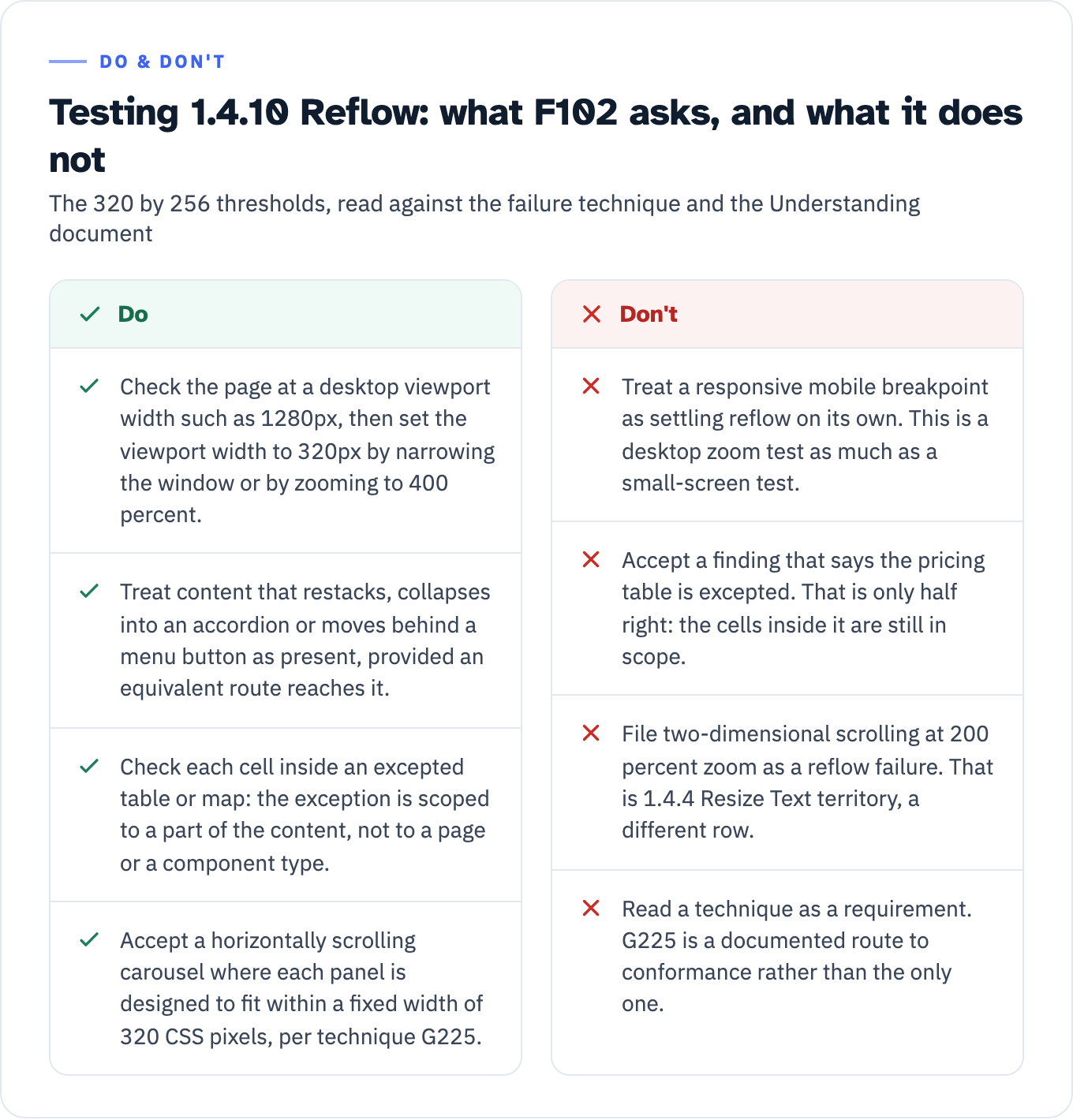
View the data as a table
| Do | Don’t |
|---|---|
| Check the page at a desktop viewport width such as 1280px, then set the viewport width to 320px by narrowing the window or by zooming to 400 percent. | Treat a responsive mobile breakpoint as settling reflow on its own. This is a desktop zoom test as much as a small-screen test. |
| Treat content that restacks, collapses into an accordion or moves behind a menu button as present, provided an equivalent route reaches it. | Accept a finding that says the pricing table is excepted. That is only half right: the cells inside it are still in scope. |
| Check each cell inside an excepted table or map: the exception is scoped to a part of the content, not to a page or a component type. | File two-dimensional scrolling at 200 percent zoom as a reflow failure. That is 1.4.4 Resize Text territory, a different row. |
| Accept a horizontally scrolling carousel where each panel is designed to fit within a fixed width of 320 CSS pixels, per technique G225. | Read a technique as a requirement. G225 is a documented route to conformance rather than the only one. |
1.4.11 Non-text Contrast: 3:1, and no border where the control is already identifiable
One number, two scoped categories. The visual presentation of “User Interface Components” and “Graphical Objects” must have a contrast ratio of at least 3:1 against adjacent colors, with exceptions built into each category: inactive components, appearance the user agent determines and the author does not modify, and graphics where “a particular presentation of graphics is essential to the information being conveyed.”
The threshold is hard. W3C’s note reads: “The 3:1 contrast ratios referenced in this success criterion is intended to be treated as threshold values.” Computed values “should not be rounded (e.g. 2.999:1 would not meet the 3:1 threshold)”. A tool that reports 2.99:1 as a pass has rounded.
Four clarifications in the Understanding document close four separate arguments.
- A visible boundary around a hit area is not required. “If a control has visible content (such as text or a sufficiently contrasting icon), which helps users identify the presence of the control, then a border or other indication of the overall boundary of the hit area is not required”. A demand for 3:1 borders on buttons that already carry labels is not a 1.4.11 finding.
- A state change does not have to meet 3:1 against the state it replaced “when they do not appear next to each other.” Non-adjacency is the condition, not a blanket exemption: W3C names visited links and mouse hover indicators as its examples, and holds the line that “the component must not lose contrast with the adjacent colors” in any state. Two link states that do sit side by side are not covered by this passage.
- Adjacent color means the color outside the component. W3C’s example: an input with a white internal background, dark border and white external background has white as its adjacent color.
- Measurement comes from the declared colors, not from the screen. W3C directs testers to “refer to the colors obtained from the user agent, or the underlying markup and stylesheets, rather than the non-text elements as presented on screen”, because authors do not control font smoothing and anti-aliasing.
1.4.12 Text Spacing: a resilience test, not an authoring specification
This criterion is a test rather than a specification, and its own note says so. WCAG 2.2 states: “Content is not required to use these text spacing values. The requirement is to ensure that when a user overrides the authored text spacing, content or functionality is not lost.”
So the four numbers, line height at least 1.5 times the font size, spacing after paragraphs at least 2 times, letter spacing at least 0.12 times and word spacing at least 0.16 times, are not a design system specification. They are the values a tester applies from outside. A design with tighter authored spacing does not fail 1.4.12. Clipping, truncation or overlap after the override does.
The Understanding document assigns two duties and no third: “The author requirement is both to not interfere with a user’s ability to override the author settings, and to ensure that content thus modified does not break content” in the ways its own figures illustrate. Failure technique F104 sets the procedure: open the page, then “Override the CSS on the page using a user stylesheet, bookmarklet, extension, or application with the values listed in the success criterion”. The machine-testable ACT rule for letter spacing is narrower still. It “checks that the style attribute is not used to prevent adjusting letter-spacing by using !important, except if it’s at least 0.12 times the font size.” An auditor who read your stylesheet and reported a line height number has not performed the criterion’s test.
Four boundaries follow from that framing:
- Truncation is conditional. “Where text is not truncated but it is when text is spaced, if there is no mechanism to show the truncated text, it fails this success criterion.” An ellipsis with a working disclosure passes.
- Text that cannot adapt is out of scope. W3C names images of text and “Video captions embedded directly into the video frames and not provided as an associated caption file”, and treats canvas text as an image of text.
- PDF is out of scope: “Currently, this SC does not apply to PDF, as the portable document format is not implemented using markup.” Not Applicable is the defensible ACR entry for a PDF-only deliverable, and it is the entry a reviewer can check against a W3C sentence rather than against your judgment. Our note on document remediation triage covers what does apply to those files.
- For software and non-web documents, WCAG2ICT narrows it further: the criterion “only applies to non-web documents and software that are implemented using markup languages and allow the user to modify these text spacing properties.”
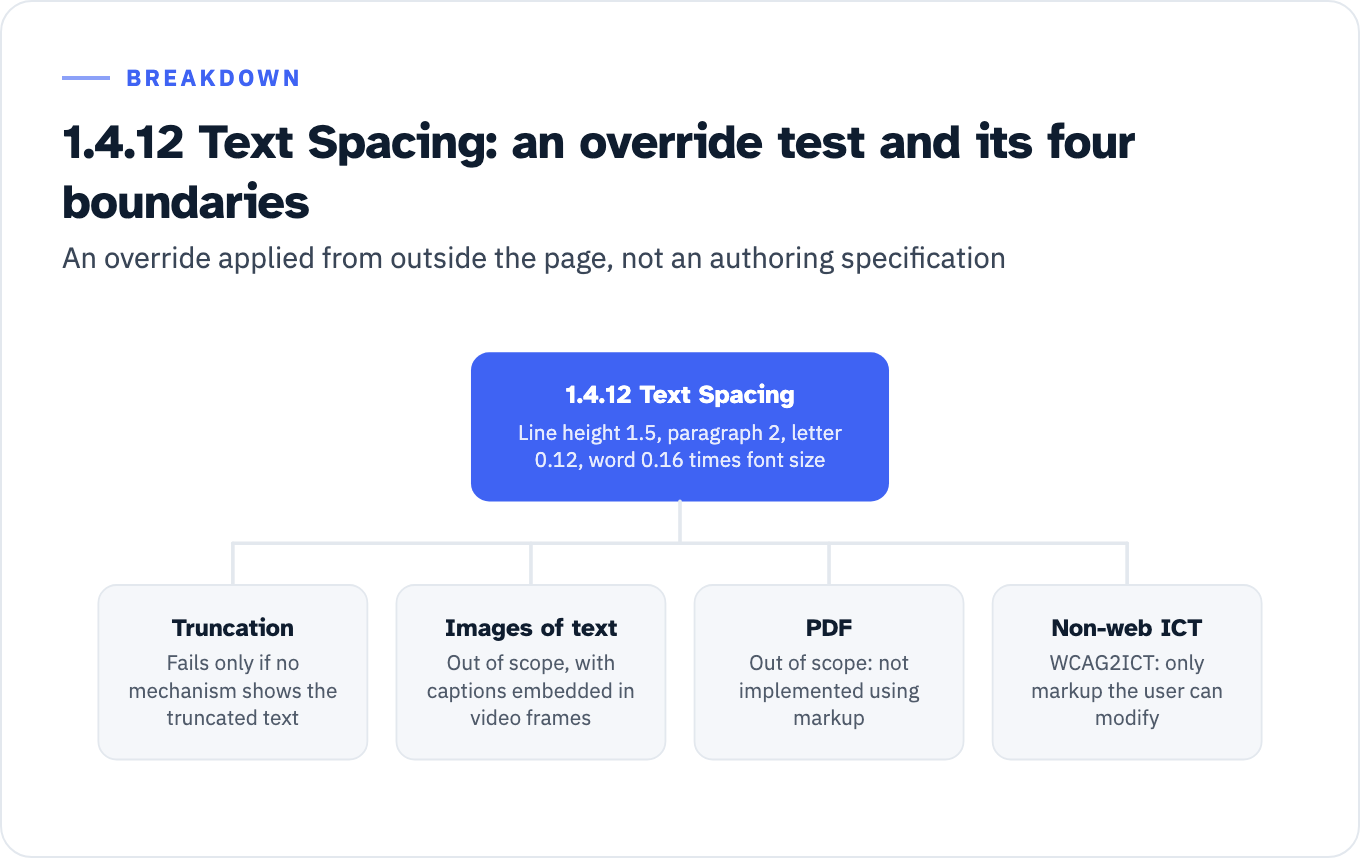
View the data as a list
1.4.12 Text Spacing: Line height 1.5, paragraph 2, letter 0.12, word 0.16 times font size
- Truncation: Fails only if no mechanism shows the truncated text
- Images of text: Out of scope, with captions embedded in video frames
- PDF: Out of scope: not implemented using markup
- Non-web ICT: WCAG2ICT: only markup the user can modify
2.4.11 Focus Not Obscured (Minimum): entirely hidden, and the component rather than the ring
The normative text: “When a user interface component receives keyboard focus, the component is not entirely hidden due to author-created content.” Entirely is the threshold. W3C is deliberate about it: “this AA criterion allows for the component receiving focus to be partially obscured by other author-created content,” and full visibility “is covered by the AAA criterion Focus Not Obscured (Enhanced),” which is 2.4.12 and reads “no part of the component is hidden by author-created content.”
The second precision point is what gets measured. W3C’s note states that “This criterion evaluates the focused component, rather than the focus indicator.” The component itself does not include the focus indicator when the test is applied, “unless the focus indicator is inside the component, or focus is indicated by a change to the component itself”. A sticky header that clips the outline on a still-visible button is not a 2.4.11 failure. It may be a 2.4.7 Focus Visible problem, which is a WCAG 2.0 Level AA criterion and therefore inside every rule in the table below that adopts a WCAG version, so the finding is not dismissed, it is re-filed under a row that actually binds.
The test in failure technique F110 is a tab pass in both directions: tab through the links and controls “Both progressing down through the page, and back up”, checking whether the focused element is completely obscured by other content. Running it downward only misses the sticky footer case.
Named outcomes from the Understanding document:
- A cookie banner implemented as sticky content fails “if it entirely obscures a component receiving focus.” W3C gives two general routes out, making the banner modal so it has to be dismissed first, or using scroll padding so it does not overlap other content, and a third that is conditioned on the type of content: “Notifications that do not require user action could also meet this criterion by closing on loss of focus.” The scroll padding route is documented as technique C43.
- Menus, select lists, comboboxes, date pickers and tooltips do not fail, because they are not expected to persist. Author-built panels that persist after the user moves focus away are “at risk of failing this criterion by obscuring the item with focus,” and a chat panel that stays open is the example W3C reaches for.
- Repositionable panels are judged where they start: “only the initial positions of user-movable content are considered for testing and conformance of this success criterion.”
- A translucent or blurring overlay can pass 2.4.11 and still fail 1.4.11. W3C says in that case “the focus indicator must be evaluated against the contrast requirements of 1.4.11 while its appearance is affected by the overlays.” Two rows, one screenshot.
2.5.8 Target Size (Minimum): 24 by 24, after five exceptions
The criterion sets one number and then names five conditions under which it does not apply. The size of a pointer target is at least 24 by 24 CSS pixels, “except when” Spacing, Equivalent, Inline, User Agent Control or Essential applies. W3C states the count in terms: “There are five exceptions.”
| Exception | What it removes | Test |
|---|---|---|
| Spacing | Undersized targets with enough clearance around them | Draw a 24 CSS pixel diameter circle centered on the target’s bounding box. It must not intersect another target, or another undersized target’s circle |
| Equivalent | Small controls duplicated elsewhere | ”The function can be achieved through a different control on the same page that meets this criterion” |
| Inline | Every link inside running text | The target is in a sentence “or its size is otherwise constrained by the line-height of non-target text” |
| User Agent Control | Native controls the author has not restyled, such as a browser date picker grid | ”The size of the target is determined by the user agent and is not modified by the author” |
| Essential | Map pins, dense data visualizations, and legally mandated layouts | ”A particular presentation of the target is essential or is legally required for the information being conveyed” |
A scan that reports every sub-24-pixel control as a failure has produced a candidate list, not a finding list. The Inline exception alone removes body-copy links, and W3C explains why: “text reflow based on viewport size makes it impossible for authors to anticipate where links may be positioned relative to one another.” The Essential exception uniquely carries the words “or is legally required,” which its Understanding document illustrates with jurisdictions that “legally require online forms to replicate paper forms, which can impose constraints on the size of targets,” alongside map pins and an interactive data visualization “where targets are necessarily dense.”
Two measurement details decide close cases.
Size is a square that fits inside the target. For a target to count as at least 24 by 24 CSS pixels, W3C requires that “it must be conceptually possible to draw a solid 24 by 24 CSS pixel square, aligned to the horizontal and vertical axis such that the square is completely within the target (does not extend outside the target’s area).” Heavy corner rounding on a nominally 24 pixel control can put it under.
Spacing is a circle, not a gap. Technique C42 gives the three steps: draw a 24px diameter circle centered on the target’s bounding box, check that it does not intersect any other target, check that it does not intersect any other undersized target’s circle.
W3C supplies the arithmetic so nobody has to invent an example. Three rows of icon buttons in the Understanding document: 24 by 24 pixel targets pass on size; 20 by 20 pixel targets that “have a 4 CSS pixel space between them” are below the size floor but pass under the Spacing exception; the same 20 by 20 targets that “have no space between them” fail it, “because the imaginary 24 CSS pixel diameter circles over the targets would intersect.” That is the whole dispute resolved with two numbers, and a reviewer can reproduce it.
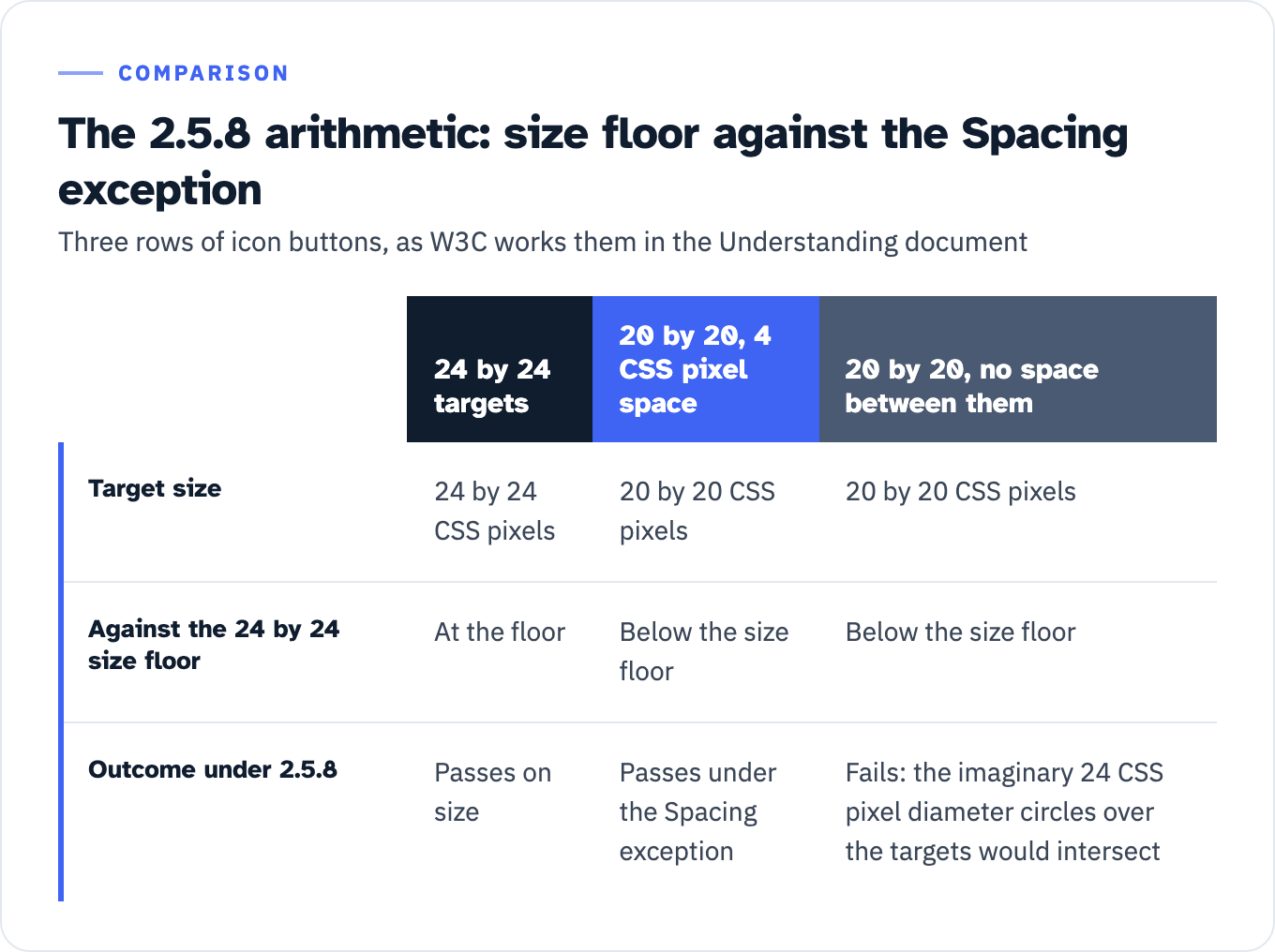
View the data as a table
| 24 by 24 targets | 20 by 20, 4 CSS pixel space | 20 by 20, no space between them | |
|---|---|---|---|
| Target size | 24 by 24 CSS pixels | 20 by 20 CSS pixels | 20 by 20 CSS pixels |
| Against the 24 by 24 size floor | At the floor | Below the size floor | Below the size floor |
| Outcome under 2.5.8 | Passes on size | Passes under the Spacing exception | Fails: the imaginary 24 CSS pixel diameter circles over the targets would intersect |
Two further points for remediation planning. Zoom does not help: “The requirement is independent of the zoom factor of the page; when users zoom in, the CSS pixel size of elements does not change.” And targets covered by something the user opened, a combobox list, a modal, a cookie banner, are out of scope while covered, but “The requirement does however apply to targets in any new content that appears on top of other content.” The AAA sibling, 2.5.5 Target Size (Enhanced), sets 44 by 44 CSS pixels, has four exceptions rather than five, has no Spacing exception, and drops “or is legally required” from Essential.
Which US rule actually binds each criterion
Level and version are independent axes. All five criteria are Level AA, and Level AA says nothing about which version a rule adopted.
| Rule | WCAG version bound | 1.4.10 | 1.4.11 | 1.4.12 | 2.4.11 | 2.5.8 | Date |
|---|---|---|---|---|---|---|---|
| Revised Section 508, 36 CFR part 1194 | WCAG 2.0 Level A and AA, IBR at 702.10.1 as the 11 December 2008 Recommendation | No | No | No | No | No | In force |
| ADA Title II web rule, 28 CFR part 35 subpart H | WCAG 2.1 Level A and AA, incorporating the 5 June 2018 edition | Yes | Yes | Yes | No | No | 26 April 2027 at population 50,000 or more, 26 April 2028 below that and for special district governments |
| HHS Section 504 web rule, 45 CFR part 84 subpart I | WCAG 2.1 Level A and AA | Yes | Yes | Yes | No | No | 11 May 2027 at fifteen or more employees, 10 May 2028 below that |
| Colorado, 8 CCR 1501-11, public entities only | WCAG 2.1 Level A and AA “as published on Sep. 21, 2023, not including any later amendments or versions”, and it reaches closed-functionality ICT | Yes | Yes | Yes | No | No | ICT in active use on or after 1 July 2024 |
| ADA Title III | No adopted technical standard in regulation | Not set | Not set | Not set | Not set | Not set | Not set |
The Section 508 row is the one worth reading twice. The Revised 508 Standards incorporate WCAG 2.0 by reference at 702.10.1 as the “W3C Recommendation, December 11, 2008,” and both operative scoping provisions point at it: E205.4 for electronic content and E207.2 for software and platform content each require conformance “to Level A and Level AA Success Criteria and Conformance Requirements in WCAG 2.0.” The Access Board’s own copy of the standards carries the same E207.2 text, so this is not a CFR reprint artifact. Federal procurement reaches it through FAR 39.203(a), which provides that “Unless an exception at 39.204 or an exemption at 39.205 applies, acquisitions for ICT supplies and services shall meet the applicable ICT accessibility standards at 36 CFR 1194.1.” A solicitation that cites Section 508 is citing the WCAG 2.0 Level A and AA set, and none of these five criteria is in it.
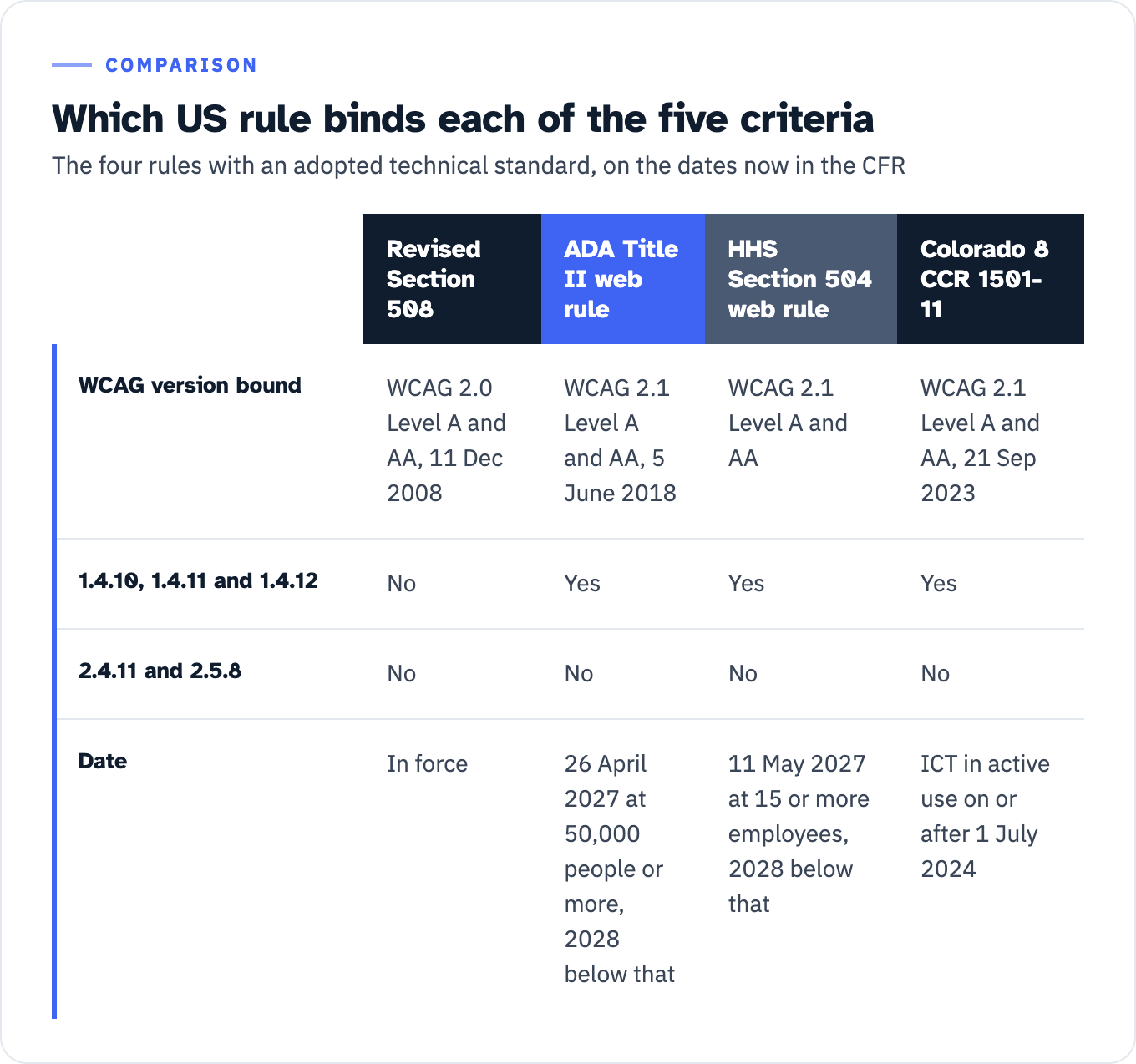
View the data as a table
| Revised Section 508 | ADA Title II web rule | HHS Section 504 web rule | Colorado 8 CCR 1501-11 | |
|---|---|---|---|---|
| WCAG version bound | WCAG 2.0 Level A and AA, 11 Dec 2008 | WCAG 2.1 Level A and AA, 5 June 2018 | WCAG 2.1 Level A and AA | WCAG 2.1 Level A and AA, 21 Sep 2023 |
| 1.4.10, 1.4.11 and 1.4.12 | No | Yes | Yes | Yes |
| 2.4.11 and 2.5.8 | No | No | No | No |
| Date | In force | 26 April 2027 at 50,000 people or more, 2028 below that | 11 May 2027 at 15 or more employees, 2028 below that | ICT in active use on or after 1 July 2024 |
The counts are checkable. Counting each success criterion block in the published documents against its own level marker on 27 July 2026 gives 61 criteria in WCAG 2.0 (25 A, 13 AA, 23 AAA), so 38 at Level A and AA; 78 in WCAG 2.1 (30 A, 20 AA, 28 AAA), so 50; and 86 in WCAG 2.2 (31 A, 24 AA, 31 AAA), so 55. The WCAG 2.2 figure excludes 4.1.1 Parsing, which that document still prints under the heading “Parsing (Obsolete and removed)” with no level marker attached. The 2.1 to 2.2 arithmetic reconciles with DOJ’s own description in the 2024 Title II final rule, which records that “WCAG 2.2 also includes six additional Level A and AA success criteria beyond those included in WCAG 2.1,” while 4.1.1 was removed, leaving a net of five.
That DOJ preamble matters for a second reason. Adopting WCAG 2.2 was on the table and was declined: “The Department believes that adopting WCAG 2.1 as the technical standard rather than WCAG 2.2 is the most prudent approach at this time.” The absence of 2.4.11 and 2.5.8 from Title II is a decision on the record. DOJ restated it in April 2026, describing WCAG 2.2 in the interim final rule extending the compliance dates as “a newer standard not incorporated by the 2024 rule.” A Federal Register full-text search for the phrase “WCAG 2.2” on 27 July 2026 returns seven documents, and none of them adopts it as a technical standard.
The dates above are the extended ones. The Title II dates moved out a year by the April 2026 interim final rule, which states that the compliance date for entities of 50,000 or more “is extended from April 24, 2026, to April 26, 2027.” The Section 504 dates moved the same way in an interim final rule published 11 May 2026: “extended from May 11, 2026, to May 11, 2027” for recipients with fifteen or more employees. Cite them as they currently stand in the CFR and note the instrument.
Keep one correction to hand, because a page that ranks for target size queries states the opposite. AllAccessible’s implementation guide for 2.5.8 states that “This is a Level AA requirement, meaning compliance is legally required under ADA, Section 508, and the European Accessibility Act (EAA)” before going on to the EAA’s own date. Section 508 incorporates WCAG 2.0 at 702.10.1, so 2.5.8 is not a Section 508 requirement, and the only ADA title with an adopted technical standard binds WCAG 2.1, which also excludes it. Both US limbs of that sentence are wrong.
Above the floor: state law and contract terms
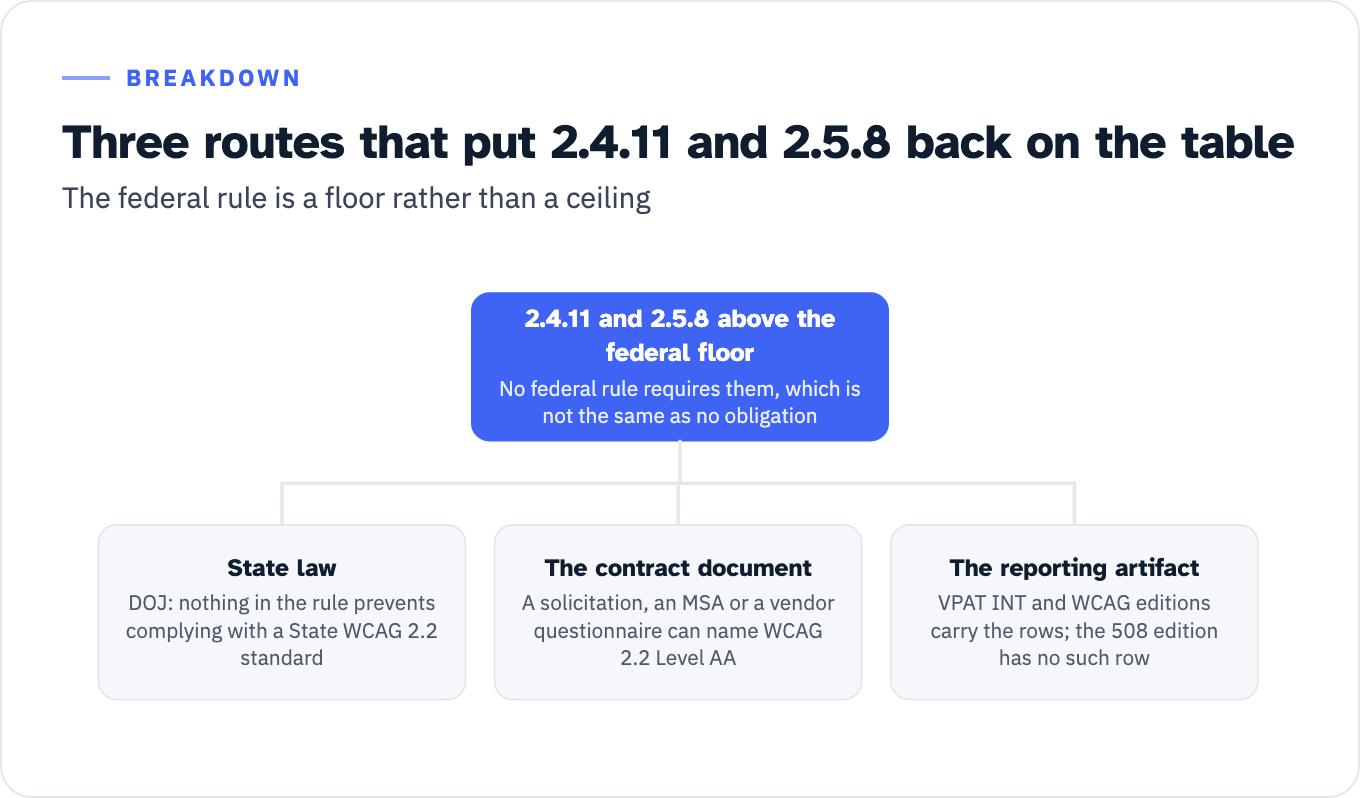
“No federal rule requires it” is not the same as “no obligation.” Three routes put 2.4.11 and 2.5.8 back on the table.
The first is state law, and DOJ addresses it directly. Explaining equivalent facilitation at 28 CFR 35.203, the Department writes that “if a State law requires public entities in that State to conform to WCAG 2.2, nothing in this rule would prevent a public entity from complying with that standard.” Colorado is the state checked for this page and it adopts WCAG 2.1, not 2.2, so it is not one of those states. What DOJ establishes is that the federal rule is a floor rather than a ceiling.
The second is the document you are actually answering. A solicitation, a master services agreement or a vendor questionnaire can name WCAG 2.2 Level AA, and the Title II rule does not answer what that document asks of you. DOJ’s framing of § 35.203 is that the provision “provides that nothing prevents a public entity from using designs, methods, or techniques as alternatives to those prescribed in this rule, provided that such alternatives result in substantially equivalent or greater accessibility and usability.” Whether a specific clause binds you, and on what terms, is a question for your counsel and your contracts team rather than for a WCAG table.
The third is the reporting artifact, which commits you on its own. The VPAT INT and WCAG editions carry 2.4.11 and 2.5.8 rows, so a vendor who submits an INT-edition ACR has undertaken to report on them, while the 508 edition has no such row. “Not legally required” and “not contractually required” are different findings, and only one of them is settled by the CFR.
View the data as a list
2.4.11 and 2.5.8 above the federal floor: No federal rule requires them, which is not the same as no obligation
- State law: DOJ: nothing in the rule prevents complying with a State WCAG 2.2 standard
- The contract document: A solicitation, an MSA or a vendor questionnaire can name WCAG 2.2 Level AA
- The reporting artifact: VPAT INT and WCAG editions carry the rows; the 508 edition has no such row
Colorado shows how far a state rule can move the same boundary in the other direction. 8 CCR 1501-11 incorporates WCAG 2.1 A and AA at a third dated snapshot, 21 September 2023, and applies it to closed-functionality ICT, which requires that “such products must provide documentation on accessibility features, provide user control over accessibility features, and conform with all applicable and achievable success criteria” of that version. Colorado’s covered-ICT list names digital kiosks and input devices, and its rules “apply to public entities as defined in section 24-34-301(18), C.R.S.”, which the rules define as “(a) Any state or local government; or (b) Any department, agency, special district, or other instrumentality of a state or local government.” So reflow, non-text contrast and text spacing are in scope for a kiosk a Colorado public entity provides or makes available, even though Section 508 would not require those three criteria. A privately operated kiosk in a Colorado mall is not reached by that rule at all. If you are drafting kiosk requirements, our page on kiosk accessibility requirements in an RFP sets out the four regimes.
WCAG2ICT, the W3C Group Note of 11 December 2025, is what makes these criteria testable there: 2.5.8 “applies directly as written,” replacing “user agent” with “user agent or other platform software” and “on the same page” with “in the same non-web document or software.” It also warns that some non-web formats “may lack a consistent base zoom level from which to evaluate this criterion.”
Which ACR row each criterion occupies
The VPAT is the blank template; the ACR is the completed report. Which edition of the template you start from decides whether these criteria have a row at all, and ITI publishes four. The current release is VPAT 2.5Rev, dated April 2025, in 508, EU, WCAG and INT editions. ITI states the reason plainly: “there are different versions of WCAG included in different editions of the VPAT … WCAG 2.0 is incorporated into the 508 edition … WCAG 2.1 is incorporated into the EU edition … WCAG 2.2 is incorporated into the WCAG and INT editions.”
The templates are downloadable and countable. Extracting the document text of all four on 27 July 2026 gives this:
| VPAT 2.5Rev edition | WCAG version | 1.4.10, 1.4.11, 1.4.12 | 2.4.11 and 2.5.8 | Notes |
|---|---|---|---|---|
| 508 | WCAG 2.0 | No rows. Zero occurrences of each | No rows | Still contains 4.1.1 Parsing. Scopes itself to WCAG 2.0 and the Revised 508 Standards published January 2017 |
| EU | WCAG 2.1 per ITI | Rows present, labeled “(Level AA 2.1 only)“ | No rows | Each row also lists the EN 301 549 clauses it maps to |
| WCAG | WCAG 2.2 | Rows labeled “(Level AA 2.1 and 2.2)“ | Rows labeled “(Level AA 2.2 only)“ | The template flags version provenance per row |
| INT | WCAG 2.2 plus the other standards | Rows present | Rows present | The edition section508.gov names for federal sellers alongside the 508 edition |
Two consequences for the proposal on your desk.
If you are selling to a federal agency, section508.gov states that “If you are selling to the U.S. federal government, then you must use the Revised Section 508 or the INT International Editions of the template (which include all Revised Section 508 requirements).” Choose the 508 edition and the question of what to write for 2.4.11 and 2.5.8 does not arise, because the rows do not exist. Choose INT and they do. Section508.gov also states that “Only Level A and AA are required in an ACR intended to inform U.S. federal procurement,” and that remarks “are required if the product either partially supports or does not support the guideline,” so a row you have marked anything other than Supports has to carry an explanation with it.
Second, the exclusions are printed on the form rather than argued for. Clarivate’s 32-page Accessibility Conformance Report for the Alexander Street Video Platform, INT edition, report date June 2025, labels its 1.4.10, 1.4.11 and 1.4.12 rows “(Level AA 2.1 and 2.2)” and marks each of them “Does not apply” against Revised Section 508 while listing the EN 301 549 clauses that do apply. The 2.4.11 and 2.5.8 rows carry “Does not apply” against both EN 301 549 and Revised Section 508. That pairing of Revised Section 508 with “Does not apply” occurs 18 times in the document. If a buyer challenges your Not Applicable entries, that is the artifact to point at. Our guidance on scoring a vendor ACR covers what else those rows have to carry.
A second published report shows what real remarks on these criteria look like, and one thing to avoid. Bloomsbury’s 33-page ACR for its Digital Resources Academic Platform, INT edition, report date 12 June 2026, records 1.4.12 as Partially Supports with the remark that “This success criterion has been validated for persons with low vision and reading disabilities using Steve Faulkner’s Text Spacing Bookmarklet.” That is a vendor confirming in writing that the criterion is an override test, and its listed remediations are the matching failure mode: placeholder text in a search field that “are no longer truncated when text spacing is applied.”
Its 2.5.8 remark is where the language slips. The report rates the criterion Partially Supports on the ground that two pagination buttons’ “target size intersect, resulting in both being smaller than 24 by 24 pixels.” That conflates the size requirement with the Spacing exception. What intersects is the 24 CSS pixel circle drawn on each bounding box, not the buttons, and intersecting circles do not make a target smaller. The finding may well be right; the sentence will not survive a reviewer who has read C42.
The dated-edition trap
Both federal web rules incorporate a fixed edition, not the live page. 28 CFR 35.200 names “https://www.w3.org/TR/2018/REC-WCAG21-20180605/” and 45 CFR 84.84 incorporates the same one. W3C’s standards page records that WCAG 2.1 has since been updated on 21 September 2023, 12 December 2024 and 6 May 2025, and that WCAG 2.2 has an update dated 12 December 2024.
For 1.4.11 and 1.4.12 the normative text is identical between the 2018 edition and the current one, so nothing turns on the difference. For 1.4.10 the informative note was rewritten. The 2018 note lists “images, maps, diagrams, video, games, presentations, data tables” as content requiring two-dimensional layout. The current note reads “images required for understanding (such as maps and diagrams), video, games, presentations, data tables (not individual cells),” which is narrower. A bid response arguing the reflow exception should quote the edition the rule names, and Colorado pins a third snapshot again. If you are writing a test evidence package, our page on whether a buyer will accept your test evidence works through the version question from the buyer’s side.
One more federal fact worth having before an evidence argument. The Access Board’s ICT Testing Baseline for Web, version 3.1, published 1 April 2024, states that although its tests reference the WCAG 2.2 Understanding articles for wording, “the Baselines are mapped only to Section 508 (and WCAG 2.0) requirements.” Searching the combined all web baselines page on 27 July 2026 returns zero occurrences of 1.4.10, 1.4.11, 1.4.12, 2.4.11 and 2.5.8, against five occurrences of 1.4.3, six of 1.4.4 and three of 2.4.7. The federal test process has no test for any of the five. That cuts both ways: it supports a Not Applicable position under a 508 solicitation, and it means a buyer asking for these criteria is asking for something outside the Baseline, which should be priced and scoped as such.
What to do with this today
Four decisions, each answerable from the tables above.
- Pick the template edition before testing starts, not after. The edition fixes the WCAG version, the version fixes the criteria list, and the criteria list fixes the test hours. Federal sale: 508 or INT. Mixed federal, state and higher education pipeline: INT, and accept that 2.4.11 and 2.5.8 get real rows. Our VPAT and ACR testing work starts at that choice for the same reason.
- For a PDF-only deliverable, write Not Applicable on 1.4.12 and cite the sentence. “Currently, this SC does not apply to PDF, as the portable document format is not implemented using markup.” A one-line remark with that citation converts a judgment call into a checkable fact.
- Re-run any 1.4.12 finding that came from reading CSS. The test is an override applied from outside the page, per F104. If the report does not name the stylesheet, bookmarklet or extension used, the criterion has not been tested.
- Send every 2.5.8 finding back through the five exceptions before it enters a sprint plan. Inline removes body-copy links. User Agent Control removes unstyled native controls. Spacing rescues a 20 by 20 target with a 4 CSS pixel gap. Equivalent rescues anything duplicated in a conforming control on the same page. Essential removes map pins and dense visualizations. What remains after that filter is the finding list.
If you want the same filter applied to your own product rather than to a table, a scoped WCAG audit that states its version and its exception handling up front is the deliverable. Send us the solicitation clause or the vendor ACR page that names the version, and we will tell you which of these five criteria are in scope for it before you commission anything.