
Kiosk ADA compliance: RFP requirements and acceptance tests
The requirement with no number in it
You have a draft solicitation for self-service kiosks, a requirements section that says “must be ADA compliant,” and a vendor response that says the same thing back to you. Neither sentence has a number in it, and neither one tells you what to reject at delivery.
There is no federal page to send you to. GSA’s section508.gov sitemap listed 608 URLs when it was pulled on 27 July 2026, and not one of them contains the word kiosk. What exists instead is four separate regimes, in force right now, that answer the question differently. Pick the wrong one and you will either specify values that do not apply to your buy or leave the only enforceable numbers out of the contract.
This page gates by regime before quoting a single requirement, gives you the provision citation and the value to specify for each requirement, and gives you the acceptance test. There is no governmentwide test process for hardware, so whatever you do not write into the contract you will be accepting on assertion.
One boundary. This is procurement and testing guidance, not legal advice. Whether a given installation is fixed or built-in, and what your organization’s obligations are, belong to your counsel.
Gate one: who is buying
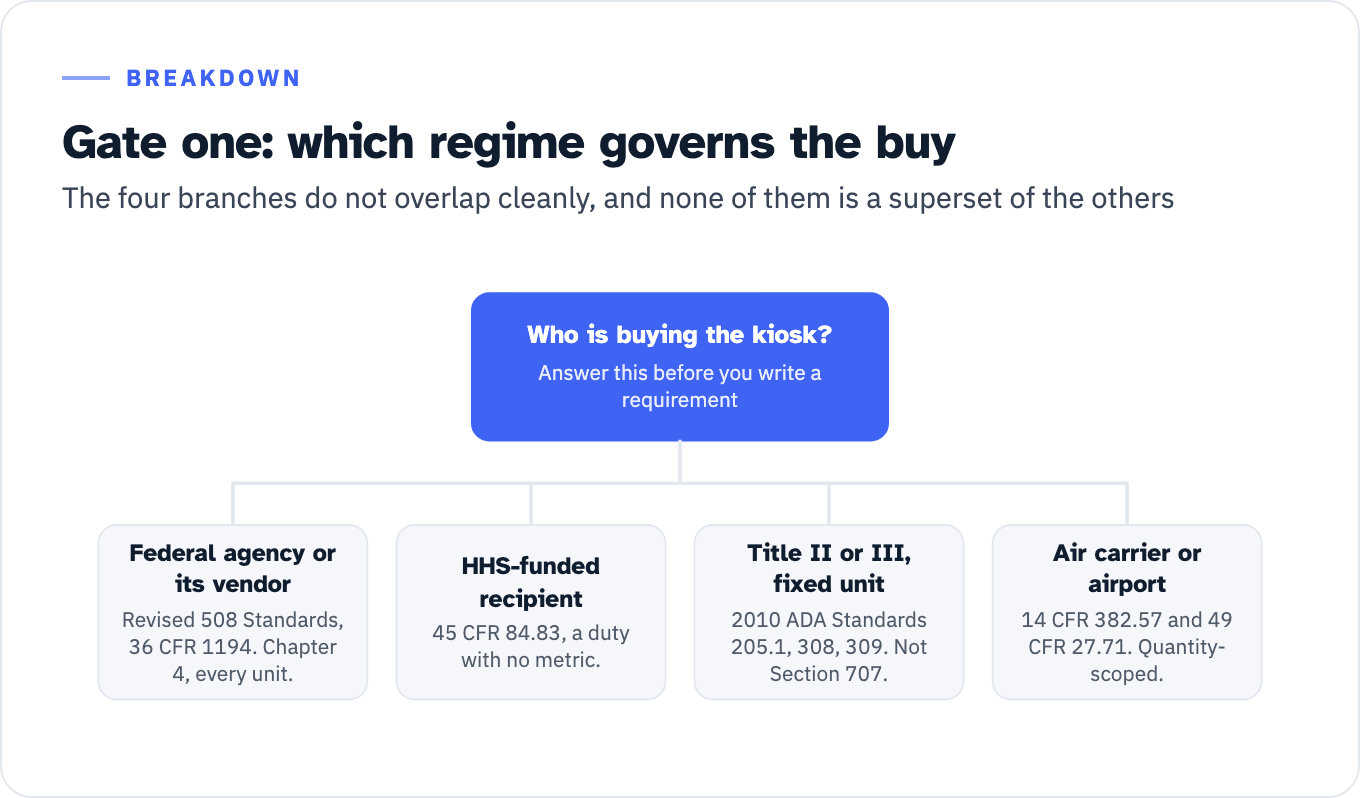
Answer this before you write a requirement. The four branches do not overlap cleanly, and none of them is a superset of the others.
View the data as a list
Who is buying the kiosk?: Answer this before you write a requirement
- Federal agency or its vendor: Revised 508 Standards, 36 CFR 1194. Chapter 4, every unit.
- HHS-funded recipient: 45 CFR 84.83, a duty with no metric.
- Title II or III, fixed unit: 2010 ADA Standards 205.1, 308, 309. Not Section 707.
- Air carrier or airport: 14 CFR 382.57 and 49 CFR 27.71. Quantity-scoped.
- Are you a federal agency, or a vendor selling a kiosk into one?
- Yes: the Revised 508 Standards, codified at 36 CFR part 1194. Chapter 4 Hardware, Chapter 5 Software, Chapter 6 Support Documentation and Services, with Chapter 3 Functional Performance Criteria as the gap filler. The hook is FAR 39.203(a): “Unless an exception at 39.204 or an exemption at 39.205 applies, acquisitions for ICT supplies and services shall meet the applicable ICT accessibility standards at 36 CFR 1194.1.” Record the applicable set using GSA’s three-step determination process and its Revised 508 Standards Applicability Checklist.
- Are you a recipient of HHS financial assistance, such as a hospital, clinic or human services agency?
- Yes: 45 CFR 84.83 creates the duty and sets no metric. 45 CFR 84.84 sets WCAG 2.1 Level A and AA for web content and mobile apps, and reaches the kiosk only where the kiosk relies on those.
- Are you a place of public accommodation or a state or local government entity, buying a kiosk that is not an ATM and not a fare machine?
- Yes, and the unit is fixed or built-in: the 2010 ADA Standards, through 205.1, 309 and 308. Section 707 does not reach you.
- Yes, and the unit is moveable: no ADA technical standard on the current record reaches the equipment itself. The operative duty is 28 CFR 36.303 for public accommodations, and effective communication for public entities.
- Are you an air carrier, or an airport operator with shared-use units?
- Yes: 14 CFR 382.57 for carriers, 49 CFR 27.71(j) and (k) for airport operators on shared-use kiosks. This is the only branch with a complete, in-force, kiosk-specific technical standard, and it is quantity-scoped rather than device-scoped.
| Regime | Trigger | Governing text | Kiosk-specific technical standard? | Quantity scoping |
|---|---|---|---|---|
| Federal procurement | Agency buys ICT hardware | Revised 508 Standards, 36 CFR 1194; FAR 39.203 | Yes, by way of the closed-functionality and hardware chapters | Every unit. The Access Board’s comparison matrix puts it against the ADA rule: “the 508 Standards apply to each device with closed functionality” |
| HHS-funded recipient | Program or activity delivered through a kiosk | 45 CFR 84.83, plus 84.84 for the web and mobile layer | No. 84.83 states a duty with no metric and no date | Not stated |
| ADA Title II or Title III | Fixed or built-in element in an accessible space | 2010 ADA Standards 205.1, 308, 309; 707 for ATMs and fare machines only | Only for ATMs and fare machines | None for a general kiosk. 220.1’s “at least one of each type provided at each location” scopes only ATMs and self-service fare vending, collection or adjustment machines. 205.1 reaches operable parts wherever they sit on an accessible element or in an accessible room or space |
| Air carrier or airport | Automated airport kiosk at a US airport with 10,000 or more annual enplanements | 14 CFR 382.57; 49 CFR 27.71(j) and (k) | Yes, complete and numeric | 25 percent of kiosks in each location, by 12 December 2022, and all new units installed on or after 12 December 2016 until that share is met |
Do not wait for the Access Board rule
The Access Board opened a rulemaking on self-service transaction machines and self-service kiosks with an advance notice of proposed rulemaking published 21 September 2022, docket ATBCB-2022-0004, RIN 3014-AA44. Comments closed 21 November 2022. Three checkable facts describe where it stands, all re-verified on 27 July 2026:
- A Federal Register query on RIN 3014-AA44 returns a count of exactly one document, the ANPRM itself.
- The most recent Unified Agenda to carry the RIN is Fall 2024, where it sits at Proposed Rule Stage, with a projected NPRM date of December 2024 and a legal deadline recorded as “None.” Requesting the same RIN under the Spring 2025 and Fall 2025 publication IDs returns Fall 2024 as the latest agenda that carried it.
- The Board’s own SSTM page describes the next steps as reviewing comments and developing a preliminary regulatory impact analysis and an initial regulatory flexibility analysis. Both are pre-proposal steps.
Even a finished guideline would not bind you directly. The Fall 2024 agenda abstract states that DOT and DOJ “are expected, via separate rulemakings, to adopt these amended guidelines as enforceable standards,” and that HHS “may elect to include these accessibility guidelines for self-service transaction machines in their regulations for compliance with Section 504.”
One consequence for bid evaluation. An ANPRM imposes no obligation. Its own abstract says the Board “will consider comments received in response to this ANPRM in its development of these guidelines for SSTMs and self-service kiosks in a future rulemaking.” If a proposal cites the September 2022 notice as the authority for a design value, the citation is to a description of existing ATM and fare-machine requirements, not to a kiosk rule. Ask for the underlying provision.
The federal branch: Chapter 4, by provision, with the value to specify
A kiosk lands inside Chapter 4 by definition rather than by argument. The Revised 508 Standards define closed functionality as characteristics “that limit functionality or prevent a user from attaching or installing assistive technology,” and name “self-service machines, information kiosks” as examples. E206.1 puts hardware that transmits information or has a user interface into Chapter 4. GSA states the trigger in one line: “Chapter 4: Hardware applies if the ICT is a tangible device or if it has a physical component,” and its ICT Hardware Overview leads its examples list with self-service kiosks at the Social Security Administration, a National Park ticketing kiosk and a handheld VA hospital check-in tablet.
The table below is the requirements section. Every value comes from the provision cited beside it. Chapter 4 is written in conditional form, so each value cell opens with the trigger the provision states: a row whose trigger is absent from your unit is a Not Applicable in the report, not a finding. Every acceptance test is written as something a person can perform at a factory acceptance test or a site walk and record a yes or a no against.
| Requirement | Provision | Value to specify, with its trigger | Acceptance test at delivery |
|---|---|---|---|
| Works without user-supplied assistive technology | 402.1 | ICT with closed functionality: operable “without requiring the user to attach or install assistive technology other than personal headsets or other audio couplers” | Complete one full transaction with no attached device, then one using a personal headset through the provided connector |
| Speech output | 402.2, 402.2.1, 402.2.2 | ICT with a display screen: speech for all information displayed on screen, and where transactional outputs are provided, “all information necessary to verify a transaction.” Subject to the six exceptions at 402.2, which release the machine location, the date and time, the customer account number and the machine identifier, and permit audible tones where user input is not displayed as entered for security | Run the two separately. Read the screen aloud against the speech for each step, then verify the transaction confirmation is fully spoken. Record which exceptions the vendor is claiming, by number |
| Speech delivery and coordination | 402.2.3 | Industry standard connector or telephone handset; recorded, digitized human or synthesized; “coordinated with information displayed on the screen” | Confirm the connector type, then check for drift between screen state and spoken state at three points in the flow |
| Speech user control | 402.2.4 | Automatic interrupt when a transaction is selected, plus repeat and pause | Select a transaction mid-utterance and confirm interrupt. Exercise repeat and pause on the same screen |
| Braille start instructions | 402.2.5 | Where speech output is required by 402.2: contracted braille conforming to 36 CFR part 1191, Appendix D, 703.3.1. Devices for personal use are excepted | Verify grade and dimensions against 703.3.1, and that the instruction actually starts speech mode |
| Private listening | 402.3.1 | Where the ICT provides private listening: a mode of operation for controlling volume, plus magnetic wireless coupling to hearing technologies where output is by a transducer typically held to the ear | Test the volume control range, and coupling with a telecoil-equipped device |
| Non-private listening | 402.3.2 | Where the ICT provides non-private listening: incremental volume control amplifying “up to a level of at least 65 dB,” with automatic reset to default after every use | Measure amplified output. Complete a transaction at maximum volume, then confirm the next session starts at default |
| Screen characters | 402.4 | At least one mode sans serif; 3/16 inch (4.8 mm) minimum on the uppercase I where the ICT does not provide a screen enlargement feature; light on dark or dark on light | Measure a rendered capital I. Record whether a screen enlargement feature exists, because it decides whether the 3/16 inch minimum applies |
| No automatic screen blanking | 405.1 | ”When speech output required by 402.2 is enabled, the screen shall not blank automatically” | Enable speech, then idle through the longest screen timeout and observe |
| Standard connections | 406.1 | Where data connections used for input and output are provided: at least one of each type in “industry standard non-proprietary formats” | Inventory the connectors and name the standard for each |
| Key and control contrast | 407.2 | Where keys and controls are provided: contrast visually from background surfaces, characters and symbols light on dark or dark on light. No ratio is stated | Visual check, recorded in the test log. Do not accept a numeric ratio claim as evidence against this provision, because the provision does not set one |
| Tactile controls | 407.3, 407.3.1 | At least one input control per function, “operable by touch and tactilely discernible without activation” | Identify every control by touch alone, with the screen off, without triggering any of them |
| Numeric keys | 407.3.3 | Where numeric keys are provided: 12-key ascending or descending layout, number five key tactilely distinct | Touch check on the five key, plus layout inspection |
| Key repeat | 407.4 | Where a keyboard with key repeat is provided: delay before repeat “fixed at, or adjustable to, 2 seconds minimum.” A kiosk with no keyboard is Not Applicable here | Confirm a key-repeat keyboard exists, then hold a key and time the delay to first repeat |
| Timeout extension | 407.5 | Where a timed response is required: alert “visually, as well as by touch or sound,” plus an opportunity to indicate more time is needed | Idle to the timeout warning. Confirm two channels of alert and a working request-more-time control |
| Activation force | 407.6 | ”The force required to activate operable parts shall be 5 pounds (22.2 N) maximum,” one-handed, no tight grasping, pinching or twisting | Gauge every operable part. Note that 407.6 is titled Operation, so a proposal that cites a force-titled provision number has not read the standard |
| Dispensed media orientation | 407.7 | Where tickets, fare cards or keycards are provided: “tactilely discernible” orientation where orientation matters | Dispense one of each and identify orientation by touch |
| Which parts have to be in reach | 407.8 | At least one of each type of operable part on stationary ICT at a conforming height, and operable parts used with speech output “shall not be the only type of operable part complying with 407.8 unless that part is the only operable part of its type” | Inventory operable part types. Confirm the conforming set is not just the headphone jack and the keys beside it |
| Reach, side, unobstructed | 407.8.2.1 | Part 10 inches (255 mm) or less beyond the vertical reference plane: 48 inches (1220 mm) maximum, 15 inches (380 mm) minimum above the floor | Establish the vertical reference plane first, 48 inches (1220 mm) long minimum per 407.8.1.1, centered on the operable part at the leading edge of maximum protrusion, then measure height |
| Reach, side, obstructed | 407.8.2.2 | Part more than 10 and up to 24 inches (610 mm) beyond the plane: 46 inches (1170 mm) maximum, 15 inches minimum, and never more than 24 inches beyond | Measure offset first, then height. This is the branch a shroud or surround puts you in |
| Reach over part of the machine | 407.8.2 | That portion of the ICT: 34 inches (865 mm) maximum | Measure the protruding element, not the control |
| Reach, forward, unobstructed | 407.8.3.1 | 48 inches maximum, 15 inches minimum | Establish the forward plane, 30 inches (760 mm) long minimum per 407.8.1.2, then measure at the leading edge of maximum protrusion |
| Reach, forward, obstructed | 407.8.3.2 and Table 407.8.3.2.1 | Reach depth 25 inches (635 mm) maximum. Height 48 inches maximum below 20 inches (510 mm) of depth, 44 inches (1120 mm) maximum from 20 to 25 inches | Measure depth, then apply the band. A counter or bin in front of the control moves you here |
| Knee and toe space | 407.8.3.2.2 | 27 inches (685 mm) high minimum, 25 inches deep maximum, 30 inches (760 mm) wide minimum, clear of obstructions | Measure all three. Check for cable runs and leveling feet inside the envelope |
| Display sightline | 408.2 | Where stationary ICT provides one or more display screens: at least one of each type visible from a point 40 inches (1015 mm) above the floor space where the screen is viewed | Sight from 40 inches. Repeat per screen type if the unit has more than one |
| Flashing | 408.3 | Where the ICT emits light in flashes: no more than three flashes in any one-second period, unless below the WCAG 2.0 general flash and red flash thresholds | Record the attract loop and any error states, then count |
| Status indicators | 409.1 | Where provided: discernible “visually and by touch or sound” | For each indicator, confirm a second channel |
| Color coding | 410.1 | Where provided: color “shall not be used as the only means of conveying information, indicating an action, prompting a response, or distinguishing a visual element” | Walk the flow in grayscale. This is 410, not 402, 407 or 408, and 302.3 Without Perception of Color is its functional counterpart |
| Audible signals | 411.1 | Where provided: sound not the only means of conveying information, indicating an action or prompting a response | Walk the flow muted |
| Biometrics | 403.1 | Where provided: not the only means of identification or control, unless at least two options using different biological characteristics are provided | Count the biometric options and the non-biometric fallback |
Two scoping provisions belong in the same section of the document. E202.5 exempts status indicators and operable parts “located in spaces that are frequented only by service personnel,” which is where a rear service panel belongs. And where no conforming product exists, E202.7 Best Meets applies, with E202.7.1 making the record mandatory: “The responsible agency official shall document in writing” the non-availability, including market research and which provisions cannot be met, and the basis for the best-meets determination. FAR 39.205(c)(3) prescribes the same content for the acquisition file. That determination is a named artifact with a named signer, and it is the difference between a documented exception and an undocumented gap. For how the exception and exemption paths differ, see Section 508 exceptions and agency determinations.
The gap in Chapter 4: clear floor space
The Revised 508 Standards do not require a clear floor space at a kiosk. This is not an inference. The Access Board’s own SSTM comparison matrix, filed in its rulemaking docket, states it: “The requirement for clear floor space is not explicit in the 508 Standards.” The 30 inch by 48 inch clear floor space dimension comes from ADA 2010 Standards 305, reached through 707.2 for an ATM or fare machine and through 309.2 for operable parts.
A federal kiosk spec that wants clear floor space has to import it. Write it as a contract term, cite 2010 ADA Standards 305 as the source of the dimension, and label it in the requirements matrix as elected rather than imposed by 36 CFR 1194. The same matrix records that the 508 reach specifications “are consistent with those in the ADA and ABA Guidelines (308),” so importing 305 alongside 407.8 does not create a conflict.
The software layer, and why it says WCAG 2.0
The Revised 508 Standards incorporate WCAG 2.0, not 2.1, and the reason is chronological. DOJ’s own Title II preamble records that when the Access Board adopted WCAG 2.0 for federal web content in 2017, “WCAG 2.1 had not been finalized.” E207.2 binds user interface components and platform and application content to Level A and Level AA success criteria and conformance requirements in WCAG 2.0. Non-web software is excepted from four success criteria, 2.4.1 Bypass Blocks, 2.4.5 Multiple Ways, 3.2.3 Consistent Navigation and 3.2.4 Consistent Identification, and from Conformance Requirement 3 Complete Processes. E207.3 then puts the multi-step flow back in scope: where non-web software requires multiple steps, “all software related to the activity to be accomplished shall conform to WCAG 2.0 as specified in E207.2.” A kiosk checkout is a multi-step activity, so it is tested end to end, not screen by screen. For the map of which US rule points at which version, see WCAG version requirements by rule.
Where Chapters 4 and 5 do not address a function, E204.1 sends it to the Chapter 3 Functional Performance Criteria, the nine criteria at 302.1 through 302.9. This is the provision to cite when a kiosk function has no technical provision behind it, and a closed self-service machine is the cleanest real-world case for it. The way those criteria are reported is covered in functional performance criteria rows in an ACR.
Two statements from WCAG2ICT, a W3C Group Note dated 11 December 2025 that is informative rather than normative, should go straight into your evidence requirements. On contrast: “Contrast requirements for hardware are out of scope for WCAG2ICT (and this success criterion),” and where lockdown prevents programmatic measurement, “precise quantifiable testing of color contrast cannot be performed by a third party.” On evidence: “Photographs (e.g., of a hardware display) are not sufficient for testing that content meets this success criterion.” If a vendor’s contrast evidence is a photograph of the screen, that is a documented insufficiency, not a judgment call. WCAG2ICT also identifies a legitimate not-applicable a reviewer should accept: on a kiosk whose keys map directly to functions with no on-screen focus, “there is no concept of focus, and therefore keyboard traps cannot exist and this success criterion would be satisfied.”
Writing acceptance tests when no federal test process exists
This is where the published federal material stops. The Access Board’s ICT Testing Baseline Portfolio states its own coverage: “The Portfolio includes a Baseline for Web and a Baseline for Documents. Additional Baselines will be developed for all ICT covered by Section 508 including software and hardware.” The DHS Trusted Tester process is published as a “Section 508 Conformance Test Process for Web.” Requiring Trusted Tester certification in a kiosk solicitation therefore buys you nothing against Chapter 4. The Portfolio is also explicit that a Baseline is not “A step-by-step testing procedure or methodology.”
So you write the tests. One public federal artifact gives you the question form without inventing anything, and GSA points at a second one you should retrieve for yourself.
The VA Section 508 Platform Hardware Standards Checklist, linked by GSA as a related resource, converts Chapter 4 provisions into yes, no or not-present questions with a four-level severity grading. Its 407.6 row asks “Does the equipment allow for operation without requiring more than 5 pounds of force?” rather than restating the provision. It grades 402.2.2 Transactional Outputs, 402.2.3 Speech Delivery, 407.3.1 Tactilely Discernible, 407.5 Timed Response, 408.2 Visibility and 408.3 Flashing as Critical, where Critical means an issue that “results in severe barriers for users with disabilities, either because content is blocked or functionality is inoperable.” It grades 407.6 and the whole 407.8 reach family as Medium. That severity split is a defensible acceptance model: a Critical finding blocks acceptance, a Medium finding goes to a dated corrective action.
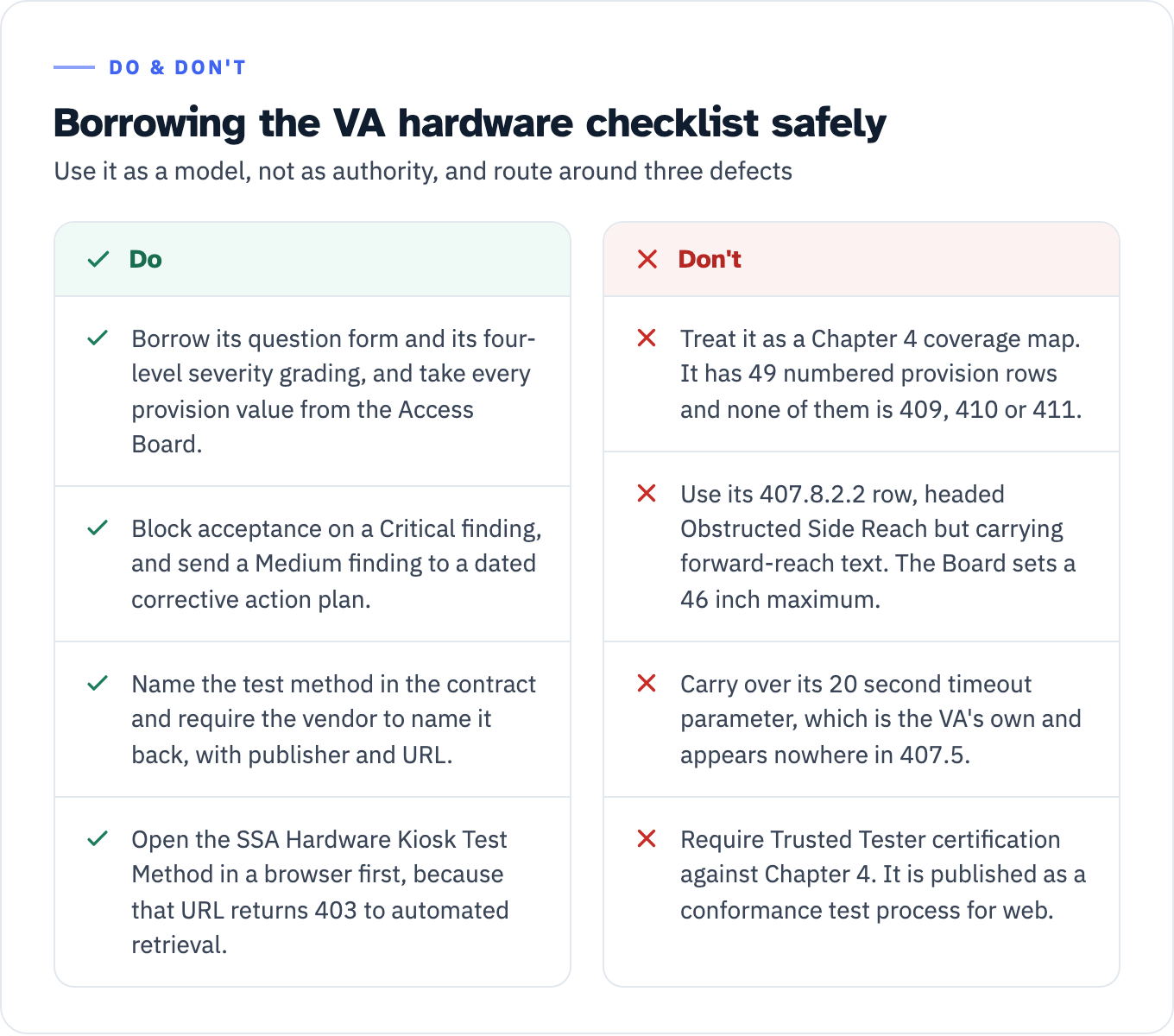
Use it as a model, not as authority, and route around three defects.
- It contains 49 numbered provision rows and none of them is 409 Status Indicators, 410 Color Coding or 411 Audible Signals. Those three numbers appear in the document only inside the reproduced text of the 402.2 exceptions, so the checklist cannot serve as a Chapter 4 coverage map.
- Its 407.8.2.2 row is headed Obstructed Side Reach but carries forward-reach text, pointing the reader at 407.8.3.2 and ending in the truncated sentence “The maximum allowable forward rean operable part shall be 25 inches (635 mm).” The Access Board’s 407.8.2.2 is a side-reach provision with a 46 inch maximum.
- Its 407.5 row asks “Did the timeout notification whether visually, sensory, or audibly display for less than 20 seconds?” That 20 second parameter is the VA’s own and appears nowhere in 407.5.
Take every provision value from the Access Board and borrow only the question form and the severity levels.
The second artifact is the Social Security Administration’s Hardware Kiosk Test Method, which GSA lists under Related Resources on its ICT Hardware Overview and links to https://www.ssa.gov/accessibility/testmethod.html?tab=1. That URL returns 403 to automated retrieval, so nothing is said here about what it contains. Open it in a browser before you name it in a solicitation.
Whatever you land on, name it in the contract and require the vendor to name it back. ITI’s own template instruction is the model: “If a published test method was used, provide name, publisher, URL link of the test method.” The wider question of what evidence a buyer should accept from a vendor is covered in will you accept our test evidence, and the clause mechanics in Section 508 contract clauses and the QASP.
View the data as a table
| Do | Don’t |
|---|---|
| Borrow its question form and its four-level severity grading, and take every provision value from the Access Board. | Treat it as a Chapter 4 coverage map. It has 49 numbered provision rows and none of them is 409, 410 or 411. |
| Block acceptance on a Critical finding, and send a Medium finding to a dated corrective action plan. | Use its 407.8.2.2 row, headed Obstructed Side Reach but carrying forward-reach text. The Board sets a 46 inch maximum. |
| Name the test method in the contract and require the vendor to name it back, with publisher and URL. | Carry over its 20 second timeout parameter, which is the VA’s own and appears nowhere in 407.5. |
| Open the SSA Hardware Kiosk Test Method in a browser first, because that URL returns 403 to automated retrieval. | Require Trusted Tester certification against Chapter 4. It is published as a conformance test process for web. |
The HHS branch: an obligation with no metric
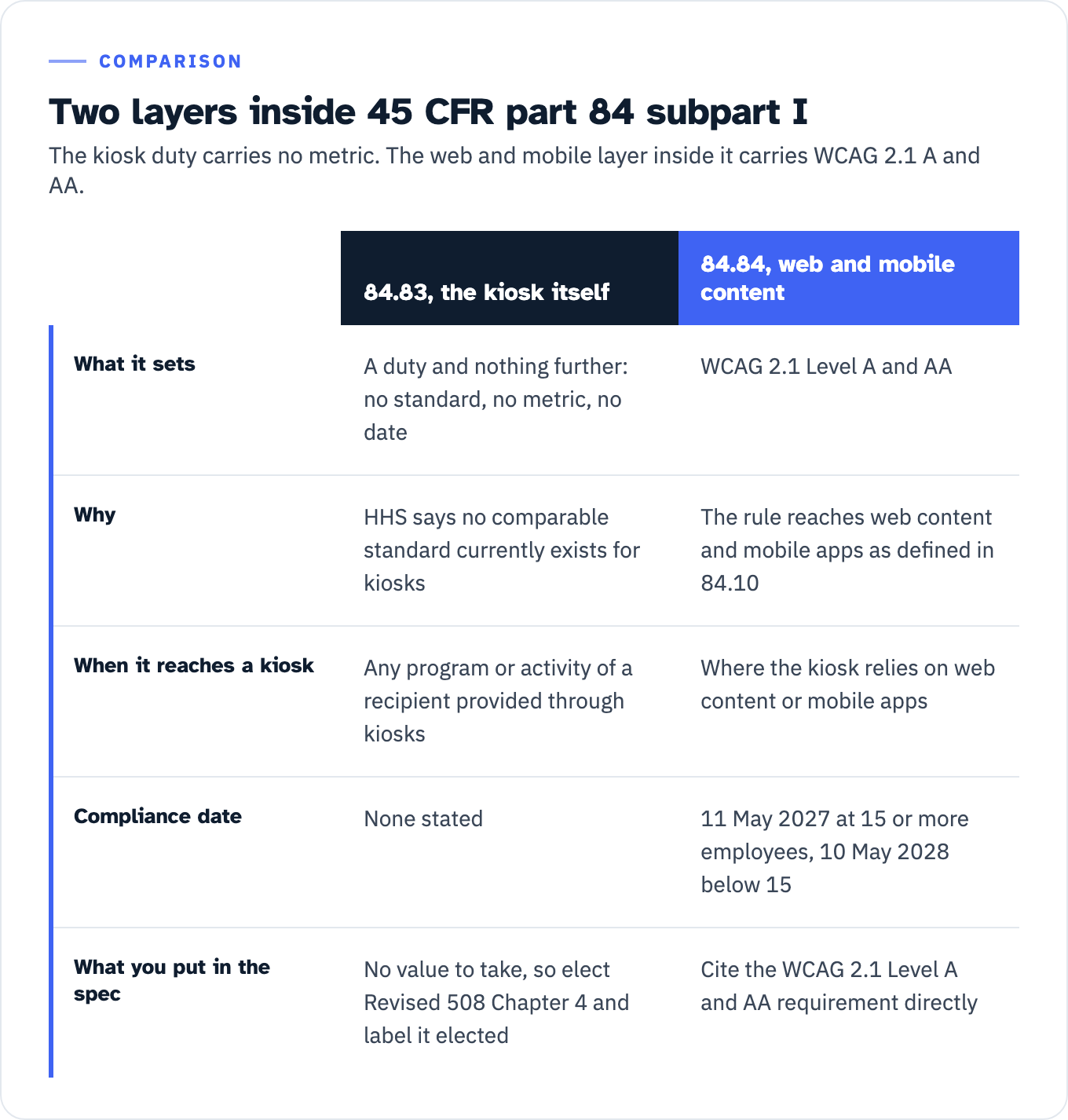
If you are a recipient of HHS financial assistance, subpart I of 45 CFR part 84 is titled “Web, Mobile, and Kiosk Accessibility.” The title puts kiosks alongside web and mobile. The technical standard does not. Section 84.83 reads in full: “No qualified individual with a disability shall, on the basis of disability, be excluded from participation in, be denied the benefits of, or otherwise be subjected to discrimination under any program or activity of a recipient provided through kiosks.” No standard, no metric, no date. HHS finalized it as proposed, without modifications, and said why in the preamble to the final rule: “no comparable standard currently exists for kiosks, except to the extent that kiosks rely on web content or mobile apps as defined in Sec. 84.10.”
Two corrections to the reading that follows from this.
First, the carve-out is layer-specific, not categorical. HHS says the 84.84 technical standard does not apply where kiosks are closed functionality devices that do not rely on web content or mobile apps. Where a kiosk does rely on web content or mobile apps as defined in 84.10, that content sits inside 84.84 and the WCAG 2.1 Level A and AA requirement reaches it. The dates were extended by interim final rule published 11 May 2026 at 91 FR 25496, effective 7 May 2026: 11 May 2027 for recipients with 15 or more employees, 10 May 2028 for recipients with fewer than 15. A tablet kiosk running a browser against your patient portal is inside that.
Second, the absence of a metric is not an absence of duty. HHS states that “recipients are still obligated to ensure that individuals with disabilities are not excluded from participation in, denied the benefits of, or otherwise subjected to discrimination in any program or activity of the recipient, including the information exchange that would occur at the kiosk.” HHS defines kiosks in 84.10 as “self-service transaction machines made available by recipients at set physical locations for the independent use of patients or program participants in health and human service programs or activities.”
So what do you specify? Elect the Revised 508 Chapter 4 values as contract terms. They are the only complete published hardware set for closed functionality, they are dimensionally consistent with the ADA reach ranges by the Access Board’s own account, and electing them gives your acceptance test a citation. Label them in the requirements matrix as elected values, not as requirements imposed by 45 CFR part 84, because a bidder who checks will find the difference.
View the data as a table
| 84.83, the kiosk itself | 84.84, web and mobile content | |
|---|---|---|
| What it sets | A duty and nothing further: no standard, no metric, no date | WCAG 2.1 Level A and AA |
| Why | HHS says no comparable standard currently exists for kiosks | The rule reaches web content and mobile apps as defined in 84.10 |
| When it reaches a kiosk | Any program or activity of a recipient provided through kiosks | Where the kiosk relies on web content or mobile apps |
| Compliance date | None stated | 11 May 2027 at 15 or more employees, 10 May 2028 below 15 |
| What you put in the spec | No value to take, so elect Revised 508 Chapter 4 and label it elected | Cite the WCAG 2.1 Level A and AA requirement directly |
The ADA branch: section 707 does not cover an ordering kiosk
Section 707 of the 2010 ADA Standards is titled Automatic Teller Machines and Fare Machines, and 707.1 covers those two equipment types. The Access Board’s own advisory closes the question: “Interactive transaction machines (ITMs), other than ATMs, are not covered by Section 707.” A retail ordering kiosk, a restaurant self-order terminal, a hotel check-in unit and a clinic registration kiosk are not 707 devices.
What still reaches a fixed unit is 205.1, which scopes operable parts on accessible elements, accessible routes and in accessible rooms and spaces to 309. Its eight exceptions cover service and maintenance controls, dedicated-use receptacles and exercise equipment, among others, and none of them covers self-service machines. From there, 309.2 requires a clear floor space complying with 305, 309.3 sends height to the 308 reach ranges, and 309.4 sets the 5 pound (22.2 N) maximum activation force with a single exception for gas pump nozzles.
The 2010 reach values, which are the ones to use:
| Approach | Condition | Value |
|---|---|---|
| Forward, unobstructed (308.2.1) | No obstruction | 48 inches maximum, 15 inches minimum |
| Forward, obstructed (308.2.2) | Reach depth 20 inches maximum | 48 inches maximum |
| Forward, obstructed (308.2.2) | Reach depth over 20 inches | 44 inches maximum, depth 25 inches maximum |
| Side, unobstructed (308.3.1) | Parallel approach, no obstruction. An obstruction up to 10 inches deep is permitted | 48 inches maximum, 15 inches minimum |
| Side, obstructed (308.3.2) | Obstruction 34 inches high maximum and 24 inches deep maximum. Reach depth 10 inches maximum | 48 inches maximum |
| Side, obstructed (308.3.2) | Reach depth over 10 inches, up to 24 inches | 46 inches maximum |
If a design package quotes a 54 inch side reach, it is working from a superseded standard. That figure is the 1991 ADAAG number, at 4.2.6 for general side reach and at 4.34.3(2)(a) for ATM controls on a parallel approach at a reach depth of 10 inches or less. In the 2010 Standards, 54 inches survives only as an exception for fuel dispensers installed on existing curbs.
What 707 would have added, and what a non-707 kiosk therefore has no ADA technical requirement for, is the half of the requirement set a blind user depends on: speech output (707.5), tactile input controls and the 12-key layout (707.6.1 and 707.6.2), the five tactile function symbols (707.6.3.2), the 40 inch display sightline (707.7.1), the 3/16 inch sans serif characters (707.7.2) and braille instructions (707.8). None of that reaches a retail ordering kiosk through the ADA Standards. If you want it, you specify it.
For a moveable unit, the record is thinner still. DOJ opened a rulemaking on equipment and furniture in 2010 and withdrew it in 2017, stating that “there are currently no specific provisions in the ADA regulations that include standards governing the accessibility of equipment and furniture that are not fixed,” and that nothing had been published since the 2010 ANPRM. The Access Board draws the same line: its “ADA and ABA Accessibility Guidelines apply only to ATMs and fare machines that are fixed or built-in, but not to those that are moveable.” Whether a particular installation counts as fixed or built-in is a fact question for your counsel, not a specification choice.
Where no technical standard reaches the machine, the operative Title III duty is 28 CFR 36.303, which lists “acquisition or modification of equipment or devices” among the auxiliary aids and services a public accommodation may need to provide. For state and local government entities, note that DOJ’s Title II web rule at 28 CFR part 35 subpart H is written for web content and mobile apps and contains no kiosk provision. DOJ was asked to extend the web content definition to closed systems including kiosks and declined, pointing entities back to their existing Title II duties on effective communication.
The DOT branch: the only complete kiosk spec in force
If you are buying automated airport kiosks, you are working with the only kiosk-specific federal technical standard in force in the United States, and its values are imposed rather than elected. 14 CFR 382.57 dates from 78 FR 67915, 12 November 2013, and applies to any automated airport kiosk a carrier owns, leases or controls at a US airport with 10,000 or more annual enplanements.
The scoping is by quantity, not by device. All units installed on or after 12 December 2016 must meet the design specifications “until at least 25 percent of automated kiosks provided in each location at the airport (i.e., each cluster of kiosks and all stand-alone kiosks at the airport) meets this specification,” and 25 percent in each location had to be met by 12 December 2022.
Four operational duties sit alongside the hardware spec and a purchase order alone will not satisfy them. Accessible kiosks must “provide all the same functions as the inaccessible kiosks in that location.” A passenger who requests an accessible kiosk must be given priority access to one. Each conforming unit must be “visually and tactilely identifiable to users as accessible” and “maintained in proper working condition.” And equivalent service must be provided on request to passengers who cannot readily use the kiosks.
For shared-use units the responsibility is joint. The carrier rule states that “you are jointly and severally liable with airport operators and/or other participating carriers for ensuring that shared-use automated airport kiosks are compliant,” and the mirror provision at 49 CFR 27.71(j)(5) says airport operators “are jointly and severally liable with carriers” for the same units. The Access Board’s matrix records that the technical requirements in the two parts are identical with different paragraph numbering, giving 14 CFR 382.57(c)(1) and 49 CFR 27.71(k)(1) as its example. If you are running the procurement for a shared-use estate, allocate that responsibility explicitly in the agreement rather than leaving it to the two regulations to sort out.
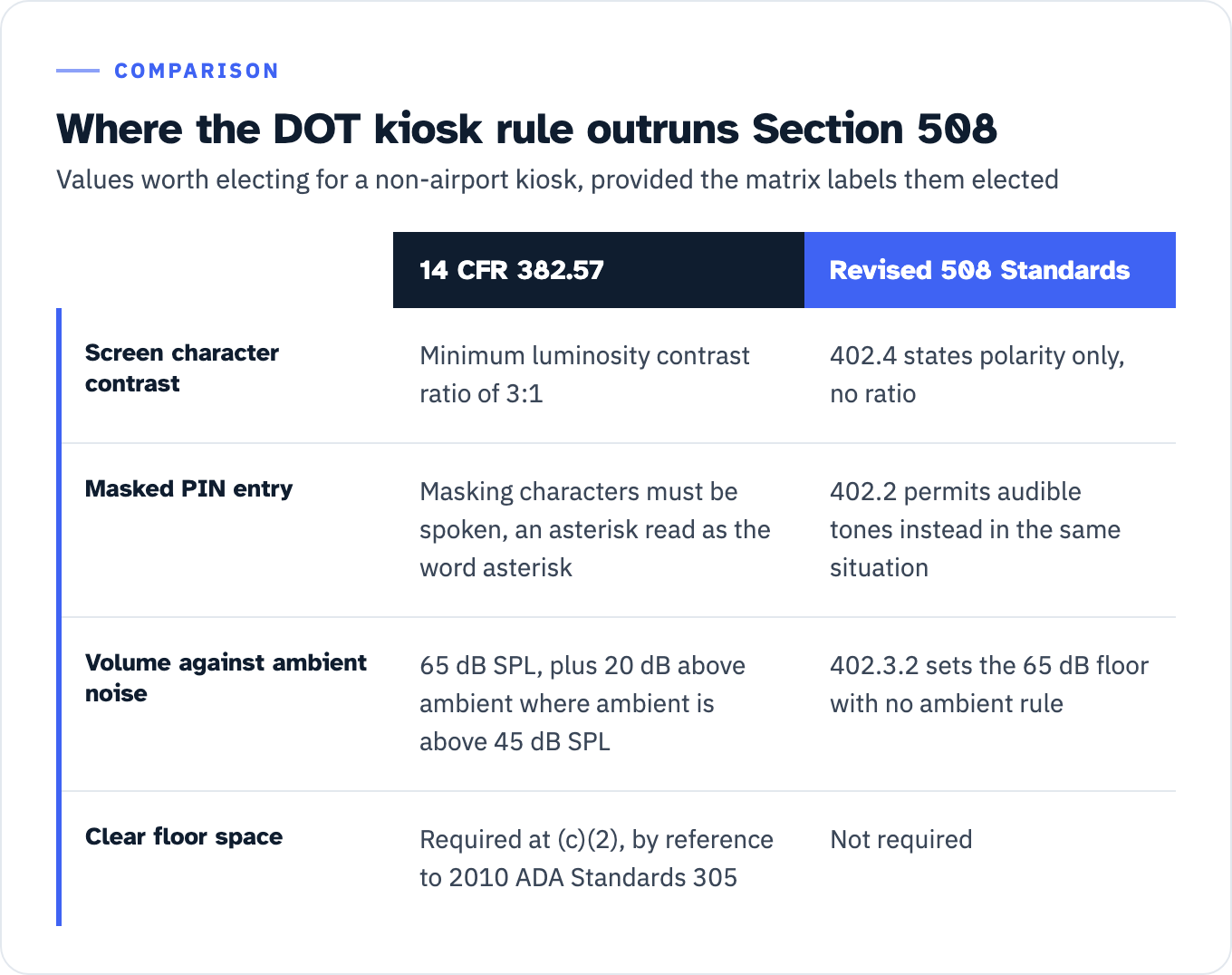
Three DOT values have no counterpart anywhere else, and they are worth electing as contract terms even for a non-airport kiosk, provided you label them as elected:
- Screen contrast, 3:1. DOT requires characters to “contrast with their background with a minimum luminosity contrast ratio of 3:1.” Section 508’s 402.4 and ADA 707.7.2 state polarity only.
- Spoken masking characters. Where asterisks or other masking characters represent a PIN, DOT requires that the masking characters “must be spoken” rather than “presented as beep tones or speech representing the concealed information,” with an asterisk read out as the word asterisk. Section 508’s 402.2 permits audible tones instead in the same situation, so the two regimes give opposite answers on the same screen.
- Ambient-referenced volume gain. For sound delivered through speakers, incremental volume control with “output amplification up to a level of at least 65 dB SPL,” and “where the ambient noise level of the environment is above 45 dB SPL, a volume gain of at least 20 dB above the ambient level must be user selectable.” Section 508’s 402.3.2 sets the 65 dB floor with no ambient rule, which matters in a concourse, a lobby or a drive-through lane.
DOT also names the five tactile function symbols outright, the same set as ADA 707.6.3.2: raised circle for Enter or Proceed, raised left arrow for Clear or Correct, raised letter ex for Cancel, raised plus sign for Add Value, raised minus sign for Decrease Value. It requires captioning of multimedia containing speech necessary for comprehension, and a biometrics fallback. And unlike Section 508, it requires a clear floor space outright, at (c)(2), by reference to section 305 of the 2010 ADA Standards.
View the data as a table
| 14 CFR 382.57 | Revised 508 Standards | |
|---|---|---|
| Screen character contrast | Minimum luminosity contrast ratio of 3:1 | 402.4 states polarity only, no ratio |
| Masked PIN entry | Masking characters must be spoken, an asterisk read as the word asterisk | 402.2 permits audible tones instead in the same situation |
| Volume against ambient noise | 65 dB SPL, plus 20 dB above ambient where ambient is above 45 dB SPL | 402.3.2 sets the 65 dB floor with no ambient rule |
| Clear floor space | Required at (c)(2), by reference to 2010 ADA Standards 305 | Not required |
No regime is a superset of the others
Any shortcut of the form “specify the strictest regime and you are covered” fails on inspection. Where a cell below records an absence, the wording is the Access Board matrix’s own comparison note for that row. Where a regime does carry the requirement, the cell cites the provision that carries it.
| Requirement | Revised 508 | 2010 ADA Standards | 14 CFR 382.57 |
|---|---|---|---|
| Clear floor space | ”Not explicit,” per the Board’s matrix | 305, via 309.2 and 707.2 | Required, (c)(2), referencing 2010 ADA Standards 305 |
| Color coding | 410.1 | No corresponding requirement | Required, (c)(3)(iv) |
| Status indicators | 409.1 | No corresponding requirement | Required, (c)(3)(iii) |
| Biometrics | 403.1 | No corresponding requirement | Required, (c)(9) |
| Key repeat | 407.4, 2 seconds minimum | No requirement | No requirement |
| Timed response | 407.5 | Not addressed | Required, (c)(3)(ii) |
| Ticket and card orientation | 407.7 | No corresponding requirement | Required, (c)(5)(iv), for tickets and boarding passes |
| Flashing | 408.3, three flashes per second | No requirement | No requirement |
| Speech coordinated with screen | 402.2.3 | Not specifically required | Required, (c)(5)(i) |
| Automatic screen blanking | Prohibited by 405.1 while speech is enabled | Not prohibited | Prohibited, (c)(4), which allows blanking only when the user activates it |
| Numeric screen contrast ratio | Polarity only, 402.4 | Polarity only, 707.7.2 | 3:1, (c)(7)(ii) |
Build your requirements matrix by union across the columns you elect, and mark each row with its source and whether it is imposed or elected. That single distinction is what separates a specification a bidder can price from a wish list.
Chapter 6: the documentation half of the deliverable
A kiosk ACR that stops at the hardware chapter is answering half the question. E208.1 scopes Chapter 6 into the buy: “Where an agency provides support documentation or services for ICT, such documentation and services shall conform to the requirements in Chapter 6.” Chapter 6 has two substantive divisions under the 601.1 scope provision, 602 Support Documentation and 603 Support Services.
| Provision | What it covers | What to test | Evidence to require | What the ACR row must say |
|---|---|---|---|---|
| 602.2 Accessibility and Compatibility Features | Documentation must “list and explain how to use the accessibility and compatibility features required by Chapters 4 and 5,” both built-in and assistive-technology compatibility | Cross-check the feature list against every Chapter 4 provision the product claims to support, including speech mode start, volume control and timeout extension | The user guide section, by page number | Names the document and the section where each feature is described. A bare Supports with no pointer is not a checkable answer |
| 602.3 Electronic Support Documentation | Electronic documentation, “including Web-based self-service support,” conforms to WCAG 2.0 Level A and AA | Test the PDF, the online help and the support portal as content, not as attachments to the hardware | A WCAG 2.0 A and AA result for each electronic artifact, with the tools and assistive technology named | In the VPAT 2.5Rev 508 edition this row ships pre-filled with “See WCAG 2.x section.” If the ACR has no WCAG table, that cross-reference points at nothing |
| 602.4 Alternate Formats | Where documentation is only non-electronic, alternate formats usable by individuals with disabilities “shall be provided upon request” | Confirm a request channel exists and produces a format on a stated turnaround | The request path, named in the contract, with the turnaround written into the service level | States the request mechanism, not just that formats are available in principle |
| 603.1 to 603.3 Support Services | Help desks, call centers, training services and automated self-service technical support | Confirm the support channel carries the 602.2 feature information and accommodates communication needs, “directly to the user or through a referral to a point of contact” | Script or knowledge-base excerpt showing the accessibility features, and the referral path | Names the channel and the referral point of contact. The template’s Chapter 6 table breaks 603 into 603.2 and 603.3 rows |
Three rules govern the report itself. The current template set is VPAT 2.5Rev, dated 24 April 2025, in four editions, 508, WCAG, EU and INT. There is no separate hardware VPAT: the 508 edition carries Chapter 3, Chapter 4, Chapter 5 and Chapter 6 tables in one document. The VPAT is the blank template; the completed report is the ACR.
ITI’s own report-size rule gives you a bright-line completeness check. Sections may be removed to reduce the size of the report, but “Individual criteria cannot be removed, only sections at a time,” and the template asks that the notes for that section say why it was removed. So a report that drops the Chapter 6 table with no note has skipped the instruction, and a report that drops individual rows inside a table has broken the hard rule regardless of what the note says. ITI also requires the report to state which standards it covers, and “A report must contain a minimum of one Standard/Guideline.”
Finally, hold the Evaluation Methods Used section to its own instruction, which asks for testing conducted with assistive technologies, testing conducted with manual and automated tools, and for a published test method, “name, publisher, URL link of the test method.” Read against the four conformance terms, that is what makes the report checkable: “Supports” means the functionality “has at least one method that meets the criterion without known defects or meets with equivalent facilitation,” which is a claim you can go and reproduce. For the full read of a vendor report, see how to score a vendor ACR and ADACP’s VPAT and ACR work for hardware.
Two items in the no-standard column that are not yours to elect
Where no technical standard applies, the requirements column fills with contract terms you choose. Two items are not yours to choose.
If you are HHS-funded and you plan a staffed alternative for people who cannot use the kiosk, HHS gives one example and one test. The example: a clinic or a social services office “may allow persons with disabilities to go directly to the personnel at the main desk to register for necessary services.” The test: such work-around procedures “must afford persons with disabilities the same access, the same convenience, and the same confidentiality that the kiosk system provides.” HHS does not define those three words further, so measure them against the kiosk rather than against a policy sentence. If the kiosk runs whenever the lobby is open, a desk staffed for two hours a day is hard to defend as the same convenience. If the kiosk takes an account number silently, a shared counter that takes it aloud is hard to defend as the same confidentiality. Put the staffed hours and the privacy arrangement in the operating procedure, and test both at go-live.
If you are a federal buyer taking the nonavailability route, FAR 39.205(c)(3) fixes the content of the determination: “A description of the market research performed,” “A listing of the requirements that cannot be met,” and “The rationale for determining that the ICT to be procured best meets the ICT accessibility standards in 36 CFR 1194.1, consistent with the agency’s needs.” E202.7.1 names the signer as the responsible agency official. That listing of unmet requirements, by provision number, is also your remediation backlog for the next refresh.
What to put in the solicitation this week
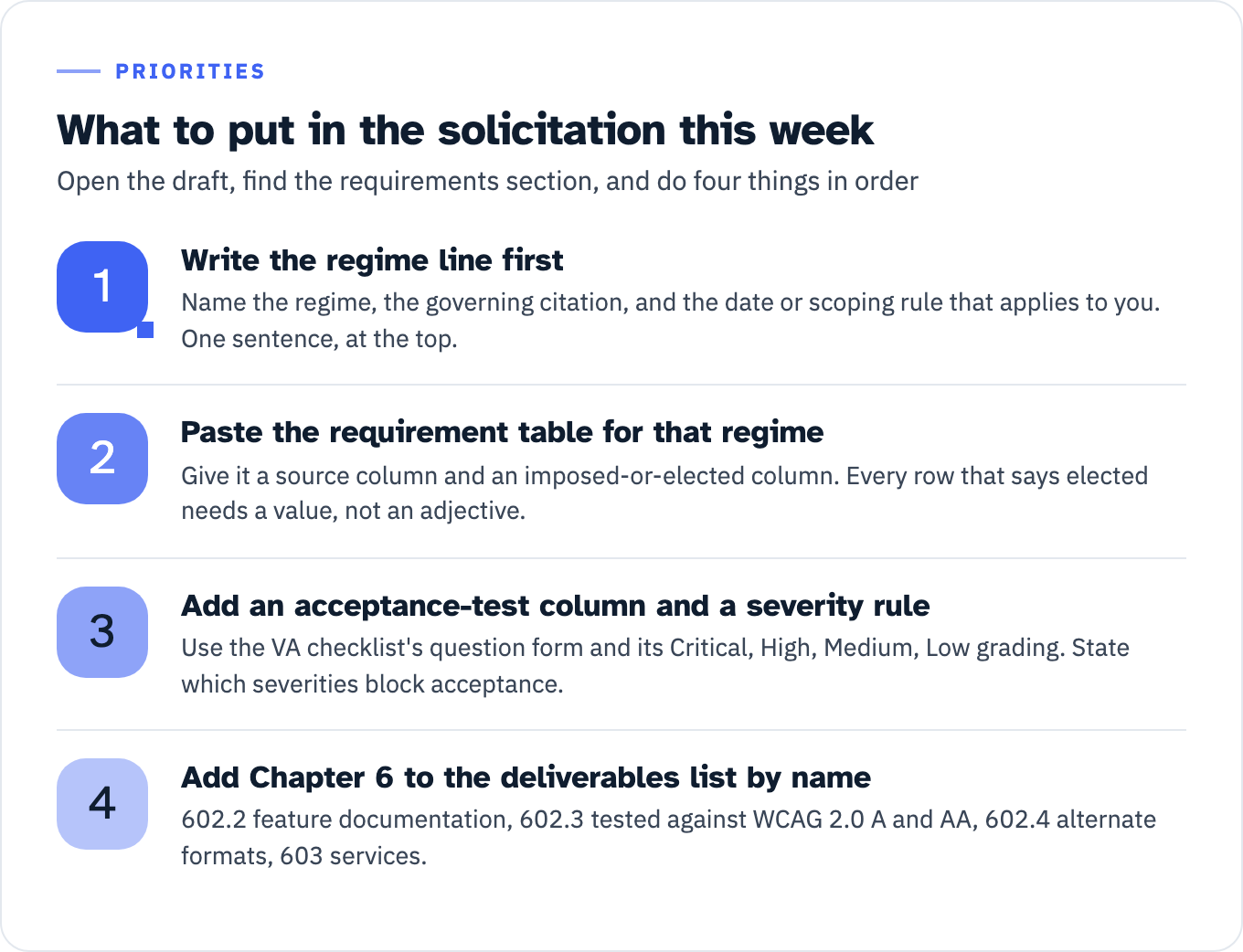
Open the draft, find the requirements section, and do four things in order.
- Write the regime line first: name the regime, the governing citation, and the date or scoping rule that applies to you. One sentence, at the top of the section.
- Paste the requirement table for that regime, with a source column and an imposed-or-elected column. Every row that says elected needs a value, not an adjective.
- Add an acceptance-test column and a severity rule, using the VA checklist’s question form and its Critical, High, Medium, Low grading as the model. State which severities block acceptance and which go to a dated corrective action plan.
- Add Chapter 6 to the deliverables list by name: 602.2 feature documentation, 602.3 electronic documentation tested against WCAG 2.0 A and AA, 602.4 alternate-format request path, and the 603 support-service commitments. Require the ACR to include the Chapter 6 table, populated, with the Evaluation Methods Used section naming tools, assistive technology and any published test method.
View the data as a list
- Write the regime line first: Name the regime, the governing citation, and the date or scoping rule that applies to you. One sentence, at the top.
- Paste the requirement table for that regime: Give it a source column and an imposed-or-elected column. Every row that says elected needs a value, not an adjective.
- Add an acceptance-test column and a severity rule: Use the VA checklist’s question form and its Critical, High, Medium, Low grading. State which severities block acceptance.
- Add Chapter 6 to the deliverables list by name: 602.2 feature documentation, 602.3 tested against WCAG 2.0 A and AA, 602.4 alternate formats, 603 services.
If you want the measurements taken and the acceptance report written against your own draft language rather than a vendor’s, that is what ADACP’s hardware accessibility testing is for. Send the draft requirements section and the unit’s dimensioned drawing, and the first thing back is the regime line and the list of rows that currently have an adjective where a number belongs.