

Inaccessible features are typically shipped, not due to a deliberate disregard for accessibility, but because the requirement was never made concrete enough to build, test, or enforce. A Jira ticket that says “must be WCAG compliant” sounds responsible, but it doesn’t tell a designer what to show, a developer what to code, or QA what to verify.
That gap creates real exposure. The 2026 WebAIM Million found detected WCAG 2 failures on 95.9% of the top one million home pages, at 56.1 errors per page. The failures are not exotic: six error types — low contrast text, missing alt text, missing form labels, empty links, empty buttons and missing document language — account for 96% of everything the scan detects. If large, well-funded organizations routinely miss requirements this basic, “we care about accessibility” clearly isn’t a control.
Accessibility acceptance criteria solve that operational problem. They turn accessibility from a broad aspiration into a release condition. For product teams, that means fewer preventable defects. For compliance leaders, it means clearer accountability. For procurement and legal stakeholders, it means more defensible evidence that accessibility was built into the delivery process, not bolted on after a complaint.
Why “WCAG Compliant” Isn’t Enough
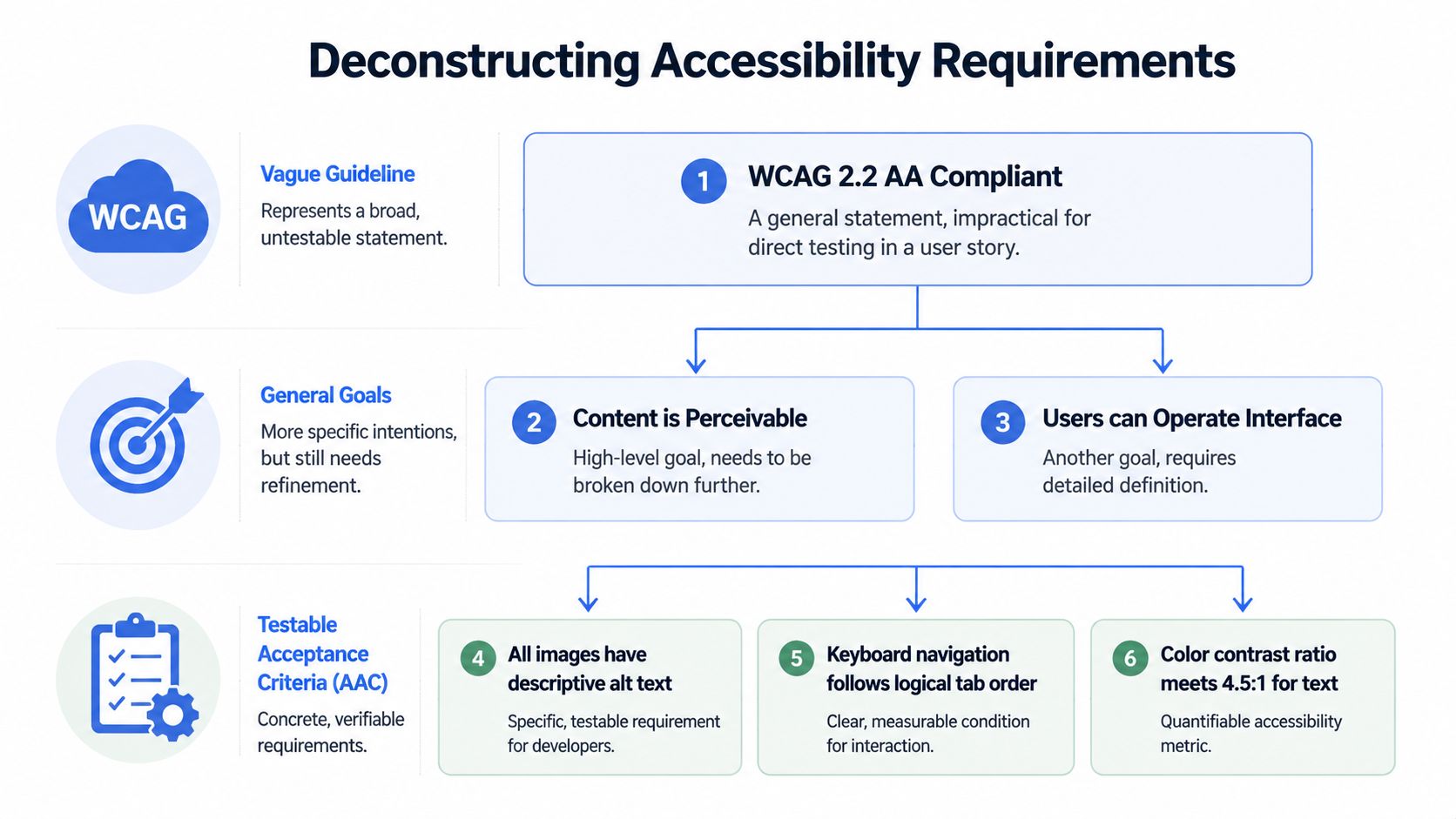
“WCAG compliant” isn’t a requirement. It’s a label teams apply after the fact, often without agreement on what was tested, who tested it, or whether the feature works for people using assistive technology.
That’s the core governance failure. A product manager writes a broad story. Design hands off screens that look polished. Engineering builds to the mock. QA checks whether the happy path works. Then someone asks, late in the cycle, whether the flow is accessible. By then, the team is arguing over interpretation instead of verifying behavior.
Compliance language doesn’t control delivery
WCAG is indispensable, but it operates at a different level than product delivery. It tells you what outcomes matter. It doesn’t automatically convert those outcomes into feature-specific pass or fail conditions.
A story like “As a customer, I want to update my billing details” can fail accessibility in many ways even if the team claims WCAG alignment. Focus might disappear in a modal. Error text might not be announced to screen readers. Required fields might rely on color alone. None of those issues get prevented by attaching a generic compliance note to the ticket.
Practical rule: If a requirement can’t be verified at story level, it won’t reliably survive sprint pressure.
This is why accessibility acceptance criteria matter. They make accessibility enforceable inside the same machinery teams already use for scope, quality, and release decisions.
Accessibility acceptance criteria create accountability
Accessibility acceptance criteria are short, testable statements attached to a user story or feature. They define what must be true for the feature to be considered complete from an accessibility standpoint.
That matters for legal risk as much as user experience. An organization that can show it defined accessibility expectations before build, verified them during delivery, and tracked failures like any other defect is in a far stronger position than one relying on informal intent. That’s also why partial compliance claims often collapse under scrutiny, as discussed in the hidden costs of partial WCAG compliance and why Level AA isn’t always enough.
A vague standard invites debate. A testable criterion creates a decision.
From Vague Guidelines to Testable Requirements
Accessibility failures usually start before code review. They start when a product requirement is too abstract to test, too broad to assign, or too vague to defend later if a complaint, demand letter, or procurement review asks what the team required.
“Meet WCAG” does not tell a designer what to show in an error state, a developer what keyboard behavior must work, or QA what evidence closes the ticket. It also does not give product or engineering leadership much protection. If the requirement was never translated into feature-level expectations, the organization cannot show that accessibility was governed in the same way as security, privacy, or performance.
WCAG is a standard, not a sprint ticket
WCAG sets the benchmark. Delivery teams still need story-level requirements that map that benchmark to a specific interaction.
A designer may need to define whether tooltip content stays visible on focus and hover. A frontend developer may need to preserve a logical tab order that matches the reading sequence. QA may need a clear pass condition for whether validation errors are announced and linked to the fields that caused them. None of that becomes obvious from a generic compliance note.
Teams usually break down in four predictable ways:
- Too few criteria: the story leaves out a failure point, so nobody builds or tests it.
- Too many criteria: the ticket becomes a policy dump that people stop reading.
- Too generic: the language copies WCAG without adapting it to the feature.
- Too prescriptive: the criterion dictates code choices instead of defining the user outcome that must be true.
That balance matters. Criteria need enough detail to drive decisions, but not so much that they turn backlog refinement into a legal memo.
What good accessibility acceptance criteria look like
Useful accessibility acceptance criteria describe outcomes a tester can verify without guessing.
- They focus on user-observable behavior. “Error text is announced after failed submission” gives the team a result to deliver. “Use ARIA correctly” does not.
- They produce a clear pass or fail result. If the team needs a long meeting to interpret the criterion, it is not ready for a sprint.
- They avoid locking in one implementation pattern unless that constraint is required. Product teams need room to choose the simplest workable solution.
- They reflect feature risk. A carousel, modal, checkout flow, and static content page do not need the same criteria because they do not fail in the same ways.
The governance value is easy to miss. Testable criteria create an audit trail. They show that accessibility expectations were defined before release, assigned to delivery teams, and checked against an explicit standard. That record matters when enterprise buyers ask for evidence of accessibility process maturity, and it matters even more when counsel needs to show that accessibility was managed deliberately rather than treated as an informal aspiration.
If you’re trying to scale this across teams, treat accessibility acceptance criteria as one layer in a broader operating model for WCAG implementation, not a standalone artifact. That’s where a documented accessibility program buildout becomes important. The criteria live in stories. Governance determines whether those stories are written consistently, reviewed by the right people, and enforced before release.
How to Write Effective Accessibility Acceptance Criteria
Good criteria don’t start with a template. They start with risk identification. If the team doesn’t understand where a feature is likely to fail, it will write polished but generic criteria that miss the actual barriers.
Start with the right people in the room
The BBC’s framework requires a Three Amigos session with a business analyst, designer, and accessibility champion before the criteria are written. Teams using that collaborative approach to identify high-risk factors report 40 to 60% fewer accessibility regressions post-launch in the BBC guidance on accessibility acceptance criteria.
That process works because each role sees a different failure mode:
- Business analyst or product owner: clarifies the task, edge cases, and business rules.
- Designer: exposes interaction states, focus behavior, visual cues, and layout changes.
- Accessibility champion: translates those decisions into risks for keyboard users, screen reader users, and other assistive technology scenarios.
Skipping this discussion usually leads to boilerplate criteria copied from an old ticket. Those criteria may be technically accurate but still wrong for the feature in front of you.
Use Given When Then to make criteria testable
Behavior-driven language keeps criteria precise. “Given, When, Then” is useful because it forces the team to define context, action, and expected result.
Compare these examples:
| Poor criterion | Better criterion |
|---|---|
| Form must be accessible | Given the login form is displayed, when a keyboard-only user tabs through the fields, then focus moves in a logical order and remains visible on each interactive element |
| Errors should be clear | Given a required field is empty, when the user submits the form, then the error is programmatically associated with the field and announced to screen readers |
| Support screen readers | Given the page loads, when a screen reader user enters the form, then each input exposes a clear accessible name and required state |
The point isn’t to force every line into rigid syntax. The point is to make each criterion observable and verifiable.
Write for the tester who didn’t attend the planning meeting. If they can’t tell what success looks like, the criterion isn’t finished.
Sample template for a login flow
Below is a practical model teams can adapt.
| User Story | Accessibility Acceptance Criteria (in GIVEN/WHEN/THEN format) |
|---|---|
| As a registered user, I want to log in, so I can access my account dashboard. | Given the login page is loaded, when a keyboard-only user navigates through the page, then all interactive elements are reachable without a mouse and focus remains visible. |
| As a registered user, I want to log in, so I can access my account dashboard. | Given the email and password fields are present, when a screen reader user moves to each field, then the field label, required state, and input purpose are announced clearly. |
| As a registered user, I want to log in, so I can access my account dashboard. | Given the user submits the form with missing or invalid data, when validation fails, then the errors are presented in text, associated to the relevant fields, and available to assistive technology. |
| As a registered user, I want to log in, so I can access my account dashboard. | Given the user activates the submit button, when authentication is processing, then status changes are conveyed without relying only on visual indicators. |
| As a registered user, I want to log in, so I can access my account dashboard. | Given the form is viewed at larger text or zoom settings, when the user completes the login task, then content remains readable and usable without loss of information or functionality. |
A few writing habits improve these criteria immediately:
- Name the interaction. Modal, dropdown, carousel, OTP input, data grid.
- Name the user condition. Keyboard-only, screen reader, enlarged text, reduced orientation flexibility.
- Name the expected outcome. Announced, visible, operable, associated, preserved.
- Avoid implementation prescriptions unless necessary. Require the accessible name. Don’t start by prescribing the exact attribute unless your team has a pattern library reason to do so.
Teams that want these criteria to hold up release after release should also track them over time, not just attach them to one ticket. A documented accessibility monitoring plan helps prevent the common pattern where a component passes once and regresses unnoticed in later iterations.
Integrating AAC into Your Agile Workflow
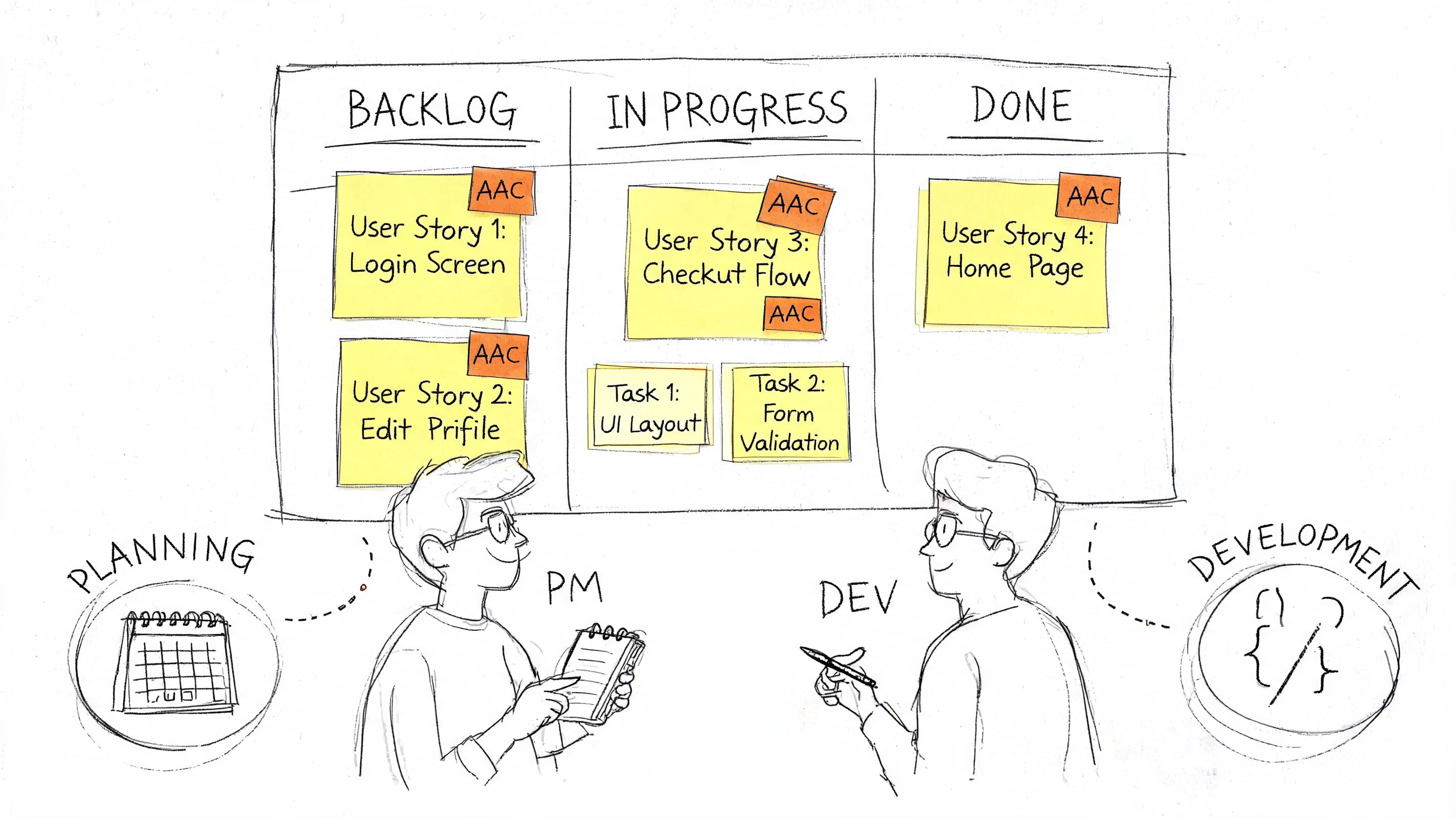
Accessibility acceptance criteria only work if they’re embedded in the same workflow that governs scope and quality. If they live in a separate accessibility document, delivery teams won’t use them at the moment decisions are made.
Put AAC in Definition of Ready and Definition of Done
A simple rule works well in Jira, Azure DevOps, or Linear. If a story affects a user interface, input flow, media experience, or custom component, the ticket isn’t ready until accessibility acceptance criteria are present.
Best-practice teams also prioritize by risk. They identify high-risk content types such as UI components, media, and input-dependent functions, and they review with actual assistive technology users rather than relying on accessibility personas alone. W3C WAI recommends the same thing in its guidance on involving users in web accessibility work: bringing in people with disabilities early surfaces issues that conformance checking against the standard does not.
That has practical implications for backlog management:
- Component stories need component criteria. Don’t use the same checklist for a tooltip and a multi-step form.
- Research findings should feed ticket content. If assistive technology users struggled with one pattern, encode that learning into future criteria.
- Readiness gates should block thin stories. A design handoff without focus states or error behavior isn’t ready.
- Done should include verification. Implemented isn’t done if no one checked the criteria.
For teams building React-heavy interfaces with custom components, outside implementation help sometimes matters. If engineering capacity is the bottleneck, a partner such as hire react developers can support delivery, but the internal team still needs governance. Extra developers don’t replace clear accessibility requirements.
Assign ownership by role, not by slogan
“Everyone owns accessibility” sounds collaborative, but it often produces ambiguity. Better programs assign distinct responsibilities.
A workable split looks like this:
| Role | Responsibility for AAC |
|---|---|
| Product manager or business analyst | Ensures the story includes relevant accessibility acceptance criteria before sprint commitment |
| Designer | Documents interaction states, focus treatment, error presentation, and responsive behavior |
| Developer | Implements the feature to satisfy the criteria and flags missing design or product decisions early |
| QA | Verifies pass or fail against criteria using appropriate tools and manual checks |
| Accessibility lead or champion | Reviews high-risk stories, advises on edge cases, and helps refine criteria when failures recur |
This is also where training matters. Teams usually don’t fail because they resist accessibility. They fail because no one taught them how to turn requirements into repeatable delivery habits. That’s why role-based accessibility training and practical guidance like how ADACP trains teams to fix digital accessibility fast are useful operational tools, not just learning resources.
Technology will keep changing the way teams test and build, but process discipline still matters most. Product leaders tracking emerging workflows should also watch how new tech from Google and Apple is shaping digital accessibility training, especially if AI-assisted development is accelerating release cycles.
Verifying Criteria Pass Fail Conditions and the Role of Manual Audits
A pass or fail decision is only useful if it would hold up under scrutiny from QA, procurement, legal, and a customer who depends on the feature.
What automation can check
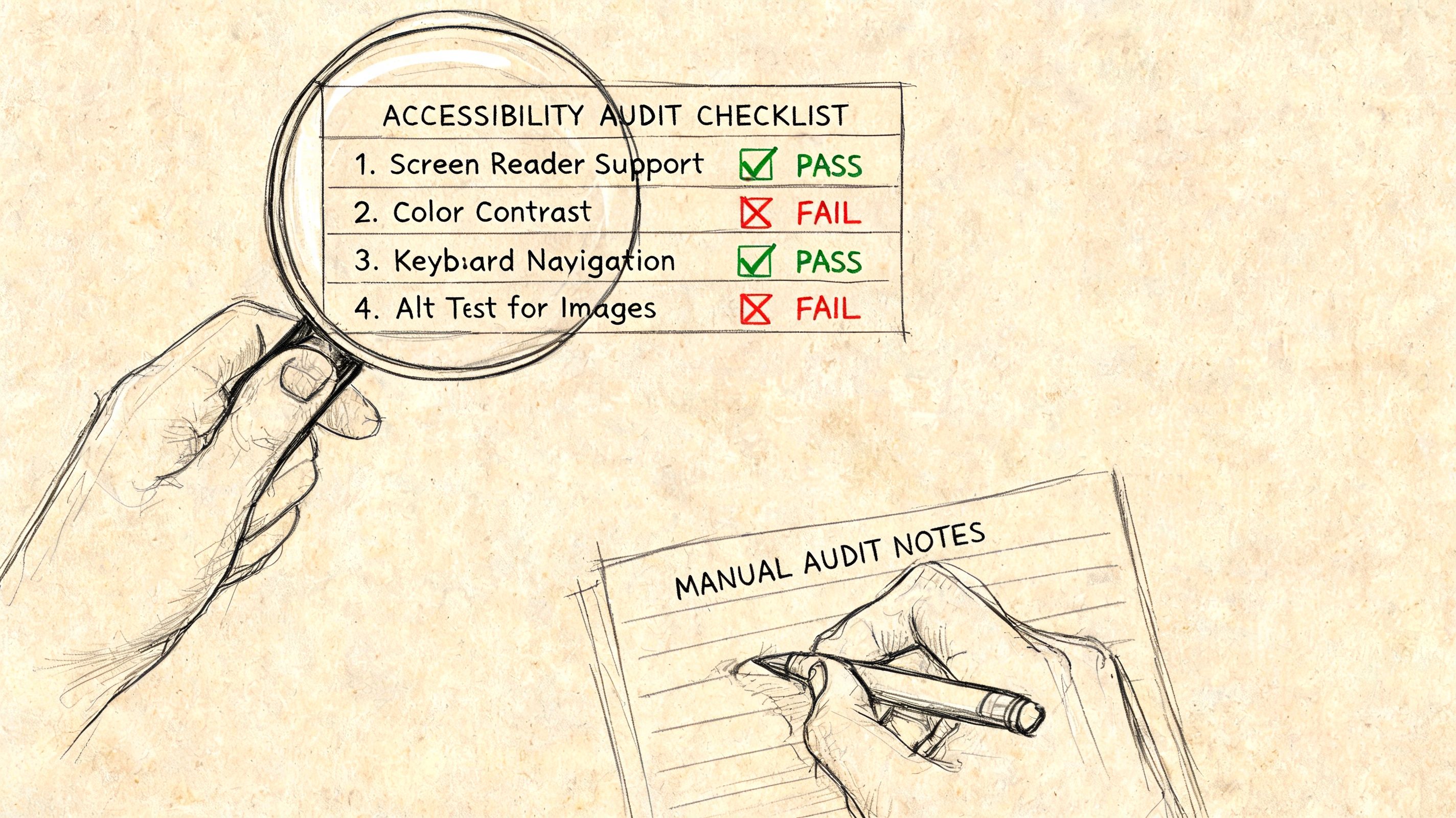
Automated testing gives teams speed and consistency. Linters, browser extensions, CI checks, and design plugins can catch missing alt text, some color contrast failures, duplicate IDs, empty buttons, and other detectable defects before they reach production.
That makes automation a strong first layer for code review and release control:
- Pull request checks for common implementation errors
- Regression scans across repeated templates and components
- Issue triage before QA spends time on manual review
- Design system verification for patterns used across many screens
Teams that want a tighter verification process can borrow good QA discipline from broader product testing practice. A practical example is this guide on creating test cases for product teams, which maps well to turning accessibility criteria into repeatable checks.
Automation reduces noise. It does not establish usability, legal defensibility, or procurement readiness on its own.
What still requires human judgment
Manual review is where acceptance criteria become meaningful governance, not just a checklist. A scanner can confirm that a field has a label. It cannot reliably judge whether the label is understandable, whether the instructions arrive at the right moment, or whether error handling supports task completion under real conditions.
The gaps become obvious in high-risk workflows. Keyboard users may hit a hidden focus state or get dropped into the wrong part of a modal. A screen reader user may hear the right words in the wrong order. A form may technically expose errors while still making correction slow or confusing.
These checks need human testing:
- Keyboard interaction quality: Can someone complete the task without lost focus, dead ends, or inconsistent behavior?
- Screen reader output: Are names, roles, states, instructions, and errors announced in a sequence that supports completion?
- Meaning and context: Does link text stand on its own? Do instructions depend on color, shape, location, or prior visual context?
- Zoom and reflow behavior: Does the task still work when users increase text size or reduce viewport width?
- Complex interaction patterns: Multi-step forms, custom widgets, live updates, data tables, and visualizations need interpretation by an experienced reviewer
Why manual audits matter for legal and procurement risk
Different auditors can reach different conclusions on the same WCAG requirement, especially where context and user intent matter. That is one reason accessibility acceptance criteria need clear pass fail conditions and an escalation path for expert review. Without that layer, two teams may both mark a story as complete and still produce very different legal exposure.
This is where product governance matters. CTOs and Product Managers need evidence that the team did more than run a scan. They need records showing what was tested, how it was tested, what failed, what was fixed, and which issues were accepted as known risk. That documentation supports release decisions, strengthens VPAT or ACR inputs, and gives procurement teams something more credible than a blanket claim of WCAG compliance.
The practical distinction is covered in manual vs automated accessibility testing.
A green automated scan is not proof that a user can complete the task.
For organizations that need defensible evidence, a manual accessibility audit from a qualified consultancy can provide WCAG-mapped findings, remediation guidance, and documentation that stands up better in procurement reviews or legal review. That level of review is usually warranted for customer-facing releases, regulated workflows, contract-sensitive features, and any product area likely to be examined after a complaint.
Frequently Asked Questions about AAC Implementation
Are accessibility acceptance criteria the same as Definition of Done
No. Accessibility acceptance criteria are feature-specific conditions attached to a story or requirement. Definition of Done is the broader release standard the team applies to all work.
A healthy setup uses both. The Definition of Done might require that all applicable accessibility criteria are verified before closure. The criteria themselves describe what “applicable” means for that specific story.
What if we don’t have an in-house accessibility specialist
Start with the flows that create the most risk. Focus on forms, authentication, navigation, search, checkout, account management, support flows, and any custom UI component.
Then build a lightweight operating model:
- Use a core template: Create a small set of criteria patterns for forms, dialogs, navigation, and media.
- Train by role: Product, design, engineering, and QA need different guidance.
- Escalate high-risk work: Complex widgets, major redesigns, and regulated workflows should get specialist review.
- Document recurring failures: If the same bug appears twice, turn the fix into a standard criterion or design system requirement.
Can we use a generic accessibility acceptance criteria template
Yes, but only as a starting point. Generic templates are useful for recurring patterns such as buttons, links, form fields, and modal dialogs. They become dangerous when teams paste them into every story without considering the actual interaction.
A dashboard with color-dependent charts, a video player, and a multi-factor authentication flow won’t share the same risks. The template should speed up thinking, not replace it.
If your template never changes, your team probably isn’t learning from defects.
How many accessibility acceptance criteria should a user story include
A practical target is around 10 criteria per user story, based on the practice guidance cited earlier in this article. That’s enough to cover common high-impact risks without turning story writing into administrative drag.
The exact number still depends on the feature. A simple content update may need fewer. A custom component or transactional workflow may need more specialized checks. What matters is relevance and testability, not hitting a quota.
When should teams bring in a manual accessibility audit
Bring in a manual audit when critical factors are at play or the interface is complex. Typical triggers include a major release, a redesign, a procurement process, VPAT preparation, a complaint, a legal demand, or a pattern of recurring accessibility bugs that internal QA isn’t catching.
If you’re building capability internally, pair audits with process improvement. The goal isn’t only to find defects. It’s to improve the criteria, design patterns, and review habits that prevent the same defects from returning.
If your team needs help turning accessibility from a broad requirement into a testable delivery process, consider working with ADA Compliance Pros. ADACP helps organizations operationalize WCAG and ADA obligations through manual audits, VPAT and ACR documentation, remediation guidance, and role-based training that supports product, design, engineering, and QA teams.