
The assistive technology pairings your test evidence must name
The field with no instructions
You are in the Evaluation Methods Used field of an Accessibility Conformance Report with a submission date on it, and the honest options are one line of boilerplate or a paragraph you have to be able to defend. Or you are on the other side, holding a supplier’s ACR that says “tested with screen readers,” deciding whether to accept it, send back a clarification request, or fund your own test.
Both decisions turn on the same missing piece. Neither the standard, nor the federal test process, nor the VPAT template tells you which assistive technologies to test with, which browsers to pair them with, or whether to record the version of either. That silence is real and it is checkable in the source documents, and it is the reason two ACRs for comparable products can look nothing alike in the same field.
What follows is what each authority actually says, what four published ACRs actually disclose, the prevalence numbers that justify a cutoff, and the six things a test-target policy has to state before it is worth publishing.
No rule requires you to test with a screen reader
Start here, because building the argument on a legal requirement that does not exist is the fastest way to lose the reviewer.
The federal conformance test process is the DHS Trusted Tester Section 508 Conformance Test Process for Web, Version 5.1.3, April 2024, maintained by the Interagency Trusted Tester Program. Its test environment is two tools, two operating systems and a short browser list. The tools are ANDI, described in the document as “a free open-source bookmarklet,” and the Colour Contrast Analyzer. The operating systems validated are “Windows 10 and 11 (desktop mode)” and “macOS (with Safari only).” The browsers appear under two headings, “On Windows 10” (Google Chrome, Mozilla Firefox, Microsoft Edge) and “On macOS” (Safari), with the note that “Use of newer versions of these browsers is acceptable.” Across the 99-page document, JAWS, NVDA and VoiceOver appear zero times.
That is not an oversight. DHS describes the design choice in terms on its Trusted Tester page: the department “developed the DHS Section 508 Trusted Tester as a common testing approach for determining compliance with Section 508 standards through code inspection. This test approach provides more accurate and consistent results than assistive technology tools or automated tools, ensuring the website or software works with any assistive technology a person might use.” The process document says the same about itself: “This test process is essentially a code inspection for accessibility properties, but the tools reduce the need for a tester to view source code or have in-depth knowledge of programming languages.”
The standard behind it names no products either. The Revised 508 Standards set the electronic content obligation at E205.4: “Electronic content shall conform to Level A and Level AA Success Criteria and Conformance Requirements in WCAG 2.0 (incorporated by reference, see 702.10.1).” The software obligation is separate, at E207.2 under the E207 Software heading: “User interface components, as well as the content of platforms and applications, shall conform to Level A and Level AA Success Criteria and Conformance Requirements in WCAG 2.0.” Interoperability is a third provision and entirely abstract, 502.1: “Software shall interoperate with assistive technology and shall conform to 502.” No product, no version, no pairing in any of the three.
The ICT Testing Baseline is explicitly out of the tools business. It describes itself as “a comprehensive set of test components that a Section 508 conformance test process should include to ensure full coverage of all requirements. Independent of any testing tools,” and states that it is not “a step-by-step testing procedure or methodology.” The Baseline for Web is version 3.1, published 1 April 2024; the Baseline for Electronic Documents is version 1.0, published 30 September 2024. The place where the Baseline reaches into the test environment to ask for a recorded version is Baseline 2, Focus: “Given the variability in how browsers may present visual focus in specific situations, test reports should include details about testing environment, including browser and version.” The same page carries one further instruction about the environment, and it is also silent on assistive technology: “No focus modifications should be enabled in the test environment during testing.” Browser and version, and a rule about focus outlines. Nothing about which screen reader.
The template is the same. Under VPAT 2.5Rev, naming assistive technology is optional twice over. The author instructions are not on the ITI landing page, they are inside the template file itself, and they read: “Describe testing conducted with assistive technologies (Optional: Include the assistive technologies that were used in testing.) Describe testing conducted with manual and automated testing tools. (Optional: Provide a list of the tools used for testing the product.)” The field is nonetheless mandatory, because the same template lists Evaluation Methods Used among the eleven required items in a complete report, alongside the report title, “(Based on VPAT® Version 2.5Rev)”, Name of Product/Version, Report Date, Product Description, Contact Information, Notes, Applicable Standards/Guidelines, Terms, and the tables for each standard. So the heading always exists. Its content is entirely at the author’s discretion, which is exactly why published ACRs range from one sentence to a full matrix.
Both of those passages come from the VPAT 2.5Rev 508 edition template, April 2025, downloadable from ITI’s VPAT page, under the headings Best Practices for Authors and Posting the Final Document respectively. If you cite them, cite the .docx and not the landing page, or the reviewer following your footnote finds nothing. Worth restating: the VPAT is the blank template, the completed document is the ACR. That one ITI does say on the page itself: “A version of the VPAT which has been completed for a specific product is an ACR.”
Even GSA’s own guidance on what a report must contain stops short. Essential Elements of an Accessibility Test Report asks you to “Specify what tools and test methodologies were used to complete testing,” to “Be as specific as possible so others can use the methodologies and tools to replicate any defects noted,” and to “Specify the operating system, browser product or version used, or any other test environment details that provide context for results.” Operating system and browser are named. Assistive technology falls under “any other test environment details.”
| Instrument | Names an assistive technology? | What it does require you to record | Where |
|---|---|---|---|
| Trusted Tester v5.1.3 (Apr 2024) | No, zero mentions in 99 pages | ANDI and Colour Contrast Analyzer, Windows 10/11 or macOS, Chrome/Firefox/Edge/Safari | Interagency Trusted Tester Program, GitHub |
| Revised 508 Standards, E205.4, E207.2 and 502.1 | No | Conformance to WCAG 2.0 Level A and AA for content and for software; software interoperates with assistive technology | access-board.gov/ict |
| ICT Testing Baseline for Web v3.1 | No, tool-independent by design | Browser and version, in the Baseline 2 Focus advisory | ictbaseline.access-board.gov |
| VPAT 2.5Rev (April 2025) | Optional, stated twice in the template | The Evaluation Methods Used heading itself, as one of eleven required items | itic.org, template .docx |
| Section508.gov, Essential Elements | No | Operating system, browser product or version, methods specific enough to replicate a defect | section508.gov/test |
The conclusion a reviewer will accept is narrow and it is the one worth making: naming your pairings is a defensibility move, not a legal obligation. Which is precisely why it separates one supplier’s evidence from another’s.
Where the requirement actually comes from
Two things, and neither of them is Section 508. One of them binds any conformance claim. The other binds nobody, and is still what a competent reviewer will measure you against.
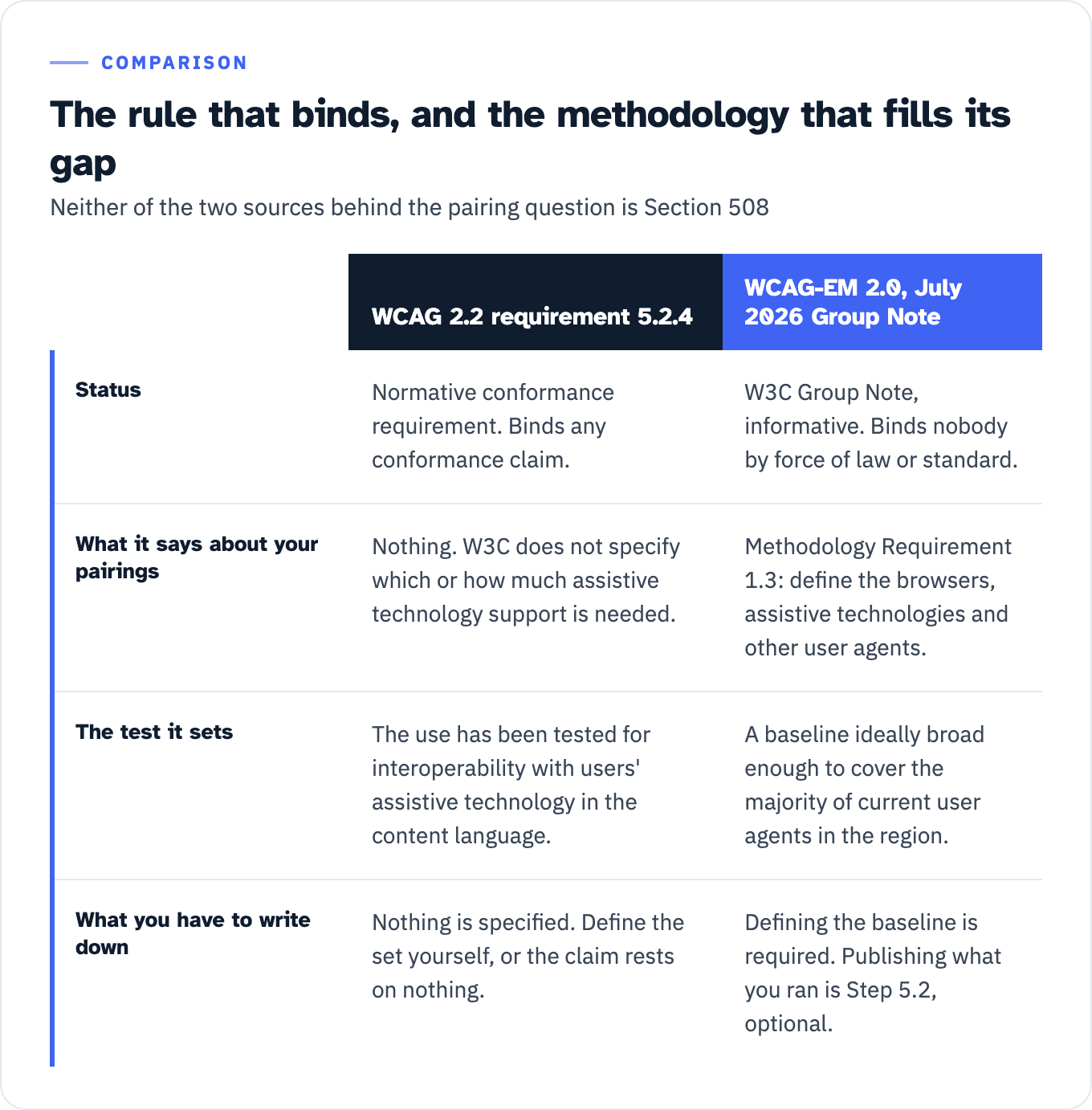
The binding one is WCAG’s own conformance requirement 5.2.4: “Only accessibility-supported ways of using technologies are relied upon to satisfy the success criteria. Any information or functionality that is provided in a way that is not accessibility supported is also available in a way that is accessibility supported.” WCAG 2.2 then defines accessibility supported as requiring that “the way that the technology is used has been tested for interoperability with users’ assistive technology in the human language(s) of the content.”
Tested for interoperability, and the standard never says with what. W3C declines to specify, in a note attached to the glossary definition: “The Accessibility Guidelines Working Group and the W3C do not specify which or how much support by assistive technologies there must be for a particular use of a web technology in order for it to be classified as accessibility supported.” That note is informative rather than normative, on WCAG’s own account of itself, since section 5.1 states that “Introductory material, appendices, sections marked as ‘non-normative’, diagrams, examples, and notes are informative (non-normative).” The requirement to be accessibility supported is normative. The refusal to define what that means in products is advisory. You are held to a set that nobody will define for you, and if you do not define it in writing, the claim rests on nothing.
The second is the current published evaluation methodology, and it is worth being precise about its status. WCAG-EM 2.0 was published as a W3C Group Note on 23 July 2026, superseding the 2014 note. A Group Note is informative. WCAG-EM 2.0 disclaims the reading you might be tempted into: “It also does not in any way add to or change the requirements defined by the normative WCAG 2 standard.” It binds nobody by force of law or standard.
What it does is make defining the set a numbered requirement of the methodology, so that skipping it means you are not following WCAG-EM. Step 1.3, Methodology Requirement 1.3: “Define the web browser, assistive technologies and other user agents for which features provided on the digital product are to be accessibility supported.” The accessibility support baseline is then listed among the components of the evaluation statement itself, next to the conformance level and the technologies relied upon. An evaluation that never names its pairings is incomplete on the methodology’s own terms, and “we followed WCAG-EM” is a claim a reviewer can check against that requirement.
Two details in WCAG-EM 2.0 change how you write this up. It says the baseline should normally reflect real-world usage: “in most cases this baseline is ideally broader to cover the majority of current user agents used by people with disabilities in any applicable particular geographic region and language community.” That is the hook for a prevalence argument rather than a taste argument. And it splits definition from record-keeping. Recording the actual “Names and versions of the evaluation tools, web browsers and add-ons, assistive technology, and other software used” is Step 5.2, marked optional, and the note says the record is “typically kept internal and not shared by the evaluator.” Defining the baseline is required of anyone claiming the methodology. Publishing what you ran is not. If you want a reviewer to be able to check the work, publish both anyway.
View the data as a table
| WCAG 2.2 requirement 5.2.4 | WCAG-EM 2.0, July 2026 Group Note | |
|---|---|---|
| Status | Normative conformance requirement. Binds any conformance claim. | W3C Group Note, informative. Binds nobody by force of law or standard. |
| What it says about your pairings | Nothing. W3C does not specify which or how much assistive technology support is needed. | Methodology Requirement 1.3: define the browsers, assistive technologies and other user agents. |
| The test it sets | The use has been tested for interoperability with users’ assistive technology in the content language. | A baseline ideally broad enough to cover the majority of current user agents in the region. |
| What you have to write down | Nothing is specified. Define the set yourself, or the claim rests on nothing. | Defining the baseline is required. Publishing what you ran is Step 5.2, optional. |
If you are also sorting out which WCAG version your obligation actually points at, that is a separate question with a different answer per rule, and it is worked through in which WCAG version each rule actually requires. Test evidence produced under a WCAG 2.0 process does not automatically discharge a WCAG 2.1 AA obligation.
The contractual hook on the buyer side
Federal buyers are told to ask for the methods in writing, separately from the ACR. GSA’s Request Accessibility Information guidance specifies a Supplemental Accessibility Report containing a “Description of evaluation methods used to produce the ACR, to demonstrate due diligence in supporting conformance claims.” For customized ICT, the requirement moves earlier, to before the work is done: “A description of the evaluation methods the offeror will use to validate for conformance to the Revised 508 Standards.”
That is the sentence a bid manager should be reading twice. Due diligence in supporting conformance claims is a standard the buyer can hold you to, and it is met by specificity, not by adjectives.
One boundary worth stating plainly, because the temptation runs the other way. No primary source says a reviewer rejects, downgrades or returns an ACR for failing to name assistive technology. Do not claim it and do not build a scare paragraph on it. What the sources do support is stronger anyway: a field that says “tested with screen readers” cannot be replicated, cannot be checked against the Essential Elements test, and gives a reviewer nothing to evidence due diligence with. If you want the reviewer-side version of this question, coverage and tester competence and version are worked through in the three questions behind “will you accept our test evidence?”, and the row-by-row scoring approach is in how to score a vendor ACR.
Also note the artifact distinction GSA draws, because the two are easy to confuse: “An Accessibility Conformance Report (ACR) provides an overview of a product’s conformance to Section 508. In contrast, a Section 508 test report offers a more detailed, developer-oriented document to assist product teams in enhancing Section 508 conformance.”
Four published ACRs, four rungs of specificity
This is the useful calibration exercise, because it is all public and you can read every one of these in a browser today. Four real reports, ordered by how much a reviewer can actually do with the Evaluation Methods field.
Rung 1, operating system and screen reader only. Quickbase’s ACR states: “The following operating systems and screen readers are used for evaluation: Mac/VoiceOver, Windows/JAWS, Windows/NVDA, manual accessibility testing, and keyboard testing with visual focus.” No browsers, no versions. This is the floor of the ladder, and everything above it is optional.
Rung 2, product versioned exactly, assistive technology not. Google’s Chrome ACR, April 2025, names the product under test to the digit: “Name of Product/Version: Chrome for Windows, version 134.” The evaluation methods entry then says: “Assistive technologies used include: NVDA and JAWS with the Chrome browser and platform assistive technologies for magnification, high contrast, and dark mode.” A precise product version, and screen readers with no versions at all. The asymmetry inside a single document is the clearest illustration available of the habit this article is arguing against.
Rung 3, a full grid plus one dated version that has aged out. JSTOR’s ACR is dated December 2025 and reads: “MacOS - VoiceOver + Safari/Chrome/Firefox, Windows - NVDA & JAWS 2023 + Chromium Edge/Firefox, Color Contrast Analyzer Tool, axe DevTools, text spacing bookmarklet, and using keyboard only.” That is more disclosure than most, and it is also the staleness worked example: the report is dated December 2025 and the JAWS version named is 2023, two years apart by year label. A version number is checkable in both directions. It tells the reviewer what you ran, and it tells the reviewer how old what you ran is.
Rung 4, the broadest public example found. Articulate’s Storyline 360 ACR, dated 6 July 2026, pins the build (“This report is based on Storyline 360 build 3.120.72341.0”) and covers four platforms: “Testing was performed on desktop computers running current versions of Windows and macOS, as well as mobile devices running current versions of iOS and Android. We tested using common web browsers, including Chrome, Edge, Firefox, and Safari. […] We also tested with assistive technologies such as JAWS, NVDA, Narrator, and Magnifier on Windows; VoiceOver on macOS and iOS; and TalkBack on Android.” It also does something none of the other three reports here does, which is disclose a known limitation at the pairing level: “While Narrator and Magnifier are commonly used together with Microsoft Edge, the Magnifier ‘Read from here’ feature is not fully supported. Learners who need text read aloud and enlarged can use Narrator in combination with Magnifier.” Even here, the assistive technologies carry no versions, only “current versions.”
| Rung | Report | Assistive technology | Browsers | Versions | What a reviewer can do with it |
|---|---|---|---|---|---|
| 1 | Quickbase ACR | VoiceOver, JAWS, NVDA, by operating system | None named | None | Confirm a screen reader was involved. Nothing else. |
| 2 | Google Chrome ACR, Apr 2025 | NVDA, JAWS, plus platform magnification and contrast | Chrome | Product only (Chrome 134) | Reproduce on the named browser, guess at the screen reader build |
| 3 | JSTOR ACR, Dec 2025 | VoiceOver, NVDA, JAWS 2023 | Safari, Chrome, Firefox, Edge | One assistive technology version, two years behind the report date | Reproduce, and see immediately that the JAWS evidence is old |
| 4 | Articulate Storyline 360 ACR, Jul 2026 | JAWS, NVDA, Narrator, Magnifier, VoiceOver, TalkBack | Chrome, Edge, Firefox, Safari | Exact product build; assistive technology as “current versions” | Reproduce across four platforms, and act on a disclosed pairing defect |
Four reports do not support a percentage, and none is offered here. What they do establish is a ladder any author can locate themselves on in about ninety seconds.
The prevalence justification, with its own caveats attached
If you are going to publish a cutoff, you need a public basis for it. The one that exists is the WebAIM Screen Reader User Survey. Two things about the edition before any number is used.
The current published edition is #10, fielded in December 2023 and January 2024, with 1,539 valid responses. Survey #11 is in the field right now: “The survey will remain open through August 31, 2026” and “Results will be published September 2026.” There are no #11 numbers. Any percentage attributed to a 2026 WebAIM survey is invented.
And WebAIM states its own limitation, which any honest coverage argument has to carry rather than bury: “The sample was not controlled and may not represent all screen reader users.” Treat the distribution as a defensible basis for a coverage decision, not as measured market share.
With that on the record, the published pairing table is the single most useful artifact for this decision, because it reports combinations rather than products. All twelve named combinations WebAIM publishes are below, plus its “Other combinations” row, so nothing is being cropped to flatter a cutoff.
| Screen reader with browser | Respondents | % of respondents (WebAIM’s label) | Running total (arithmetic performed here) |
|---|---|---|---|
| JAWS with Chrome | 373 | 24.7% | 24.7% |
| NVDA with Chrome | 323 | 21.3% | 46.0% |
| JAWS with Edge | 173 | 11.4% | 57.4% |
| NVDA with Firefox | 152 | 10.0% | 67.4% |
| VoiceOver with Safari | 107 | 7.0% | 74.4% |
| NVDA with Edge | 75 | 5.0% | 79.4% |
| JAWS with Firefox | 39 | 2.6% | 82.0% |
| VoiceOver with Chrome | 30 | 2.0% | 84.0% |
| Orca with Firefox | 29 | 1.9% | 85.9% |
| Dolphin SuperNova with Chrome | 24 | 1.6% | 87.5% |
| ZoomText/Fusion with Chrome | 18 | 1.2% | 88.7% |
| ZoomText/Fusion with Edge | 16 | 1.1% | 89.8% |
| Other combinations | 154 | 10.2% | 100.0% |
Two notes on reading that table honestly. The running total column is arithmetic performed here on WebAIM’s published percentages, not a figure WebAIM publishes. And the denominator is not the full 1,539: 373 of 1,539 is 24.2%, while WebAIM prints 24.7%, so the base is respondents who answered this particular question. Neither point weakens the cutoff argument, and both are the kind of thing a reviewer will notice if you do not say it first.
What the table gives you is a cutoff you can argue for: five pairings cover 74.4% of those answering, six cover 79.4%. That is a sentence a bid manager can put in a solicitation response and a reviewer can verify in one click.
Three qualifications change the shape of the answer for a US federal, state or higher ed audience.
Region inverts the ranking. WebAIM reports that “JAWS usage was higher than NVDA in North America (55.5% vs. 24.0%) and Australia (45.8% vs. 37.5%), though JAWS usage was lower than NVDA in Europe (29.7% vs. 37.2%), Africa/Middle East (23.3% vs. 69.9%), and Asia (22.9% vs. 70.8%).” Only 47.2% of respondents were in North America, so the global headline figures understate JAWS for a product whose users are American government staff or students. A policy written for a domestic audience should say so and cite the regional split rather than the global one.
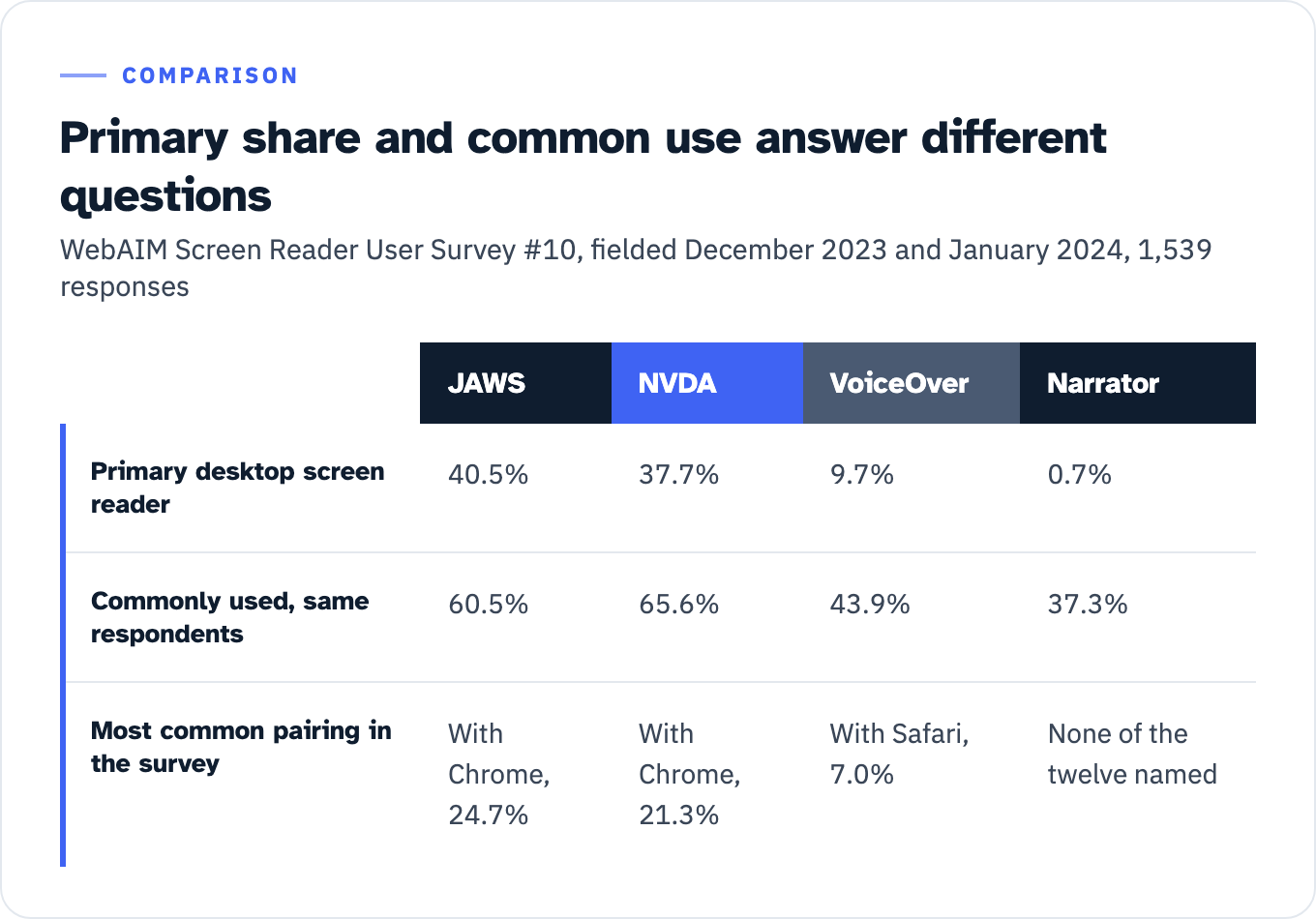
Primary use and common use are different questions with different answers. By primary desktop screen reader, Survey #10 reports JAWS 40.5%, NVDA 37.7%, VoiceOver 9.7%, Dolphin SuperNova 3.7%, ZoomText/Fusion 2.7%, Orca 2.4%, Narrator 0.7%. By commonly used, the same respondents report NVDA 65.6%, JAWS 60.5%, VoiceOver 43.9%, Narrator 37.3%, Orca 8.3%. Narrator is the case that forces the choice: 0.7% primary, 37.3% commonly used. A coverage argument built on primary share drops Narrator. One built on commonly-used share cannot. Your policy has to say which of the two figures it is reasoning from, because the answer changes the test matrix.
View the data as a table
| JAWS | NVDA | VoiceOver | Narrator | |
|---|---|---|---|---|
| Primary desktop screen reader | 40.5% | 37.7% | 9.7% | 0.7% |
| Commonly used, same respondents | 60.5% | 65.6% | 43.9% | 37.3% |
| Most common pairing in the survey | With Chrome, 24.7% | With Chrome, 21.3% | With Safari, 7.0% | None of the twelve named |
Mobile is its own pair. Commonly used mobile screen readers: VoiceOver 70.6%, TalkBack 34.7%, Commentary/Jieshuo 10.1%, Voice Assistant 6.0%, VoiceView 5.9%. Primary mobile browser: Safari 58.2%, Chrome 27.9%, Firefox 4.6%. That combination is what justifies VoiceOver with Safari on iOS and TalkBack with Chrome on Android as the mobile pair, and it is a justification, not a habit.
What the vendors actually document, and how to write a version
Here is the part that trips up anyone trying to build the matrix from vendor support pages: those pages mostly do not exist in the form you want. There is no JAWS-by-browser support matrix to cite. Assembling a reference matrix means reporting what each vendor does document, and sourcing the pairing column to usage data and your own policy instead.
| Assistive technology | Platform the vendor states | Browser support the vendor documents | Version format to record | Prevalence basis (Survey #10) |
|---|---|---|---|---|
| JAWS | ”Windows 11, Windows 10, Windows Server 2025, Windows Server 2022, Windows Server 2019, and Windows Server 2016,” x64 for all operating systems, with ARM64 support added on Windows 11 | None. The System Recommendations page lists operating system, processor speed, memory, hard disk space, video and sound, and no browsers | Dated build string, e.g. “JAWS 2026.2606.132 - June 2026” | 40.5% primary; 55.5% primary in North America |
| NVDA | ”64-bit editions of Windows 10 and Windows 11. Windows Server 2016, 2019, 2022 and 2025,” with “Both AMD64 and ARM64 variants of Windows 11 […] supported, including Copilot+ PCs” and ARM64 Windows 10 not supported | No matrix. The user guide says only “Support for popular applications including web browsers.” The nearest thing is a per-feature note: Native Selection Mode “is supported in” Mozilla Firefox, Mozilla Thunderbird, and “Chrome, Edge, and any browser based on Chromium 134 or newer” | Year-dot-release number, currently 2026.1.1 | 37.7% primary, 65.6% commonly used |
| Narrator | Built into Windows: “there’s nothing you need to download or install” | Two, and only for one behavior: “Scan mode turns on automatically in Google Chrome and Microsoft Edge” | No separate version. Record the Windows version | 0.7% primary, 37.3% commonly used |
| VoiceOver (macOS and iOS) | Shipped with the operating system. Current guide edition is macOS Tahoe 26, with prior editions kept back to macOS High Sierra | None published as a matrix | No standalone version exists. Record the macOS or iOS version | 9.7% primary desktop; 70.6% commonly used on mobile |
| TalkBack | Tied to device and Android version. Google’s own help text says “How you turn on TalkBack on your phone can be a little different. It depends on your phone and its version of Android” | Named in a task topic rather than a support statement: “Use TalkBack to browse the web with Chrome” | No publishable version number. Record the Android version and the device | 34.7% commonly used on mobile |
Sources for that table, in order: the JAWS System Recommendations and JAWS download pages as archived on 27 June and 25 July 2026 respectively, because the live vendor host refuses non-browser clients; the NVDA download page and user guide; Microsoft’s complete guide to Narrator; Apple’s VoiceOver User Guide for macOS; and Google’s TalkBack help, with the Chrome pairing named on the separate TalkBack getting-started page rather than on the main help topic. NVDA 2026.1 was released on 6 May 2026 per the vendor blog; no dated post for the 2026.1.1 patch was located, so do not print one.
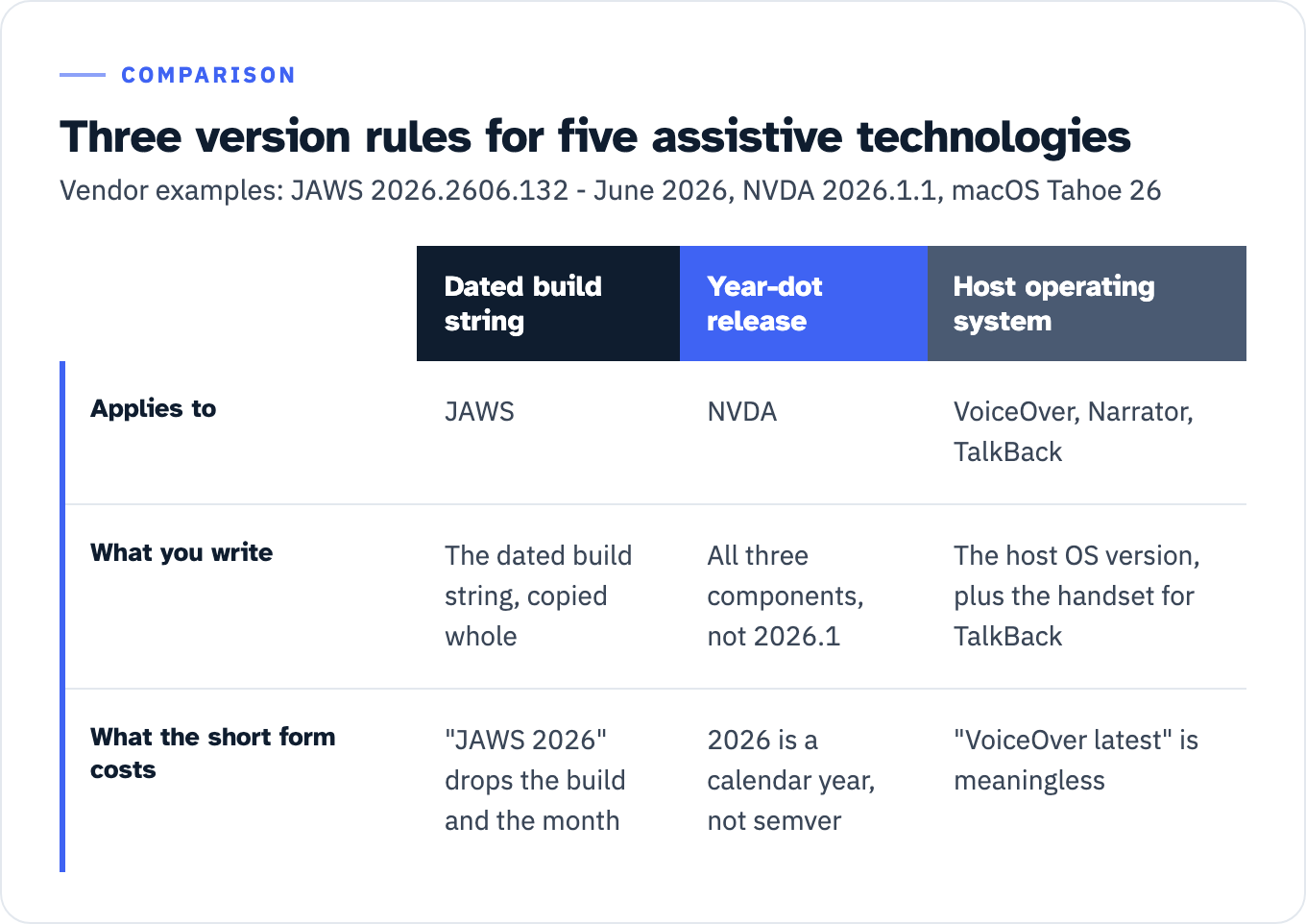
Five products, three version rules, and that is the single most transferable thing in the article:
- A dated build string, for JAWS. Copy it whole. Writing “JAWS 2026” throws away the build and the month, which is the part that tells a reviewer whether your evidence predates a behavior change.
- A year-dot release, for NVDA. Record all three components, 2026.1.1, not 2026.1. It is not semantic versioning: 2026 is a calendar year and carries none of semver’s compatibility contract, so the third component is not safe to drop.
- Inherit the host operating system, for VoiceOver, Narrator and TalkBack. None of the three has a version worth printing on its own. “VoiceOver latest” is meaningless. Record “VoiceOver on macOS Tahoe 26” or “VoiceOver on iOS [version],” whichever you ran; record the Windows version for Narrator; record the Android version and the handset for TalkBack.
View the data as a table
| Dated build string | Year-dot release | Host operating system | |
|---|---|---|---|
| Applies to | JAWS | NVDA | VoiceOver, Narrator, TalkBack |
| What you write | The dated build string, copied whole | All three components, not 2026.1 | The host OS version, plus the handset for TalkBack |
| What the short form costs | ”JAWS 2026” drops the build and the month | 2026 is a calendar year, not semver | ”VoiceOver latest” is meaningless |
Apply that rule and the JSTOR problem becomes visible in your own reports before a reviewer finds it.
A published policy that already works
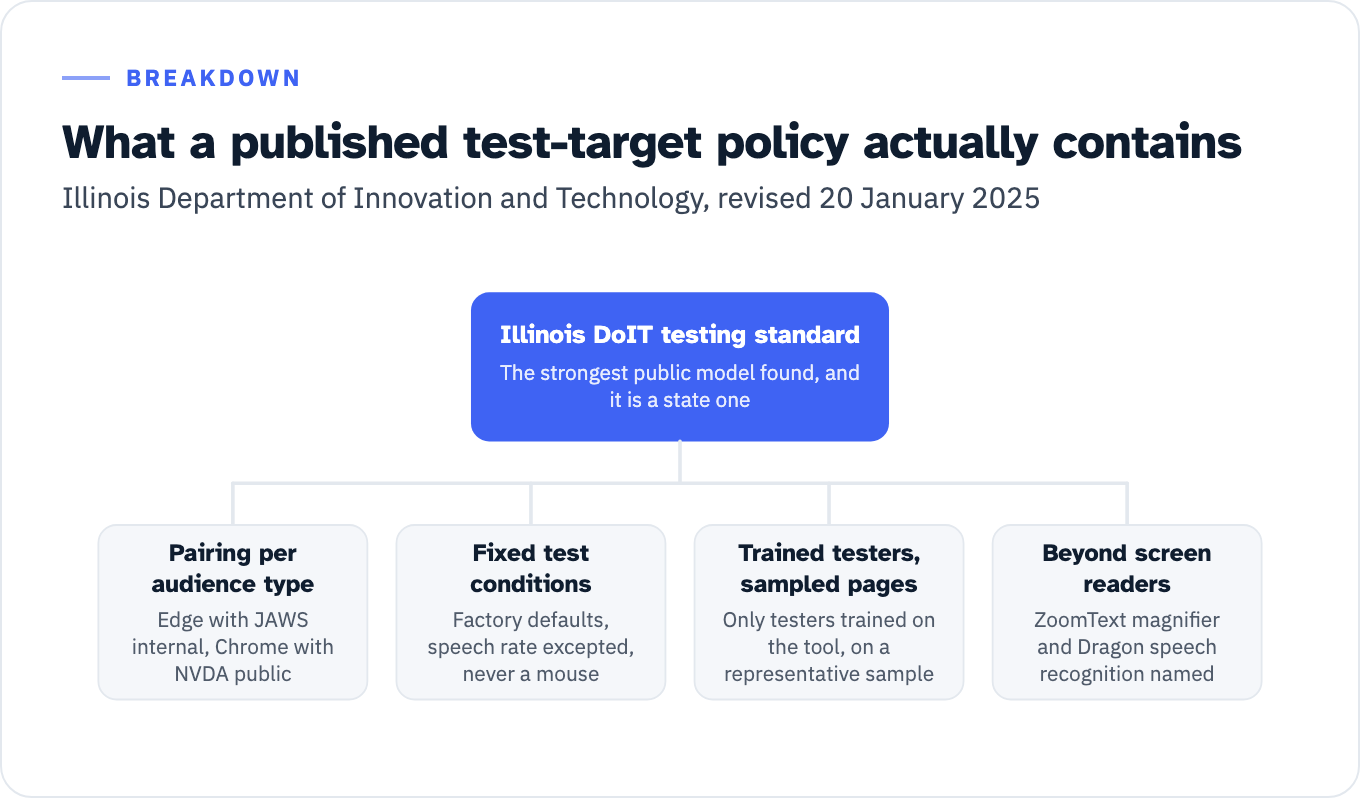
The strongest public model is not from a vendor and not from a federal agency. It is the Illinois Department of Innovation and Technology accessibility testing standard, revised 20 January 2025. No US federal agency was found publishing a comparable pairing list, and it would be wrong to imply one exists.
Illinois does four things worth copying.
It states the pairing per audience type rather than as one global rule: “Screen reader testing should be performed using the browser and screen reader most likely to be used by the intended audience(s) of the system, i.e., Edge with JAWS for internal applications and Chrome with NVDA for public applications.” An internal case management system and a public benefits portal do not have the same user population, and the policy says so.
It fixes the test conditions, so two testers produce comparable results: “Use factory default settings and do not make any setting changes other than to speech rate (and, for NVDA, ‘Highlight Navigator Object’). NEVER use a mouse, and rely ONLY on what you can hear.”
It gates the activity behind competence and treats it as sampled rather than universal: “Assistive technology testing should be performed only by testers who have been trained to use assistive technology tools. Do not test with assistive technology unless you are completely confident in your ability to use it as it would be used by someone with a disability. Assistive technology testing may be performed on a representative sample of screens/pages.” It sits at step 4 in their sequence, after automated, visual and keyboard testing.
And it covers assistive technology that is not a screen reader: “NVDA screen reader […] JAWS screen reader […] ZoomText screen magnifier […] Dragon speech recognition.” A screen-reader-only policy silently leaves magnification and speech input uncovered, and a reviewer who works with those users will notice.
View the data as a list
Illinois DoIT testing standard: The strongest public model found, and it is a state one
- Pairing per audience type: Edge with JAWS internal, Chrome with NVDA public
- Fixed test conditions: Factory defaults, speech rate excepted, never a mouse
- Trained testers, sampled pages: Only testers trained on the tool, on a representative sample
- Beyond screen readers: ZoomText magnifier and Dragon speech recognition named
The six things your test-target policy has to state
Publish fewer than these six and it is a preference, not a policy. Every element below is justified by a source already cited above.
| Element | What it must say | Why, and from where |
|---|---|---|
| Primary set | Operating system, browser and assistive technology for every pairing you run on every engagement, desktop and mobile | WCAG-EM 2.0 Methodology Requirement 1.3 makes defining the baseline mandatory for anyone claiming to follow WCAG-EM; WebAIM’s combination table gives you a defensible cutoff |
| Secondary set | Pairings run on sampled screens, on request, or for named product types | Illinois runs assistive technology testing on “a representative sample of screens/pages” rather than everything |
| Explicitly not covered | The screen readers, magnifiers and speech tools you do not test, named | Dolphin SuperNova at 3.7% primary, ZoomText/Fusion at 2.7% and Orca at 2.4% are real users, and all three appear in WebAIM’s pairing table. Silence reads as an unstated claim |
| Version-pinning rule | Which of exact build, year-dot release, or host operating system applies per product, using the three formats above | Five products, three rules; JSTOR shows what an unpinned rule looks like two years on |
| Review cadence and trigger | A date and an event | WebAIM Survey #11 publishes in September 2026, which is a natural trigger. Illinois carries “Revised 1/20/2025” on the face of the standard |
| Named owner | A person, by role, who approves changes | A policy nobody owns cannot be defended in a clarification exchange |
Turn that into the field itself. The weak version reads: “Testing was conducted using manual and automated methods with screen readers and keyboard-only navigation.” Nothing there can be replicated, which is the specific test GSA’s Essential Elements page sets.
The strong version fits in a paragraph and follows the Articulate shape, with the versions Google and Quickbase leave out:
Product under test: [product] build [exact build]. Conformance target: WCAG [version] Level AA. Desktop pairings run in full on every screen in scope: JAWS 2026.2606.132 with Chrome [version] and with Edge [version] on Windows 11 [build]; NVDA 2026.1.1 with Chrome [version] and with Firefox [version] on Windows 11 [build]; VoiceOver with Safari [version] on macOS Tahoe 26. Mobile pairings run on a sampled set of [n] screens: VoiceOver with Safari on iOS [version]; TalkBack with Chrome on Android [version], [device]. Assistive technology run at factory default settings, speech rate excepted. Not covered by this report: Dolphin SuperNova, ZoomText, Fusion, Orca, Dragon. Known pairing-specific limitations: [list, or “none identified”]. Tester competence: [attestation]. Test-target policy version [n], owner [role], next review September 2026.
The three concrete strings in there are worked examples taken from the vendor pages cited above, not defaults to copy: JAWS 2026.2606.132 was the current build in the 25 July 2026 archived snapshot, NVDA 2026.1.1 was the current release on the same date, and macOS Tahoe 26 is the current VoiceOver guide edition. Replace all three with what you actually ran. Every other bracket is a value you already have or a decision you already made. The reason the paragraph survives review is not length. It is that a reviewer can take any one clause and reproduce it.
What a named pairing does not prove
The honest boundary, in two sentences from sources that have no reason to soften it.
WebAIM’s own long-standing guidance on testing with screen readers warns that “Sighted users may rely too much on what they see, and not realize that not everything they see is being read by the screen reader.” Illinois says outright not to test with assistive technology “unless you are completely confident in your ability to use it as it would be used by someone with a disability.”
A published pairing set is a statement of coverage and method. It is not a claim that the product works for users of those pairings, and an ACR that implies otherwise has overreached. Tester competence is a separate axis, and so is whether the process covers every test component in the first place. If an overlay widget is running on the pages you tested, the question of what you can honestly write in a row changes again, and that is covered in what an overlay can and cannot put in an ACR.
Do this before your next submission
Open the most recent ACR you own or received. Read only the Evaluation Methods Used field and check it against five things: does it name a browser with each assistive technology, does it name an operating system, does it give a version in the correct format for each product, does it state what is not covered, and could a stranger reproduce a defect from it. A field that fails any of those five cannot be replicated by the person reading it, and the rewrite is one paragraph.
If the answer is that no policy exists behind the field to rewrite it from, the six-row table above is the specification. ADACP runs the manual keyboard and screen reader testing behind these fields as part of Section 508 testing engagements; if you are still deciding whether you need an audit, an evidence package or just an ACR review, the engagement types are compared side by side in what each accessibility engagement actually produces.