
ADA compliance training by role: hours and competency checks
The assignment, and what is already published
You have been handed a line that did not exist last quarter: mandatory accessibility training. Somebody upstream decided it, a Chief Human Capital Officer, a Section 508 program manager, a state CIO, or a general counsel who read the April 2027 date in the Title II rule. What you have to produce is a plan with names on it. Which roles have to be trained, how many hours each one costs, what proves the training landed, and whether you can do it with free federal material or have to buy the rest.
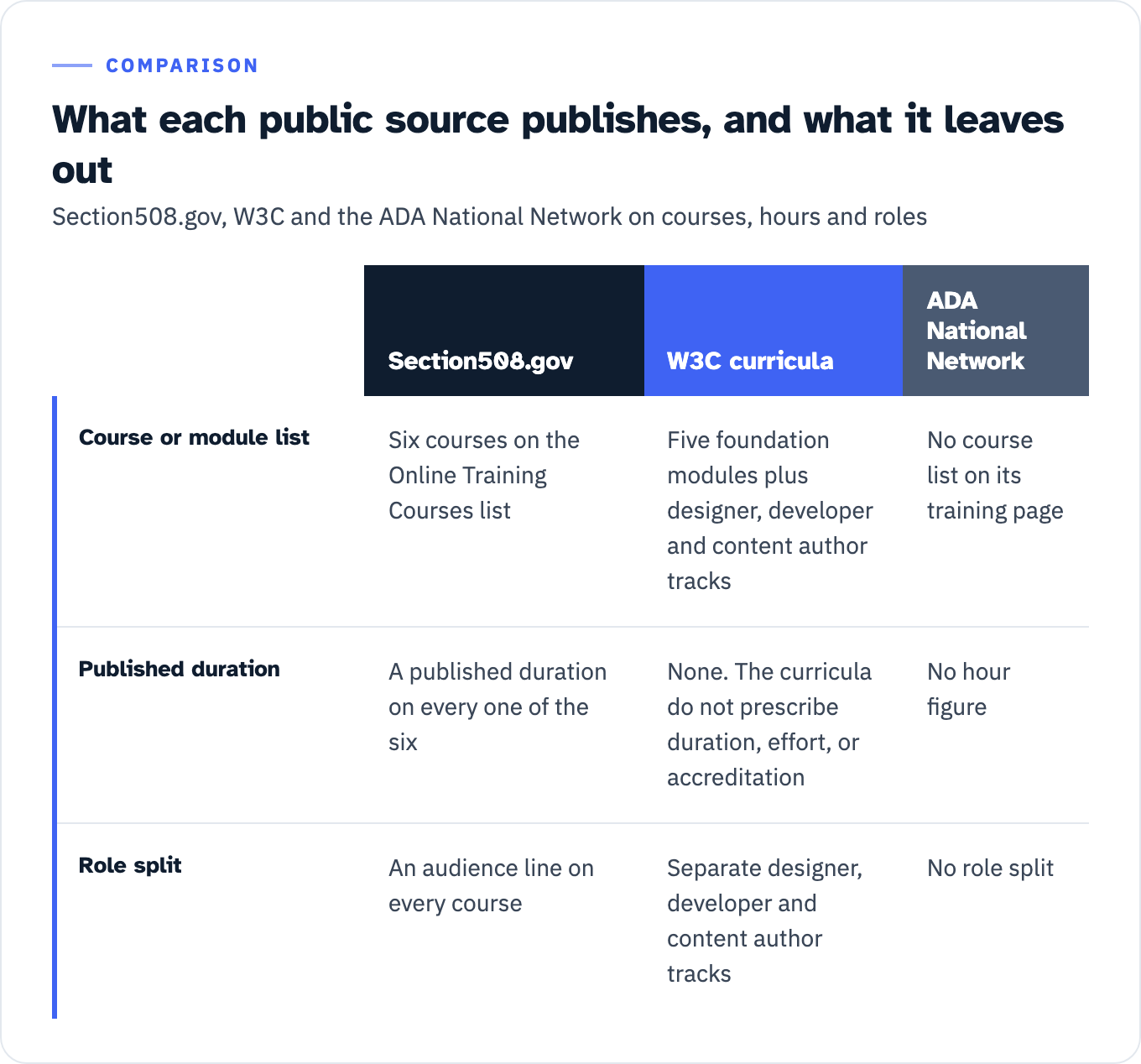
The raw material for that plan is public, but it arrives in two halves that do not meet. Section508.gov’s Online Training Courses list is six courses, every one of them carrying a published duration, a version number and an audience line, and all of them free to read. W3C publishes module structure in detail, five foundation modules plus separate designer, developer and content author tracks with named topics under each, and states outright that its curricula do not “prescribe duration, effort, or accreditation.” The ADA National Network offers training on all ADA topics “on all levels from basic to advanced,” delivered “in-person, webcast, and online,” and its training page publishes no course list, no hour figure, no role split and no assessment. You can have modules without hours, or hours without a role matrix. The join is left to you.
View the data as a table
| Section508.gov | W3C curricula | ADA National Network | |
|---|---|---|---|
| Course or module list | Six courses on the Online Training Courses list | Five foundation modules plus designer, developer and content author tracks | No course list on its training page |
| Published duration | A published duration on every one of the six | None. The curricula do not prescribe duration, effort, or accreditation | No hour figure |
| Role split | An audience line on every course | Separate designer, developer and content author tracks | No role split |
This page is the join, written as a curriculum specification: five roles, the modules each one owns, hours summed from named public courses with the arithmetic shown, the instrument that proves a person can do the thing, and the counted defect class each module exists to reduce. W3C names exactly this use, a procurer who “includes requirements in a training Request for Proposals (RFP) based on the modules provided in this resource,” among the intended uses of its curricula.
One rule governs every number below. Each hour figure is the published duration of a named public course or video series, cited where it appears. Because W3C declines to prescribe duration, no hour count anywhere on this page is attributed to W3C module structure. Nothing here is a quote for an engagement, and nothing here reports what any particular provider delivers.
Which ADA training this is
The phrase covers two unrelated products. One is employment training under Title I: reasonable accommodation and the interactive process. The other is digital accessibility training for the people who build and buy technology. This article is the second one.
One clarification before the split, because it is the error that gets a proposal handed back. ADA coordinator duties are not a Title I subject. The coordinator is a Title II creature: under 28 CFR 35.107(a), “A public entity that employs 50 or more persons shall designate at least one employee to coordinate its efforts to comply with and carry out its responsibilities under this part.” If your syllabus files coordinator training under employment law, the reviewer will assume the rest of it is guesswork too.
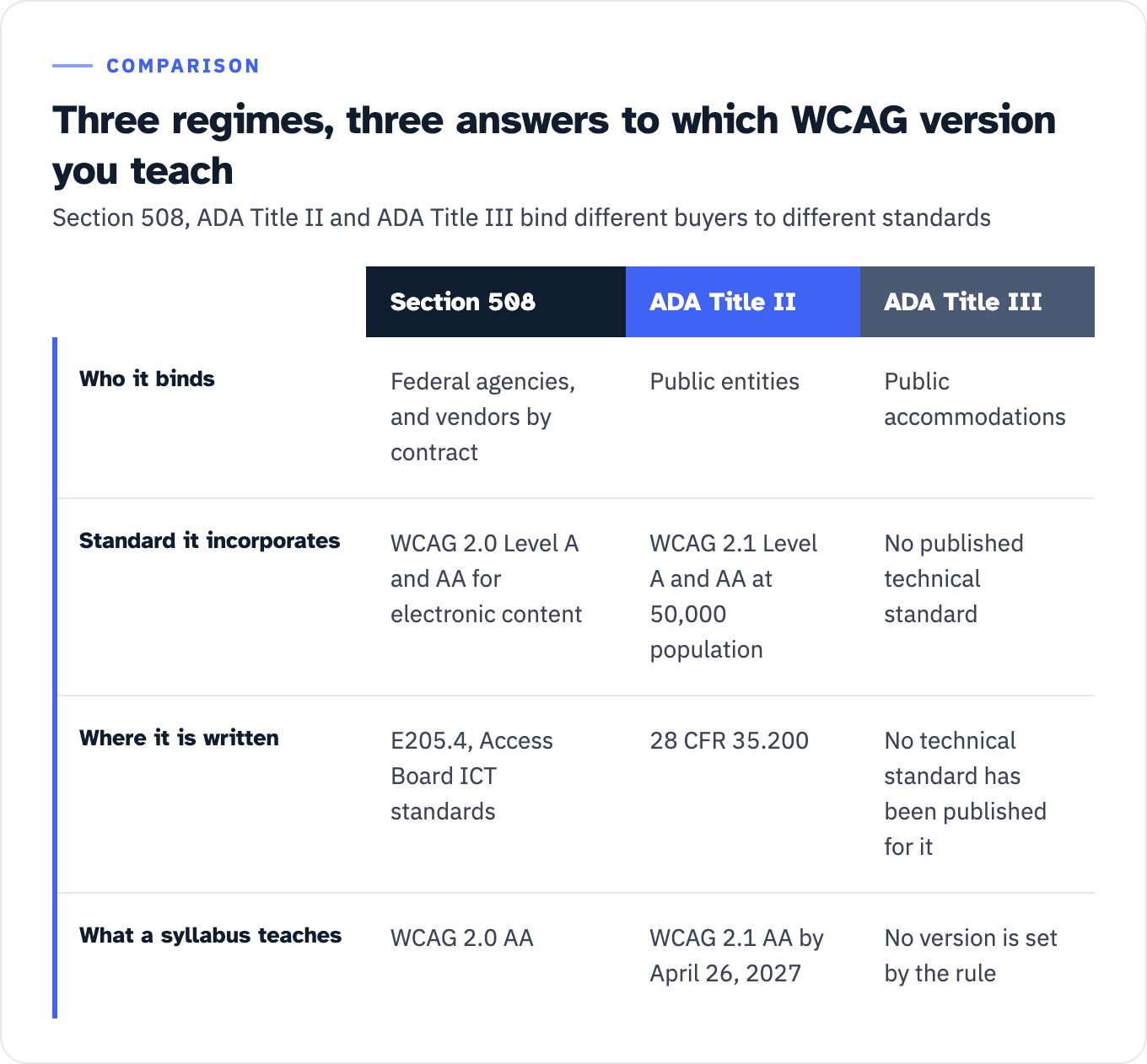
Three legal regimes drive the second kind of training, and they do not point at the same standard:
- Section 508 binds federal agencies and, through their contracts, their vendors. The Revised 508 Standards incorporate WCAG 2.0 Level A and AA for electronic content, at E205.4 of the Access Board’s ICT standards.
- ADA Title II binds public entities. Under 28 CFR 35.200, a public entity with a population of 50,000 or more has to meet WCAG 2.1 Level A and AA from April 26, 2027, and everyone else from April 26, 2028.
- ADA Title III binds public accommodations and carries no published technical standard.
View the data as a table
| Section 508 | ADA Title II | ADA Title III | |
|---|---|---|---|
| Who it binds | Federal agencies, and vendors by contract | Public entities | Public accommodations |
| Standard it incorporates | WCAG 2.0 Level A and AA for electronic content | WCAG 2.1 Level A and AA at 50,000 population | No published technical standard |
| Where it is written | E205.4, Access Board ICT standards | 28 CFR 35.200 | No technical standard has been published for it |
| What a syllabus teaches | WCAG 2.0 AA | WCAG 2.1 AA by April 26, 2027 | No version is set by the rule |
If your buyers are federal, you teach WCAG 2.0 AA because that is what the standard incorporates. If you are a county, you teach 2.1 AA against a dated deadline. Getting this wrong spends the whole budget on the wrong criteria, which is why the version question belongs in the WCAG version each rule actually requires before the syllabus is written, not after.
The gap, in counted numbers
GSA runs an annual governmentwide Section 508 assessment. The FY 2025 edition, reading view, reports that “Only 16 agencies (27 percent) and 38 components (25 percent) reported mandatory Section 508 training.” The denominators matter: 212 respondents in total, 60 agencies and 152 components. Forty-three further agencies did not respond at all. GSA also states that agencies “self-reported the data in this report” and that “No independent validation or external data was utilized.” So 27 percent is a share of self-reporting responders, not a measurement of the federal government.
Role-specific training is thinner still. The same report gives the split for additional role-specific training:
| Role group | Share of responding agencies requiring additional role-specific training |
|---|---|
| Accessibility testers | 28% |
| Web content managers | 28% |
| Developers | 23% |
| Document authors | 22% |
| Acquisition professionals | 20% |
| Designers | Not measured. GSA’s counted role split has five rows and designer is not one of them. |
| None of the five groups above | 55% |
That last row is the one to take into a budget meeting. Fifty-five percent of responding agencies require role-specific training for none of the five groups “despite their direct responsibility for accessibility implementation and conformance outcomes.” Component-level data shows a nearly identical pattern.
Two cautions travel with these figures. GSA states that the FY 2025 criteria changed and the respondent pool shrank, so no year-over-year trend on training is supportable from this report. And designers are absent from the count while appearing in GSA’s own narrative: responsibility for accessibility, GSA writes, “spans acquisition staff, designers, developers, testers, content authors, and program managers.”
Where training does exist, the cadence is unsettled. Among the 16 agencies with a mandatory requirement, “most require annual training, but the others require only one-time or irregular training,” and some components require it where their parent agency does not.
Who owns the plan and who signs it
A training proposal that lands on the wrong desk stalls. Federal guidance names the desks.
OMB M-24-08, issued December 21, 2023, states that agencies “should develop an accessibility training plan that identifies appropriate training requirements for specific staff and the frequency at which it must be completed.” Read the verb. This is the recommendation voice, not a mandate. The mandatory character of any course comes from the agency’s own policy, and GSA’s assessment likewise recommends rather than requires annual role-based training.
The plan itself is a human capital deliverable. Section508.gov’s roles and responsibilities page assigns the Chief Human Capital Officer the duty to develop “training plans to identify who should receive training on digital accessibility” and to establish schedules, “in consultation with the Section 508 program manager.” The program manager’s own published duties include managing “Section 508 training.” A proposal is therefore written to two signatures, not one: the program manager scopes it, the CHCO makes it mandatory.
M-24-08 also names the groups that get regularly scheduled training: acquisition professionals, IT help desk staff, and staff with broad responsibilities for official communication and outreach. Help desk is the role that falls outside a build-and-test role matrix, because it neither creates nor tests the product. Play 12 of the Technology Accessibility Playbook still gives it a line of its own: “Troubleshooting and resolving reported accessibility issues.”
The two layers: awareness for everyone, role modules on top
GSA publishes a filled-in worked example of the memo that makes a course mandatory. Its structural claim is the one to copy: “All personnel … should complete accessibility awareness training and receive annual reinforcement of its significance and requirements. Role-specific training may be assigned as appropriate.” The elided words are “regardless of role, supervisory status, or grade level,” which is the memo refusing to exempt anybody from the base layer.
Two layers, then. A short awareness course for everyone with an annual refresh, and role modules stacked on top for the people who introduce or catch defects. GSA’s training plan checklist lists the cadence options to pick from: onboarding or one-time, annual or biennial refresher, role-based, role change or promotion, and project-based, with the recommendation that “At minimum, an annual Section 508 basics or general knowledge training is recommended.”
The same checklist tells you how to build the role list. Inventory “all job roles across the agency such as developers, web content managers, document authors, Section 508 testers, Human Resources (HR), acquisition and procurement, content creators, and leadership,” then “Identify at least one training, shared or role-specific, for each role” and “Identify any training needs to address common defect types.” That last instruction is the connective tissue of the matrix below: a module earns its hours by reducing a defect class you can name.
The curriculum matrix
This is the deliverable. Five role tracks plus the baseline layer, with the module set each one owns, the hours available from named public courses, the competency instrument, and the counted defect class the module targets.
| Role | Module set it owns | Hours from named public courses | Competency check | Counted defect class it targets |
|---|---|---|---|---|
| Everyone who touches ICT | W3C foundation modules 1, 2 and 4, plus the “Roles and Responsibilities” topic from module 5 | 60 min: Section 508: What Is It and Why Is It Important? (FAC 049) | 10-question completion test, as shipped with FAC 049 | None directly. W3C names this layer as a prerequisite for the designer, developer and content author tracks. |
| Designer | W3C designer modules 1 to 7: visual design, information design, navigation design, interaction design, images and graphics, multimedia and animations, forms design | None in the federal catalog. W3C publishes a 2 hour lecture outline for accessible web design. | Short answer on contrast ratios, practical layout simplification, portfolio review | Low contrast text, detected on 83.9% of home pages in the 2026 WebAIM Million |
| Developer | W3C developer modules: page structure, menus, images, tables, forms, custom widgets, rich applications | None in the federal catalog. | Practical keyboard operation of a custom widget, portfolio of coded widgets | Missing form input labels 51%, empty links 46.3%, empty buttons 30.6%, missing document language 13.5% |
| QA and tester | ICT Testing Baseline coverage, plus tool proficiency | 1 h 46 m 31 s of tool video: ANDI 31m 11s, Color Contrast Analyzer 6m 07s, WebAIM Contrast Checker 5m 22s, PDF testing and remediation 63m 51s. The PDF series is shared with the content author track, so do not add the two totals. | The published federal tester position description, used as a graded rubric, plus supervised retest of a known defect | Whatever the scanner cannot see. WebAIM states that “absence of detected errors does not indicate that a page is accessible or conformant.” |
| Content author | W3C content author modules: clear content, structure, forms, images, data tables, multimedia | 1 h 27 m 27 s core: Microsoft Word 60 min, universal design for content creators 18m 21s, accessible media 5m 41s, alternative text 3m 25s. 3 h 54 m 20 s with the full document set. | Research task on alternative text types, portfolio of authored pages with alternatives supplied | Missing alternative text 53.1%, skipped heading levels on 41.8% of pages |
| Procurement and acquisition | FAR Subpart 39.2: applicability, three exceptions, three exemptions, determination contents, legacy boundary | 2 h 54 m 30 s: Procuring Section 508 Conformant ICT 105 min (FAC 056), Micro-Purchases 30 min (FAC 047), Soliciting and Evaluating ACRs 30 min, ART tool 9m 30s | Write a nonavailability determination containing all three FAR-required elements; judge a supplied ACR | Awards made without a conformance requirement, exceptions granted without documentation, ACRs accepted without review |
Every figure in the hours column is traced in the ledger below. The two tracks with no federal hours are not an oversight in the table. They are the finding.
Baseline layer: everyone who touches ICT
One course, 60 minutes, Section 508: What Is It and Why Is It Important?, version 4.1 dated September 2024, beginner level, audience “Federal Employees and Contracts.” It carries Federal Acquisition Institute course ID FAC 049 and earns Continuous Learning Points.
The detail worth copying is in its change log. Version 4.0, September 2024: “Add Completion Test: Learners now take a 10-question test to earn a certificate of completion.” An awareness course with a gate on the certificate is a different artifact from an awareness course with a play button, and it is the difference between a completion metric and a knowledge metric.
W3C’s foundation modules supply the same layer in five modules: what web accessibility is, people and digital technology, business case and benefits, principles standards and checks, and getting started. This is not optional scaffolding. The developer, designer and content author tracks carry an identical Foundation Prerequisites block naming the same subset: modules 1, 2 and 4 with all of their topics, plus one topic from module 5, “Roles and Responsibilities.” Module 3, the business case, is not a prerequisite for any of the three. If you cut the awareness hour to save budget, you have removed the stated prerequisite for the three tracks you kept.
For executives there is a shorter path: Accessibility of ICT: An Overview for Government Executives, 20 minutes, version 2.0.1 dated February 2025, aimed at agency heads, chief acquisition officers, the CHCO, CIOs, EEO officers and Section 508 program managers. Twenty minutes is the realistic ask for the person who signs the plan.
Designer track
W3C’s designer modules are seven, written for visual designers, information architects, UX designers and interaction designers: visual design, information design, navigation design, interaction design, images and graphics, multimedia and animations, and forms design.
Module 1 is the worked example for how a module ties to a defect class without guessing. The visual design module maps to 17 named success criteria, including 1.4.3 Contrast (Minimum), 1.4.11 Non-Text Contrast, 1.4.10 Reflow, 1.4.12 Text Spacing and 2.5.5 Target Size. Its learning outcomes are written as behaviors with the thresholds in them: students should be able to “design text and images of text that have a contrast ratio of at least 4.5:1 with respect to their background,” at least 3:1 for large-scale text and images of text, and at least 3:1 for user interface components and graphics.
That is assessable. W3C names three instrument types for the module: short answer questions on contrast ratios for different interface components, a practical exercise giving students a complex layout to simplify, and a portfolio in which students design a page and are assessed on color, layout, spacing and placement.
The defect class is the largest one measured. In the 2026 WebAIM Million, low contrast text was detected on 83.9 percent of the one million home pages scanned, the largest of six categories that together account for 96 percent of all detected errors and have been the same six categories for seven years. Contrast is a design decision made once in a token file and then repeated on every page that uses the token, which is what makes it the module to fund first.
No course in the federal catalog teaches it. The only federal assets that touch contrast are three short tool videos, and two of them overlap: How to Use the Color Contrast Analyzer at 6m 07s, How to Use the WebAIM Contrast Checker at 5m 22s, and How to Test Color Contrast using the Color Contrast Analyzer at 2m 33s, which the training library itself identifies as Module 14 of the ANDI series and is therefore already inside the ANDI total. Checking a ratio after the fact is not the same skill as choosing a palette that never produces a failing one.
Developer track
Seven modules, from W3C: page structure, menus, images, tables, forms, custom widgets and rich applications, with named topics under each. Page structure covers section headings, sections of content, page regions and page composition. Forms covers controls and labels, instructions, and notifications. Custom widgets covers role definitions, accessible names and descriptions, states and properties, and keyboard and focus management.
Sequencing matters here, and there is counted evidence for it. The 2026 WebAIM Million found that home pages with ARIA present carried 59.1 detected errors on average against 42 on pages without it, so a reader “would expect to encounter an additional 17 potential barriers on home pages with ARIA present.” Menus are the specific case: 5.7 percent of home pages had an ARIA menu, and 22 percent of those menus “introduced accessibility barriers due to the lack of necessary ARIA menu markup and interactions.”
The operational conclusion is that the custom widgets module sits behind a gate, not in the intro. Its own learning outcomes put native HTML first: students should be able to “explain the accessibility benefits of using native HTML elements” before they write ARIA roles, states and properties. Its assessment ideas are practical and portfolio: select a date from a calendar widget using only the keyboard, and add custom widgets to a site under construction, assessed on roles, properties, states and keyboard interactions.
The counted defect classes the earlier developer modules target are the plain ones: missing form input labels on 51 percent of home pages, empty links on 46.3 percent, empty buttons on 30.6 percent, and missing document language on 13.5 percent. One third of the 6.9 form inputs found on an average home page were not properly labeled by any of label, aria-label, aria-labelledby or title.
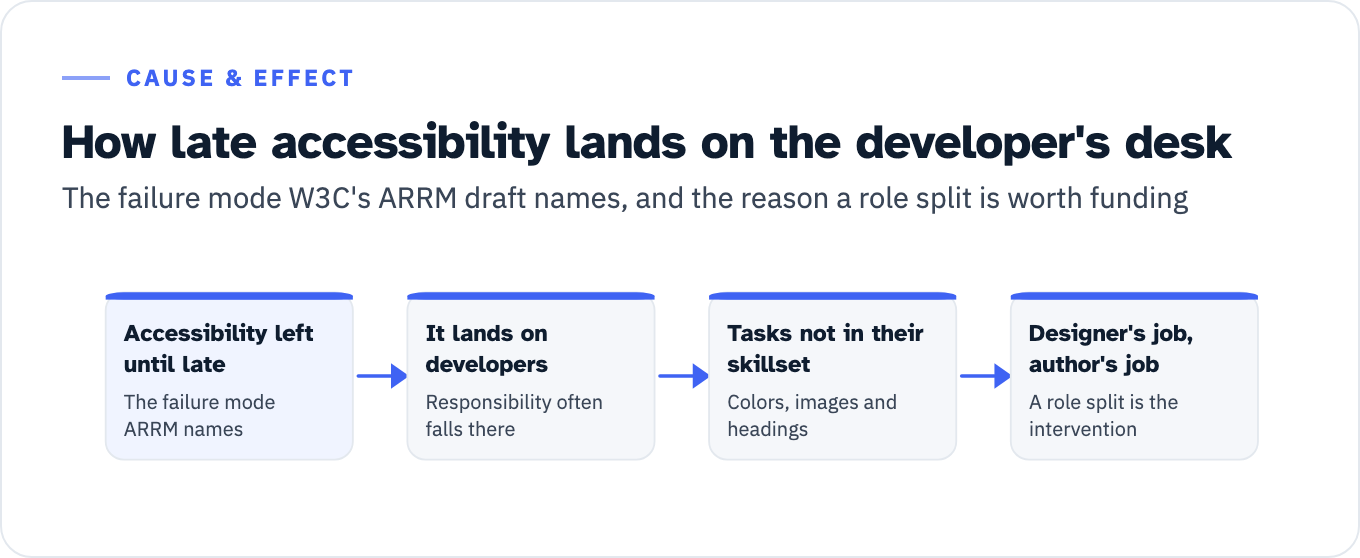
Note what W3C’s roles draft says about why this track exists at all. The Accessibility Roles and Responsibilities Mapping work, an in-progress draft from a W3C Community Group updated July 24, 2025 and not a W3C Recommendation, states the failure mode directly: when accessibility is left until late, responsibility “often falls on developers,” who “end up handling tasks that are not in their skillset,” and the examples ARRM gives are selecting colors, describing images and writing headings. Those are the designer’s job and the author’s job. A role-based curriculum is the intervention against exactly that. ARRM’s three ownership levels, Primary, Secondary and Contributor, are a usable way to write the split into a RACI without pretending it is a standard.
View the data as a list
- Accessibility left until late: The failure mode ARRM names
- It lands on developers: Responsibility often falls there
- Tasks not in their skillset: Colors, images and headings
- Designer’s job, author’s job: A role split is the intervention
QA and tester track
This is the track where the public material runs out fastest, and where a training plan is easiest to overpromise.
The coverage standard is the ICT Testing Baseline Portfolio from the Access Board, which “establishes the minimum requirements for evaluating the conformance of ICT with the Revised Section 508 of the Rehabilitation Act of 1973, as amended.” It is a comprehensive set of test components, independent of any testing tool, and it is explicitly “NOT: A step-by-step testing procedure or methodology.” A tester course that teaches a tool has not taught the baseline. A tester course that teaches the baseline still has to teach a process on top of it.
GSA is candid about the cost. Its page on attaining Section 508 testing expertise lists among the drawbacks of building testers in house that “Training personnel may require significant initial resources and time,” that “Section 508 Standards can be complex and difficult to learn,” that “There is potential for inconsistent quality early on as testers begin to complete tasks independently,” and that “Mentoring and oversight of testers is needed as they learn to test independently.” A one-day course can start a tester. On the government’s own published account, it cannot finish one, because the finishing is mentoring and supervised repetition rather than seat time.
The competency benchmark is already written and downloadable. The federal Section 508 position descriptions set out, for an accessibility tester, a “Minimum 3 years of ICT accessibility testing experience,” a “Deep understanding of Revised Section 508 Standards and WCAG 2.0 Level AA,” “Proficiency with manual testing procedures including keyboard-only navigation and code review,” “Expertise in evaluating and creating Accessibility Conformance Reports (ACRs),” and the “Ability to document and interpret test results, and advise on remediation techniques.” Used as a rubric rather than a job ad, that is a five-line scoring sheet for a trainee tester at the end of a program. Note that the fifth line is not a knowledge item. Documenting a result and advising on a fix cannot be assessed by a quiz, which is why the instrument for this track has to be a supervised piece of work.
The hours the federal catalog can fund here are tool familiarization only, and they are precise: the ANDI tool overview runs 31m 11s across 18 parts, the Color Contrast Analyzer 6m 07s, the WebAIM Contrast Checker 5m 22s, and PDF testing and remediation in Acrobat 63m 51s across five parts. That is 1 hour 46 minutes 31 seconds of video, published as tutorials with no graded instrument attached to any of them. Which manual test targets a tester has to cover, and on which assistive technology, is the separate question handled in assistive technology test targets.
The defect class this track targets is the inverse of the others. WebAIM states its own limit plainly: WAVE analyzes the rendered DOM and detects failures, but “All automated tools, including WAVE, have limitations,” and “not all conformance failures can be automatically detected.” Its conclusion is the sentence to put in the test plan: “Absence of detected errors does not indicate that a page is accessible or conformant.” The tester’s value is the part of the standard no scanner reaches. That is why this module is assessed by supervised retest rather than by a quiz.
Content author track
Six W3C modules: clear content, structure, forms, images, data tables and multimedia, written for writers, editors, content creators and publishers.
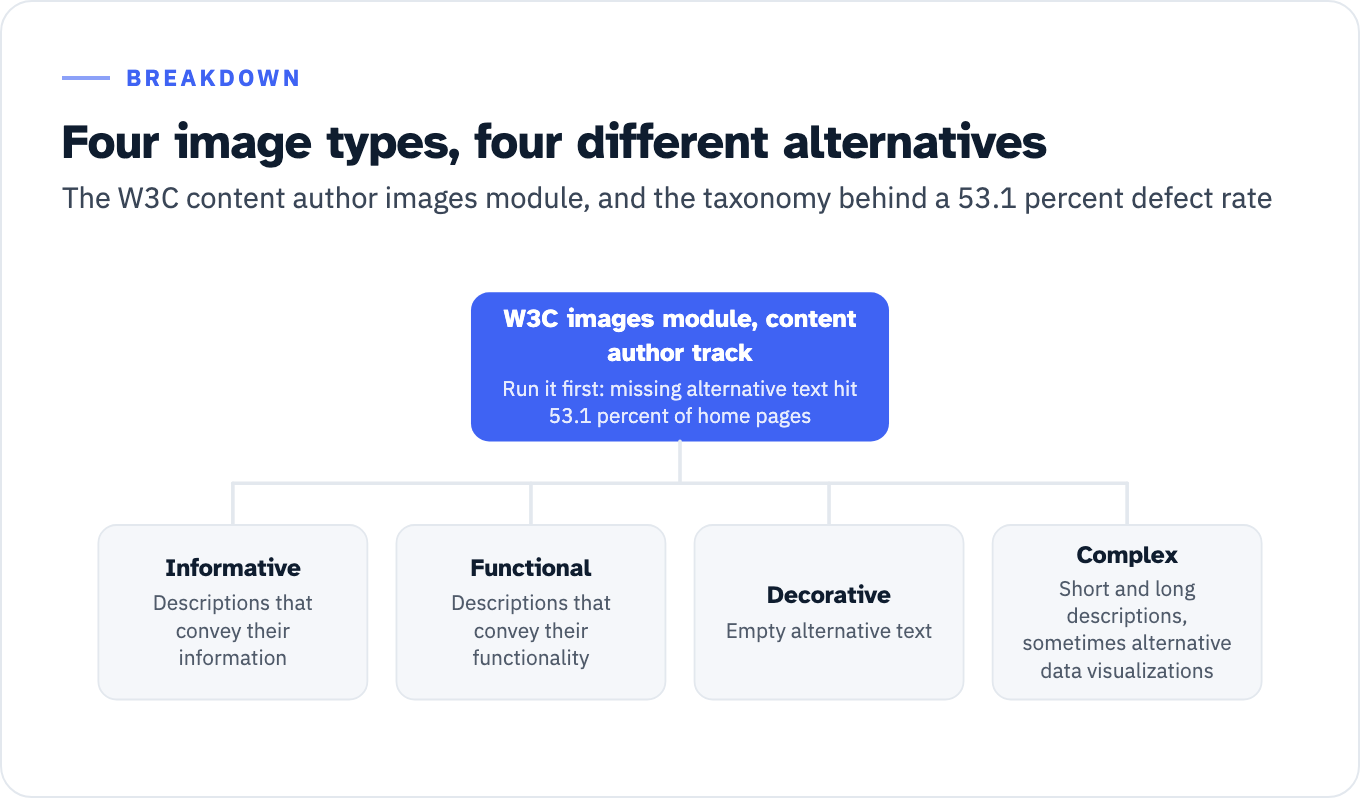
Two counted defect classes belong to this role rather than to development. Missing alternative text, one of the six categories in the WebAIM set, was detected on 53.1 percent of home pages in the 2026 edition, with one in four linked images missing alternative text. Skipped heading levels, counted separately in the same study, were present on 41.8 percent of pages at a rate of one in every 25 headings, up from 39 percent in 2025. Neither is a coding failure. Both are authoring decisions.
The images module is the one to run first, because its learning outcomes are the taxonomy the defect data implies: informative images “require descriptions that convey their information,” functional images “require descriptions that convey their functionality,” decorative images “require empty alternative text,” and complex images “require short and long descriptions and sometimes alternative data visualizations.” Its assessment ideas are a research task and a portfolio in which students supply alternatives for several image types and are scored on whether the type they chose matches the image’s context and function.
View the data as a list
W3C images module, content author track: Run it first: missing alternative text hit 53.1 percent of home pages
- Informative: Descriptions that convey their information
- Functional: Descriptions that convey their functionality
- Decorative: Empty alternative text
- Complex: Short and long descriptions, sometimes alternative data visualizations
The federal hours here are real and generous. The Microsoft Word and Accessibility Best Practices course runs 60 minutes, version 1.2 dated July 2024, aimed at document authors, web content managers and accessibility testers. Add the short video tutorials that map to the W3C modules, universal design for content creators at 18m 21s, creating accessible media at 5m 41s and alternative text at 3m 25s, and the core author layer is 1 hour 27 minutes 27 seconds. Add the format sets, PowerPoint at 43m 54s plus templates at 8m 18s, Excel at 30m 50s and PDF at 63m 51s, and the full document authoring track reaches 3 hours 54 minutes 20 seconds.
Documents come with a scope rule that a general WCAG course will not have taught. Under E205.4 of the Access Board’s standards, electronic content conforms to WCAG 2.0 Level A and AA, but “Non-Web documents shall not be required to conform to the following four WCAG 2.0 Success Criteria: 2.4.1 Bypass Blocks, 2.4.5 Multiple Ways, 3.2.3 Consistent Navigation, and 3.2.4 Consistent Identification.” Four criteria off the list for a PDF is a real saving and a real trap in the other direction. The related W3C guidance, WCAG2ICT, is a Group Note dated December 11, 2025, which means it explains application rather than setting a requirement.
If the reason you are buying author training is a backlog of legacy files rather than new output, the sequencing question comes first, and that is a triage problem before it is a training problem: see triaging a legacy document mountain.
There is a buy-side twin to this module, and it sits in the procurement track rather than the classroom. Provision 504.2 of the standards requires that authoring tools “provide a mode of operation to create or edit content that conforms to Level A and Level AA,” and 504.2.1 requires them to preserve accessibility information on format conversion. GSA’s FY 2025 recommendation is to “Prioritize the procurement and use of accessible authoring tools,” which reduces defects “at the source.” Training an author on a tool that discards structure on export is money spent against the tool.
Procurement and acquisition track
This is the best-supplied track in the federal catalog and the one with the clearest competency instrument.
Three courses, all with published durations: Procuring Section 508 Conformant ICT Products and Services at 105 minutes, version 1.0 dated March 2024; Micro-Purchases and Section 508 Requirements at 30 minutes, version 3.0 dated March 2025; and Soliciting and Evaluating Accessibility Conformance Reports in Federal ICT Procurement at 30 minutes, version 1.0 dated May 2023. Add the 9m 30s introduction to the Accessibility Requirements Tool and the track is 2 hours 54 minutes 30 seconds. The training home page is the authoritative source for the course IDs that earn Continuous Learning Points: FAC 047 for micro-purchases, FAC 049 for the foundation course, FAC 056 for procuring conformant ICT.
The ACR course states its outcomes as verbs the buyer actually needs: describe the importance of an ACR, determine when someone must request one, explain key aspects of a complete one, “Write an ACR for a product or service,” and “Judge whether an ACR is complete.” Note the direction: it trains both sides of the transaction. A vendor’s proposal team is being asked for the same competency as the contracting officer reading their document. The scoring instrument for that competency is published separately at how to score a vendor’s ACR.
The syllabus proper is FAR Subpart 39.2, and it is short enough to teach in an afternoon. Under 39.203(a), acquisitions for ICT supplies and services meet the standards at 36 CFR 1194.1 unless an exception at 39.204 or an exemption at 39.205 applies. Three exceptions: national security systems, incidental contract items, and maintenance or monitoring spaces. Three exemptions, all at 39.205(a): undue burden, fundamental alteration, and nonavailability of conforming commercial products and commercial services.
Keep the exemption and its paperwork in separate columns of the syllabus, because they sit in separate subsections and trainees conflate them. The exemption itself is 39.205(a)(3). The documentation duty is 39.205(c), which requires the contracting officer to obtain a written determination from the requiring activity and keep it in the contract file. The nonavailability determination is the competency check, because 39.205(c)(3) states its required contents and they can be graded pass or fail. A determination “shall include (i) A description of the market research performed; (ii) A listing of the requirements that cannot be met; and (iii) The rationale for determining that the ICT to be procured best meets the ICT accessibility standards.” Hand a trainee a scenario and score their determination against those three elements. The wider question of who inside an agency has authority to make each determination is treated in Section 508 exceptions and agency determinations.
One date belongs in this module and nowhere else. Legacy ICT is measured from January 18, 2018 under FAR 39.203(e), and under 39.203(f) any alteration of a component after that date pulls it back into the current standards. That is the sentence a procurement trainee should leave holding, because it converts a maintenance ticket into a conformance obligation.
GSA’s own per-role expectation for this group matches: procurement professionals “need to understand accessible acquisition processes, Quality Assurance Surveillance Plans, Contractor Performance Assessment Reporting System, and Federal Acquisition Regulations.” The QASP half of that is contract construction rather than classroom material, and it is covered in Section 508 contract clauses and the QASP.
Where every hour figure came from
The hours column above is built by summing named public assets, so here is the whole ledger and a reviewer can check the arithmetic.
| Asset | Published duration | Source |
|---|---|---|
| Section 508: What Is It and Why Is It Important? (FAC 049) | 60 min | section508.gov course page, v4.1, Sep 2024 |
| Accessibility of ICT: An Overview for Government Executives | 20 min | section508.gov course page, v2.0.1, Feb 2025 |
| Micro-Purchases and Section 508 Requirements (FAC 047) | 30 min | section508.gov course page, v3.0, Mar 2025 |
| Procuring Section 508 Conformant ICT (FAC 056) | 105 min | section508.gov course page, v1.0, Mar 2024 |
| Soliciting and Evaluating ACRs | 30 min | section508.gov course page, v1.0, May 2023 |
| Microsoft Word and Accessibility Best Practices | 60 min | section508.gov course page, v1.2, Jul 2024 |
| Accessible document in Microsoft Word, 14 parts | 59m 21s | section508.gov video library |
| Test and remediate PDFs in Acrobat, 5 parts | 63m 51s | section508.gov video library |
| Author and test PowerPoint, 14 parts | 43m 54s | section508.gov video library |
| Creating PowerPoint templates | 8m 18s | section508.gov video library |
| Accessible spreadsheet in Excel, 11 parts | 30m 50s | section508.gov video library |
| ANDI tool overview, 18 parts | 31m 11s | section508.gov video library |
| How to Use the Color Contrast Analyzer | 6m 07s | section508.gov video library |
| How to Use the WebAIM Contrast Checker | 5m 22s | section508.gov video library |
| How to Test Color Contrast using the Color Contrast Analyzer | 2m 33s | section508.gov video library, identified there as Module 14 of the ANDI series, so already inside the 31m 11s above and not added again |
| Universal design for content creators, 4 parts | 18m 21s | section508.gov video library |
| Creating accessible media | 5m 41s | section508.gov video library |
| What is alternative text | 3m 25s | section508.gov video library |
| Accessibility Requirements Tool (ART), 5 parts | 9m 30s | section508.gov video library |
| Introducing web accessibility, any audience | 20 min | W3C presentation outlines |
| Digital accessibility business case, senior management | 10 min | W3C presentation outlines |
| Accessible web design, design students | 2 hour lecture | W3C presentation outlines |
The W3C presentation outlines are the only W3C source that carries minute budgets, and they are per talk, not per role. Everything else in the table is a US government publication.
Four arithmetic notes for anyone checking the sums.
- The 60-minute Microsoft Word course and the 59m 21s Word video series cover the same subject, so only the course is counted in the content author track and the video series is an alternative rather than an addition.
- The content author core of 1 h 27 m 27 s is the Word course plus universal design, accessible media and alternative text. The full document track of 3 h 54 m 20 s adds PowerPoint, PowerPoint templates, Excel and PDF.
- The 63m 51s Acrobat series appears in two tracks on purpose, because a tester and an author both need it, so it is inside the QA total of 1 h 46 m 31 s and inside the full document track of 3 h 54 m 20 s. Adding the two totals together double counts it by just over an hour.
- The procurement track of 2 h 54 m 30 s is the three courses plus the ART introduction, and it excludes the executive overview, which sits with leadership.
Competency checks that survive a reviewer
A certificate of attendance proves attendance. Play 12 of the Technology Accessibility Playbook publishes the four questions a reviewer will ask about a program, and only one of them is about who showed up: what training does the organization offer, how effective is it at helping the workforce understand policy and build accessible technology, which training is mandatory and for which roles, and “How is participation in mandatory training tracked; and what metrics are available for analysis and decision making?”
GSA’s training plan checklist gives the metric set to answer with. It instructs agencies to “Establish success metrics such as completion rates, knowledge assessments, and final exams,” and asks directly whether employees are “retaining content, as measured by knowledge assessments or final exams.” Seven instruments, then, in rising order of what they prove. They are not interchangeable, and a program that reports only the first row has not answered the reviewer’s fourth question:
| Instrument | What it establishes | Where the precedent is published |
|---|---|---|
| Completion rate | That the hours were spent | GSA training plan checklist success metrics |
| Knowledge assessment or final exam | That the content was retained | GSA checklist; the 10-question test gating the FAC 049 certificate |
| Short answer | That thresholds are known, for example contrast ratios per component type | W3C designer visual design module |
| Practical | That the person can perform the task under observation, for example operating a custom widget by keyboard only | W3C developer custom widgets module |
| Portfolio | That the person applies it in their own work product | W3C designer and content author modules |
| Graded artifact | That a required document contains its required elements, for example a FAR nonavailability determination | FAR 39.205(c)(3) |
| Supervised retest | That a specific defect class no longer recurs in the person’s output | GSA guidance on mentoring and oversight of testers |
For the people whose output is a conformance judgment, there is a floor above these instruments. M-24-08 states that agencies “should ensure that Section 508 program managers and employees or contractors tasked with testing and evaluating digital accessibility have appropriate expertise and have, at a minimum, participated in a certified Section 508 conformance training program.” Which certification, and whether it is worth the seat cost, is a separate decision from the curriculum and is not settled here.
What the free federal material covers, and where it stops
Before you price anything, subtract what a buyer can get for nothing.
Federal agencies can take GSA’s courses free and host them themselves. GSA makes the course files available under a memorandum of understanding at no cost to other federal agencies, “eliminating the time and expense associated with developing in-house training,” to be loaded onto the agency’s own learning management system and assigned as mandatory or optional. That MOU is federal-agency-only. A SaaS vendor, a university or a hospital can send staff to the same courses on section508.gov at no charge, but cannot take the files. Large institutions solve the hosting problem by building their own: Stanford University IT runs role-targeted learning paths for faculty, staff, content authors, web developers and designers, free to Stanford employees.
Now look at what the free federal catalog actually contains. Six courses. Their audience lines name agency heads, chief acquisition officers, the CHCO, CIOs, EEO officers, Section 508 program managers, purchase card holders, requiring officials, contracting officers and CORs, approving officials, program and project managers, procurement team members, document authors, web content managers, and all federal employees. Accessibility testers appear once, in the audience line of the 60-minute Microsoft Word course. Designers and developers do not appear at all.
That is the shape of the gap. The awareness layer, the procurement track and the whole document authoring track are already funded and free to a federal buyer, and every hour in those three columns above came from a GSA asset. The designer track, the developer track and everything in the tester track above tool familiarization are not covered by any of the six courses, and those three are where the largest counted defect class, low contrast text at 83.9 percent, and the ARIA error premium live. For a federal buyer, a paid engagement that starts at the awareness layer is selling something the agency already owns. Our live WCAG and Section 508 training is built for designers, developers and content authors, with fix-it labs on the team’s own pages.
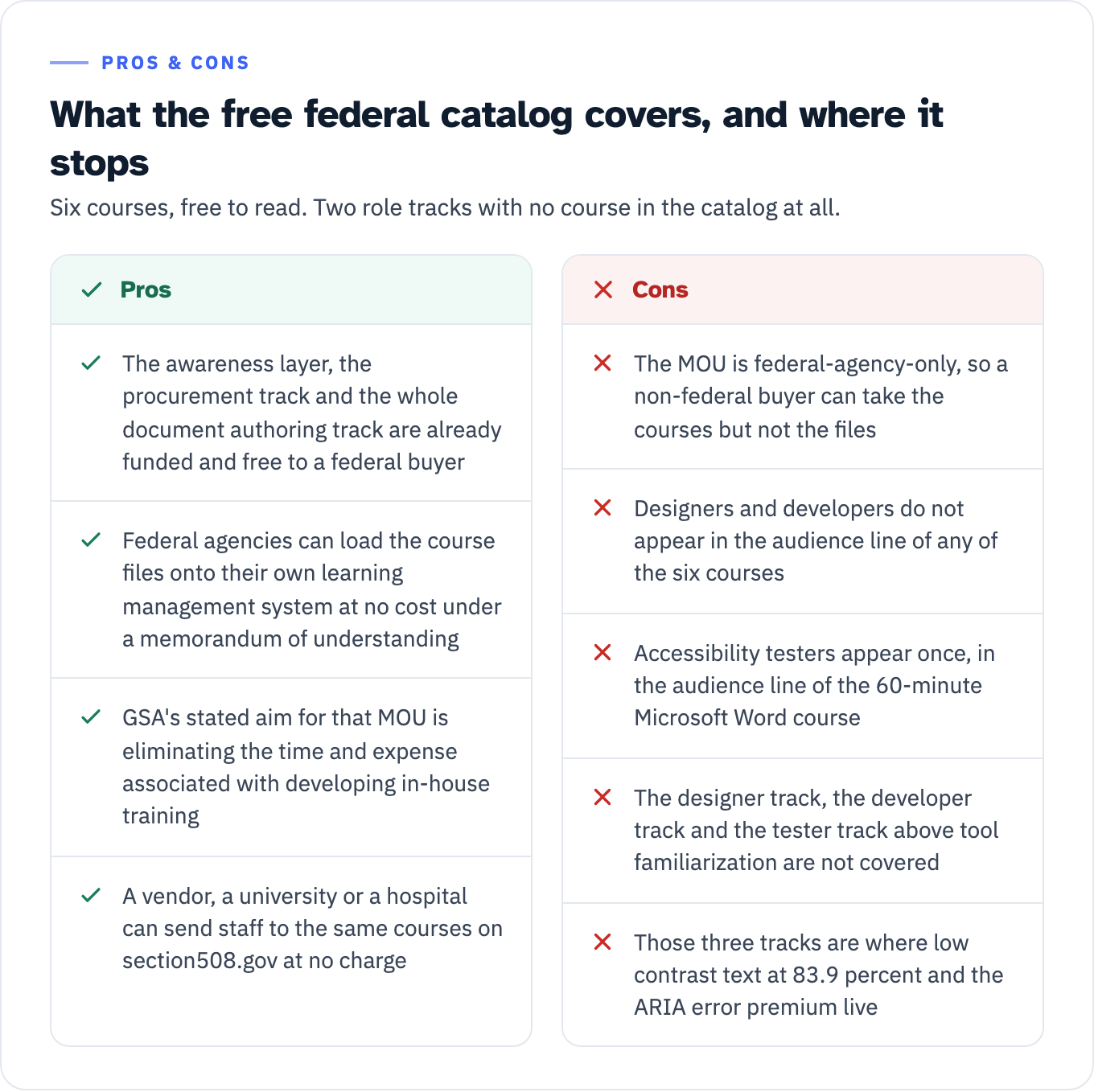
View the data as a table
| Pros | Cons |
|---|---|
| The awareness layer, the procurement track and the whole document authoring track are already funded and free to a federal buyer | The MOU is federal-agency-only, so a non-federal buyer can take the courses but not the files |
| Federal agencies can load the course files onto their own learning management system at no cost under a memorandum of understanding | Designers and developers do not appear in the audience line of any of the six courses |
| GSA’s stated aim for that MOU is eliminating the time and expense associated with developing in-house training | Accessibility testers appear once, in the audience line of the 60-minute Microsoft Word course |
| A vendor, a university or a hospital can send staff to the same courses on section508.gov at no charge | The designer track, the developer track and the tester track above tool familiarization are not covered |
| Those three tracks are where low contrast text at 83.9 percent and the ARIA error premium live |
The five-role split is not a vendor invention. New York State’s design system instructs agencies to “Ensure that designers, developers, content authors, and QA staff have baseline accessibility knowledge,” and separately to “Require a VPAT/ACR before contract award or during evaluation,” which is procurement treated as its own discipline. GSA’s training plan guidance adds two more roles beyond the five: product or system owners, who need to understand how ICT intersects with physical estate such as printers, copiers and digital signage and who carry “Responsibility for preventing inaccessible ICT from being released to users,” and communications staff, who need “electronic content conformance, including social media, audio, video, multimedia, digital forms, and electronic signatures.”
The justification memo, because somebody has to approve mandatory time
Mandatory training costs staff hours and needs a written justification before it goes on anyone’s learning record. GSA publishes both a blank template and a filled-in example built around the Section 508 foundation course, and the example is worth reading as a structure rather than as prose.
It opens with purpose, course information and four learning objectives, runs a justification of nine paragraphs, and then closes with the fields a reviewer actually checks: frequency (“Annually”), audience (“All [agency initials] employees”), “Anticipated course length: One (1) hour,” a list of authorizations and recommendations, a coordination paragraph naming who builds the course and who adds it to the mandatory program, and a completion monitoring and reporting paragraph naming who tracks it. The authorities the example relies on are 29 U.S.C. 794d, OMB Circular A-130 section 5.d.5.c, M-24-08 section F, and the recommendations in the FY 2024 governmentwide assessment. Copy that field list. Frequency, audience, course length, authorities, coordination owner and completion owner are the six things an approver has to know before signing, and the example puts every one of them on the page.
The checklist specifies the matrix that goes with it. Build a justification matrix with these columns:
| Column | What goes in it |
|---|---|
| Role | The job role from the inventory, not the person |
| Training topic | The module or named course |
| Justification | Tied to risk, regulatory obligation or operations |
| Frequency | Onboarding, annual, biennial, role change, or project-based |
| Mandatory | Yes or no, per role |
For the justification column, GSA’s example memo supplies language you can cite rather than invent: “General awareness of accessibility standards helps reduce the risk of non-compliance and mitigates the time, cost, and operational disruption associated with rework and remediation. Preventative training is far more efficient and effective than retroactive correction.” The FY 2025 assessment makes the same argument in its own voice: “Without consistent training, agencies incur higher remediation costs and continue to deploy inaccessible technology and digital content.”
Neither statement is quantified, and no counted before-and-after figure for accessibility training was found in preparing this article. Use the government’s sentence as the argument. Do not attach a percentage to it.
What training does not do
Conformance is not compliance, and training is neither. A trained team does not produce a conformance claim. Training changes the rate at which a named defect class enters the product. The claim itself still comes from a test against the ICT Testing Baseline and lands in an ACR.
This matters when the training budget is being justified against an audit finding. The honest version of the argument is narrow. The six categories that account for 96 percent of detected errors in the WebAIM Million have been the same six for seven years. Two of them, low contrast text at 83.9 percent and missing alternative text at 53.1 percent, are decided by a designer and an author before a developer sees the ticket. If those two defect classes are showing up in your retests, the training hours belong to the roles that created them, and ARRM’s account of what goes wrong when they do not is the argument to put in the memo.
Where a training program sits relative to an audit, a remediation sprint and an ongoing advisory retainer is a scoping question rather than a curriculum question, and the trade-offs are laid out in accessibility consulting engagements compared. If you do not yet know which of those you need, the accessibility maturity self-assessment is the shorter route to an answer.
Your next step
Open GSA’s training plan checklist and do the role-based needs assessment today: list every job role in your organization that creates, buys, tests or publishes ICT, and write next to each one the ICT it actually touches. Then take your most recent audit or scan, count the top three defect classes in it, and match each one to the role that introduced it using the matrix above. Those are the rows that get hours first, and they are the rows whose justification paragraph writes itself.
If the rows that come out are designer, developer and QA, that is the part no free federal course covers. ADACP’s role-based accessibility training covers those three tracks. Bring the three defect classes and the headcount per role into that conversation. Those two inputs are what turn a curriculum specification into a scoped program, and without them any hour figure you are quoted is a guess.