

You have the audit. It lists broken forms, missing labels, keyboard traps, contrast failures, media issues, document problems, and design system defects across more pages than your team can reasonably fix at once. That’s the point where many organizations stall. They know the gaps, but they don’t have a defensible way to decide what gets fixed first.
That’s where accessibility issue prioritization matters. Without it, teams chase the easiest tickets, the loudest stakeholder, or the latest complaint. None of those are reliable ways to reduce risk. A strong manual audit gives you the backlog. A strong prioritization model turns that backlog into a roadmap your legal, product, engineering, and compliance teams can execute.
1. WCAG 2.2 Conformance Level Prioritization
Some teams need a structured starting point more than a complex one. Prioritizing by WCAG level does that. It gives compliance officers, product owners, and engineers a shared language for what is foundational versus what is enhancement.
This model works best when you’re dealing with formal obligations such as ADA expectations, Section 508 procurement reviews, or EN 301 549 alignment. If your organization needs a compliance narrative that outside counsel, procurement teams, or government buyers can follow, start here.
Use conformance as the legal baseline
Level A issues are the floor. If a form control lacks a programmatic label or a key interaction fails without a mouse, you don’t have a “nice to improve” item. You have a barrier that often blocks use entirely.
Level AA is usually where mature programs aim operationally, because that’s where many public-facing requirements and procurement expectations land. If your teams are still sorting out what changed in recent standards, this breakdown helps: WCAG 2.2 compliance changes and risk areas.
A practical way to run this model:
- Tag every finding by criterion: Include the WCAG number in every ticket so legal, QA, and engineering can trace the remediation path.
- Treat A as immediate baseline work: Don’t let “we’re aiming for AA” become an excuse to leave A-level blockers open.
- Run AA planning in parallel: If teams wait to finish all A issues before touching AA, the backlog drags on and risk stays open longer.
- Pull in low-effort AAA improvements selectively: Some AAA fixes are worth doing when they align with design system upgrades or content governance.
Practical rule: WCAG-level prioritization is strongest when you need a compliance baseline. It’s weakest when used alone, because not every failure carries the same user impact or legal exposure.
A healthcare portal, for example, might classify all patient authentication and intake barriers as first-wave work even if the audit contains many other AA findings elsewhere. The website accessibility best practices discussion is useful here because it reinforces that compliance work has to connect to actual user journeys, not just checklist completion.
2. Impact-Effort Matrix
The impact-effort matrix is where accessibility issue prioritization becomes operational instead of theoretical. Product managers like it because it fits sprint planning. Engineers like it because it respects remediation effort. Accessibility leads like it because it stops low-value work from dominating the queue.
Use a simple MoSCoW-style variation. High impact and low effort becomes Must-have. High impact and high effort becomes Should-have. Low impact and low effort becomes Could-have. Low impact and high effort gets deferred unless there’s a regulatory reason to pull it forward.
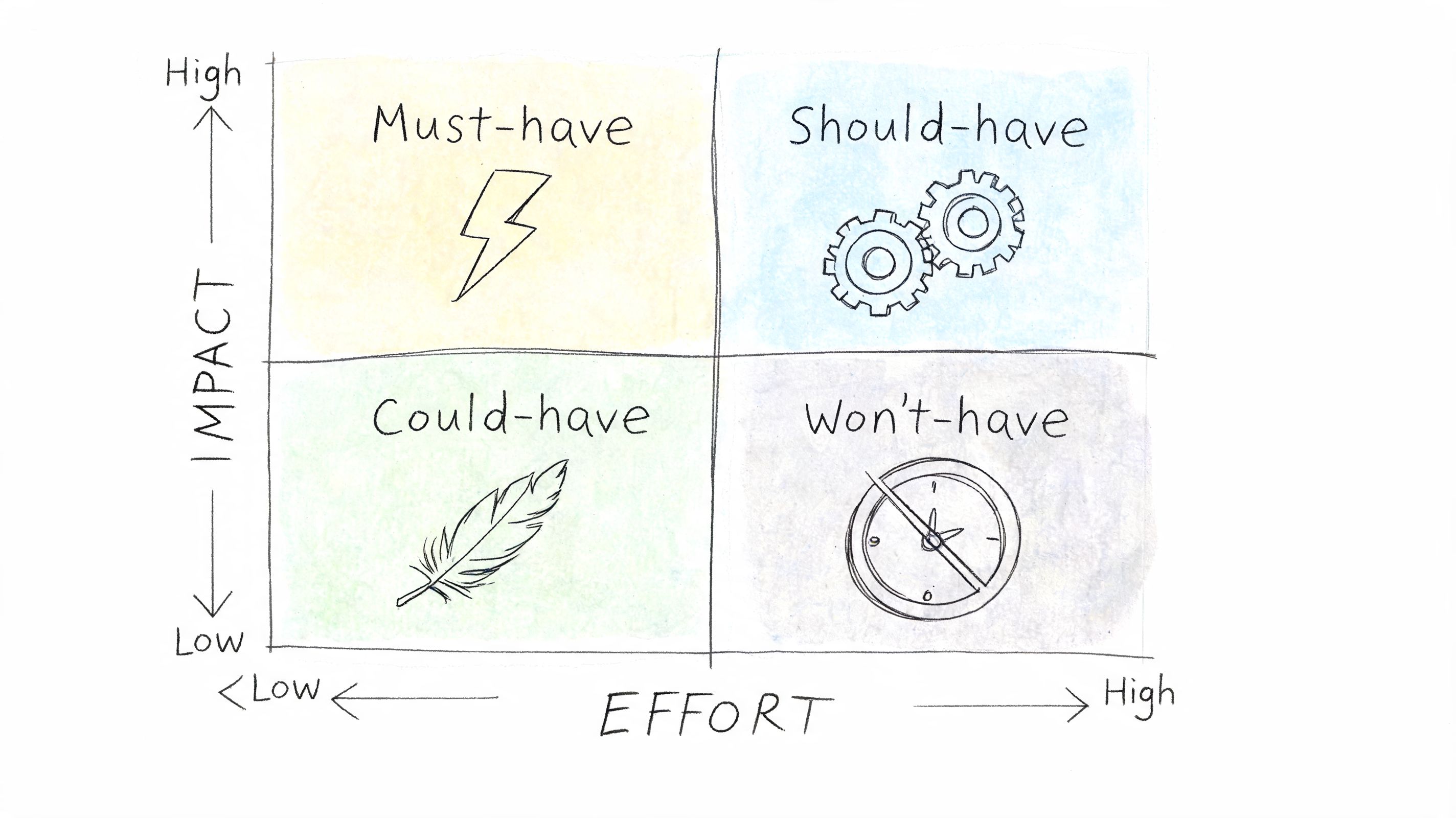
A large SaaS platform might place missing form labels, broken error identification, and inaccessible primary navigation in Must-have. Decorative image alt cleanup and edge-case content polish may sit in Could-have. That doesn’t mean those issues never matter. It means they don’t belong ahead of blockers.
Turn large fixes into smaller decisions
This model fails when teams estimate effort too broadly. “Fix keyboard access in the dashboard” sounds like one item, but it often hides many different component problems. Break it apart by workflow, component, or page template.
Deque-style severity approaches are helpful here because they center user impact over abstract order. The broader accessibility data is also a reminder that triage matters. The WebAIM Million, an annual automated scan of the top one million home pages, found in its 2026 edition that 95.9% of home pages had detected WCAG 2 failures, with 56.1 errors per page on average and low contrast text on 83.9% of home pages.
Use the matrix with a few hard rules:
- Define impact by blocked task: Checkout, registration, login, booking, and account management usually outrank informational content.
- Get engineering estimates early: Accessibility teams often underestimate front-end dependency chains and QA time.
- Split “Should-have” epics: If a high-impact issue is too large for one sprint, break it into shippable pieces with re-test points.
- Re-rank after each release: A backlog changes as design systems, templates, and shared components get fixed.
High-impact, low-effort fixes build momentum. High-impact, high-effort fixes reduce serious risk. You need both in motion at the same time.
3. User Barrier Severity Rating
A code defect doesn’t always tell you how bad the user experience is. Severity models do. They force the team to ask the question that matters most: does this issue inconvenience the user, slow them down, or stop them completely?
That’s why manual testing matters. Automated scans can flag missing attributes and contrast issues, but they don’t reliably show how a blind screen reader user moves through a multi-step application, how a keyboard-only user reaches a modal action, or whether a workaround is realistic.
Rate the barrier, not just the code defect
I usually see four practical severity bands in working programs: Critical, Major, Moderate, and Minor. The useful distinction isn’t technical purity. It’s whether the issue blocks a required action, affects multiple user groups, or creates an unstable workaround.
A banking signup flow is a good example. If the “Continue” control is announced poorly, focus disappears after validation, or an OTP field can’t be completed with assistive tech, that’s often Critical because the user can’t open the account independently. A slightly unclear help-text association may still matter, but it belongs lower.
For user-centered severity, tie ratings to actual workflows and technologies:
- Document the task failure: “Screen reader user can’t submit insurance claim form” is better than “aria-describedby missing.”
- Test across tools: NVDA, JAWS, VoiceOver, and TalkBack don’t expose issues in exactly the same way.
- Note workaround quality: If support intervention is required, don’t score the issue as minor.
- Escalate repeat blockers: If the same barrier appears in shared components, rate it based on system-wide effect.
A litigation-risk perspective supports this user-first approach, and the base rate is the reason. In the 2026 WebAIM Million, only 4.1% of the top one million home pages came through an automated scan with no detected WCAG 2 failure at all. When almost nothing is clean, “fix everything” is not a plan, and the order you choose is the whole strategy.
Field note: Severity ratings get much better when QA writes tickets in user language first and technical language second.
That single change often improves stakeholder buy-in, because leaders understand blocked outcomes faster than they understand markup syntax.
4. Legal Risk and Compliance Deadline Matrix
Sometimes the right fix order isn’t determined by engineering logic. It’s determined by exposure. If your team supports a public website, a government contract, an internal procurement process, a VPAT, or a launch into regulated markets, legal timing can outrank technical neatness.
This model organizes findings by two questions. First, how likely is this issue to appear in a complaint or derail a procurement review? Second, what deadline, enforcement window, or contract obligation applies?
Map findings to real exposure
The legal case for prioritization is stronger now because the volume and pattern of claims are hard to ignore. Website accessibility litigation and issue frequency data describes the Accessible.org “Risk Factor” approach and notes that in 2025 alone, over 5,114 ADA lawsuits were filed, a 37% increase from 2024. The same analysis says issues such as missing alt text, low contrast, and missing form labels consistently rank highest in complaints, often making up over 50% of cited failures across thousands of cases reviewed from 2020-2025.
That changes remediation planning. A retailer preparing for a procurement review and a healthcare organization reviewing patient workflows may both care about WCAG conformance, but their first-wave fixes should be driven by the barriers most likely to trigger legal claims or procurement rejection.
This matrix usually needs:
- A jurisdiction map: ADA, Section 508, EN 301 549, EAA, contractual language, and procurement commitments.
- A deadline view: Product launch dates, renewal cycles, public sector bids, and internal compliance milestones.
- A risk register: Findings most likely to affect screen reader use, keyboard operation, forms, and core navigation.
- An audit trail: Each remediation ticket should show why it moved ahead of lower-risk work.
If your leadership still sees accessibility as a quality initiative instead of a legal and business issue, the framing in legal risks of ignoring WCAG guidelines helps connect the backlog to actual exposure.
5. Assistive Technology User Population Analysis
This model shifts the question from “How many pages are affected?” to “Who depends on this working?” That’s a better lens when your product serves distinct user groups with different access patterns.
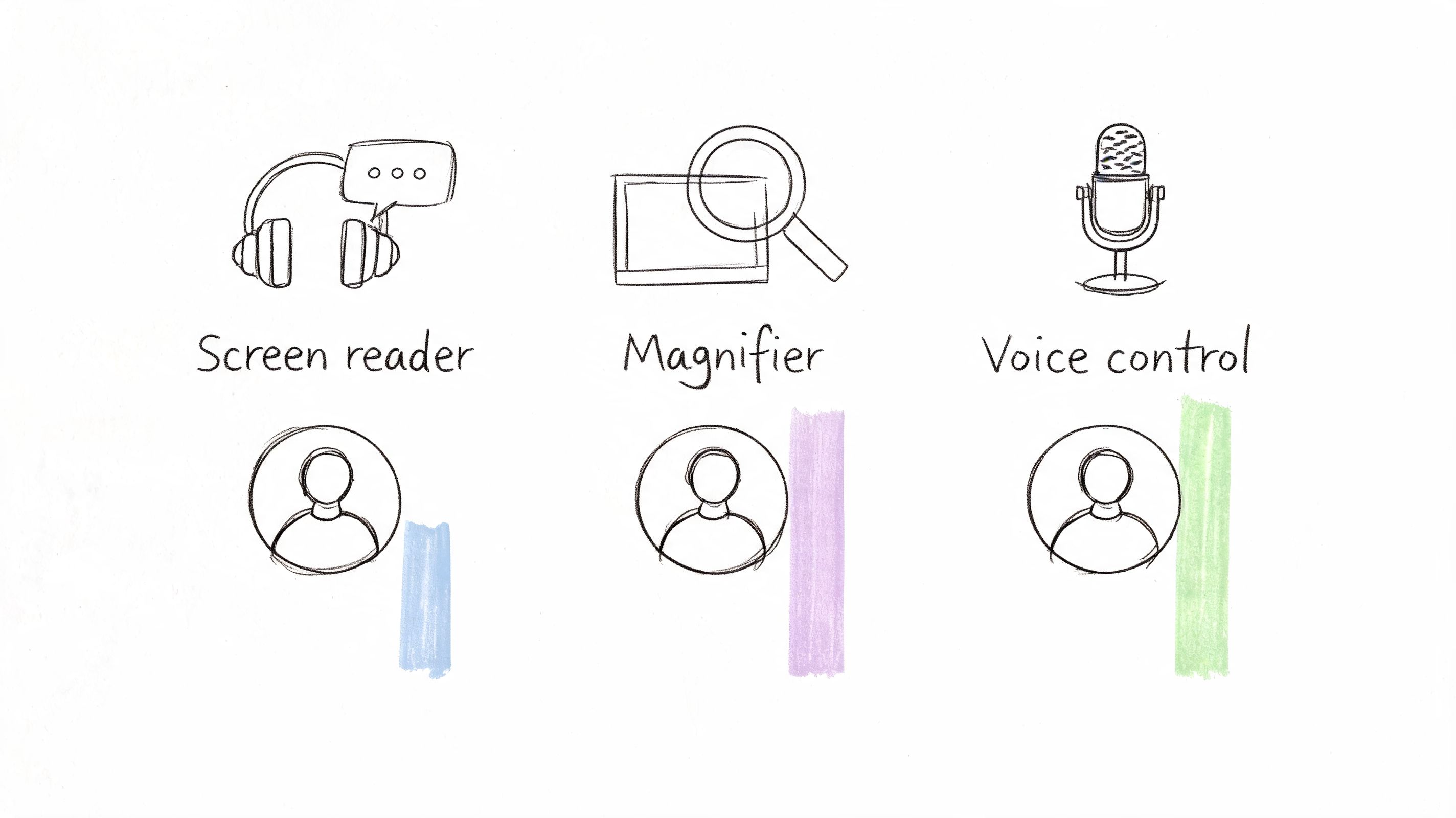
A complex enterprise dashboard, patient portal, or fintech workflow may have fewer total users than a marketing site, but the users who rely on keyboard access, screen readers, zoom, or voice input may be far more dependent on a small set of tasks working well.
Prioritize by dependency, not page count
This model works best when you have product analytics, support patterns, moderated testing, or customer success data that can reveal where users get blocked. You don’t need invasive detection. You need enough evidence to know which journeys matter most to people using assistive technology.
A government service portal, for example, may decide that search and landing pages can wait while form completion, document download, and account management get immediate attention. A SaaS vendor may discover that keyboard-only operation inside data tables matters more than polishing low-traffic knowledge base articles.
Use this method carefully:
- Look at workflow dependency: If a blind user can’t complete identity verification, that issue outranks cosmetic content fixes.
- Combine telemetry with human feedback: Support tickets, usability sessions, and client escalations often reveal what scanners miss.
- Avoid false precision: If you don’t have reliable assistive technology usage data, keep the model qualitative.
- Weight by business-critical tasks: Revenue, access to care, benefits enrollment, and compliance workflows usually come first.
Emerging tooling can help group patterns, but it shouldn’t replace hands-on testing. Clustering recurring issues by component or template genuinely cuts remediation time, because one fix in a shared header retires the same finding on every page that uses it. The limit is what the grouping is built from. W3C WAI is explicit that no tool alone can determine whether a site meets accessibility standards, so anything an automated scan never detected will not appear in the clusters either, no matter how the results are sorted.
The users who depend most on accessibility often interact with the parts of your product that generate the highest business and compliance risk. That overlap is where prioritization gets sharper.
6. Accessibility Debt Scoring
Some organizations won’t sustain accessibility work until it’s managed the same way they manage security debt, performance debt, and defect debt. That’s where accessibility debt scoring helps. It converts a vague backlog into a measurable operational concern.
A debt model usually combines several weighted factors. Severity. user impact. remediation effort. business risk. component reuse. audit recurrence. The exact formula matters less than consistency. If the team can explain why one issue scored higher than another, the model is already useful.
Make debt visible to product and engineering
The strongest version of this model lives inside your normal delivery tooling. Jira, Azure DevOps, or whatever your teams already use should expose the score, affected component, owner, and retest status. If accessibility lives in a separate spreadsheet, it falls behind every other engineering priority.
This is also where recurring templates and shared components deserve special treatment. A defect in a design system button, form field, or modal often carries more debt than a one-off content issue because it propagates across products and pages. Teams that build debt scoring into governance generally pair it with an accessibility monitoring plan so regressions are tracked instead of rediscovered in the next audit.
A simple scoring setup might include:
- Compliance weight: Does the issue map to a required WCAG outcome?
- Impact weight: Does it block or substantially impair a core task?
- Reuse weight: Does it exist in shared code or many templates?
- Effort weight: Can the team fix it cleanly within current sprint capacity?
- Risk weight: Does it affect litigation-sensitive patterns such as forms, links, labels, or media?
Engineers usually understand this model quickly because it resembles other debt management practices. If you need a technical analogy for skeptical product leaders, refactoring code for better software health makes the broader case that unmanaged debt compounds delivery problems over time.
7. Remediation Workflow and Organizational Capacity Planning
A perfect prioritization framework still fails if the team can’t execute it. Capacity planning is the model that keeps accessibility issue prioritization grounded in reality.
Most accessibility backlogs contain a mix of design fixes, front-end code changes, CMS edits, document remediation, QA retesting, and third-party vendor follow-up. If you dump all of that into one sprint without sequencing by skill set and dependency, quality drops and trust disappears.
Sequence work the team can actually finish
Mature teams separate urgent from actionable. A broken checkout flow may be urgent, but if the component belongs to a vendor and legal review is pending, the internal team still needs a parallel plan. That might mean adding a temporary accessible path, escalating contract language, or redesigning the workflow around a controllable component.
Capacity-based planning usually starts with a skills inventory. Who can remediate ARIA correctly? Who can test keyboard behavior reliably? Who owns design system updates? Who handles document accessibility? Teams that answer those questions accurately tend to move faster, because they stop pretending every developer can fix every issue equally well.
Use workflow planning to reduce failure points:
- Sequence shared components first: One fix in a design system can remove many downstream issues.
- Write better tickets: A clear accessibility bug report template shortens remediation and retest cycles.
- Add acceptance criteria before development starts: Teams ship faster when accessibility expectations are explicit in stories. This is where accessibility acceptance criteria templates help.
- Train the people doing the work: Role-based accessibility training and practical examples from how ADACP trains teams to fix digital accessibility fast often remove the bottlenecks that keep the same defects recurring.
- Build governance around the fixes: Teams that want sustainable progress need a real program, not one-off cleanup. Build an accessibility program is the right next step once triage starts working.
For teams under pressure, this is often the model that makes the biggest immediate difference. It doesn’t just decide what matters. It decides what can ship without creating fresh accessibility debt.
7-Method Accessibility Prioritization Comparison
| Approach | Implementation Complexity 🔄 | Resource Requirements 💡 | Expected Quality ⭐ | Speed / Efficiency ⚡ | Results / Ideal Use Cases 📊 |
|---|---|---|---|---|---|
| WCAG 2.2 Conformance Level Prioritization | Medium 🔄: standards mapping; requires accessibility expertise | Moderate 💡: audits, legal input, documentation | ⭐⭐⭐: strong compliance defensibility | ⚡⚡: methodical but can defer some fixes | 📊: Regulatory compliance, government contracting, procurement baselines |
| Impact-Effort Matrix (MoSCoW Variation) | Low 🔄: simple 2×2 matrix; needs estimation discipline | Low–Moderate 💡: team estimates, some user data | ⭐⭐: balances value vs cost but subjective | ⚡⚡⚡: enables quick wins and sprint delivery | 📊: Agile teams, resource-constrained projects, fast ROI |
| User Barrier Severity Rating (UAAG‑Informed) | High 🔄: detailed assistive‑tech testing and rubric | High 💡: AT specialists, user testing, time | ⭐⭐⭐⭐: user‑centric; identifies blocking barriers | ⚡: time‑intensive evaluation | 📊: User‑first programs, litigation defense, critical UX issues |
| Legal Risk & Compliance Deadline Matrix | Medium–High 🔄: maps to multiple legal frameworks and timelines | High 💡: legal owners, compliance tracking tools | ⭐⭐⭐: minimizes regulatory and litigation risk | ⚡⚡: rapid for urgent deadlines, may misalign with UX | 📊: Multi‑jurisdiction organizations, government contractors, VPAT/ACR preparation |
| Assistive Technology User Population Analysis | High 🔄: integrates analytics and demographic data | High 💡: telemetry, privacy compliance, research effort | ⭐⭐⭐: data‑driven prioritization for largest users | ⚡⚡: depends on data availability and analysis cadence | 📊: Product teams with telemetry; prioritize fixes for dominant AT users |
| Accessibility Debt Scoring (Technical & Compliance Combined) | High 🔄: design and calibrate weighted scoring model | Moderate–High 💡: tooling, governance, committee time | ⭐⭐⭐: measurable, standardizes trade‑offs | ⚡⚡: supports continuous remediation planning | 📊: CTOs/Product Managers tracking accessibility as technical debt |
| Remediation Workflow & Organizational Capacity Planning | Medium 🔄: sequences work to match skills and cadence | Moderate 💡: training, staffing, coordination | ⭐⭐⭐: improves delivery quality and sustainability | ⚡⚡: ensures shipped fixes but may slow urgent items | 📊: Large orgs needing sustainable remediation and capability building |
Build Your Hybrid Prioritization Framework
No single model is enough on its own. WCAG conformance gives you a compliance baseline, but it doesn’t always tell you which issues are most dangerous in practice. Impact-effort matrices help teams ship meaningful fixes quickly, but they can underweight legal exposure. Severity ratings center the lived user barrier, but they need structure to stay consistent across teams. Risk matrices are strong for counsel and procurement, but they can ignore operational constraints if engineering isn’t involved.
The most effective accessibility issue prioritization systems combine these models. Start with WCAG 2.2 mapping so every issue is traceable to a standard. Layer in severity so blockers for screen reader, keyboard, and other assistive technology users rise appropriately. Add legal risk when you have public-sector obligations, procurement pressure, or visible ADA exposure. Then use impact-effort and capacity planning to build a release sequence that people can execute.
That hybrid approach creates something important. Defensibility. If a regulator, client, plaintiff’s counsel, procurement reviewer, or internal executive asks why one issue was fixed before another, your team should be able to answer clearly. Not with “it seemed important,” but with “it blocked a core task, affected a protected user group, mapped to required criteria, and carried immediate business and legal risk.”
It also creates better governance. Teams stop treating accessibility as a periodic cleanup project and start managing it as an operational discipline. Shared components get prioritized correctly. Acceptance criteria get tighter. QA improves. New defects enter the backlog with context instead of chaos.
If you’re still relying on automated scans alone, that’s usually the point where prioritization breaks down. Automated tools can help surface patterns, but they don’t reliably tell you which failures block real tasks, where workarounds fall apart, or how to sequence remediation across product, design, engineering, and compliance. A manual audit and a structured remediation plan are still the most reliable foundation.
If your team needs help turning audit findings into a roadmap, validating priorities, or producing procurement-ready documentation, consider a professional audit and remediation strategy that connects WCAG findings to business risk, user impact, and real delivery capacity.
ADA Compliance Pros can help you turn a dense audit backlog into a practical remediation roadmap. If you need manual testing, prioritized WCAG-mapped findings, VPAT or ACR support, team training, or a stronger accessibility operations model, ADA Compliance Pros provides the structure and hands-on guidance to help your team reduce risk and ship accessible digital products with confidence.