

If you’re leading digital operations for a state agency, city, county, public university, library, court, or transit authority, you’re probably dealing with the same problem right now. You know accessibility matters, but the hard part isn’t the concept. It’s figuring out what falls inside the rule, which vendors create risk, and what proof you’ll need if someone asks how you determined your site, app, portal, or document set was compliant.
That’s where most summaries of ADA Title II web accessibility fall short. They tell you the rule exists. They don’t tell you how to run the work like a compliance program.
For public entities, the immediate challenge is operational. You need to scope the right assets, assign ownership, deal with vendor contracts, prioritize remediation, and keep records that hold up under review. If your team treats this as a homepage redesign or a one-time scan, you’ll miss the actual exposure.
The New Digital Mandate for Public Entities
The ambiguity is over. Public entities now have a defined federal technical standard for digital accessibility, and that changes how leaders should treat websites, mobile apps, and online documents.
For years, many government teams handled accessibility reactively. A complaint came in, a PDF was remediated, a widget was added, or a vendor promised that a platform was “accessible enough.” That approach doesn’t work under a rule that expects digital services to be accessible as part of normal operations.
This matters beyond legal exposure. When a resident can’t submit a form, pay a fee, read a notice, watch a public meeting, or use a mobile service independently, the problem isn’t abstract. The service failed.
Practical rule: If a constituent needs the content or function to access a public service, treat it as a compliance priority unless you have a documented reason that it falls outside scope.
Organizations often underestimate critical risk areas. They focus on the main website and ignore payment systems, scheduling tools, map embeds, meeting platforms, forms, document libraries, and vendor-hosted applications. They also underestimate the documentation burden. If your organization can’t explain what it scoped, why it prioritized certain fixes, how it tested, and what controls it applied to vendors, it’s in a weak position.
A workable ADA Title II web accessibility program has three traits:
- Clear ownership: Someone owns the inventory, testing process, remediation queue, and vendor follow-up.
- Real testing: Automated scans help, but they don’t tell you whether a resident can complete a transaction.
- Defensible evidence: Decisions, exceptions, fixes, and retests are documented.
That’s the standard experienced compliance teams work toward. Not perfection on paper. Operational control.
What Is the ADA Title II Web Accessibility Rule
The core rule is now straightforward. On April 24, 2024, the U.S. Department of Justice published the final ADA Title II web accessibility rule, setting WCAG 2.1 Level AA as the technical standard for state and local government web content and mobile apps, as described in the DOJ’s final rule overview.
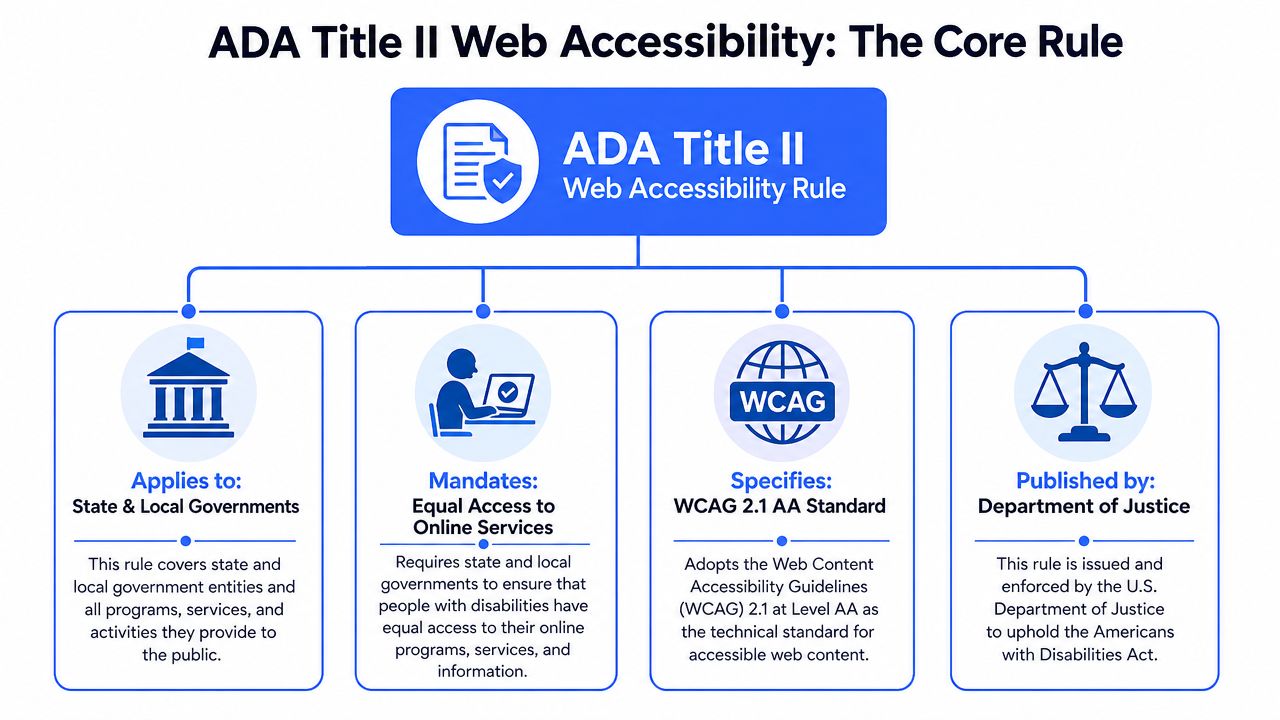
What the rule actually changes
This rule gives public entities something they did not previously have in this form. A binding technical baseline for digital access. The baseline is not a vague promise to be inclusive. It is a specific conformance target.
That changes internal decision-making in practical ways:
- Technology teams can no longer treat accessibility as a design preference.
- Procurement teams can’t assume vendor statements are enough.
- Compliance and legal teams need evidence tied to a recognized standard.
- Content owners must account for accessibility before publishing, not after complaints.
The scope is wider than most teams expect
The rule isn’t limited to public homepages or core CMS templates. It applies to a much broader digital estate. That includes websites, web content, mobile apps, and digital documents used in delivering services.
The legal standard also points to usability, not just technical box-checking. Public entities must keep those digital assets readily accessible and usable in real use, which means inaccessible forms, navigation patterns, media players, app screens, and file workflows can still create exposure even if some pages look improved.
The rule pushes teams away from isolated fixes and toward service-level accessibility. If a user still can’t complete the task, the organization hasn’t solved the real problem.
Why this matters operationally
The most expensive misunderstanding is thinking this is a web-team issue only. It isn’t. Title II digital accessibility affects IT, product, procurement, communications, records, legal, and any department that publishes documents or relies on software to serve the public.
That’s why mature programs map the rule to systems and workflows, not just pages. If your agency publishes agendas in PDF, uses a third-party scheduling platform, embeds maps, posts meeting video, and routes payments through a vendor application, all of those choices become part of your compliance posture.
Who Must Comply With Title II Digital Requirements
If you’re part of state or local government, this rule is likely aimed directly at your organization. The scope includes public entities and reaches much further into the digital services those entities provide.
The coverage is broad, and the rule text is worth reading rather than paraphrasing. The Title II final rule (89 FR 31320) defines web content to include “conventional electronic documents,” which it in turn defines as PDF, word processor, presentation and spreadsheet files. Section 35.201 then sets five exceptions, and they are narrower than most summaries suggest: archived web content, conventional electronic documents that predate the compliance date unless they are still used to apply for or access a service, content posted by a third party that is not acting under contract or licence, individualized secured documents, and social media posts published before the compliance date.
Public entities should think in service lines, not org charts
In practice, this includes organizations such as:
- State agencies: departments, boards, commissions, benefit portals, licensing systems
- Local governments: cities, counties, municipal courts, clerk offices, utility portals
- Public education and civic institutions: public colleges, libraries, school-related digital services
- Operational authorities: transportation systems, public safety interfaces, permit and payment platforms
A common mistake is assuming the rule only matters if your internal IT department built the system. That’s the wrong test. The better question is whether the digital experience is part of the service your organization provides to the public.
For government teams that need a sector-specific compliance view, this government accessibility compliance page is useful as a practical reference point.
Vendors don’t remove responsibility
At this point, many compliance programs break down. A city buys a reservation system. A university licenses a student portal. A transit authority embeds trip planning tools. The software may sit on a vendor domain, but the public still experiences it as part of the government service.
That means accountability doesn’t stop at your DNS boundary or procurement paperwork. If the tool is integral to the service, teams need a clear ownership position.
When a public entity offers a service through a contractor, the accessibility question usually becomes procurement and governance first, then technical remediation.
Content types that often get overlooked
Teams usually identify the main website quickly. They miss the rest. Watch for these categories:
| Digital asset type | Why teams miss it | Why it matters |
|---|---|---|
| PDF forms and notices | Owned by departments, not web teams | They often control access to services |
| Mobile apps | Managed by outside vendors | They fall inside the rule’s digital scope |
| Embedded tools | Treated as “third-party” and ignored | They may still be part of the public service |
| Document repositories | Viewed as records only | Current-use files can affect access |
| Portals and authenticated areas | Assumed to be internal or exempt | Users may still depend on them for services |
The practical takeaway is simple. Scope everything the public uses to get information, complete tasks, or participate in government programs. Then sort true exceptions carefully, with documentation.
Understanding the WCAG 2.1 AA Technical Standard
The rule’s technical center of gravity is WCAG 2.1 Level AA. Under the ADA Title II web rule, this is the binding baseline for state and local government web content and mobile apps, and the rule requires those digital assets to be “readily accessible to and usable by individuals with disabilities,” as reflected in the DOJ Title II regulations.
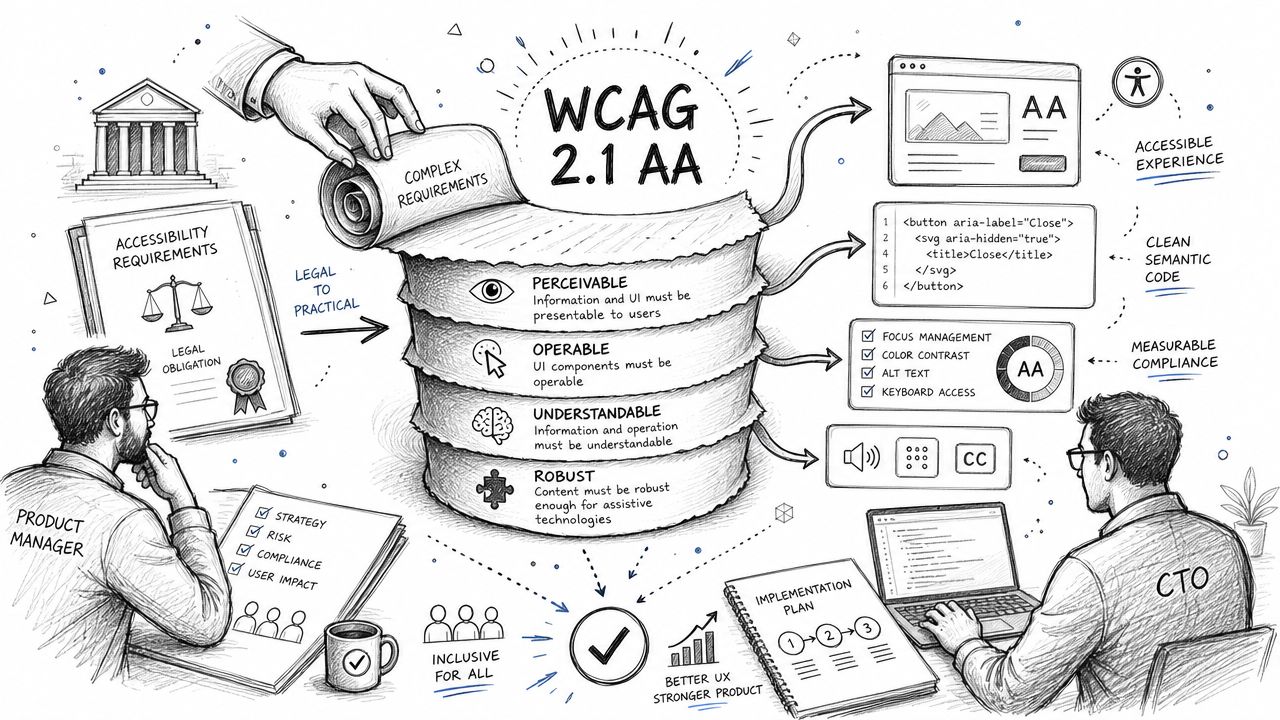
What WCAG 2.1 AA means in practice
Most decision-makers don’t need to memorize every success criterion. They do need to understand what conforming work looks like in delivery.
WCAG is commonly understood through four principles:
- Perceivable: Users need access to information in forms they can perceive, such as text alternatives for meaningful images and usable media presentation.
- Operable: Navigation and controls must work for people using keyboards or assistive technology, not only a mouse or touch input.
- Understandable: Labels, instructions, error messages, and interface behavior must make sense and remain consistent.
- Interoperable: Code and components should work reliably with current assistive technologies and standard user agents.
In government environments, that affects routine things like online forms, meeting videos, PDF notices, tab order in applications, autocomplete behavior, modal dialogs, and custom UI components in design systems.
A lot of teams discover that media is one of their fastest-growing risk areas. If your staff creates webinars, public meeting recordings, or training content, they need to understand basics like the key differences between captions and subtitles, because accessibility requirements are not satisfied by merely “adding text to video.”
For a grounded primer on the standard itself, see this internal guide to WCAG web content accessibility guidelines.
Where automated tools help and where they fail
Automated scanners are useful. They catch recurring defects such as missing form labels, low contrast in some contexts, empty links, missing alt text patterns, and malformed headings. They help teams triage and monitor large properties.
They do not prove conformance.
Tools won’t reliably tell you whether a keyboard user can complete a permit application, whether a screen reader user can understand dynamic validation feedback, or whether a PDF reading order makes sense. They also struggle with context. A tool may confirm that alt text exists. It can’t always tell you whether the alt text is meaningful.
Scan first if you need speed. Validate manually if you need evidence.
That’s why organizations concerned about legal risk should also understand the broader implications discussed in this article on what happens if you ignore WCAG guidelines and the legal risks involved.
A short walkthrough helps frame the gap between standards and execution:
How this fits with other compliance frameworks
Many public sector and adjacent teams operate across multiple frameworks. WCAG 2.1 AA often aligns well with Section 508-oriented procurement and testing practices, especially when teams use structured audits and product documentation. Organizations with international exposure may also need to compare obligations with the European Accessibility Act. If that applies to your roadmap, this overview of EAA compliance after 2025 helps clarify where the frameworks intersect and where implementation diverges.
The practical point is that one strong accessibility engineering process can support multiple compliance needs. But only if the work is tested, documented, and maintained.
Key Compliance Deadlines and Exceptions
Deadlines matter because they determine sequencing, budgets, and contract pressure. If leadership doesn’t have a current date map, teams usually either overreact with superficial fixes or wait too long and create avoidable backlog.
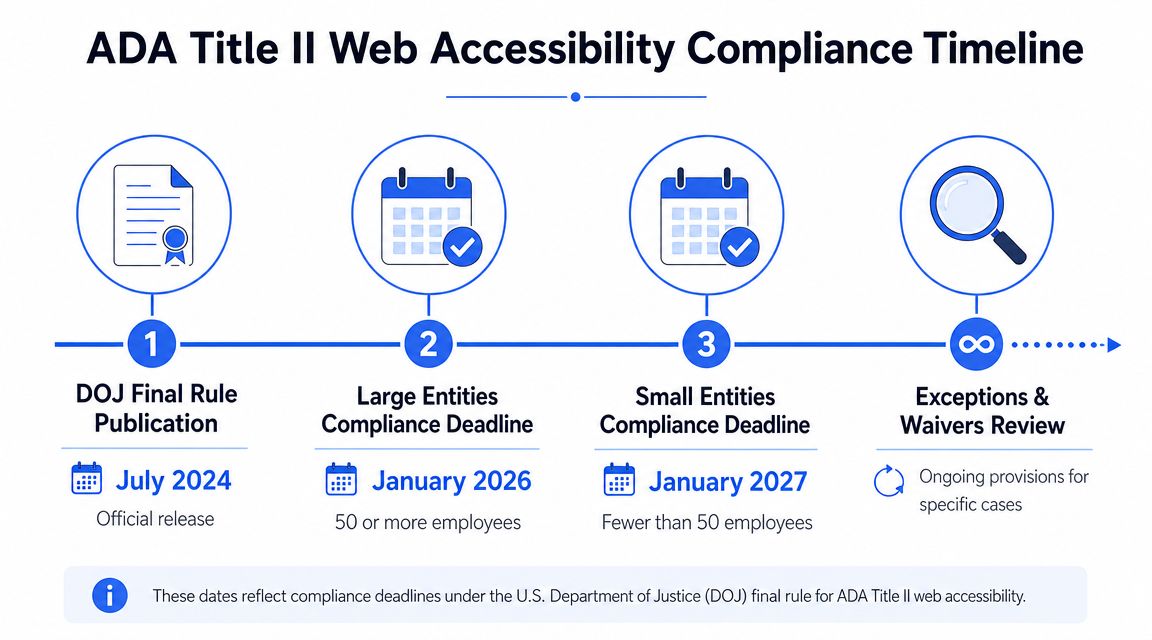
Deadline map for public entities
The DOJ sets compliance dates by the size of the population served, and both dates were pushed back in 2026. Public entities serving 50,000 or more people must comply by April 26, 2027. Entities serving fewer than 50,000 people, and any special district government regardless of the population behind it, must comply by April 26, 2028. Those are the dates set by the DOJ’s interim final rule of April 20, 2026 (91 FR 20902), which extended the original deadlines of April 24, 2026 and April 26, 2027 by one year each.
The extension is not sector-specific. It keys on population, so a school district, a transit authority and a county health department are all placed by the same test. Public universities and public hospitals should check a second rule as well: HHS extended the parallel Section 504 web deadlines to May 11, 2027 for recipients of departmental financial assistance with 15 or more employees, and May 10, 2028 for recipients with fewer than 15, in its interim final rule of May 11, 2026 (91 FR 25496). An entity covered by both rules owes both dates.
An extended date is not a pause. The obligation not to discriminate on the basis of disability applies now; the compliance dates govern when the specific WCAG 2.1 Level AA technical standard becomes enforceable, not when accessibility becomes a duty.
That means public sector leaders shouldn’t rely on a single generic date chart. They need a current deadline map tied to entity type and population served.
Exceptions are narrower than many teams assume
The rule includes limited exceptions, but teams make a mistake when they treat those exceptions like broad safe harbors. They aren’t.
A cautious interpretation is the right one, especially for these categories:
- Archived content: Material may qualify only in limited circumstances. Calling a page “archive” doesn’t automatically remove the obligation.
- Preexisting electronic documents: Some older files may fall under an exception, but that doesn’t mean current-use service documents can be ignored.
- Certain third-party content: The key question is whether the content is part of the service the entity provides.
- Individualized protected documents: Even where a WCAG conformance exception applies, organizations may still have accessibility obligations in practice.
- Preexisting social posts: Older content may be treated differently from current posts.
The safest operational approach is to document why content is out of scope. Never assume it is.
Teams also get in trouble when they use exceptions as a reason to delay core remediation. That usually backfires because the highest-risk items are often current forms, active transactions, navigation components, and vendor-managed services. Those should move first.
Your Actionable Roadmap for Title II Compliance
Strong Title II programs aren’t built from a single scan or a last-minute remediation sprint. They work because the organization treats accessibility as an inventory, testing, procurement, and governance problem all at once.
The vendor issue is central, and it is written into the regulation rather than inferred from it. Section 35.200(a) of the DOJ’s Title II final rule (89 FR 31320) requires a public entity to ensure the accessibility of web content and mobile apps it “provides or makes available, directly or through contractual, licensing, or other arrangements.” The exception for third-party content in § 35.201(c) does not apply where the third party is posting under one of those arrangements. That makes vendor-managed components and contract language a practical compliance gap: public entities must evaluate whether inaccessible third-party content is part of the service they provide.
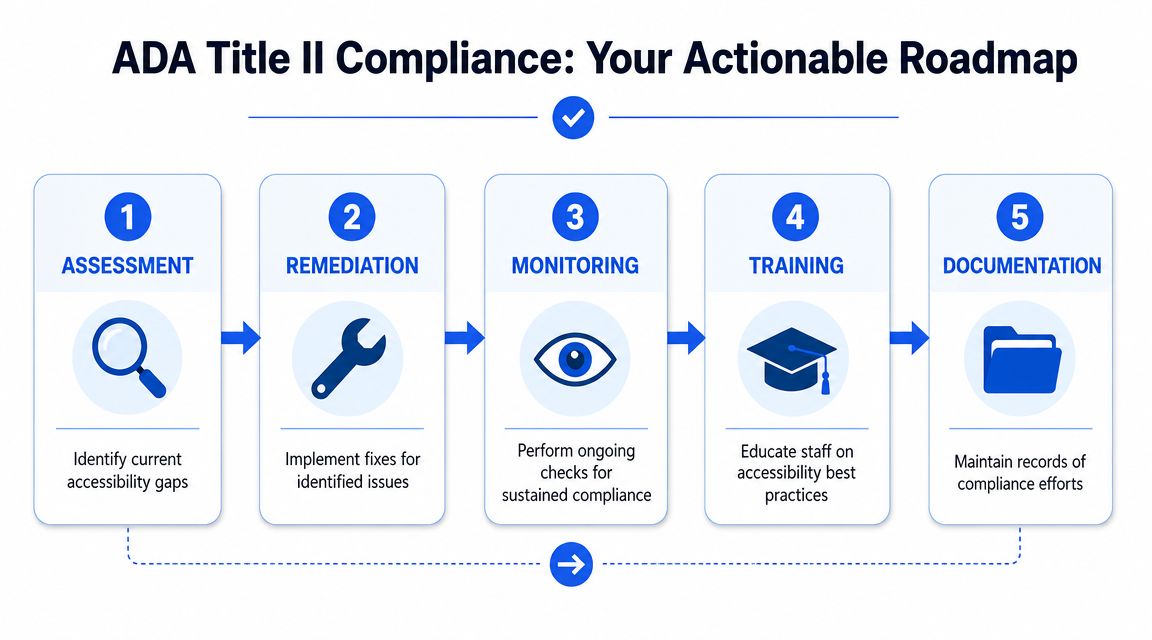
Start with inventory and scoping
Before testing, build a real inventory. Not a marketing sitemap. A service inventory.
That usually includes public websites, subdomains, mobile apps, authenticated portals, form systems, media libraries, PDFs, Word documents, spreadsheets, payment tools, scheduling tools, maps, and embedded third-party components. Include owner names, platform vendors, contract dates, and whether the asset is part of a public-facing service.
This is also the point where many organizations realize they need specialized support for a web accessibility audit and remediation process, especially when the estate includes custom applications, legacy documents, and vendor-hosted systems.
Test the way users actually interact
A defensible program uses both automation and manual review. The mix matters.
Use automated tools for scale. Use manual testing for risk. Manual review should cover keyboard operation, focus management, screen reader behavior, form completion, error handling, modal interaction, media accessibility, and representative document samples.
A practical testing model often looks like this:
| Testing layer | Best use | Weak point |
|---|---|---|
| Automated scanning | Fast issue discovery across many pages | Misses context and interaction failures |
| Manual expert review | Validates real conformance and usability | Takes planning and skilled reviewers |
| Assistive technology testing | Exposes user-impact failures | Needs representative user flows |
| Document testing | Checks PDFs and office files in active use | Often overlooked in web-only reviews |
If your concern includes enforcement, complaint response, or litigation posture, the value of thorough testing becomes obvious. This related overview of ADA compliance lawsuits is useful for understanding why surface-level fixes are rarely enough.
Prioritize remediation by service impact
Don’t send teams into a generic bug-fix backlog. Prioritize based on user consequence.
Start with high-impact items such as:
- Transactional barriers: permit applications, payments, registrations, submissions
- Navigation blockers: menus, search, authentication, task routing
- Form failures: labels, instructions, validation, status messaging
- Critical documents: forms, notices, policies, instructions tied to services
- Media and communications: videos, live updates, public information assets
This keeps the program tied to access, not aesthetics.
One caution matters here. Quick cosmetic work can create false confidence. You can clean up color contrast, add some alt text, and still leave the service unusable. Teams should retest after remediation, especially in common flows.
Fix procurement before the next renewal
Mature programs distinguish themselves here. They change intake and contracting, not just code.
Your procurement language should require accessibility expectations for software, hosted services, and document deliverables. Vendor review should ask for current documentation, known gaps, testing approach, and remediation commitments. If a department can buy a public-facing tool without accessibility review, the organization will keep recreating the same risk.
Useful controls include:
- RFP requirements: Ask how the product is tested against WCAG 2.1 AA and what evidence the vendor can provide.
- Contract language: Define remediation obligations, response times, and update responsibilities.
- Acceptance criteria: Tie launch approval to accessibility findings, not vendor assurances.
- Renewal review: Re-check products before extending agreements.
Keep defensible records
A mature compliance file should answer simple questions clearly. What did you inventory? What did you test? What issues were found? What was fixed? What remains? Who owns it? Which items were treated as exceptions, and why?
That doesn’t require perfect paperwork. It requires consistent paperwork.
At minimum, keep:
- Asset inventories
- Audit reports
- Issue logs mapped to WCAG
- Remediation tickets and retest results
- Vendor correspondence and accessibility commitments
- Decision memos for scope and exceptions
- Product documentation such as VPATs or ACR-style records where relevant
Good documentation does two jobs. It helps teams manage the work, and it shows reviewers that the organization acted deliberately rather than casually.
The most reliable strategy is to treat ADA Title II web accessibility as an ongoing compliance program. New pages, new apps, new PDFs, and new vendors will keep entering the environment. Your process has to catch them before they create the next problem.
Frequently Asked Questions About Title II Web Accessibility
Can an overlay or accessibility widget make us compliant
No. An overlay isn’t a substitute for accessible code, usable components, accessible documents, or proper testing. In some cases it adds friction instead of reducing it. This review of accessibility overlay widget risk explains why teams shouldn’t rely on that shortcut.
What should we do if we receive an accessibility complaint or lawsuit
Treat it as an urgent operational issue. Preserve records, involve legal counsel, and start a real accessibility assessment immediately. If you need a response framework, this guide on what to do after receiving a class action website ADA complaint is a practical starting point.
Do password-protected or internal systems matter
They can. If a system is part of how people access services, benefits, records, or required information, don’t assume authentication removes it from risk. Scope it carefully and document the reasoning for any exception analysis.
Are automated scans enough for Title II readiness
No. They are useful for triage and monitoring, but they don’t replace manual testing, workflow validation, or document review.
If your team needs a defensible path to compliance, ADA Compliance Pros helps organizations assess websites, apps, documents, and vendor-managed systems against WCAG and related accessibility requirements. Their work is built around hands-on testing, prioritized remediation guidance, and procurement-ready documentation that supports real compliance decisions.