
Audio Transcript: Your 2026 Compliance Guide
If your team publishes podcast episodes, investor calls, training recordings, customer support audio, or product walkthroughs without a transcript, you may already have a compliance gap. The problem usually surfaces late. A procurement questionnaire asks how your audio-only media meets WCAG. Legal asks whether an accessibility complaint has merit. Product assumes the media player is the issue, when the missing artifact is often the transcript itself.
For a CTO, an audio transcript isn’t just content reuse. It’s a control. It helps satisfy accessibility requirements, supports internal governance, and creates something your team can point to in audits, VPATs, and remediation records. It also makes audio operationally useful. Searchable text is easier to review, archive, redact, translate, and route into downstream workflows than a standalone audio file.
Why Audio Transcripts Are a Legal and Business Necessity
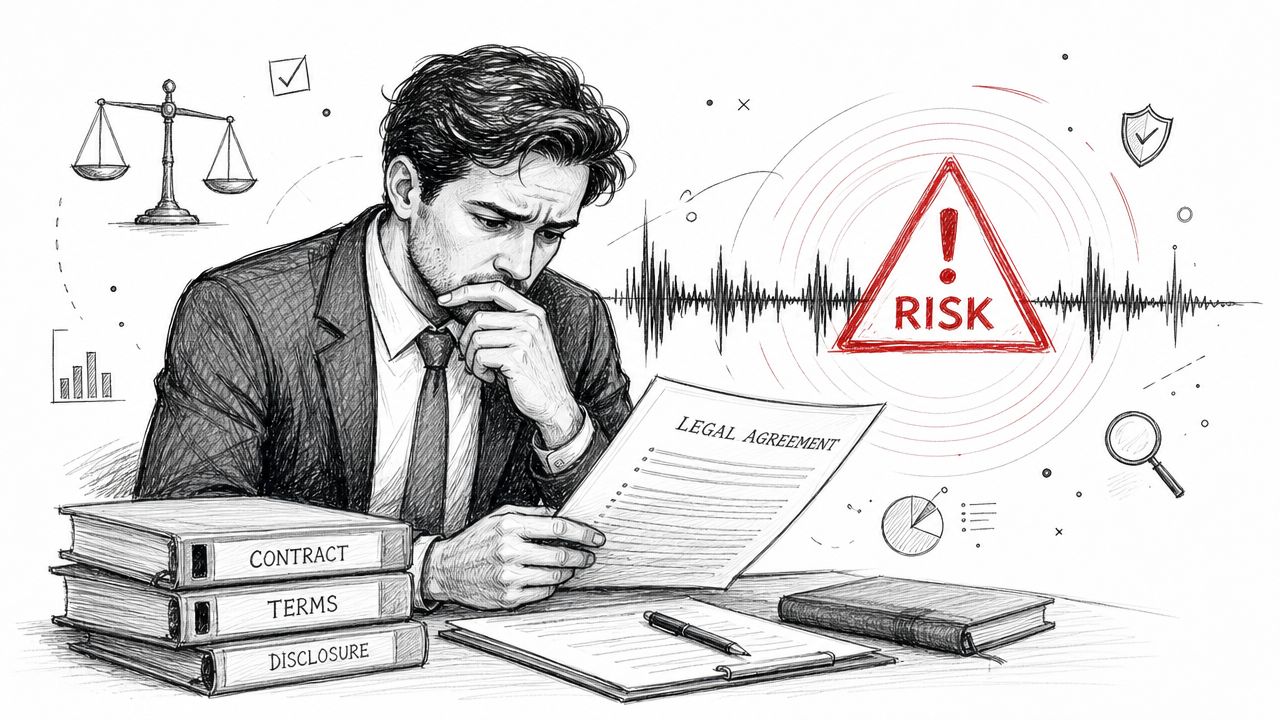
A common failure pattern is easy to spot. A company publishes a podcast, training module, investor update, or support recording without a transcript because the release date matters more than the documentation. The problem surfaces later, during a complaint review, a procurement questionnaire, a VPAT discussion, or an internal audit. At that point, the missing transcript is no longer a content gap. It is missing compliance evidence.
An audio transcript gives audio-only content an equivalent text record that users can read, search, magnify, translate, review slowly, or process with assistive technology. For legal, accessibility, and procurement teams, that text record also serves another function. It documents what was provided to meet the accessibility requirement and gives reviewers something concrete to inspect.
That distinction matters in practice.
CTOs often hear “we need transcripts” and treat the request as a media feature. In regulated environments, public sector sales, higher education, healthcare, and enterprise procurement, transcripts belong in the compliance record. If an audio file contains product instructions, policy terms, training content, public communications, or customer support guidance, the transcript should be managed like any other required artifact. It needs ownership, version control, publication standards, and retention rules.
The business risk shows up in several places at once:
- Legal and compliance: Missing transcripts can become part of an ADA complaint, remediation scope, or audit finding.
- Procurement and sales: Buyers and government customers may ask for proof that audio content is accessible, especially when accessibility claims appear in a VPAT or security and compliance review packet.
- Engineering and product: Retrofitting transcript support into a player, CMS, or design system costs more than building the workflow at launch.
- Operations and records management: Text is easier to review, redact, archive, translate, index, and route through approval processes than audio alone.
I advise clients to treat transcripts as part of the shipped deliverable whenever audio carries business meaning. That single decision reduces rework later.
Quality also matters. A rough machine output may be enough for internal note-taking, but it often fails under audit, procurement review, or dispute response. Teams handling sensitive recordings should understand the role of accuracy in legal transcripts, because a transcript that misstates names, numbers, disclaimers, or speaker intent can create a second problem while trying to solve the first.
If your organization is already responding to a complaint or assessing exposure, transcript gaps usually belong in the same workstream as broader website accessibility lawsuit response planning.
How Transcripts Meet WCAG and Section 508 Requirements
A common failure pattern looks like this. A team publishes a podcast episode, product briefing, or investor update, adds a polished audio player, and assumes the accessibility work is done. Then procurement asks how the audio-only content meets WCAG, legal asks what supports the VPAT statement, or an auditor asks where the text alternative is located. If the answer is “we can generate one if needed,” the gap is already visible.
For prerecorded audio-only content, WCAG expects a text alternative that gives the same information as the recording. In practice, that means the transcript has to carry the meaning of the audio, not just approximate the spoken words. Speaker identification, meaningful pauses, and material non-speech cues may all matter if they affect understanding.
Teams also confuse transcripts with captions. Captions are tied to timed media, usually video. For audio-only files, the usual compliance path is a transcript users can read without relying on the player.
Section 508 raises the operational bar. The transcript must be published in an accessible format and placed where users can reasonably find it alongside the media. A transcript buried in a separate repository, attached to a ticket, or stored as an image-based PDF does little for the user and creates weak evidence for an audit or procurement review.
That placement issue matters more than many teams expect.
In VPAT work, I look for two things. First, whether the audio-only content has an equivalent text alternative. Second, whether the product or site presents that transcript in a predictable, accessible way. If either piece is missing, the accessibility claim becomes harder to defend because the control exists only on paper, not in the shipped experience.
For Section 508 buyers, this affects several parts of delivery:
- VPAT responses: The answer needs to describe how prerecorded audio-only content is provided with a usable text alternative.
- Publishing workflows: Content teams need a defined field or component for transcript publication, not an ad hoc upload habit.
- Media components: The player page or content template should expose the transcript near the audio so users do not have to hunt for it.
- Compliance records: Teams should be able to show which transcript was approved, when it was published, and which media asset it supports.
A transcript that is accurate but disconnected from the audio still creates risk. A transcript that is easy to find but incomplete creates a different risk. Compliance depends on both content quality and delivery.
For a CTO, the practical point is simple. Meeting WCAG and Section 508 for audio-only media is not a speech-to-text feature decision. It is a product and governance decision that has to hold up in user testing, procurement review, and written compliance documentation.
Choosing Between Basic and Descriptive Transcripts
A transcript choice can create or reduce compliance risk.
I see teams treat this as a formatting preference, then run into trouble during procurement review or internal audit. The core question is whether the written record preserves the meaning a user gets from the audio. If it does not, the transcript may exist, but it will not do much for accessibility claims, VPAT support, or defensible documentation.
When a basic transcript is enough
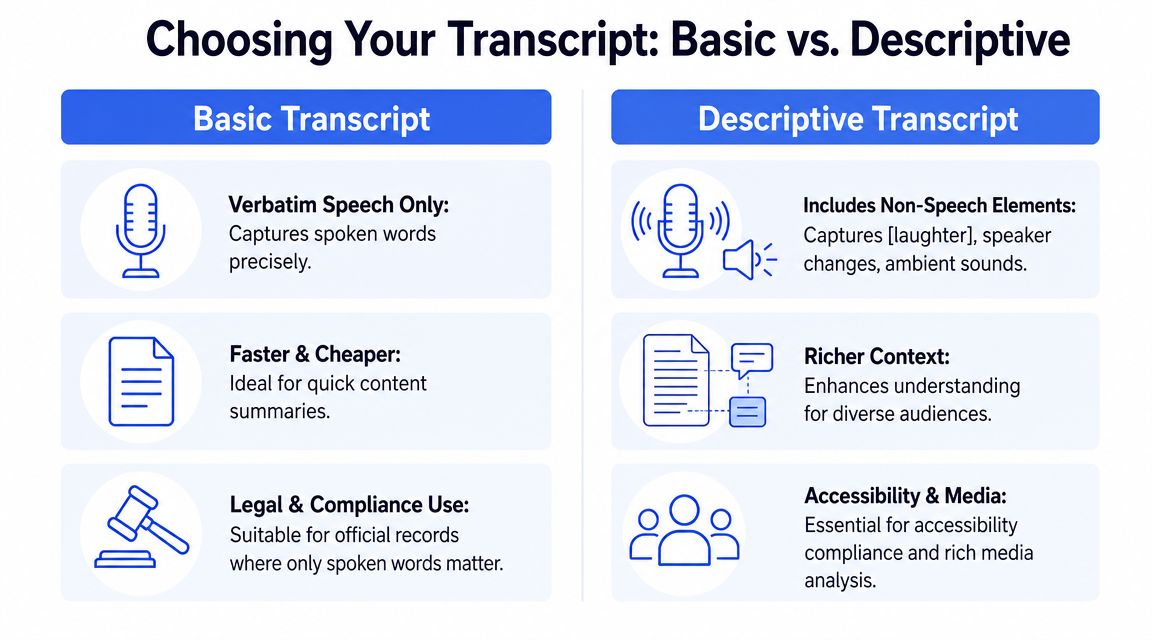
A basic transcript fits recordings where spoken language carries the full message and non-speech audio adds little or no meaning. In those cases, the transcript should still be accurate, complete, and easy to follow, with speaker identification where needed.
Typical cases include:
- Executive remarks: A CEO statement or policy update where the substance is in the spoken message.
- Interview-style podcasts: Clear speaker turns and faithful wording usually cover what the audience needs.
- Straightforward training audio: One narrator, limited ambient sound, and no meaningful effects or demonstrations.
Basic does not mean stripped down. Include any non-speech element that affects interpretation, such as laughter after a statement, an alarm that triggers an action, or a pause that changes the tone of an answer. If those cues help a hearing user understand the content, leaving them out creates a weaker compliance artifact.
When descriptive detail is required
Descriptive transcripts are the safer choice when meaning depends on sound, sequence, speaker interaction, or context that is not obvious from words alone. This is common in media teams, research environments, support operations, and regulated organizations where the transcript may later be reviewed outside the original publishing context.
Use more descriptive detail for:
- Sound-led demonstrations: Product sounds, alert comparisons, pronunciation examples, or audio quality tests.
- Narrative or branded media: Story-driven audio, music-led segments, or sound design that carries mood or plot.
- Complex multi-speaker sessions: Panels, focus groups, hearings, or community calls with interruptions and overlapping speech.
- High-risk records: Research interviews, legal documentation, investigations, or incident reviews where ambiguity can create downstream disputes.
A simple decision test works well. Remove the audio and read only the transcript. If a reader would miss who interrupted, what sound occurred, whether a response was sarcastic or distressed, or why a moment matters, the transcript needs more description.
That trade-off matters operationally. A basic transcript is faster to produce and cheaper to maintain. A descriptive transcript takes more editorial judgment, more QA time, and clearer rules for what to annotate. But for procurement, accessibility conformance, and audit readiness, the more expensive option is often the lower-risk option because it leaves less room for challenge later.
I also recommend consistency across media types. Teams that publish both audio and video usually benefit from a shared annotation standard, and this overview of video transcription is a useful reference point for aligning those workflows.
For a CTO, the practical rule is to classify transcript type at intake, not after publication. If content owners have to guess, they will usually choose the cheaper format. That saves a little time up front and creates rework when legal, procurement, or accessibility review asks whether the transcript captures the full user experience.
Automated vs Human Transcription A Cost and Accuracy Analysis
A common failure pattern looks like this. A team publishes an audio transcript generated in minutes, marks the work complete, and then runs into problems during an accessibility review, a customer security questionnaire, or a VPAT discussion because nobody can show how accuracy was verified. Speed helped operations. It did not create a defensible compliance artifact.
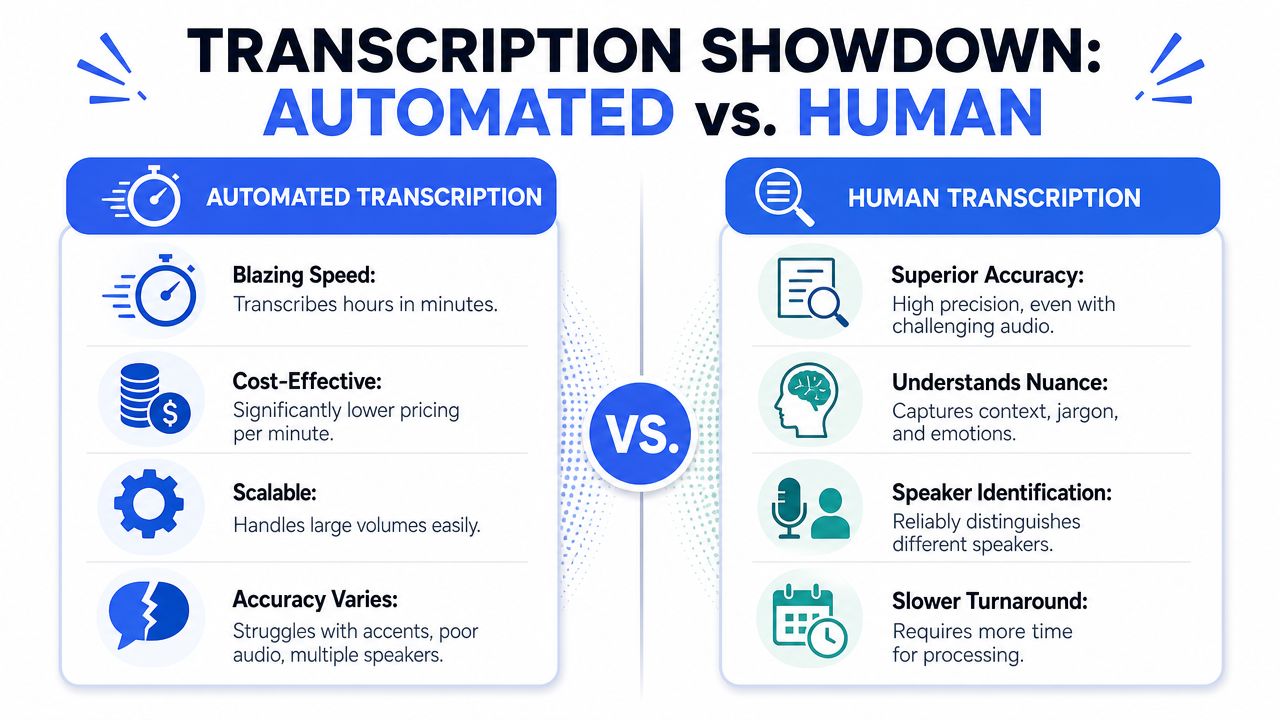
Automation still has a clear role. It cuts turnaround time, helps teams process volume, and gives content, support, and operations groups a usable draft quickly. For internal notes, media library search, rough summaries, and first-pass transcript creation, AI is often the right starting point.
Where automation works well
AI transcription works best where the output is provisional or low risk. Typical use cases include:
- First-pass drafts: Create a transcript that an editor can correct and format.
- Search and indexing: Make large audio archives searchable by topic, speaker, or term.
- Meeting operations: Capture internal discussions for follow-up notes and action items.
- Content repurposing: Turn recorded material into draft articles, knowledge base entries, or FAQs.
If your team also supports multimedia workflows, this overview of video transcription is a useful companion because the review standards and production decisions often overlap.
A short demo can help technical stakeholders understand the workflow differences before committing to a process:
Where automation creates risk
The trade-off is straightforward. AI is efficient at producing text. It is less reliable at deciding whether that text is accurate enough to publish as an accessibility deliverable, retain as a formal record, or cite during procurement review.
Published comparisons of AI and human transcription accuracy consistently show the same pattern: automated output degrades in the conditions that appear most often in real business audio. The trouble spots are familiar. Overlapping speakers, accents, weak microphones, domain-specific terminology, background noise, and inconsistent speaker labeling all increase the editing burden. In a compliance context, each unresolved error matters because the transcript is not just content. It is evidence that the organization provided an equivalent text alternative.
One practical mistake shows up again and again. Teams treat raw machine output as finished because the file looks complete. That creates downstream risk in three places:
- Accessibility conformance: Errors can leave the transcript incomplete or misleading for users who depend on it.
- Procurement documentation: A VPAT or customer questionnaire may ask how transcripts are produced, reviewed, and maintained.
- Audit and dispute readiness: If a complaint, internal investigation, or contract review turns on exact wording, an unverified transcript is weak evidence.
For legal, healthcare, HR, public sector, and procurement-sensitive content, the safer operating model is AI plus human review. For high-stakes recordings, fully human transcription is often the lower-risk choice even when the unit cost is higher. The reason is simple. Review costs less than remediation, republication, legal review, and repeated accessibility exceptions.
Comparison of Transcription Methods
| Factor | Automated Transcription (AI) | Human Transcription |
|---|---|---|
| Speed | Very fast for initial output | Slower turnaround |
| Scalability | Good for high-volume workflows | Harder to scale quickly |
| Audio tolerance | Weaker with noise, overlap, accents, and jargon | Better at difficult audio |
| Context handling | Often misses nuance, speaker intent, or unclear references | Better at resolving ambiguity |
| Compliance readiness | Usually requires editorial and QA review before publication | Better fit for final, defensible output |
| Best use | Drafting, indexing, internal operations | Final accessibility deliverables and high-stakes records |
For a CTO, the decision is not AI versus humans in the abstract. The decision is where to place human review, how much review each content class requires, and what documentation proves that the transcript is accurate enough to stand up in accessibility testing, procurement review, and internal audit. Raw AI output is useful. Reviewed transcript output is what reduces risk.
Best Practices for Creating and Integrating Transcripts
Good transcript programs fail for two predictable reasons. The text is weak, or the publishing pattern is weak. You need both content quality and delivery quality.
Build the transcript from good source audio
Transcript accuracy starts before transcription begins. The University of Oregon recommends WAV, 48 kHz sample rate, 16-bit depth, and mono when using one microphone, with recording levels around -12 dB to -6 dB and export levels not exceeding -6 dB, as described in audio recording standards that support intelligibility and cleaner transcription.
For content teams, that translates into a few practical habits:
- Use a predictable recording setup: Don’t mix microphones casually across a recurring series if consistency matters.
- Control the environment: Reduce HVAC noise, keyboard sounds, room echo, and crosstalk before you record.
- Name speakers during production: Host introductions and clear turn-taking make later transcript editing easier.
- Keep a terminology list: Product names, acronyms, and proper nouns should be available to whoever reviews the transcript.
Publish transcripts where users can actually find them
A strong audio transcript can still fail if it’s hidden behind bad UX. The safest pattern is to place the transcript directly on the same page as the player, below or adjacent to the media. That supports accessibility, indexing, and user trust.
Useful implementation options include:
- Inline HTML transcript
Best for most public-facing pages. It’s easy to access, searchable, and usually the lowest-friction option for users. - Expandable transcript panel
Works well when page length is a concern. Make sure the control is keyboard accessible, properly labeled, and obvious. - Linked transcript page
Acceptable when necessary, but only if the link is prominent and the destination is accessible. - Accessible PDF transcript
Sometimes required for records workflows or document distribution. If your team uses PDFs, follow a process for making a PDF accessible step by step.
Keep the transcript in HTML when you can. It’s usually easier to maintain, easier to search, and easier for users to access than a separate file format.
A few content details improve usability immediately:
- Speaker labels: Essential for interviews, panels, and support recordings.
- Timestamps: Add them when users may need to reconcile text with the recording.
- Unclear audio notes: Mark inaudible or uncertain passages instead of guessing.
- Plain formatting: Headings, paragraphs, and lists make long transcripts easier to follow.
Teams building broader media standards should also align transcript publishing with their general accessible content writing practices and, where relevant, with media guidance for captions and transcripts in video accessibility workflows.
Quality Assurance and Documenting Transcripts for Compliance
Having a transcript file isn’t enough. You need a review process that can withstand internal scrutiny, procurement review, and external challenge. That’s especially true because there’s a known gap between simple speech-to-text and a transcript that preserves meaning through timestamps, speaker cues, and nonverbal context, as discussed in research on usable transcripts in accessibility and qualitative workflows.
What a defensible QA review checks
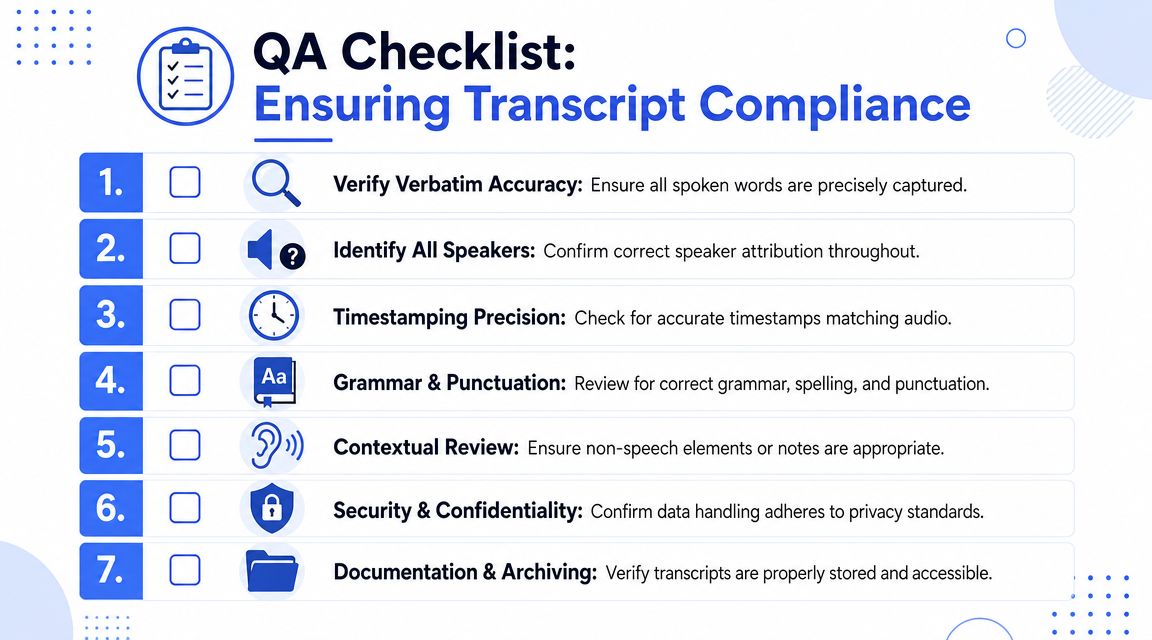
A real transcript QA pass should look beyond spelling and punctuation.
Review for:
- Meaning accuracy: Do the words reflect what was said, especially around names, product terms, and regulated language?
- Speaker attribution: Are speakers identified correctly and consistently?
- Non-speech context: Are important sounds included where they affect interpretation?
- Unclear segments: Are inaudible or uncertain passages marked accurately instead of guessed?
- Placement and access: Can a keyboard and screen reader user reach the transcript easily from the media page?
A practical workflow is to assign transcript QA to someone other than the original transcriber. Fresh review catches speaker confusion and context mistakes faster than self-checking.
How to document transcripts for audits and procurement
For procurement and legal teams, transcripts should be documented as evidence, not treated as informal editorial assets.
That means:
- Reference them in conformance documentation: If your product or site includes audio-only media, note how transcripts are provided and where.
- Store review status: Keep records of who reviewed the transcript, when, and against what criteria.
- Include transcript requirements in vendor workflows: If a podcast host, LMS, CMS, or media player is part of your stack, define transcript support in contracts and RFPs.
- Map the control in your reporting: Accessibility documentation should connect the transcript practice to the applicable WCAG media requirement.
For teams preparing procurement-ready accessibility records, it helps to align transcript evidence with a broader Accessibility Conformance Report and ACR documentation process.
Procurement reviewers rarely want promises. They want a traceable process, a sample artifact, and a clear statement of how users access the equivalent content.
That’s why transcript governance belongs with your release process, not just your content operations.
Frequently Asked Questions About Audio Transcripts
Do audio-only files need transcripts under accessibility standards
Yes. If the content is prerecorded and audio-only, a transcript is the expected accessible equivalent. The transcript should be available in an accessible format and easy to locate with the media.
Are captions the same as an audio transcript
No. Captions are tied to video playback and synchronize with speech and sounds over time. An audio transcript is a separate text version of the content. For video, you may need both depending on the experience and the accessibility requirement.
Is an AI-generated transcript good enough for compliance
Not on its own. AI can be useful for drafting, but compliance-sensitive content should be reviewed by a person who can correct wording, speaker labels, and meaningful non-speech details.
Should the transcript be on the same page as the audio player
Usually, yes. That’s the lowest-friction pattern for users and the easiest one to defend in an audit. If you link out to a separate page or file, make sure the link is obvious and the destination is accessible.
Can transcripts help SEO and internal search
Yes, in practical terms. Search engines and internal site search can work with text more effectively than with raw audio. Transcripts also help support teams, legal reviewers, and content editors find specific statements without replaying the recording.
Do internal recordings need transcripts too
They often do. Internal training, HR communications, all-hands recordings, and employee resources can still create accessibility obligations and employee relations risk. Internal-only doesn’t mean risk-free.
If your team needs help validating audio transcript workflows, documenting conformance, or reviewing media accessibility gaps before they become procurement or legal problems, consider working with ADA Compliance Pros. They help organizations audit websites, products, and digital content against WCAG, Section 508, and related requirements, with remediation guidance and procurement-ready documentation.