
CAPTCHA Accessibility Your Guide to Compliant Alternatives
Your security team added a CAPTCHA to stop fake signups, credential stuffing, or checkout abuse. The rollout looked harmless. Then support gets a complaint from a customer who can’t log in with a screen reader. A second complaint follows when someone can’t complete a purchase because the image challenge keeps resetting. At that point, the issue isn’t a minor UX bug. It’s a blocked transaction, a denied account action, and a legal exposure sitting on one of the most sensitive paths in your product.
That is why captcha accessibility belongs in the same conversation as authentication, checkout reliability, and ADA risk. A control designed to keep bots out can also lock legitimate users out. When that happens on account recovery, registration, payment, or lead forms, the business impact is immediate. You lose revenue, create support costs, and hand plaintiffs’ firms an easy fact pattern.
Teams usually catch accessibility problems in labels, validation, and error recovery first. But a form isn’t accessible if the user can’t submit it. That matters on every conversion path, especially the ones covered in guides to accessible forms and checkout accessibility.
The Hidden Cost of Your Website’s Gatekeeper
A CAPTCHA often gets approved as a narrow security fix. Bot traffic rises, spam slips through, fraud ops complains, and engineering adds a challenge to the form. The immediate metric looks better. Spam drops. Abuse slows down. Security closes the ticket.
Then the hidden costs start showing up somewhere else.
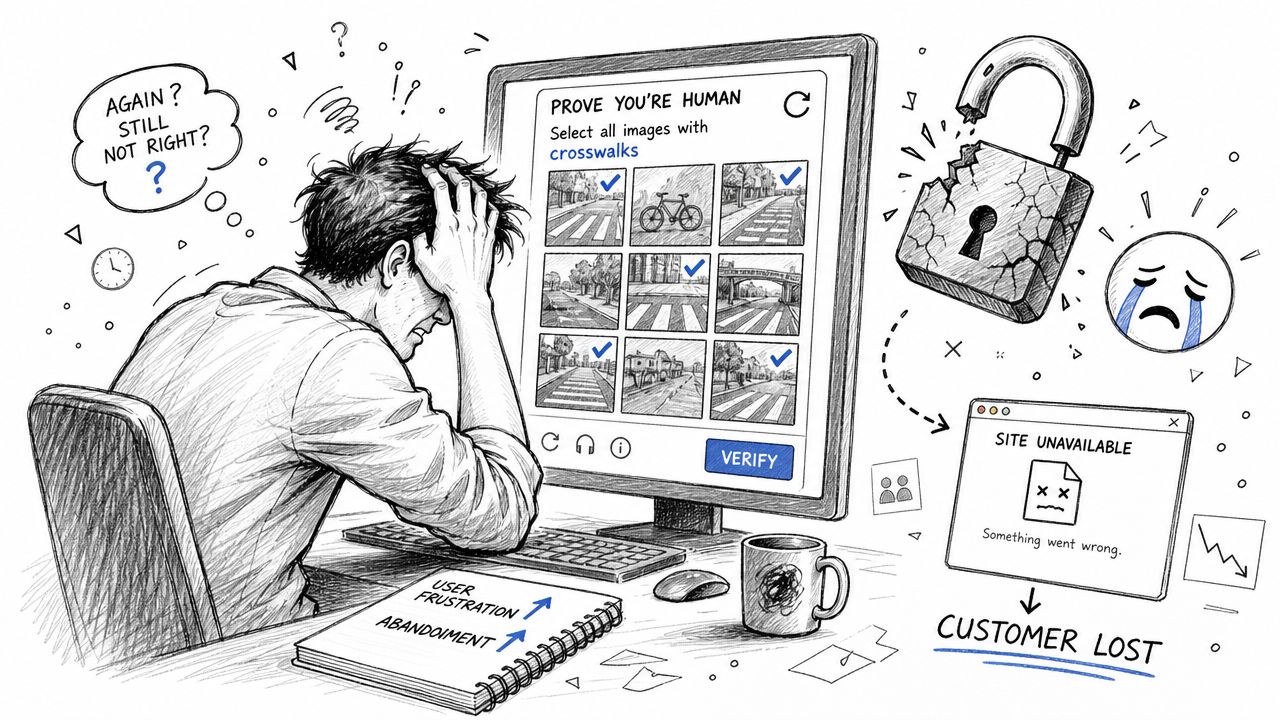
A blind user can’t pass the image prompt. A low-vision user enlarges the screen and loses context. A keyboard-only user gets trapped in an iframe. A customer with a cognitive disability fails a logic puzzle that product assumed was “simple.” In a checkout flow, that means abandoned revenue. In authentication, it means account lockout. In healthcare, banking, and government-adjacent services, it can mean failure to access essential functions.
Revenue loss happens before legal notices do
Most leadership teams think about CAPTCHA as a security control, not a conversion blocker. That’s a mistake. If a user can’t complete sign-in, reset a password, submit a lead form, or place an order, your anti-bot layer has become a business interruption layer.
Practical rule: Any control on login, registration, checkout, or account recovery should be treated as revenue-critical and accessibility-critical at the same time.
The damage is also easy to miss in dashboards. Teams may classify failed CAPTCHA attempts as bot filtering, when some of those failures are legitimate users hitting an inaccessible challenge. That hides the problem until support, social complaints, or legal demand letters force it into view.
The risk is concentrated on high-value journeys
CAPTCHA problems rarely sit on low-stakes pages. They show up where organizations care most about abuse: forms, checkout, password reset, and sign-in. Those are exactly the journeys where friction costs the most and where barriers create the clearest ADA arguments.
If a blocked user reaches out, the complaint usually isn’t technical. It’s simple. “I couldn’t access my account.” “I couldn’t complete my order.” “Your site wouldn’t let me through.” That plain-language failure is what makes inaccessible CAPTCHA so dangerous. It looks like a denial of service because, for that user, it is one.
Why Traditional CAPTCHAs Fail Accessibility Standards
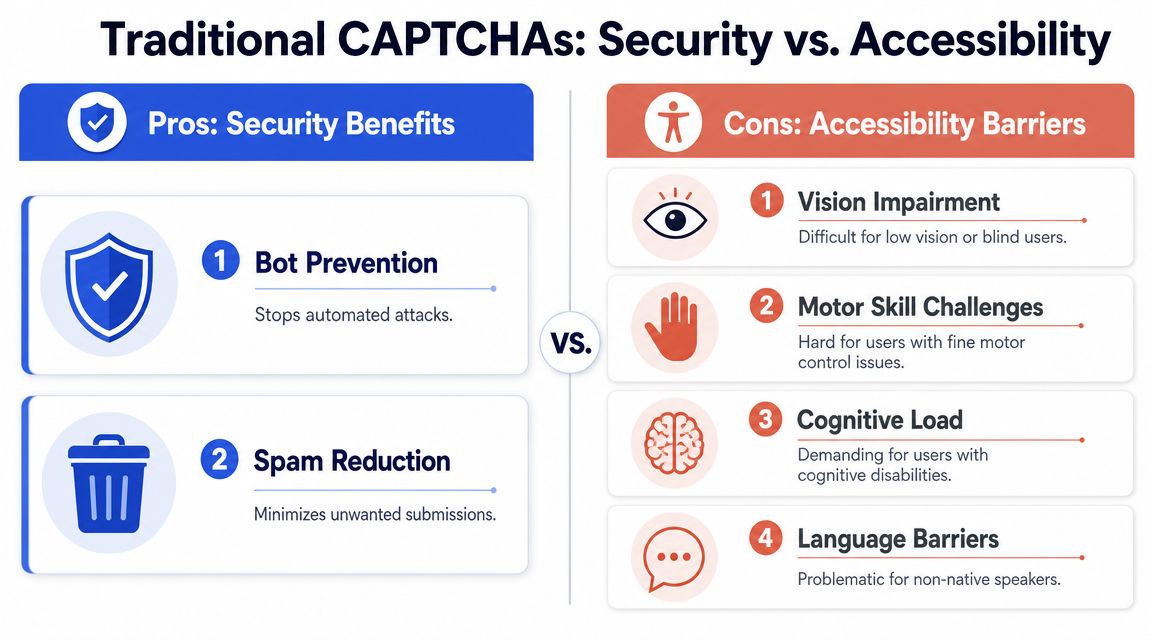
Traditional CAPTCHAs fail accessibility standards because they test human ability in ways that have nothing to do with the service a user is trying to access. A customer may be fully able to buy, sign in, or submit a form, yet still be blocked because the verification step depends on seeing distorted text, hearing noisy audio, reacting quickly, or controlling a precise pointer. For a business, that is not a minor UX flaw. It is a preventable access barrier on a revenue-critical path.
The pattern has been visible for years. In a study of 150 forums, 61% used a CAPTCHA, with use rising to 80% on gambling sites and falling to 20% on government sites. Only 14% offered an audio CAPTCHA, and only 19% told disabled users to contact the firm for help (2010 CAPTCHA accessibility study). The exact products have changed since then. The core failure has not. Many teams still buy anti-bot tools that treat accessibility as an add-on instead of a pass-fail procurement requirement. That same vendor-risk pattern shows up in other digital barriers, which is why OkraPDF’s risk report is a useful parallel for leadership teams assessing accessibility exposure across critical assets.
Traditional CAPTCHAs fail users in predictable ways
Visual CAPTCHAs are the clearest example. Distorted letters, low contrast, cluttered images, and image-selection tasks can shut out blind users, many low-vision users, and people who rely on screen magnification. Even if a screen reader can announce the presence of the widget, the challenge itself may still require visual judgment.
Audio alternatives often fail a different group. Background noise, clipped speech, accents, timing limits, and replay restrictions can make them unusable for deaf and hard of hearing users, people with auditory processing disabilities, and users in workplaces where audio is not practical.
Interaction-heavy challenges create another layer of exclusion.
- Motor barriers: Sliders, drag-and-drop puzzles, and small click targets can fail for users with tremors, limited dexterity, switch access, or voice input.
- Cognitive barriers: Multi-step logic prompts, vague image categories, and memory-based tasks increase cognitive load and create avoidable failure points.
- Language barriers: Prompts often assume English fluency, cultural context, or familiarity with ambiguous labels that many users do not share.
One technical detail gets missed in audits. CAPTCHA failures often trigger poor error recovery. The form resets. Focus jumps. Timeout rules are unclear. Previously entered data disappears. That compounds the barrier and is one reason teams should review CAPTCHA flows alongside accessible error messages.
WCAG risk usually comes from the workflow, not the widget label
WCAG does not prohibit CAPTCHA outright. The problem is that many implementations fail the underlying requirements for perceivable, operable, and understandable content. If a user cannot complete the challenge through more than one sensory channel, cannot recover from failure, or cannot understand what happened and what to do next, the control is already in risky territory.
The business mistake is trusting a vendor claim such as “audio supported” or “WCAG friendly” without testing the full journey. A compliant outcome depends on whether disabled users can pass the verification step independently, repeatedly, and without a degraded fallback. If they must call support, wait for manual review, or abandon the transaction, the organization still owns the barrier.
That is why I advise CTOs to treat CAPTCHA review as a procurement and legal-risk issue, not just an engineering detail. The practical standard is simple. Can users with disabilities reach the same endpoint on materially equal terms? If the answer is uncertain, review the broader legal risks of ignoring WCAG guidelines before renewing a vendor or rolling the control out across login, checkout, or account recovery.
A short explainer can help teams align on the issue:
Mapping CAPTCHA Failures to Legal and Compliance Risks
An inaccessible CAPTCHA isn’t just a design flaw. It creates a strong fact pattern for legal claims because it blocks a user at the point of service. If the user can’t sign in, recover an account, make a purchase, or submit a required form, the organization has placed a barrier in front of a core digital function.
Why counsel and engineering should treat this as a denial-of-access issue
Under the ADA, the core question is often practical rather than theoretical. Could the person access the service on equal terms? A broken CAPTCHA answer is often no. That makes the issue easy to explain in a demand letter and difficult to defend with vague language about “security needs.”
For federal agencies and contractors, the same barrier also creates Section 508 exposure. If the verification step blocks assistive technology users, the service isn’t meaningfully available. In procurement settings, that can spill into vendor review, ACR scrutiny, and contract risk.
Courts and settlement discussions frequently turn to WCAG as the benchmark for digital accessibility. That means a CAPTCHA failure isn’t isolated. It becomes evidence that the organization didn’t maintain accessible access to a critical path. Teams that already manage document risk often recognize this pattern immediately. The logic is similar to the one outlined in OkraPDF’s risk report. A single blocked experience can create outsized compliance exposure when it sits on a required user journey.
Where organizations underestimate exposure
Many teams assume the vendor owns the risk because the CAPTCHA is third-party code. That isn’t how this usually plays out. If your site deploys the control, your organization owns the user outcome.
The second mistake is treating accessibility only as a content issue. CAPTCHA barriers are operational. They affect security architecture, conversion funnels, support queues, and legal review. They also create a poor paper trail when a company can’t show it tested the experience with assistive technology before launch.
Consider the common failure points legal teams care about most:
- Blocked transactions: A user can’t complete checkout, pay a bill, or submit an application.
- Blocked authentication: A user can’t log in, register, or reset a password because the challenge fails with screen readers or keyboard access.
- No fallback path: Support has no documented bypass, and the site offers no accessible alternative route.
- Weak compliance evidence: The organization has an automated scan report but no manual test record showing the CAPTCHA was usable in practice.
A broader breakdown of that exposure is covered in this guide on what happens if your business ignores WCAG guidelines and the legal risks involved.
Security controls don’t get a legal pass because their intent was legitimate. If they block disabled users from core services, they still create compliance risk.
Evaluating Common CAPTCHA Types for Accessibility
CAPTCHA selection is a procurement decision with revenue and legal consequences. A control that blocks a small share of legitimate users still fails if it sits on checkout, registration, patient intake, account recovery, or any other high-value flow. The right review lens is simple: who gets blocked, what fallback exists, and how much risk the business accepts when the control misfires.
Legacy challenges create the highest exposure
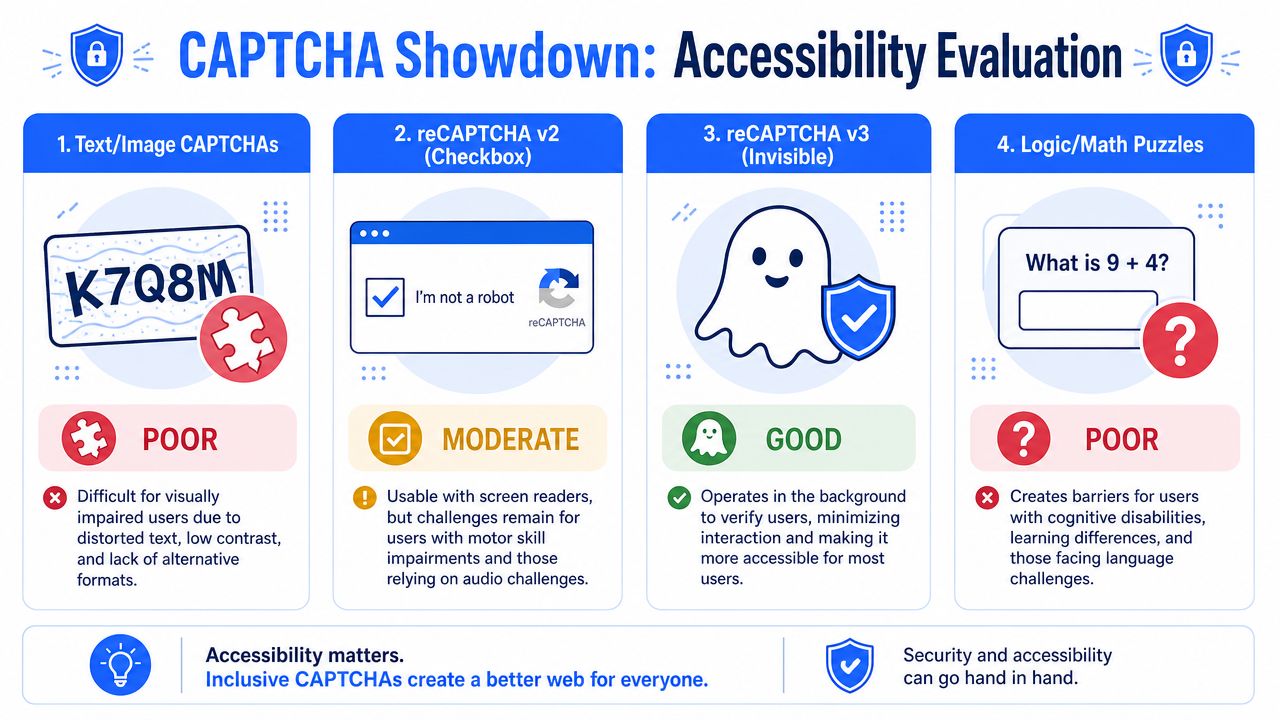
Text distortion and image selection CAPTCHAs remain the weakest option for compliance-sensitive services. They depend on degraded visual interpretation by design. Proper labels do not fix that core barrier.
Audio CAPTCHA reduces one barrier and creates others. It can help some blind users, but it often fails users with hearing impairments, auditory processing issues, language barriers, or anyone in a noisy or public setting. Treating audio as the remediation path is a common compliance mistake.
Logic puzzles and game-style widgets are not much safer. They shift the burden from visual perception to memory, comprehension, timing, and pointer control. For flows that also fall under accessible authentication requirements under WCAG 3.3.8, that is a poor trade.
CTOs reviewing vendors should compare CAPTCHA types against both accessibility failure modes and operational cost.
| CAPTCHA Type | Accessibility Impact | Security Effectiveness | Recommendation |
|---|---|---|---|
| Text/Image CAPTCHAs | High barrier for blind, low-vision, cognitive, and some keyboard-only users | Can deter basic automated abuse, but user friction is severe | Avoid for public-facing critical flows |
| Audio CAPTCHA | Helps some users but excludes others and is often hard to understand | Limited by usability and inconsistent completion | Do not treat as sufficient remediation |
| Logic or puzzle CAPTCHAs | Adds cognitive and motor demands | May stop simple bots | Poor fit for compliance-sensitive experiences |
| reCAPTCHA v2 and similar checkbox systems | Lower friction than legacy text challenges, but can trigger inaccessible visual tasks | Commonly used, but challenge fallback remains a major concern | Use cautiously and test real-world fallback behavior |
| Invisible or risk-based systems | Best chance of reducing user-facing barriers | Depends on implementation and review of fallback handling | Stronger option if validated through manual testing |
Risk-based systems reduce friction, but they still need governance
The strongest pattern in current products is reducing or removing the visible challenge. Researchers in an ACM evaluation found that reCAPTCHA v2 discriminated against users with visual impairments, while reCAPTCHA v3 did not in that evaluation (ACM evaluation of reCAPTCHA systems). That aligns with what implementation teams see in practice. The more a system relies on visual or interactive puzzles, the more likely it is to block legitimate users.
A 2022 study reached a similar conclusion. Researchers reported that reCAPTCHA v3 did not discriminate against users with visual impairments and described it as accessible, while reCAPTCHA v2 remained a barrier (2022 study of reCAPTCHA accessibility). That does not make any invisible CAPTCHA automatically compliant. It makes it a better starting point for risk reduction.
The remaining work is operational. Teams still need to test false positives, keyboard flow, screen reader behavior, privacy impact, vendor logging, and the fallback path for users flagged as suspicious. If a vendor cannot explain what happens after a risk score escalates, procurement should treat that as a control gap, not a minor product detail.
Product teams revisiting spam prevention during form redesign should also review upstream ways to generate smart forms that reduce bot abuse without putting a puzzle in front of every user.
Modern Accessible CAPTCHA Alternatives
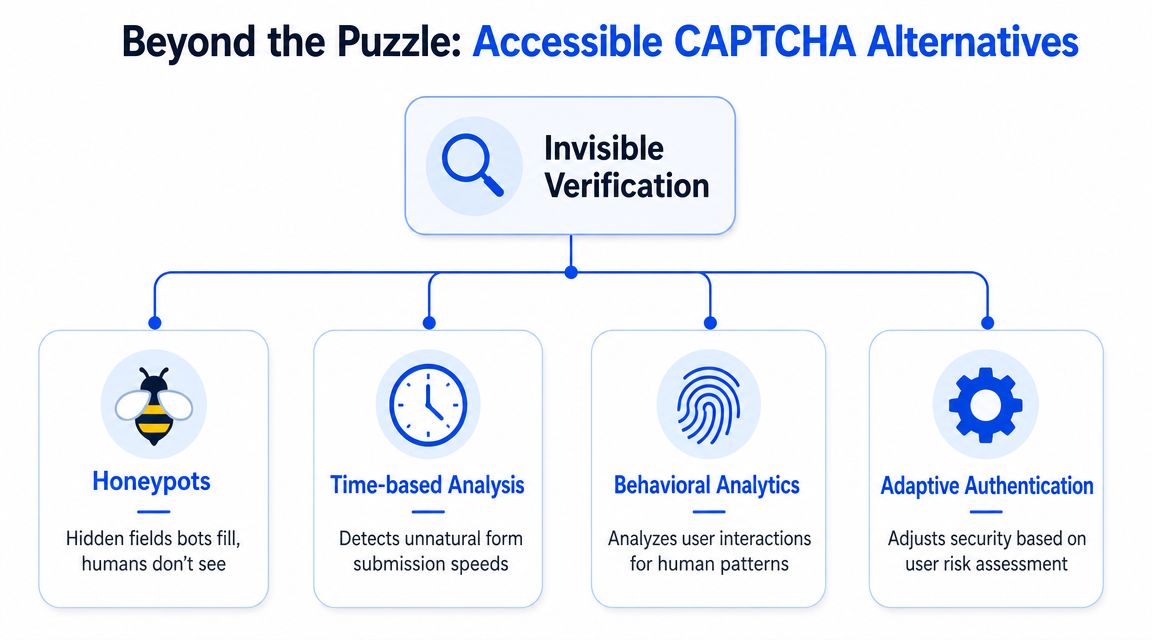
The safest direction is to stop asking users to prove they are human through a visible puzzle. Modern anti-bot controls work best when they operate in the background and only escalate when the risk justifies it.
Start with controls users never have to solve
A good baseline is a layered approach that removes the puzzle from the UI.
- Honeypot fields: Add hidden fields that legitimate users won’t interact with. Bots that auto-fill every field expose themselves without creating user-facing friction.
- Time-based analysis: Flag submissions that happen unnaturally fast or follow patterns unlikely for a human completing the form.
- Behavioral or risk scoring: Tools such as reCAPTCHA v3 and similar systems assess context and interaction signals in the background rather than forcing a challenge first.
- Adaptive authentication: Step up security only when risk is higher. A low-risk user gets through quietly. A risky session may require an alternate verification path.
This is also where product teams should look upstream. If you’re redesigning intake or lead-generation workflows, it helps to generate smart forms with cleaner structures and fewer unnecessary inputs before layering on anti-bot controls. Simpler forms reduce bot targets and make accessible validation easier.
The best CAPTCHA for accessibility is often the one the user never sees.
For sign-in and recovery workflows, these controls should also be reviewed alongside broader identity requirements such as accessible authentication under WCAG 3.3.8. A login flow can pass a narrow CAPTCHA test and still fail users if the surrounding authentication journey depends on memory tasks, repeated retries, or inaccessible fallback steps.
Procurement questions that matter
Invisible systems are promising, but procurement teams shouldn’t stop at vendor marketing. A recent industry analysis notes that background risk scoring and proof-of-work models are increasingly favored because they can be “fully accessible,” while also emphasizing an unresolved tradeoff. The Friendly Captcha accessibility analysis argues that the key procurement question is whether a background challenge actually improves both access and security, because public evidence on false positives and abandonment by disability type remains thin.
That leads to better vendor questions:
- What happens on failure? If the risk score flags a user, does the fallback become a visual or cognitive challenge?
- Can the control be completed without sight, hearing, precise pointer use, or memory tests?
- Does it work in screen readers, zoom, keyboard-only operation, and voice control?
- What logs exist to distinguish bot blocks from legitimate user friction?
- Can authorized or known users bypass repeated challenges?
A mature solution doesn’t just block bots. It gives the organization a defensible path for legitimate users who don’t fit the model.
Choosing and Implementing a Compliant Solution
Replacing an inaccessible CAPTCHA should be handled like any other high-risk product change. Scope the threat model, review the user journeys, validate the vendor, and test the actual experience. Don’t treat it as a widget swap.
Treat CAPTCHA replacement like a product risk project
Start by separating your use cases. A public contact form, a checkout page, a login screen, and a password reset flow don’t carry the same abuse patterns or the same business risk. Apply the lightest effective control to each route.
Then pressure-test the vendor’s claims. Ask for a VPAT or Accessibility Conformance Report. Read it critically. “Supports WCAG” isn’t enough if the document is vague about iframe behavior, fallback challenges, or assistive technology compatibility. Teams evaluating interactive lead capture tools and chat-driven intake flows often ask similar questions when reviewing a conversational marketing platform guide. The lesson carries over. Engagement tooling still needs accessible, defensible user flows.
Verify claims with human testing
Automated scans won’t tell you whether a blind user can complete the CAPTCHA flow in practice. They won’t reveal whether a challenge loops under zoom, traps keyboard focus, or fails when speech input is used. That requires manual testing with assistive technology and realistic scenarios.
Use a validation checklist like this:
- Test critical journeys: Registration, sign-in, password reset, checkout, and any gated submission flow.
- Test with assistive technology: Screen readers such as JAWS and NVDA, screen magnification, keyboard-only operation, and voice control.
- Inspect fallback behavior: Many tools look acceptable until they escalate a user into a challenge path.
- Document evidence: Keep test notes, recordings, defects, and remediation decisions for legal and procurement review.
A form can appear polished and still fail at the final gate. That is why form accessibility work has to include the anti-bot layer, not just fields and labels, as discussed in guidance on accessible forms and WCAG.
Vendor documentation is a starting point. Compliance confidence comes from testing what disabled users actually encounter.
Frequently Asked Questions on CAPTCHA Accessibility
A CAPTCHA decision is rarely just a UX detail. It affects conversion, support volume, procurement, and whether a plaintiff can point to a known barrier on a core user journey.
Is CAPTCHA allowed under WCAG
Yes, in limited circumstances.
WCAG does not ban CAPTCHA outright, but it does require an accessible path for people who cannot complete the default challenge. In practice, that is where many implementations fail. A vendor may advertise conformance, yet the live flow still blocks account creation, checkout, or password reset when the challenge escalates.
For legal and procurement teams, the safer position is simple. Treat any CAPTCHA as a control that needs evidence, not assumptions.
Is an audio CAPTCHA enough
No. Audio is only one alternative, and it still excludes people who are deaf or hard of hearing, users with auditory processing disabilities, and anyone in a setting where sound is not usable or safe.
It also creates operational risk. If the only fallback is audio, some users will abandon the flow, contact support, or leave the transaction unfinished. That turns an accessibility defect into lost revenue and avoidable service cost.
What is the safest option for captcha accessibility
The lowest-risk option is usually to avoid a visible challenge unless the session behavior justifies one.
Background bot controls such as risk scoring, honeypots, rate limits, device signals, and step-up verification generally create fewer accessibility failures than image or audio puzzles. They are not perfect. They require tuning, fraud review, and privacy review. But they usually give security teams more flexibility without putting a hard block in front of legitimate users.
Do invisible CAPTCHAs eliminate compliance risk
No. They reduce friction in the default path, but the legal risk sits in the edge cases.
If the system escalates some users into a challenge, that challenge still has to work with keyboard access, screen readers, zoom, voice input, and mobile assistive tech. The fallback path matters. Error handling matters. Session timeout behavior matters. Those are the details that determine whether the control is defensible in an audit or complaint.
Should procurement require a VPAT
Yes. A VPAT should be a purchasing requirement for any CAPTCHA or bot-mitigation vendor.
It is not enough on its own. Procurement should also require test evidence on your real journeys, documented exceptions, remediation commitments, and contract language that assigns responsibility when accessibility defects block customers. If a vendor cannot support that level of review, the product introduces more risk than it removes.
If your team needs a defensible answer on captcha accessibility, ADA Compliance Pros can help you assess the risk, test critical flows with assistive technology, and document a remediation path that supports ADA, WCAG, and procurement requirements.