

The instruction arrives as one sentence. Counsel answering a demand letter writes it into an email, a county clerk reads it next to an April 2027 date, and a marketing lead hears it before a redesign: make the website ADA compliant. It does not come with a work plan. This article sets out how to make a website ADA compliant in the order the work pays off: the target, the program around it, the scope, the baseline test, the fixes, the vendors, and the habits that keep the result.
The Justice Department has written much of that plan, just not in one place, and the W3C fills in the rest. The Department’s guidance names the standards, its Title II rule names the version and the dates, and two of its settlement agreements with businesses, one from 2021 and one from 2024, list what an organization does once it has agreed to fix a website. Two pages measured on November 19, 2026 show why the order of the work matters.
WCAG 2.1 AA is the working target, and a record shows the site meets it
Knowing how to make your website ADA compliant starts with the target, and the target depends on who runs the site. State and local governments have a rule. 28 CFR 35.200(b) requires their web content and mobile apps to meet WCAG 2.1 Level A and AA, from April 26, 2027 for entities with a total population of 50,000 or more and from April 26, 2028 for smaller entities and special district governments.
Those dates come from an interim final rule of April 20, 2026, which also says the Department plans further rulemaking on the 2024 rule’s substance, so check the current text before relying on it. The rule allows defenses for fundamental alteration and undue burden in 35.204. The Title II guide covers the rest of that rule.
Businesses open to the public fall under Title III, which has no web rule. The Department’s guidance, which is not binding, says businesses “can currently choose how they will ensure” that what they offer online is accessible, and it points to WCAG as one existing standard. In a February 2026 court filing, the United States wrote that it “does not endorse WCAG as the appropriate or necessary standard” for auxiliary aids under Title III.
The two agreements below, both signed before that filing, name WCAG 2.1 Level AA. So the question “how do I make my website ADA compliant?” has a working answer for a business: conform to WCAG 2.1 AA and keep the evidence. The guide to what the ADA requires of a website explains that benchmark and who it reaches.
New work can aim one version higher. The W3C’s repair guidance calls “the latest version of Web Content Accessibility Guidelines (WCAG) Level AA” the generally accepted target, and WCAG 2.2 keeps the 2.1 criteria except 4.1.1 Parsing, which it removes (What’s New in WCAG 2.2). Write the target into one sentence of policy, as a goal with a date: “Our website and apps will conform to WCAG 2.1 Level AA by the date this policy sets, and new work is built to WCAG 2.2 Level AA.”
Two DOJ agreements show the program around the standard
A standard says what a page must do. It does not say who is responsible, how anyone finds out about a barrier, or how the site stays fixed after the next release. The Justice Department’s agreements answer those questions, and with them the owner’s question, “how to make my website ADA compliant”.
The two used here are the Rite Aid agreement, signed in November 2021 after a Title III compliance review of a vaccine registration portal, and the Springfield Clinic agreement of May 2024, which followed a patient’s complaint that the clinic’s patient and records portals “did not work with screen readers”. Each bound only its parties, for a term that has since ended, and Rite Aid denied that it had violated Title III (¶10). Read together, they describe one program, with the differences shown here:
| What the agreement required | Rite Aid, 2021 | Springfield Clinic, 2024 |
|---|---|---|
| Standard | WCAG 2.1 AA for the vaccine pages and the paths to them (¶13.a) | WCAG 2.1 AA for websites, mobile apps, web-based services and contractors’ portals, within nine months (¶16) |
| Who is responsible | A website accessibility consultant, retained to advise and verify (¶16) | A web accessibility coordinator, the “primary contact” for reports, named within 31 days (¶17) |
| A policy | Not required | A web accessibility policy within 90 days, given to every employee whose work it affects (¶18) |
| A public statement and a channel | An accessibility page linked from the home page, with an email address and a toll-free number (¶14) | A statement on the home page naming WCAG 2.1 AA and a contact for reports (¶19) |
| Training | At least once a year for employees who build or manage the content; contractors trained before they start (¶17) | Mandatory for employees and contractors; new hires within six weeks (¶20) |
| Testing | An automated tool inside content development and quality control, plus manual and user testing by people with disabilities (¶15, ¶16) | An independent consultant’s written evaluation within six months, its recommendations carried out within 60 days (¶21) |
| Vendors | Third-party content in scope when the task depends on it (¶13.d) | Contractors monitored, and 90 days to fix a barrier a contractor’s change introduces (¶16) |
| Reporting | Reports with every accessibility email received and a summary of every call (¶18) | An annual report listing every accessibility complaint (¶23) |
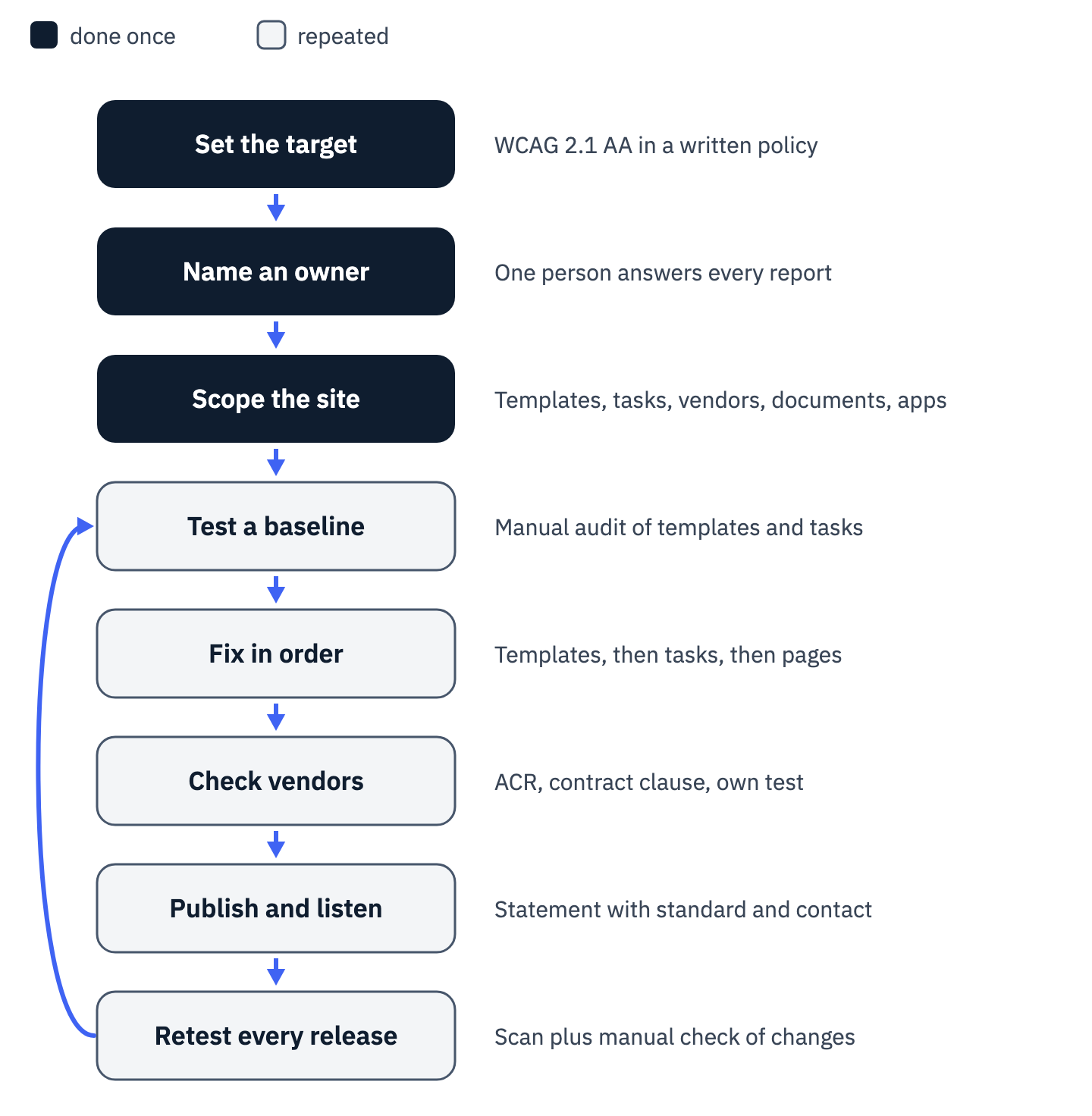
View the data as a list
- Set the target: WCAG 2.1 AA in a written policy, with a date. Done once.
- Name an owner: one person answers every report. Done once.
- Scope the site: templates, key tasks, vendors, documents and apps. Done once, updated as the site changes.
- Test a baseline: a manual audit of the shared templates and the key tasks. Repeated.
- Fix in order: shared templates, then key tasks, then individual pages. Repeated.
- Check vendors: an Accessibility Conformance Report, a contract clause and your own test of the embed. Repeated.
- Publish and listen: a statement naming the standard and a contact for reports. Repeated.
- Retest every release: a scan plus a manual check of what changed. New pages or vendors loop back to the baseline test.
The W3C’s planning guide groups the same activities into stages and notes that they “are not necessarily carried out in sequence, and are ideally repeated over time”. The order in the figure follows dependencies: a fix list without a scope misses the vendor’s portal, and a statement without an owner sends complaints nowhere.
The Springfield deadlines run the same way: a coordinator within 31 days, a policy within 90, an evaluation within six months, and full conformance within nine (¶16 to ¶21). The first decision, before any testing, is a name: the person or consultant who owns accessibility and answers every report.
A complete scope lists templates, key tasks and the content vendors run
A site is more than the pages the marketing team edits. Every one of the 19 barriers listed in the Springfield agreement’s Exhibit 1 sat in the two portals run by contractors, among them controls whose accessible name “does not contain a visual label” (item 16, WCAG 2.5.3). The agreement made the clinic answer for them: it had to ensure that “all its websites, web content, mobile applications, web-based services, and contractors” conform.
The Title II rule reaches the same way, covering content a public entity provides “directly or through contractual, licensing, or other arrangements” (35.200(a)). The W3C’s policy guide says a policy’s scope “includes third-party, legacy, and mobile content”. An inventory for the work has six rows:
| List | Why it is in scope | Source |
|---|---|---|
| Shared templates and components: header, footer, navigation, forms | A failure in one repeats on every page built from it | W3C repair guidance: repairs that “Appear on multiple web pages” |
| Key tasks, end to end: contact, booking, checkout, account, payment | Each is tested as a complete process, every step | WCAG-EM 2.0, Step 3.3 |
| Vendor content: booking, chat, payment, intake forms, portals | Content provided through a contract is still content you provide | 35.200(a); Springfield ¶16 |
| Documents people use to apply or take part | Title II exempts documents posted before the compliance date unless they are currently used to apply for, gain access to, or take part in a service | 35.201(b) |
| Mobile apps | Both the Title II rule and the Springfield agreement name them | 35.200(b); Springfield ¶16 |
| The content system and its editors | Editors write the alt text, link text and headings | W3C repair guidance on authoring tools |
The guide to third-party content explains how conformance claims treat embedded content, and the CMS guide covers the settings that let editors publish accessible pages. The output of this step is the six-row list, filled in for your site, with an owner for each row.
A baseline audit finds what to fix, and a scan alone finds a fraction
With the scope written down, test it. A scanner is a fast first pass and a poor last one. axe-core 4.11.4, an open-source rule engine, runs a default rule for 19 of the 50 WCAG 2.1 Level A and AA success criteria. The other 31 have no default rule, and the 19 that do still need a person for judgment, such as whether an accessible name matches its label. The Department’s guidance warns that “A ‘clean’ report does not necessarily mean everything is accessible.”
Both organizations had tools and help before the Department looked. Rite Aid represented that it had retained an outside consultant and used an automated scanning tool from the portal’s first development (¶5), and the review still found images, buttons, links and form fields with missing or inaccurate labels, pop-ups and error messages a screen reader never announced, and buttons a keyboard could not select (¶4). Springfield Clinic “employs a consultant to monitor and screen its website for accessibility barriers” (¶12).
Both agreements then paid for people. Rite Aid’s consultant had to verify conformance “through the use of manual testing from both a programmer/code and user/assistive technology perspective”, including user testing by people who are blind, have low vision or have difficulty using a mouse (¶16.a). Springfield Clinic had to retain an independent consultant whose written evaluation would state whether the website, both portals and the mobile apps conform, “and recommendations to achieve conformance” (¶21).
The accessibility audit guide explains how the W3C methodology selects a sample and what the report owes you, and the ADA compliance checklist lists the tests for each criterion. Scope a first audit to the inventory’s first two rows: every shared template and every key task from start to finish. If an overlay is already installed, test with it switched on and off, because the code underneath is what the audit has to judge.
Shared templates and key tasks come first, because one fix repeats on every page
The audit returns a list, and the order in which a team works through it decides how fast the barriers fall. The W3C’s repair guidance suggests teams “consider prioritizing what you repair first” by focusing on high-impact repairs, those that “Appear on multiple web pages, such as navigation bars”, “Appear on frequently-used web pages, such as the home page” or “Are critical to complete processes, such as purchase forms”, along with Level A issues, and on low-effort repairs that “Require less time, cost, or skills to repair”.
The first example shows the arithmetic. On a home-services contractor’s site, the shared header carries a top bar with a tagline and three links, and below it a booking button. All five are 16-pixel white text on the same teal, #00A08D, which measures 3.27:1. WCAG 1.4.3 asks for 4.5:1 for text of that size. axe-core reported all five on each of the 12 pages tested: the home page and 11 pages linked from it.

The same teal fails twice more in the shared footer on all 12 pages: white text on an estimate button, and an 18-pixel bold teal label on white, just under the 14-point bold size at which WCAG’s 3:1 large-text minimum applies. Seven elements on twelve pages make 84 failing instances, and every one traces back to a single color value in two shared templates. A darker teal there clears all 84 at once.
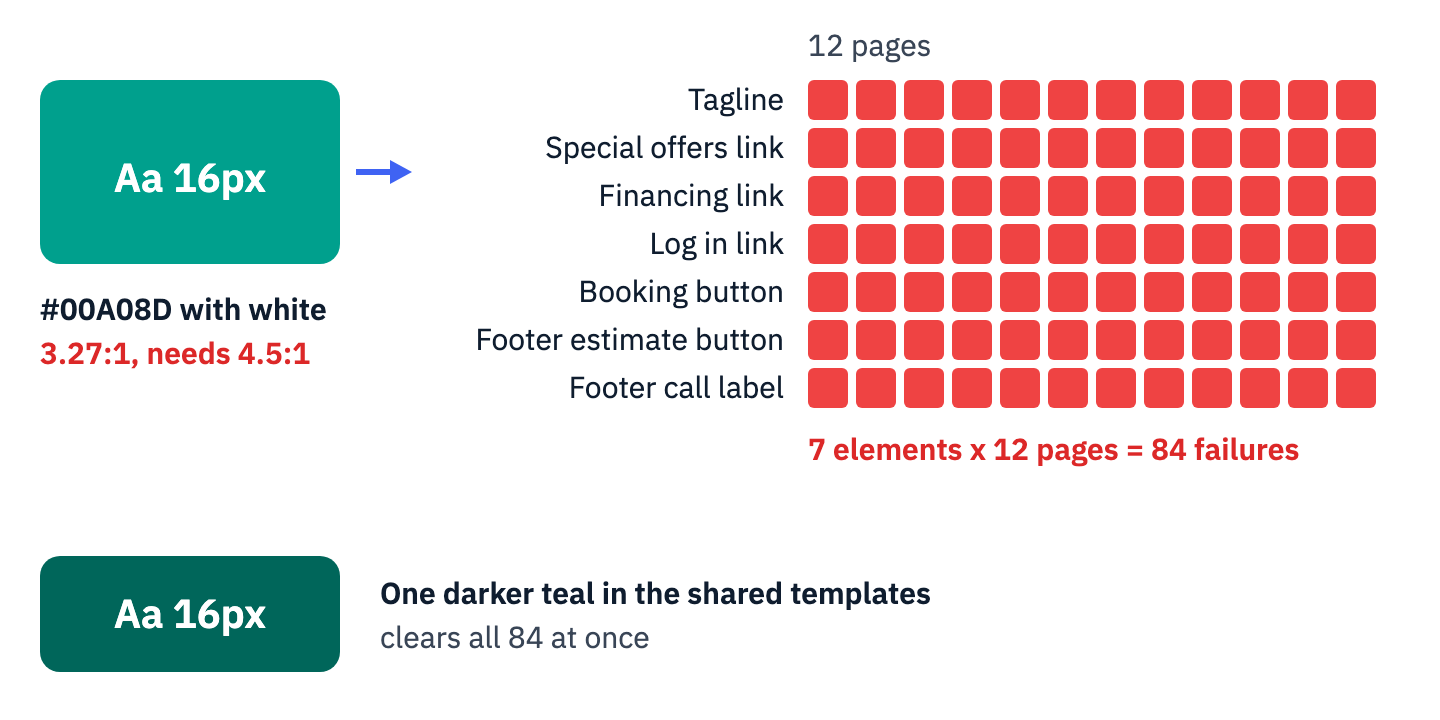
View the data as a table
| Element | Template | Pages failing (of 12) | Contrast |
|---|---|---|---|
| Tagline in the top bar | Header | 12 | 3.27:1 |
| Special offers link | Header | 12 | 3.27:1 |
| Financing link | Header | 12 | 3.27:1 |
| Log in link | Header | 12 | 3.27:1 |
| Booking button | Header | 12 | 3.27:1 |
| Estimate button | Footer | 12 | 3.27:1 |
| Call label, 18 px bold | Footer | 12 | 3.27:1 |
| Total | 84 failing instances | one color value |
Size changes the threshold, and a fix list should record it. The phone number in the same header is 24-pixel bold text in the same teal. WCAG counts that as large text, so 3.27:1 passes there. A developer who darkens the teal leaves the phone number passing either way, but a designer who shrinks it below 18.66 pixels bold, at the current teal, turns it into an eighty-fifth failure.
The repair guidance also spreads the work. It notes that “designers can select better colors and content authors can improve the wording of links, headings, and text alternatives”, so a developer does not have to own every line of the list. The W3C policy guide adds that in some cases “a phased approach might be appropriate”: “First, quickly fix significant accessibility barriers. Then implement fixes for other issues.”
The prioritization guide and the remediation plan guide turn the audit into tickets. Sort the fix list this way: shared templates and components first, then each key task end to end, then high-traffic pages, then everything else, with Level A failures ahead of Level AA inside each group.
A vendor’s widget on your page is part of your website, and so is its failure
The second example sits inside a form the site owner did not build. A small law office’s contact page embeds its intake form from a lead-management vendor in an iframe. One field, marked required with an asterisk, is labeled on screen “How did you hear about us?”. The browser’s accessibility tree, which a screen reader works from, names it with an internal identifier, twenty random characters followed by “-searchbox”, set as an aria-label that overrides the visible label. Four more dropdowns in the same form follow the same pattern.
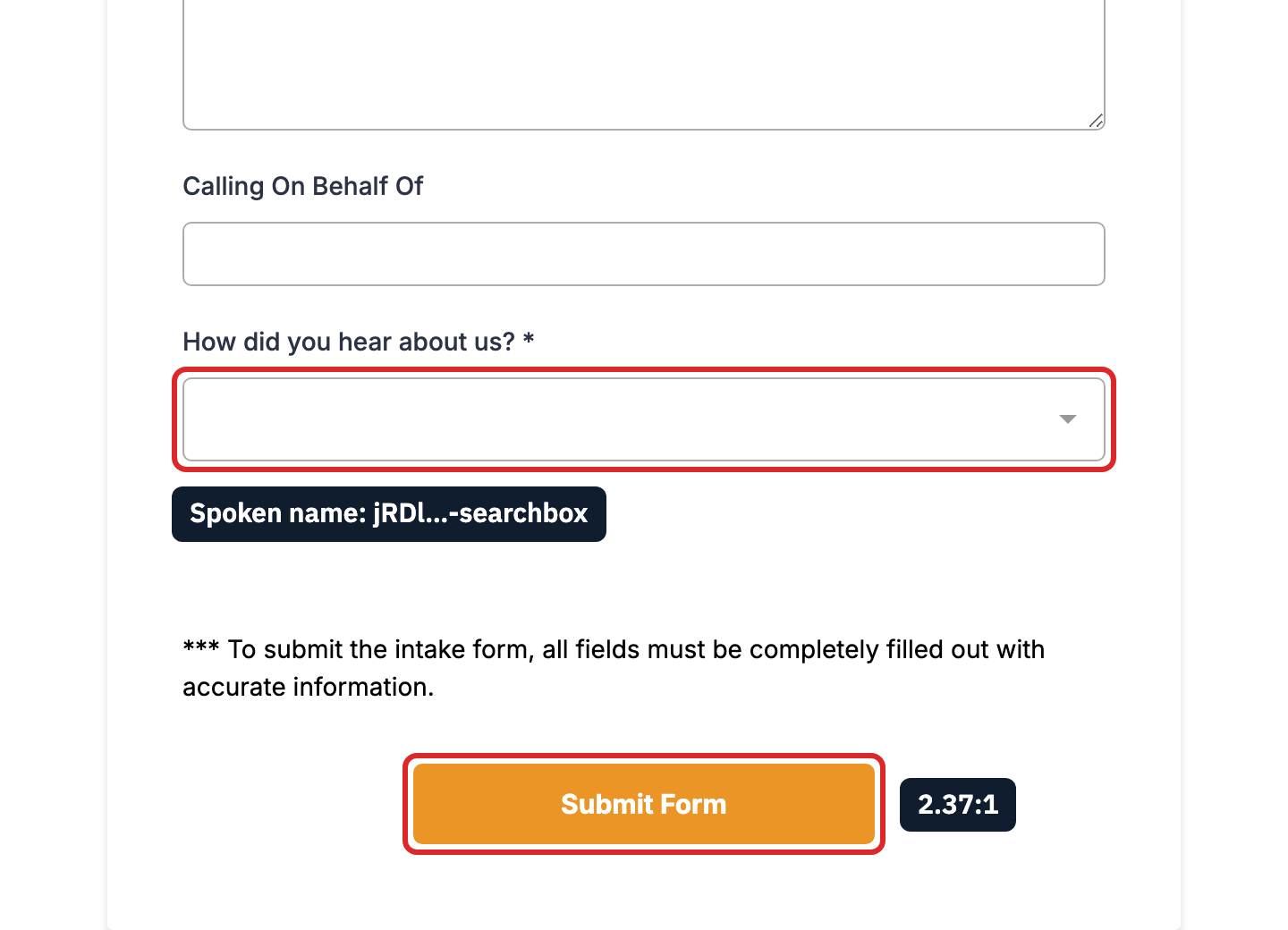
axe-core ran on the page with the form loaded and reported five rules. Two were inside the vendor’s form: the Submit Form button, white on orange #EA9526 at 2.37:1, and an image with no alternative text. The misnamed field was not among them. The engine’s form-label rule passes any field that carries an aria-label, whatever it says, and its rule for WCAG 2.5.3 Label in Name is marked experimental, so it does not run by default.
That criterion, Level A in WCAG 2.1, requires that “the name contains the text that is presented visually.” A person comparing the visible label with the announced name sees the gap at once. It is the same failure the Department listed in the Springfield Clinic’s patient portal, and that agreement’s Exhibit 1, with a WCAG criterion for each barrier, reads as a ready test list for any vendor portal.
The owner cannot edit the vendor’s code, and responsibility does not move to the vendor. The Title III regulation reaches what a business provides “directly, or through contractual, licensing, or other arrangements” (28 CFR 36.202(a)). Both agreements kept the organization that used a contractor answerable: Rite Aid “nevertheless remains responsible” when it relies on contractors (¶29), and the Springfield agreement required the clinic to “periodically monitor and review its contractors”, with 90 days from notice to remove a barrier a contractor’s change introduced (¶16).
When a vendor’s component fails, the fix list gets a vendor ticket with the evidence: the visible label, the announced name, the criterion and the page. If the vendor cannot fix it within the window your contract sets, the remaining choices sit with the owner: change the component’s settings, replace the product, or build the form on your own page and send its data to the vendor’s system. For a key task such as an intake form, waiting on the vendor without a date leaves the barrier in place.
Overlays are vendor code too. The Department’s guidance says checkers and overlays “need to be used carefully”. The Federal Trade Commission’s April 2025 consent order against accessiBe, entered without an admission of the allegations, bars that company from claiming its product “can make any website compliant with WCAG” without reliable evidence.
Ask every vendor whose code runs on your pages for three things: an Accessibility Conformance Report for the exact product you embed (how to find one), a contract clause that names WCAG 2.1 AA and a time to fix (vendor flow-down clauses), and permission to test the embed yourself. The vendor questionnaire has the wording.
A statement, trained publishers and a check on every release keep the site compliant
A site that passes an audit in March can fail in May, after a new landing page, a new chat tool or a new editor. Knowing how to make sure your website is ADA compliant next year comes down to three habits: a public channel and trained people, which both agreements required, and a test before each release, which the Rite Aid agreement required (¶15).
The statement comes first because it gives users a way in. The W3C’s statement guide sets the minimum at “A commitment to accessibility for people with disabilities”, “The accessibility standard applied” and “Contact information in case users encounter problems”, and adds that statements “are not technical assessments or declarations of conformity”. It also advises listing known limitations, the measures taken, supported browsers and the environments the content was tested in.
A statement that names the pages still failing, with a date for the fix and a phone number for help in the meantime, gives a user a working route around the barrier. Rite Aid’s page had to carry an email address and a toll-free number that accepts video relay calls (¶14). Springfield Clinic’s statement had to name the coordinator and an email address for reports (¶19).
Route every report to the coordinator and keep a log with the fields the Springfield annual report listed for each complaint: the complainant’s name, the date, a summary and the response (¶23). The statement template has the fields for the public page.
Training reaches everyone who publishes. Springfield Clinic’s training had to cover the policy, common barriers, the assistive technologies people use and WCAG 2.1 AA, with new hires trained within six weeks (¶20). Rite Aid’s requirement extended to contractors before they started work (¶17). The training curriculum by role splits that content for editors, designers and developers.
Testing becomes part of shipping. Rite Aid had to run its automated tool “as an integrated and routine part of its content development, assessment, and quality control processes”, and a critical barrier found before launch blocked the launch until it was fixed (¶15.c). The W3C’s user involvement guide warns that treating accessibility “just as a checklist” risks “missing the real purpose of accessibility”, so a manual check of the changed template or task belongs next to the scan.
The regression testing guide and the monitoring guide set up both. The release rule fits on one line: no template or key task ships while it fails a Level A or AA criterion that a scan or a manual check found.
Your next step
Three actions start the work this week. Write the target and the owner into a one-paragraph policy: WCAG 2.1 Level AA for the site and apps by a set date, WCAG 2.2 Level AA for new work, and the name of the person who answers every report. Fill in the six-row inventory, and send each vendor whose code runs on your pages the three requests above. Then commission a baseline audit of the shared templates and the key tasks, and fix in the order they repeat.
What the documents leave open belongs to counsel: whether Title II, Title III or both apply, which date governs, whether a Title II exception covers an old document, and how to answer a demand letter that has already arrived (state cure statutes change that answer in some states). Small businesses can ask a tax advisor about the disabled access credit.
ADA Compliance Pros scopes an audit of the pages and flows that matter most to your users and to a legal review, then tests them by hand with keyboards and the JAWS, NVDA and VoiceOver screen readers. Every finding is mapped to the WCAG success criterion it fails, with its location and evidence, and the fixes are ranked by user impact and legal risk. Your developers or your agency make the code changes, ADA Compliance Pros retests to confirm what is resolved, and you keep documentation that supports an accessibility statement. To start, book a consultation about ADA website compliance.