

The findings already exist. An audit report lists them by success criterion, a demand letter names barriers on specific pages, a buyer has questioned an Accessibility Conformance Report, or a Title II compliance date is on the calendar. The list has not moved because nobody owns the fixing. The code sits with developers, the PDFs with whoever publishes them, the videos with marketing, and each team reads the report as a problem that belongs to someone else.
What is accessibility remediation? The answer is narrow. Accessibility remediation is the work of changing the source, meaning the code, the document or the media file, until each finding passes the success criterion it failed and a retest confirms it. This guide turns one audit report into one plan: the queue each finding belongs to, what gets fixed first, where each fix is made, and what record shows a buyer, an agency or counsel that the work is done.
Accessibility remediation changes the source, and an overlay does not
WCAG is the standard the work is measured against, and remediation is the work. For website accessibility remediation the changed file is a template, a component, a stylesheet or a script, and the same holds for web accessibility remediation in an app or a customer portal. WCAG judges the result page by page. Its conformance requirements say conformance “is for full web page(s) only, and cannot be achieved if part of a web page is excluded,” so a fix that covers part of a page does not make the page conform.
Automated checkers find part of the problem and cannot settle the rest. W3C’s guide to selecting evaluation tools says “Tools cannot check all accessibility aspects automatically” and “Human judgement is required.” The Justice Department’s guidance on web accessibility and the ADA, which has no binding force of its own, warns that “A “clean” report does not necessarily mean everything is accessible” and says that pairing a manual check with automated checkers “can give you a better sense of the accessibility of your website.”
An overlay is a script that runs on top of a page. In its complaint against accessiBe, the Federal Trade Commission described the category this way, at paragraph 4:
Accessibility overlays are not intended to permanently alter web code or design, but to permit temporary modifications to the user interface that may impact accessibility while visiting a web page
The Commission alleged that the product failed, in a number of instances, to make menus, headings, tables, images and recordings compliant with WCAG. The consent order issued April 21, 2025 requires a payment of $1,000,000. It bars claims that any product marketed to correct accessibility barriers with automated tools “can make any website compliant with WCAG,” unless the claim is non-misleading and backed by “competent and reliable evidence.” accessiBe neither admitted nor denied the allegations.
Teams weighing a subscription against a fix can compare what overlay vendors publish about price and what their contracts exclude. The test for any proposal, from a vendor or from the internal team, is one question: which file changes? If the answer is a script tag and nothing else, the proposal is not remediation. Put the question in writing before a plan is drafted.
An accessibility remediation plan is one table with three queues
Federal guidance already lists what a plan holds. Section508.gov’s testing lifecycle tells agencies to “Prioritize defects for remediation based on severity, risk, or impact on users,” to assign each one to “a specific person, team, or vendor,” and to “Set and document deadlines in a Remediation Plan.” Deadlines “should preferably not exceed 1 year,” and tracking should record the “expected remediation date, and actual remediation date.” Nothing in that list depends on being a federal agency.
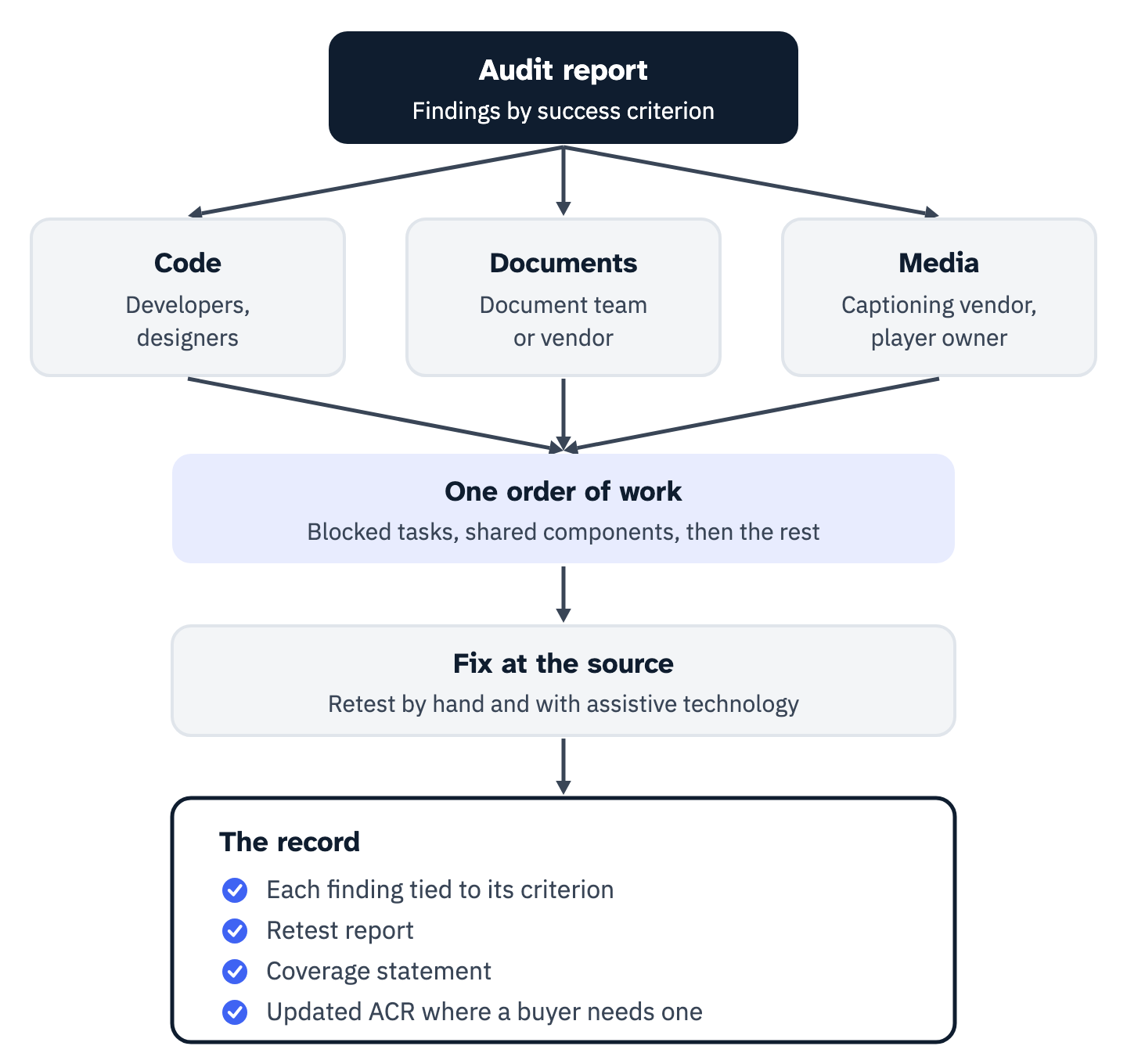
Findings fall into three queues because three different groups fix them. Code findings go to front-end developers, and color or layout findings to designers. Document findings go to whoever produces the PDFs, Word files and slide decks, or to a document vendor. Media findings go to the captioning and description vendor and to whoever owns the video player. W3C’s guidance on interim repairs makes the same point about roles inside the code queue: “designers can select better colors and content authors can improve the wording of links, headings, and text alternatives.”
View the data as a list
- Code: front-end developers; designers for color and layout.
- Documents: the team that publishes PDFs, Word files and slide decks, or a document vendor.
- Media: the captioning and description vendor, and the owner of the video player.
- Every queue: ordered by the same rule, fixed at the source, retested by hand and with assistive technology.
- The record: each finding tied to its success criterion, a retest report, a coverage statement, and an updated ACR where a buyer needs one.
Each finding gets one row. The rows below are examples, and the columns are the plan.
| Finding | Criterion | Queue and owner | Place in the order | Fix made in | Retest and record |
|---|---|---|---|---|---|
| Search link in the header has no accessible name | 4.1.2, 2.4.4 | Code, front-end developer | Repeats on every page | The header component | Screen reader names the link on each page type; result logged per page type |
| Checkout error shown in red and never announced | 3.3.1, 4.1.3 | Code, front-end developer | Blocks a key task | The form error component | Submit each checkout step with errors using a screen reader |
| Permit application posted as a scanned PDF | 1.4.5, 1.3.1 | Documents, document team | Used to apply for a service | Rebuilt from the source file | Screen reader reads every field in order; file listed in the document log |
| Training video without captions | 1.2.2 | Media, captioning vendor | Level A on a key page | Caption file loaded in the player | Captions on, in sync, with speakers and sounds; vendor QA sheet attached |
| Footer text below 4.5:1 contrast | 1.4.3 | Code, designer | Level AA, blocks no task | The footer color token | Contrast measured on every footer variant |
Each row then becomes a ticket, and an accessibility bug report template gives the fields a developer needs to reproduce a finding without testing the page again. A finding in a part a vendor runs, such as a hosted checkout, a chat widget or a video platform, goes to whoever holds that contract, because Title II reaches content an entity provides “directly or through contractual, licensing, or other arrangements” under 28 CFR 35.200.
The same table sizes the project. Count templates and shared components rather than pages, because one fixed component closes a finding on every page that uses it. Count findings that repeat across components apart from one-off findings. Count documents, and among them the scans and the files used to apply for a service. Count minutes of video and audio. Note whether an ACR has to be updated. Before asking anyone for a quote, have those counts and the compliance date that applies on one page.
Blocked tasks come first, and instance counts come last
WCAG sets the first rule itself. Under 5.2.3 Complete processes, “When a web page is one of a series of web pages presenting a process (i.e., a sequence of steps that need to be completed in order to accomplish an activity), all web pages in the process conform at the specified level or better.” The example W3C gives is a store’s checkout. A checkout fixed on three of its four steps does not conform on any of them, so the steps of one task are scheduled together.
W3C’s interim repair guidance, an informative WAI resource, lists what to bring into scope first. It names “Key tasks, such as registration, search, submit, or checkout processes” and adds “Include all steps involved to complete each task.” It also names key content, content being redesigned, and “Reported content, that has known barriers,” which covers what a demand letter or a user complaint names.
Within that scope the guidance lists high-impact repairs: those that “Appear on multiple web pages, such as navigation bars,” those that “Appear on frequently-used web pages, such as the home page,” those “critical to complete processes, such as purchase forms,” and WCAG Level A issues. It lists low-effort repairs as the second consideration.
For state and local governments the rule rewards the same order. Under 28 CFR 35.205, an entity that is not in full compliance is deemed to meet the rule only “in the limited circumstance” in which it “can demonstrate” that the noncompliance “has such a minimal impact on access” that people with disabilities can still access the same information, engage in the same interactions, conduct the same transactions and otherwise take part in the same services, “in a manner that provides substantially equivalent timeliness, privacy, independence, and ease of use.”
A barrier that stops a payment or an application fails that test, and so does one that only slows the task or takes away the user’s independence. The provision is a defense the entity has to prove, not a category of findings that can stay open.
Dates set the outer limit. Under 28 CFR 35.200, public entities with a total population of 50,000 or more, other than special district governments, must meet WCAG 2.1 Level A and AA beginning April 26, 2027. Smaller entities and special district governments follow on April 26, 2028, after a Justice Department interim final rule moved each date back a year. The four Title II and Section 504 compliance dates as the CFR now reads them are set out separately, with what the extension does not reach.
Each date carries the rule’s own limit. Where an entity can demonstrate that compliance would cause a fundamental alteration or undue financial and administrative burdens, 28 CFR 35.204 still requires compliance up to that point, a written statement of reasons from the head of the entity or a designee, and other action that gives people with disabilities the benefits or services “to the maximum extent possible.”
View the data as a list
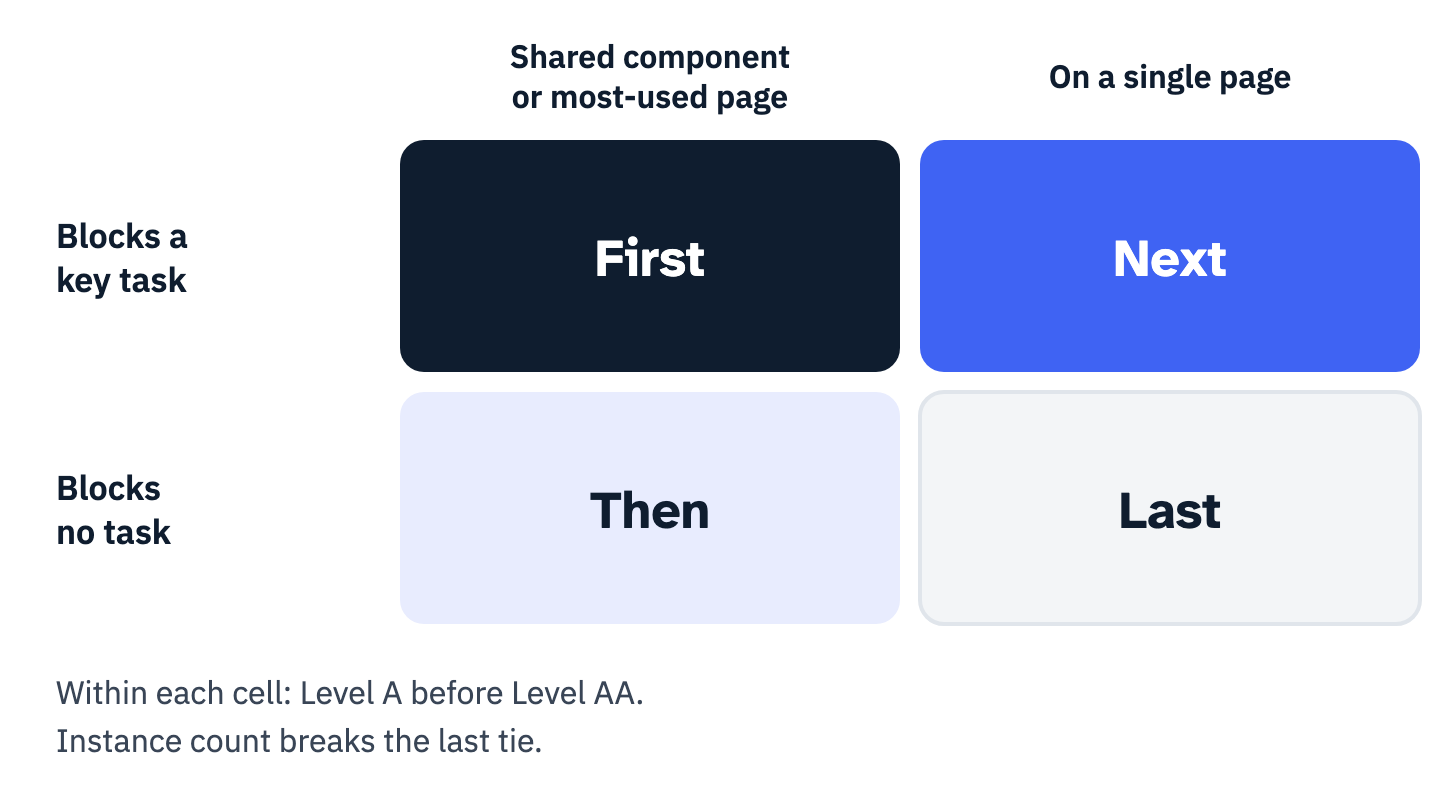
- First: blocks a key task, and sits in a shared component or on a most-used page.
- Next: blocks a key task on a single page.
- Then: sits in a shared component or on a most-used page, and blocks no task.
- Last: a single page and no blocked task.
- Within each cell: Level A before Level AA, and the instance count only as the final tie-break.
The ordering rule fits on one line. First the findings that stop a key task, shared components before single pages, with every step of that task fixed together; then findings in shared components and on the most used pages; then everything else. Within each group Level A comes before Level AA, and instance counts are the last tie-break.
Findings named in a demand letter or a complaint are reported content in W3C’s terms, and where they sit in this order is a decision to make with counsel. Cases the rule leaves open, such as weighting by legal deadline or by team capacity, are covered by seven prioritization models compared side by side.
Code fixes belong in the shared component, not on the page where the audit found them
WCAG-EM 2.0, an evaluation methodology published as a Group Note by W3C’s Accessibility Guidelines Working Group, gives informative guidance and is not endorsed by W3C itself. It observes that “Many samples will have components, such as the header, navigation bars, search form, and others that occur repeatedly.” It adds that “typically these components do not need to be re-evaluated on each occurrence unless they appear or behave differently, or when additional evaluation requirements are defined.”
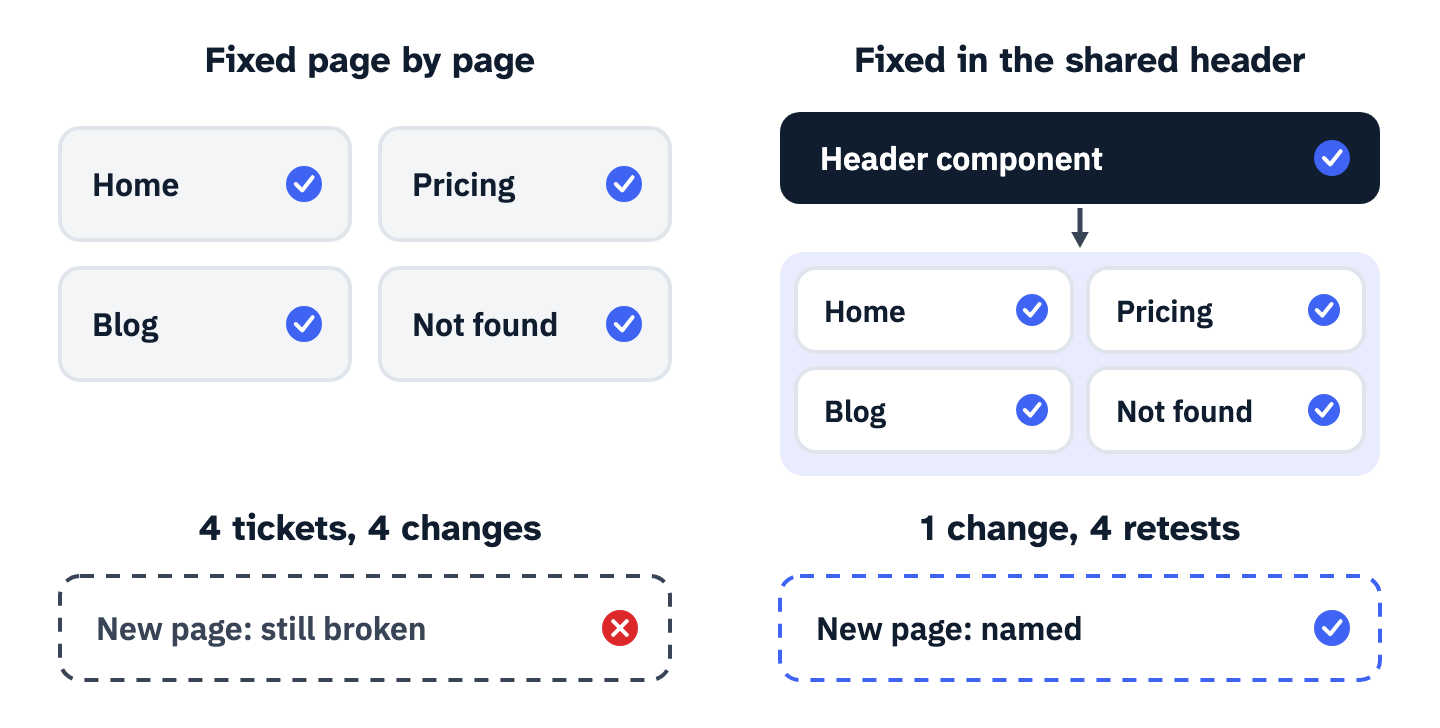
The same reasoning runs the other way for fixing: a failure in a shared component is one defect, however many pages display it. The example below is a search link in a site header, an icon with no text, no label and no title. Automated testing reports it as a link without an accessible name.
Success Criterion 4.1.2 “requires a programmatically determinable name for all user interface components,” and W3C documents a link that “contains only non-text content, such as an image, and that link cannot be identified by an accessible name” as failure F89 of 2.4.4, 2.4.9 and 4.1.2. The same link sits in the page source of the home page, the pricing page, the blog and the page-not-found template, because all four use one header.

That is the general answer to how to fix accessibility issues that repeat: fix them where they are made. One change to the header gives the link a name on every page that uses it, and the retest confirms each page type once. Patching the link page by page would open one ticket per page and leave the next new page broken.
View the data as a list
- Fixed page by page: four tickets and four changes, one each for the home, pricing, blog and not-found pages. A new page built on the header starts with the same failure.
- Fixed in the shared header: one change, retested once on each of the four page types. A new page built on the header inherits the name.
Component findings come with their own checks. The index of accessible UI components and the WCAG 2.2 criteria each one must pass lists, for dialogs, menus, forms, tables and checkout steps, the criteria that apply and a one-minute keyboard and screen reader check. Section508.gov’s testing activities by lifecycle phase recommends “incremental accessibility test thresholds to prevent regressions such as no increase in critical violations.” Accessibility regression testing in a CI/CD pipeline sets up those checks so a fixed component stays fixed.
Write every code ticket with four fields: the element and the component it lives in, the change, the success criterion it closes, and how the retest will confirm it on each page type that uses the component.
Documents are sorted before anyone remediates them
Document remediation starts with a count and a sort, because some files need no fix and some cannot be fixed. Title II’s definitions at 28 CFR 35.104 cover “portable document formats (“PDF”), word processor file formats, presentation file formats, and spreadsheet file formats.” Section 35.201(b) excepts those posted before the compliance date “unless such documents are currently used to apply for, gain access to, or participate in the public entity’s services, programs, or activities.”
Archived web content is excepted as well, but only when all four parts of the definition in 35.104 hold. The content was created before the compliance date, or reproduces paper or physical media made before it. It “Is retained exclusively for reference, research, or recordkeeping.” It “Is not altered or updated after the date of archiving.” It “Is organized and stored in a dedicated area or areas clearly identified as being archived.”
An exception is not the end of the file. The Justice Department’s fact sheet on the rule says a government “would likely still need to provide the content to a person with a disability who needs it in a format that is accessible to them.”
Federal agencies work under a different rule, and contractors meet it through their contracts. The Revised 508 Standards require public-facing electronic content, and agency official communications in the categories E205.3 lists, to conform to WCAG 2.0 Level A and AA (E205.4). Non-Web documents are exempt from four criteria: 2.4.1 Bypass Blocks, 2.4.5 Multiple Ways, 3.2.3 Consistent Navigation and 3.2.4 Consistent Identification. What a Section 508 document test has to cover sets out the 57 tests of the federal documents baseline and what to require from a supplier.
Scanned files are their own case. W3C technique PDF7, which is informative and not required to meet WCAG, says “A document that consists of scanned images of text is inherently inaccessible because the content of the document is images, not searchable text.” It tells authors to use actual text from an authoring tool, and documents optical character recognition for the case where the source file and authoring tool are not available. Where a source file exists, rebuild from it rather than repairing the scan.
Document remediation triage under Title II and Section 504 runs each file through four gates and prints the cost inputs for each branch. Teams fixing individual files can check each one against what an accessible PDF must contain. Law firms have a narrower question, answered in what the Title II rule means for PDFs filed into a court portal.
Give every file one of four outcomes before paying to fix any of them: retire or archive it under the conditions above, replace it with an HTML page, remediate or rebuild it, or leave it under an exception and record how an accessible version will be produced on request. Files used to apply for or take part in a service go to the front of the queue.
Video and audio fixes are separate purchases with separate tests
WCAG splits media into five Level A and AA success criteria, which come down to four purchases: transcripts, captions, live captions, and audio description, which meets both 1.2.3 and 1.2.5. Under Guideline 1.2, 1.2.1 asks for a text alternative to prerecorded audio-only content, a transcript in practice, and for prerecorded video-only content either a text alternative or an audio track, both at Level A. 1.2.2 asks for captions on prerecorded audio in synchronized media, also Level A. 1.2.3 accepts either audio description or a text alternative at Level A.
At Level AA, 1.2.4 adds captions for live audio and 1.2.5 requires audio description “for all prerecorded video content in synchronized media.” The Level AA rule has one limit worth writing into the plan. W3C’s Understanding note for 1.2.5 says “Where all of the video information is already provided in existing audio, no additional audio description is necessary.” A talking-head recording where the speaker says everything shown may need no description track, while a product demonstration that shows steps nobody reads aloud does.
The player is part of the media. For federal ICT, the Revised 508 Standards at 503.4 state that “Where ICT displays video with synchronized audio, ICT shall provide user controls for closed captions and audio descriptions conforming to 503.4,” and 503.4.1 puts the caption control “at the same menu level as the user controls for volume or program selection.”
Under Title II, the player is reached through WCAG 2.1, which 28 CFR 35.200 adopts, so its controls must work by keyboard and carry names like any other control. No regulation adopts WCAG for businesses under Title III, and the Justice Department’s guidance says “Existing technical standards provide helpful guidance,” naming WCAG among them.
The video accessibility checklist tests one video in the media, the player and the page. Buyers writing contracts can see why captions, audio description and CART are separate purchases, and podcasts and recorded calls are covered in how audio transcripts meet WCAG and Section 508.
Build the media inventory with these columns before ordering any of it: address, length in minutes, live or prerecorded, audio only, video only or both, whether the picture carries information the sound does not, captions present, transcript present, description present, and the player it runs in.
A finding is closed when a retest says so and the record shows it
Section508.gov follows remediation with a retest. Knowledgeable testers should “Re-check fixes and confirm defects have been adequately addressed” and “Ensure fixes did not introduce new issues.” The test report is updated “with the new status for each Section 508 Standard, date of re-test, and any other product information that has changed,” and an “Accommodation or Alternate Means Plan” covers any defect that remains unresolved. A ticket marked resolved without that retest is not that record.
The retest covers what the finding covered. WCAG-EM’s Methodology Requirement 3.3 is to “Include all samples that are part of a complete process in the selected sample set,” so a fixed checkout is retested from the first step to the confirmation. W3C’s interim repair guidance asks teams to “Ensure that any solutions adequately address the issues raised” and says “If at all possible, it is important to involve people with disabilities in such validation.”
Buyers read the result. Section508.gov’s guidance on requesting accessibility information tells federal buyers to require an Accessibility Conformance Report for each standard off-the-shelf ICT item, and says “To be considered for award, the ACR must be complete.” Its lifecycle page adds that once defects are remediated “there may be a need to develop an Accessibility Conformance Report (ACR) based on the test results.” Federal vendors can follow what Section 508 remediation covers and how to order it and how to write the ACR the retest feeds.
Closed does not stay closed by itself. Section508.gov says “Schedule periodic re-testing” and that testing “should be included in any updates or redesigns.” A monitoring plan that blends automated and manual checks keeps the record current, and public entities can set it against the Title II rule’s standard, scope and exceptions.
Paste these six deliverables into the statement of work for whoever does the remediation:
- Fixes. Made in the codebase, or specified at the level of the element and the success criterion so developers implement rather than diagnose.
- A record per finding. Each closed issue tied to the success criterion it resolves, with what changed.
- A retest report. What was verified and how, and what remains open with the reason.
- A coverage statement. The templates, components, processes and documents that were in scope.
- An updated ACR. Where a buyer or a contract needs one, reflecting the product as it ships after the fixes.
- Structural findings. The defects that will return until an underlying pattern changes, listed apart.
Your next step
Put every open finding into the table from the second section and give each one a queue, an owner, a place in the order and a retest method. Mark the findings that stop a key task or sit in a shared component, and schedule those first. Before work starts, agree in writing what counts as closed and which record will show it.
Two decisions sit with others. The standard and the date you are held to come from your regulation or contract, and counsel reads those. Whether a limitation that remains open is acceptable is the buyer’s or the agency’s call.
ADA Compliance Pros works from the audit you already have, whoever wrote it, and says before work starts when a report is thin, out of date or written against a different standard than the one you are held to. It orders the work by whether an issue stops someone completing a task and whether a reviewer will land on it, fixes findings in your codebase or delivers changes your developers can apply without diagnosing them again, and remediates documents, saying up front when a scan should be rebuilt instead.
Closed issues are retested by hand and with assistive technology where the finding calls for it, across the part of the set agreed at scoping, and you receive a record of what was fixed and verified, what remains open and why, and an updated VPAT or ACR where procurement needs one. Bring the report and the counts from your plan, and we will scope the accessibility remediation work with you on a call.